
Zvolte jazyk

IRS Form 14345 – Fillable PDF for Qualified Intermediary Application

  1. Země USA
  2. Jazyk Angličtina
  3. Aktivita Daně
  4. oddělení Internal Revenue Service
IRS Form 14345 – Fillable PDF for Qualified Intermediary Application

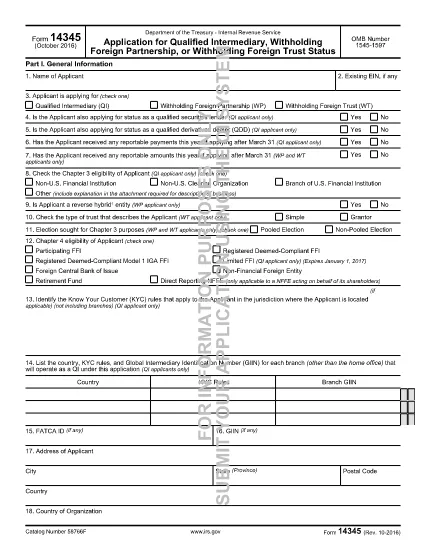
Form 14345 is the Qualified Intermediary (QI) Application used by non‑U.S. financial institutions, clearing organizations, and other entities that need to be recognized by the Internal Revenue Service (IRS) as a QI. Completing this form accurately is essential for compliance with Chapter 3 and Chapter 4 of the Internal Revenue Code.

What Is Form 14345?

The IRS issues Form 14345 to gather detailed information about the applicant’s structure, ownership, and U.S. tax‑withholding responsibilities. The form includes sections for:

  • Applicant identification and eligibility
  • Business description and account‑opening procedures
  • Contact persons and external auditor details
  • U.S. asset holdings and withholding responsibilities

How to Fill Out Form 14345 Online

Instead of downloading the PDF and using a separate editor, simply click the "Fill out this form" button on this page. The Formize PDF Filler app will load automatically, allowing you to complete every field directly in your browser.

  1. Click "Fill out this form" – the Formize filler launches in a new tab.
  2. Enter the applicant’s name and select the appropriate eligibility option (e.g., Non‑U.S. financial institution).
  3. Complete address, business description, and account‑opening procedure sections.
  4. Provide contact‑person and external‑auditor information exactly as it appears on official documents.
  5. Answer yes/no questions about prior QI applications, SS‑4 filing, and primary withholding responsibility.
  6. Review all entries, then click Save & Download to obtain a completed PDF you can print or submit electronically.

Common Mistakes to Avoid

  • Leaving eligibility boxes unchecked – the IRS will reject the form.
  • Using an outdated address format – always include country, state/province, and zip code.
  • Incorrectly reporting the number of U.S. asset holders – provide estimates, not exact figures, when unsure.
  • Omitting the external auditor’s contact details – this field is mandatory for QI status.

Download the Fillable PDF

If you prefer to work offline, you can download the official fillable PDF directly from the IRS:

Download Form 14345 (PDF)

FAQs About Form 14345

Below are answers to the most common questions applicants have.

FAQ
  • Who must file Form 14345?

    Non‑U.S. financial institutions, clearing organizations, branches of U.S. financial institutions, and other foreign entities that want Qualified Intermediary status must file Form 14345.

  • Can I submit Form 14345 electronically?

    Yes. After completing the fillable PDF with Formize, you can save the file and upload it through the IRS QI portal or mail a printed copy as instructed in the form’s instructions.

  • What is the OMB number on the form?

    The OMB control number for Form 14345 is 1545‑1597. It appears at the top of the first page and is used for federal record‑keeping.

  • Do I need a U.S. tax identification number to file?

    A U.S. EIN is not required for the initial QI application, but you must indicate whether you have already filed Form SS‑4 (EIN application).

  • How long does the IRS take to approve a QI application?

    Processing times vary, but most applicants receive a decision within 30‑45 days after the IRS receives a complete and accurate Form 14345.

  • What happens if I make a mistake on the form?

    Errors can delay approval. The IRS may issue a notice requesting clarification. Using the Formize filler helps reduce mistakes by providing field validation.

JAK

Jak zdarma vyplnit Form 14345 online v 4 jednoduchých krocích:

  1. 1
    Open the Formize filler
    Click the "Fill out this form" button on the page. The Formize PDF Filler app loads in a new browser tab.
  2. 2
    Enter applicant information
    Fill in the name of the applicant, select the correct eligibility option, and provide the full mailing address.
  3. 3
    Complete business and contact sections
    Provide a brief business description, account‑opening procedures, and contact‑person details as required by the form.
  4. 4
    Review and save
    Double‑check every field for accuracy, then click "Save & Download" to get a completed PDF you can print or submit electronically.
Aplikace Formize PDF Filler
O

Daňové formuláře

Form 14345 je jedním z daňových formulářů, které jsou dokumenty používané k nahlášení informací souvisejících s daněmi příslušnému daňovému úřadu. Existují různé typy daňových formulářů, včetně federálních, státních a místních daňových formulářů, které se mohou lišit v závislosti na okolnostech a umístění poplatníka.

FUNKCE

PDF Filler

Nejjednodušší způsob, jak vyplnit Form 14345 online

  • Rychle vyplňte Form 14345
    Hledáte způsob, jak rychle vyplnit Form 14345 online? S naším online bezplatným vyplňováním formulářů PDF budete vědět, jak upravit a vyplnit tento dokument PDF za méně než minutu.
  • Snadno použitelný online editor PDF
    Už vás nebaví tisknout soubory PDF, abyste je mohli upravovat, než je znovu naskenujete a odešlete zpět? Upravujte dokumenty PDF zdarma online. Použijte náš online editor PDF, abyste ušetřili čas a papír.
  • Skvělé nástroje, všechny platformy
    Zajímá vás, jak vyplnit Form 14345 na Macu, nebo možná jak používat PDF filler zdarma? Naše online nástroje PDF fungují na všech platformách.
  • Bezpečné ukládání souborů
    Dokončené soubory „Form 14345“ jsou uloženy v zabezpečené databázi spravované hostingem Amazon Cloud. Své soubory můžete z našeho systému kdykoli smazat. V každém případě jsou tyto soubory po 24 hodinách automaticky smazány.
  • Chat s Form 14345
    Chatujte s „Form 14345“ na Chatize, což je bezplatný pomocník pro čtení PDF. Ptejte se a získejte odpovědi z „Form 14345“. Stačí kliknout na tlačítko Chat with Document výše.

Smazat relaci plnění

Smazat vybranou relaci plnění? V takovém případě bude váš postup při vyplňování formuláře ztracen.

Smazat relaci úprav

Smazat vybranou relaci úprav? V tomto případě bude váš postup při vytváření a úpravách formuláře ztracen.