
Sprache auswählen

IRS Form 14345 – Fillable PDF for Qualified Intermediary Application

  1. Land USA
  2. Sprache Englisch
  3. Aktivität Steuern
  4. Abteilung Finanzamt
IRS Form 14345 – Fillable PDF for Qualified Intermediary Application

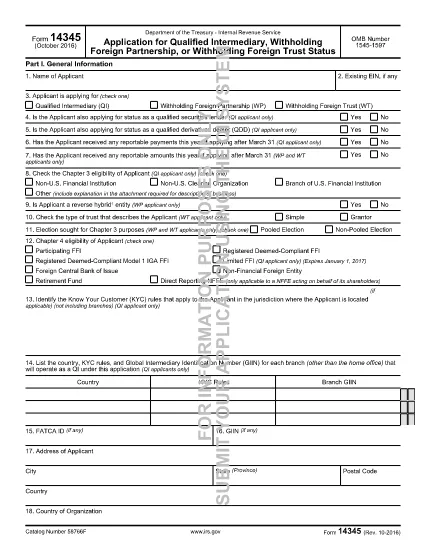
Form 14345 is the Qualified Intermediary (QI) Application used by non‑U.S. financial institutions, clearing organizations, and other entities that need to be recognized by the Internal Revenue Service (IRS) as a QI. Completing this form accurately is essential for compliance with Chapter 3 and Chapter 4 of the Internal Revenue Code.

What Is Form 14345?

The IRS issues Form 14345 to gather detailed information about the applicant’s structure, ownership, and U.S. tax‑withholding responsibilities. The form includes sections for:

  • Applicant identification and eligibility
  • Business description and account‑opening procedures
  • Contact persons and external auditor details
  • U.S. asset holdings and withholding responsibilities

How to Fill Out Form 14345 Online

Instead of downloading the PDF and using a separate editor, simply click the "Fill out this form" button on this page. The Formize PDF Filler app will load automatically, allowing you to complete every field directly in your browser.

  1. Click "Fill out this form" – the Formize filler launches in a new tab.
  2. Enter the applicant’s name and select the appropriate eligibility option (e.g., Non‑U.S. financial institution).
  3. Complete address, business description, and account‑opening procedure sections.
  4. Provide contact‑person and external‑auditor information exactly as it appears on official documents.
  5. Answer yes/no questions about prior QI applications, SS‑4 filing, and primary withholding responsibility.
  6. Review all entries, then click Save & Download to obtain a completed PDF you can print or submit electronically.

Common Mistakes to Avoid

  • Leaving eligibility boxes unchecked – the IRS will reject the form.
  • Using an outdated address format – always include country, state/province, and zip code.
  • Incorrectly reporting the number of U.S. asset holders – provide estimates, not exact figures, when unsure.
  • Omitting the external auditor’s contact details – this field is mandatory for QI status.

Download the Fillable PDF

If you prefer to work offline, you can download the official fillable PDF directly from the IRS:

Download Form 14345 (PDF)

FAQs About Form 14345

Below are answers to the most common questions applicants have.

FAQ
  • Who must file Form 14345?

    Non‑U.S. financial institutions, clearing organizations, branches of U.S. financial institutions, and other foreign entities that want Qualified Intermediary status must file Form 14345.

  • Can I submit Form 14345 electronically?

    Yes. After completing the fillable PDF with Formize, you can save the file and upload it through the IRS QI portal or mail a printed copy as instructed in the form’s instructions.

  • What is the OMB number on the form?

    The OMB control number for Form 14345 is 1545‑1597. It appears at the top of the first page and is used for federal record‑keeping.

  • Do I need a U.S. tax identification number to file?

    A U.S. EIN is not required for the initial QI application, but you must indicate whether you have already filed Form SS‑4 (EIN application).

  • How long does the IRS take to approve a QI application?

    Processing times vary, but most applicants receive a decision within 30‑45 days after the IRS receives a complete and accurate Form 14345.

  • What happens if I make a mistake on the form?

    Errors can delay approval. The IRS may issue a notice requesting clarification. Using the Formize filler helps reduce mistakes by providing field validation.

WIE MAN

So füllen Sie Form 14345 kostenlos online in 4 einfachen Schritten aus:

  1. 1
    Open the Formize filler
    Click the "Fill out this form" button on the page. The Formize PDF Filler app loads in a new browser tab.
  2. 2
    Enter applicant information
    Fill in the name of the applicant, select the correct eligibility option, and provide the full mailing address.
  3. 3
    Complete business and contact sections
    Provide a brief business description, account‑opening procedures, and contact‑person details as required by the form.
  4. 4
    Review and save
    Double‑check every field for accuracy, then click "Save & Download" to get a completed PDF you can print or submit electronically.
Formize PDF Filler-App
ÜBER

Steuerformulare

Form 14345 ist eines der Steuerformulare, bei denen es sich um Dokumente handelt, mit denen Informationen über das Einkommen, die Abzüge und die Steuerschuld einer Einzelperson oder eines Unternehmens an die zuständige Steuerbehörde gemeldet werden. Diese Formulare sind zur Einhaltung der Steuergesetze und zur Erfüllung steuerlicher Pflichten erforderlich. Die Steuerformulare variieren je nach Land und den spezifischen Steueranforderungen. Hier sind einige gängige Arten von Steuerformularen:

Individuelle Steuerformulare: Diese Formulare werden von einzelnen Steuerzahlern verwendet, um ihr persönliches Einkommen anzugeben und Abzüge, Gutschriften und Befreiungen zu beantragen. Beispiele hierfür sind das Formular 1040 in den Vereinigten Staaten oder das Formular „Self-Assessment Tax Return“ im Vereinigten Königreich.

Gewerbesteuerformulare: Gewerbesteuerformulare werden von Unternehmen, Personengesellschaften oder Selbständigen verwendet, um ihre Geschäftseinnahmen, -ausgaben und andere steuerbezogene Informationen anzugeben. Beispiele hierfür sind das Schedule C-Formular (Profit or Loss from Business) in den Vereinigten Staaten oder das CT600-Formular (Company Tax Return) im Vereinigten Königreich.

Lohnsteuerformulare: Diese Formulare werden von Arbeitgebern verwendet, um die von den Gehaltsschecks ihrer Mitarbeiter einbehaltenen Löhne, Gehälter und Steuern anzugeben. Beispiele hierfür sind das W-2-Formular in den Vereinigten Staaten oder das P60-Formular im Vereinigten Königreich.

Umsatzsteuerformulare: Umsatzsteuerformulare werden von Unternehmen verwendet, um die auf steuerpflichtige Waren oder Dienstleistungen erhobene Umsatzsteuer zu melden und abzuführen. Die spezifischen Umsatzsteuerformulare variieren je nach Gerichtsbarkeit.

Mehrwertsteuerformulare (MwSt.): Mehrwertsteuerformulare werden in Ländern verwendet, die eine Mehrwertsteuer erheben, um die auf Verkäufe erhobene Mehrwertsteuer zu melden und abzuführen und Mehrwertsteuergutschriften für Einkäufe zu beantragen. Beispiele hierfür sind die in vielen Ländern verwendeten Mehrwertsteuererklärungsformulare.

Schätzungssteuerformulare: Schätzsteuerformulare werden verwendet, um geschätzte Steuern auf Einkünfte zu melden und zu zahlen, die nicht der Quellensteuer unterliegen, beispielsweise Einkünfte aus selbständiger Tätigkeit oder Kapitalerträge.

Dies sind nur einige Beispiele für die zahlreichen Steuerformulare, die es geben kann. Welche konkreten Formulare erforderlich sind, hängt von den Steuergesetzen und -vorschriften in Ihrem Land oder Ihrer Gerichtsbarkeit ab. Es ist wichtig, die Richtlinien der Steuerbehörde zu konsultieren oder professionellen Rat einzuholen, um festzustellen, welche Formulare auf Ihre Situation anwendbar sind.

MERKMALE

PDF-Filler

Der einfachste Weg, PDF-Formulare online auszufüllen

  • Füllen Sie schnell Form 14345 aus
    Suchen Sie nach einer Möglichkeit, Form 14345 schnell online auszufüllen? Mit unserem kostenlosen Online-PDF-Formularausfüller wissen Sie, wie Sie dieses PDF-Dokument in weniger als einer Minute bearbeiten und ausfüllen.
  • Einfach zu bedienender Online-PDF-Editor
    Haben Sie es satt, PDF-Dateien auszudrucken, damit Sie sie bearbeiten können, bevor Sie sie erneut scannen und zurücksenden? PDF-Dokumente kostenlos online bearbeiten. Nutzen Sie unseren Online-PDF-Editor, um Zeit und Papier zu sparen.
  • Tolle Tools, alle Plattformen
    Sie fragen sich, wie Sie Form 14345 auf einem Mac ausfüllen oder vielleicht einen kostenlosen PDF-Ausfüller verwenden können? Unsere Online-PDF-Tools funktionieren auf allen Plattformen.
  • Sichere Dateispeicherung
    Fertige "Form 14345"-Dateien werden in einer gesicherten Datenbank gespeichert, die vom Amazon Cloud-Hosting verwaltet wird. Sie können Ihre Dateien jederzeit aus unserem System löschen. In jedem Fall werden diese Dateien nach 24 Stunden automatisch gelöscht.
  • Chatten Sie mit Form 14345
    Chatten Sie mit „Form 14345“ auf Chatize, einem kostenlosen PDF-Leseassistenten. Stellen Sie Fragen und erhalten Sie Antworten von „Form 14345“. Klicken Sie einfach oben auf die Schaltfläche Mit Dokument chatten.

Füllsitzung löschen

Die ausgewählte Füllsitzung löschen? In diesem Fall gehen Ihre Fortschritte beim Ausfüllen des Formulars verloren.

Bearbeitungssitzung löschen

Ausgewählte Bearbeitungssitzung löschen? In diesem Fall geht Ihr Fortschritt beim Erstellen und Bearbeiten des Formulars verloren.