
언어 선택

IRS Form 14345 – Fillable PDF for Qualified Intermediary Application

  1. 국가 미국
  2. 언어 영어
  3. 활동 구실
  4. 부서 국세청
IRS Form 14345 – Fillable PDF for Qualified Intermediary Application

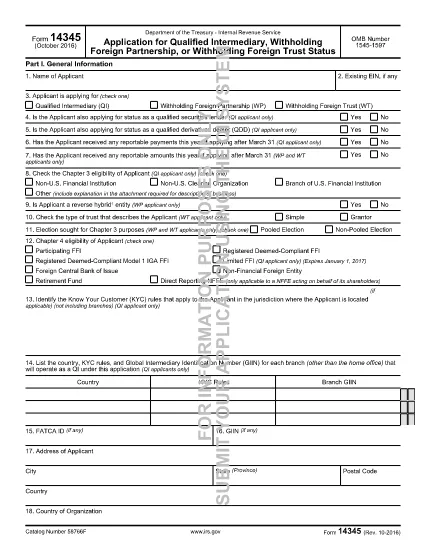
Form 14345 is the Qualified Intermediary (QI) Application used by non‑U.S. financial institutions, clearing organizations, and other entities that need to be recognized by the Internal Revenue Service (IRS) as a QI. Completing this form accurately is essential for compliance with Chapter 3 and Chapter 4 of the Internal Revenue Code.

What Is Form 14345?

The IRS issues Form 14345 to gather detailed information about the applicant’s structure, ownership, and U.S. tax‑withholding responsibilities. The form includes sections for:

  • Applicant identification and eligibility
  • Business description and account‑opening procedures
  • Contact persons and external auditor details
  • U.S. asset holdings and withholding responsibilities

How to Fill Out Form 14345 Online

Instead of downloading the PDF and using a separate editor, simply click the "Fill out this form" button on this page. The Formize PDF Filler app will load automatically, allowing you to complete every field directly in your browser.

  1. Click "Fill out this form" – the Formize filler launches in a new tab.
  2. Enter the applicant’s name and select the appropriate eligibility option (e.g., Non‑U.S. financial institution).
  3. Complete address, business description, and account‑opening procedure sections.
  4. Provide contact‑person and external‑auditor information exactly as it appears on official documents.
  5. Answer yes/no questions about prior QI applications, SS‑4 filing, and primary withholding responsibility.
  6. Review all entries, then click Save & Download to obtain a completed PDF you can print or submit electronically.

Common Mistakes to Avoid

  • Leaving eligibility boxes unchecked – the IRS will reject the form.
  • Using an outdated address format – always include country, state/province, and zip code.
  • Incorrectly reporting the number of U.S. asset holders – provide estimates, not exact figures, when unsure.
  • Omitting the external auditor’s contact details – this field is mandatory for QI status.

Download the Fillable PDF

If you prefer to work offline, you can download the official fillable PDF directly from the IRS:

Download Form 14345 (PDF)

FAQs About Form 14345

Below are answers to the most common questions applicants have.

자주하는 질문
  • Who must file Form 14345?

    Non‑U.S. financial institutions, clearing organizations, branches of U.S. financial institutions, and other foreign entities that want Qualified Intermediary status must file Form 14345.

  • Can I submit Form 14345 electronically?

    Yes. After completing the fillable PDF with Formize, you can save the file and upload it through the IRS QI portal or mail a printed copy as instructed in the form’s instructions.

  • What is the OMB number on the form?

    The OMB control number for Form 14345 is 1545‑1597. It appears at the top of the first page and is used for federal record‑keeping.

  • Do I need a U.S. tax identification number to file?

    A U.S. EIN is not required for the initial QI application, but you must indicate whether you have already filed Form SS‑4 (EIN application).

  • How long does the IRS take to approve a QI application?

    Processing times vary, but most applicants receive a decision within 30‑45 days after the IRS receives a complete and accurate Form 14345.

  • What happens if I make a mistake on the form?

    Errors can delay approval. The IRS may issue a notice requesting clarification. Using the Formize filler helps reduce mistakes by providing field validation.

어떻게

4개의 간단한 단계를 통해 온라인으로 Form 14345를 무료로 작성하는 방법:

  1. 1
    Open the Formize filler
    Click the "Fill out this form" button on the page. The Formize PDF Filler app loads in a new browser tab.
  2. 2
    Enter applicant information
    Fill in the name of the applicant, select the correct eligibility option, and provide the full mailing address.
  3. 3
    Complete business and contact sections
    Provide a brief business description, account‑opening procedures, and contact‑person details as required by the form.
  4. 4
    Review and save
    Double‑check every field for accuracy, then click "Save & Download" to get a completed PDF you can print or submit electronically.
Formize PDF 필러 앱
에 대한

세금 양식

Form 14345는 세금 관련 정보를 해당 세무 당국에 보고하는 데 사용되는 문서인 세금 양식 중 하나입니다. 납세자의 상황과 위치에 따라 연방, 주 및 지방 세금 양식을 포함하여 다양한 유형의 세금 양식이 있습니다.
특징

PDF 필러

온라인에서 PDF 양식을 채우는 가장 쉬운 방법

  • Form 14345를 빠르게 작성하세요.
    온라인에서 Form 14345을(를) 빠르게 채우는 방법을 찾고 계십니까? 온라인 무료 PDF 양식 필러를 사용하면 1분 이내에 이 PDF 문서를 편집하고 채우는 방법을 알 수 있습니다.
  • 사용하기 쉬운 온라인 PDF 편집기
    다시 스캔하여 다시 보내기 전에 편집할 수 있도록 PDF 파일을 인쇄하는 데 지쳤습니까? 온라인에서 무료로 PDF 문서를 편집하세요. 온라인 PDF 편집기를 사용하여 시간과 종이를 절약하십시오.
  • 훌륭한 도구, 모든 플랫폼
    Mac에서 Form 14345를 채우는 방법이나 PDF 필러를 무료로 사용하는 방법이 궁금하십니까? 당사의 온라인 PDF 도구는 모든 플랫폼에서 작동합니다.
  • 안전한 파일 저장
    완료된 "Form 14345" 파일은 Amazon 클라우드 호스팅에서 관리하는 보안 데이터베이스에 저장됩니다. 언제든지 시스템에서 파일을 삭제할 수 있습니다. 어쨌든 이러한 파일은 24시간 후에 자동으로 삭제됩니다.
  • Form 14345님과 채팅
    무료 PDF 리더 도우미인 Chatize에서 "Form 14345"와 채팅하세요. "Form 14345"에서 질문하고 답변을 받으세요. 위의 문서와 채팅 버튼을 클릭하세요.

필링 세션 삭제

선택한 필링 세션을 삭제하시겠습니까?이 경우 양식 작성 진행 상황이 손실됩니다.

편집 세션 삭제

선택한 편집 세션을 삭제하시겠습니까? 이 경우 양식 작성 및 편집 진행 상황이 손실됩니다.