Seleccione el idioma

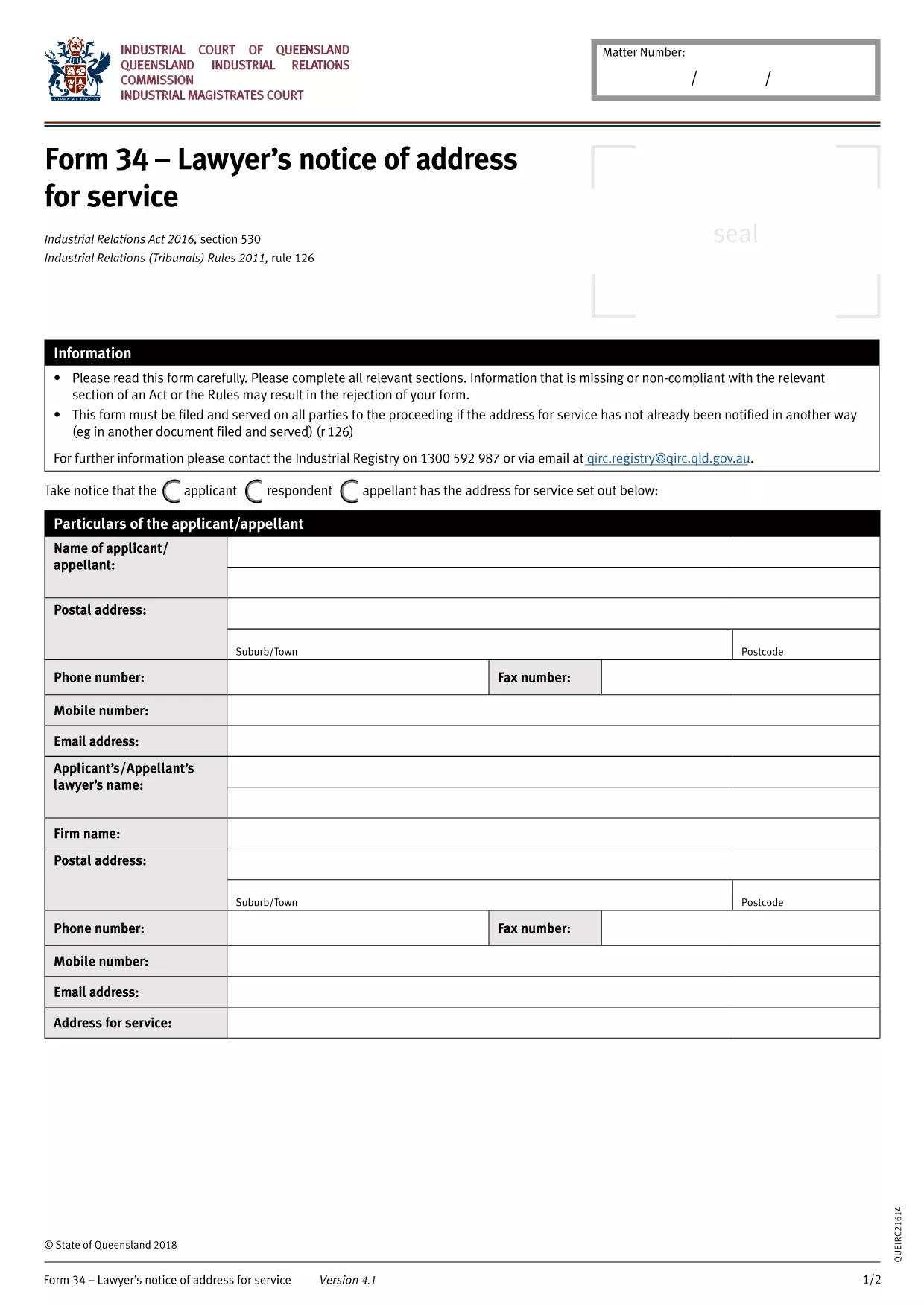
BLS‑34 Lawyer's Notice of Address – Fillable PDF Form

  1. Idioma Inglés
  2. País Australia
  3. Departamento Queensland Industrial Relations Commission
  4. Actividad Legal Forms
BLS‑34 Lawyer's Notice of Address – Fillable PDF Form

The BLS‑34 (Lawyer's Notice of Address for Service) is the standard document used in Queensland under the Industrial Relations Act 2016 to notify the tribunal of a lawyer’s address for service of legal documents. Instead of printing, printing, and scanning, you can now complete the form instantly with our online PDF filler.

What Is the BLS‑34 Form?

The BLS‑34 is required when a lawyer represents a party in an industrial relations matter. It provides the tribunal with a reliable address for service, ensuring that all notices, orders, and filings reach the correct legal representative.

How to Fill Out the BLS‑34 Online with Formize

Follow these simple steps to complete the form without leaving your browser:

  1. Click the "Fill out this form" button on this page.
  2. Wait a few seconds while the Formize PDF Filler app loads the fillable BLS‑34 template.
  3. Enter the required information (lawyer’s name, firm, address, contact details, client reference, etc.). All fields are clearly labelled.
  4. Review the entered data using the built‑in validation checks.
  5. Click Save & Download to get a completed PDF you can email or upload to the Queensland Industrial Relations Commission portal.

Common Mistakes & Tips for a Successful Submission

  • Incorrect address format: Use the full postal address, including suburb and postcode.
  • Missing client reference: The reference number must match the case file to avoid processing delays.
  • Leaving optional fields blank: Even optional fields help the tribunal locate the lawyer quickly; fill them if possible.
  • Signature requirement: After downloading, print, sign, and scan the signature page if the tribunal still requires a wet signature.

Where to Submit the Completed Form

Once you have the signed PDF, upload it through the Queensland Industrial Relations Commission online portal or email it to the case officer listed in your correspondence.

Need help? Review the FAQs below or contact your legal representative for guidance.

PREGUNTAS MÁS FRECUENTES
  • Is the BLS‑34 form free to download?

    Yes. The fillable PDF is provided at no cost. You only need an internet connection to use the Formize online filler.

  • Can I submit the form electronically without printing?

    Most Queensland Industrial Relations Commission processes accept a digitally signed PDF. Check your specific case instructions; if a wet signature is required, print, sign, and scan the final page.

  • What if I make a mistake after downloading?

    You can reopen the saved PDF in Formize, correct the fields, and download a new version. No need to start over.

  • How long does the Formize filler take to load?

    Typically under 5 seconds on a standard broadband connection. Larger browsers or slower connections may take a few extra seconds.

  • Do I need a PDF reader to fill out the BLS‑34?

    No. The entire process happens in your web browser via Formize. A PDF reader is only needed if you want to view the final file offline.

  • Is my information secure while using Formize?

    Formize uses SSL encryption for all data transmitted between your browser and our servers. Your information is never stored permanently.

CÓMO

Cómo completar BLS-34 form gratis, en línea en 3 sencillos pasos:

  1. 1
    Open the Fillable Form
    Click the "Fill out this form" button on the page. The Formize PDF Filler will load the BLS‑34 template directly in your browser.
  2. 2
    Enter Your Details
    Complete each highlighted field—lawyer’s name, firm address, phone, email, and client reference. The filler validates entries in real time.
  3. 3
    Save and Download
    After reviewing, click "Save & Download". The completed PDF will be saved to your device, ready for electronic submission or printing for a wet signature.
Aplicación Formize PDF Filler
SOBRE

BLS-34 form plantilla

Con el conjunto tradicional de funciones para ver y completar un documento PDF, combinado con los beneficios de una aplicación web y un diseño receptivo, puede completar BLS-34 form en minutos.

CARACTERÍSTICAS

Relleno de PDF

La forma más fácil de llenar formularios PDF en línea

  • Rellene rápidamente BLS-34 form
    ¿Está buscando una manera de llenar rápidamente BLS-34 form en línea? Con nuestro rellenador de formularios PDF gratuito en línea, sabrá cómo editar y rellenar este documento PDF en menos de un minuto.
  • Editor de PDF en línea fácil de usar
    ¿Cansado de imprimir archivos PDF para poder editarlos antes de volver a escanearlos y enviarlos de vuelta? Edite documentos PDF gratis en línea. Utilice nuestro editor de pdf en línea para ahorrar tiempo y papel.
  • Excelentes herramientas, todas las plataformas.
    ¿Se pregunta cómo completar BLS-34 form en una Mac, o tal vez cómo usar un relleno de PDF gratis? Nuestras herramientas de PDF en línea funcionan en todas las plataformas.
  • Almacenamiento seguro de archivos
    Los archivos "BLS-34 form" completados se almacenan en una base de datos segura administrada por Amazon Cloud hosting. Puede eliminar sus archivos de nuestro sistema en cualquier momento. En cualquier caso, estos archivos se eliminan automáticamente después de 24 horas.
  • Chatea con {palabra clave}
    Chatea con "BLS-34 form" en Chatize, que es un asistente de lectura de PDF gratuito. Haga preguntas y obtenga respuestas de "BLS-34 form". Simplemente haga clic en el botón Chatear con documento de arriba.

Eliminar sesión de llenado

¿Eliminar la sesión de llenado seleccionada? En este caso, se perderá su progreso al completar el formulario.

Eliminar sesión de edición

¿Eliminar la sesión de edición seleccionada? En este caso, se perderá su progreso en la creación y edición del formulario.