בחר שפה

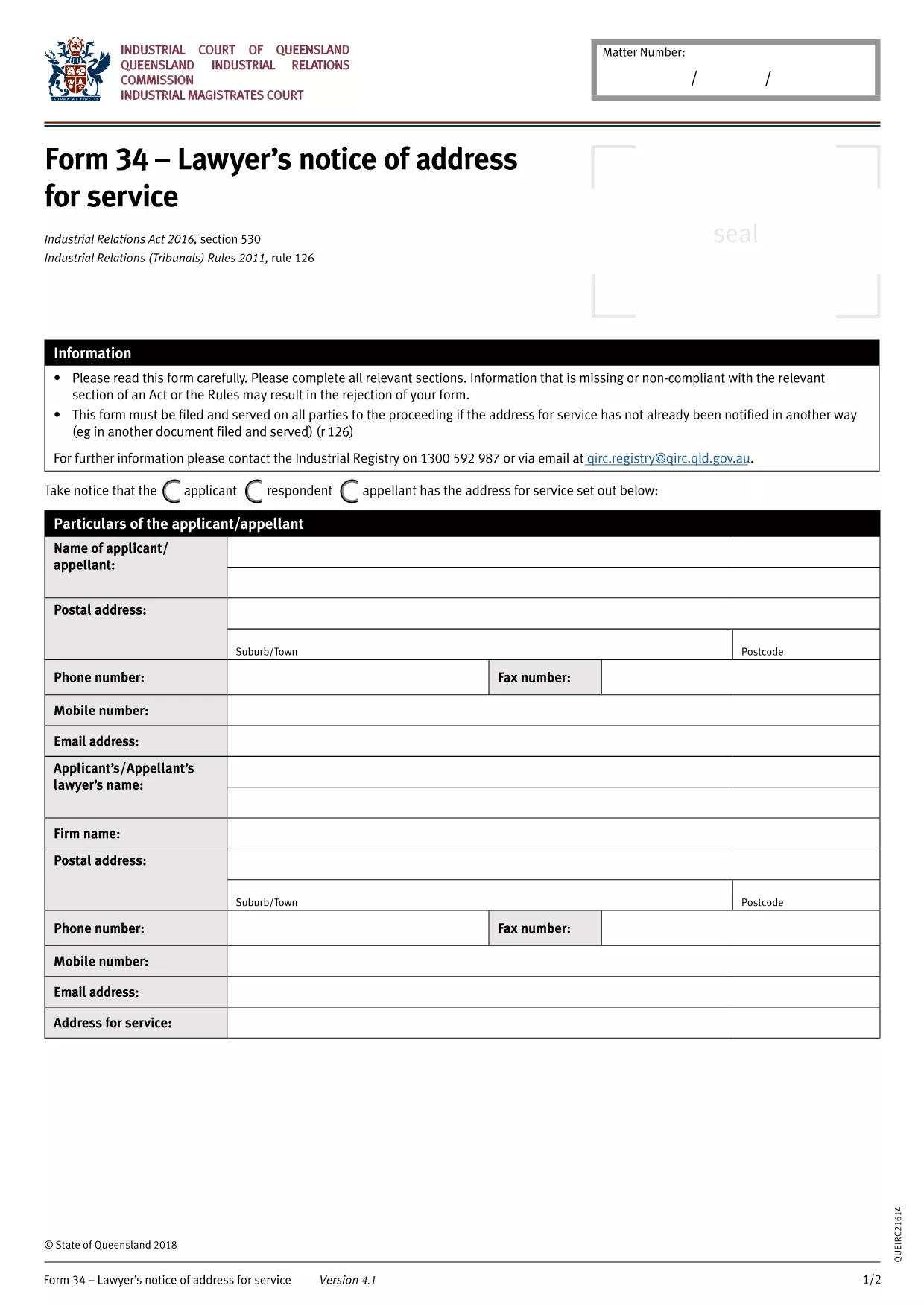
BLS‑34 Lawyer's Notice of Address – Fillable PDF Form

  1. שפה אנגלית
  2. מדינה אוֹסטְרַלִיָה
  3. מַחלָקָה Queensland Industrial Relations Commission
  4. פעילות Legal Forms
BLS‑34 Lawyer's Notice of Address – Fillable PDF Form

The BLS‑34 (Lawyer's Notice of Address for Service) is the standard document used in Queensland under the Industrial Relations Act 2016 to notify the tribunal of a lawyer’s address for service of legal documents. Instead of printing, printing, and scanning, you can now complete the form instantly with our online PDF filler.

What Is the BLS‑34 Form?

The BLS‑34 is required when a lawyer represents a party in an industrial relations matter. It provides the tribunal with a reliable address for service, ensuring that all notices, orders, and filings reach the correct legal representative.

How to Fill Out the BLS‑34 Online with Formize

Follow these simple steps to complete the form without leaving your browser:

  1. Click the "Fill out this form" button on this page.
  2. Wait a few seconds while the Formize PDF Filler app loads the fillable BLS‑34 template.
  3. Enter the required information (lawyer’s name, firm, address, contact details, client reference, etc.). All fields are clearly labelled.
  4. Review the entered data using the built‑in validation checks.
  5. Click Save & Download to get a completed PDF you can email or upload to the Queensland Industrial Relations Commission portal.

Common Mistakes & Tips for a Successful Submission

  • Incorrect address format: Use the full postal address, including suburb and postcode.
  • Missing client reference: The reference number must match the case file to avoid processing delays.
  • Leaving optional fields blank: Even optional fields help the tribunal locate the lawyer quickly; fill them if possible.
  • Signature requirement: After downloading, print, sign, and scan the signature page if the tribunal still requires a wet signature.

Where to Submit the Completed Form

Once you have the signed PDF, upload it through the Queensland Industrial Relations Commission online portal or email it to the case officer listed in your correspondence.

Need help? Review the FAQs below or contact your legal representative for guidance.

שאלות נפוצות
  • Is the BLS‑34 form free to download?

    Yes. The fillable PDF is provided at no cost. You only need an internet connection to use the Formize online filler.

  • Can I submit the form electronically without printing?

    Most Queensland Industrial Relations Commission processes accept a digitally signed PDF. Check your specific case instructions; if a wet signature is required, print, sign, and scan the final page.

  • What if I make a mistake after downloading?

    You can reopen the saved PDF in Formize, correct the fields, and download a new version. No need to start over.

  • How long does the Formize filler take to load?

    Typically under 5 seconds on a standard broadband connection. Larger browsers or slower connections may take a few extra seconds.

  • Do I need a PDF reader to fill out the BLS‑34?

    No. The entire process happens in your web browser via Formize. A PDF reader is only needed if you want to view the final file offline.

  • Is my information secure while using Formize?

    Formize uses SSL encryption for all data transmitted between your browser and our servers. Your information is never stored permanently.

איך ל

כיצד למלא את BLS-34 form בחינם, באינטרנט ב-3 שלבים פשוטים:

  1. 1
    Open the Fillable Form
    Click the "Fill out this form" button on the page. The Formize PDF Filler will load the BLS‑34 template directly in your browser.
  2. 2
    Enter Your Details
    Complete each highlighted field—lawyer’s name, firm address, phone, email, and client reference. The filler validates entries in real time.
  3. 3
    Save and Download
    After reviewing, click "Save & Download". The completed PDF will be saved to your device, ready for electronic submission or printing for a wet signature.
Formize אפליקציית מילוי PDF
על אודות

תבנית BLS-34 form

עם סט התכונות המסורתי לצפייה ומילוי של מסמך PDF, בשילוב עם היתרונות של אפליקציית אינטרנט ופריסה רספונסיבית, תוכל להשלים את BLS-34 form בתוך דקות.

תכונות

מילוי PDF

הדרך הקלה ביותר למלא טפסי PDF באינטרנט

  • מלא במהירות את BLS-34 form
    מחפש דרך למלא במהירות את BLS-34 form באינטרנט? עם מילוי טופס ה-PDF המקוון שלנו בחינם, תדע כיצד לערוך ולמלא את מסמך ה-PDF הזה תוך פחות מדקה.
  • עורך PDF מקוון קל לשימוש
    נמאס לך להדפיס קבצי PDF כדי שתוכל לערוך אותם, לפני סריקה מחדש ושליחה חזרה? ערוך מסמכי PDF בחינם באינטרנט. השתמש בעורך ה-PDF המקוון שלנו כדי לחסוך בזמן ובנייר.
  • כלים מעולים, כל הפלטפורמות
    תוהה כיצד למלא את BLS-34 form ב-Mac, או אולי איך להשתמש בחומר מילוי PDF בחינם? כלי ה-PDF המקוונים שלנו פועלים בכל הפלטפורמות.
  • אחסון קבצים מאובטח
    קבצי "BLS-34 form" שהושלמו מאוחסנים במסד נתונים מאובטח המנוהל על ידי אירוח Amazon Cloud. אתה יכול למחוק את הקבצים שלך מהמערכת שלנו בכל עת. בכל מקרה, קבצים אלו נמחקים אוטומטית לאחר 24 שעות.
  • צ'אט עם BLS-34 form
    צ'אט עם "BLS-34 form" ב-Chatize שהוא עוזר לקורא PDF בחינם. שאל שאלות וקבל תשובות מ-"BLS-34 form". פשוט לחץ על הלחצן צ'אט עם מסמך למעלה.

מחק הפעלת מילוי

למחוק את הפעלת המילוי שנבחרה? במקרה זה, ההתקדמות שלך במילוי הטופס תאבד.

מחק סשן עריכה

למחוק את סשן העריכה שנבחר? במקרה זה, ההתקדמות שלך ביצירה ועריכה של הטופס תאבד.