Válasszon nyelvet

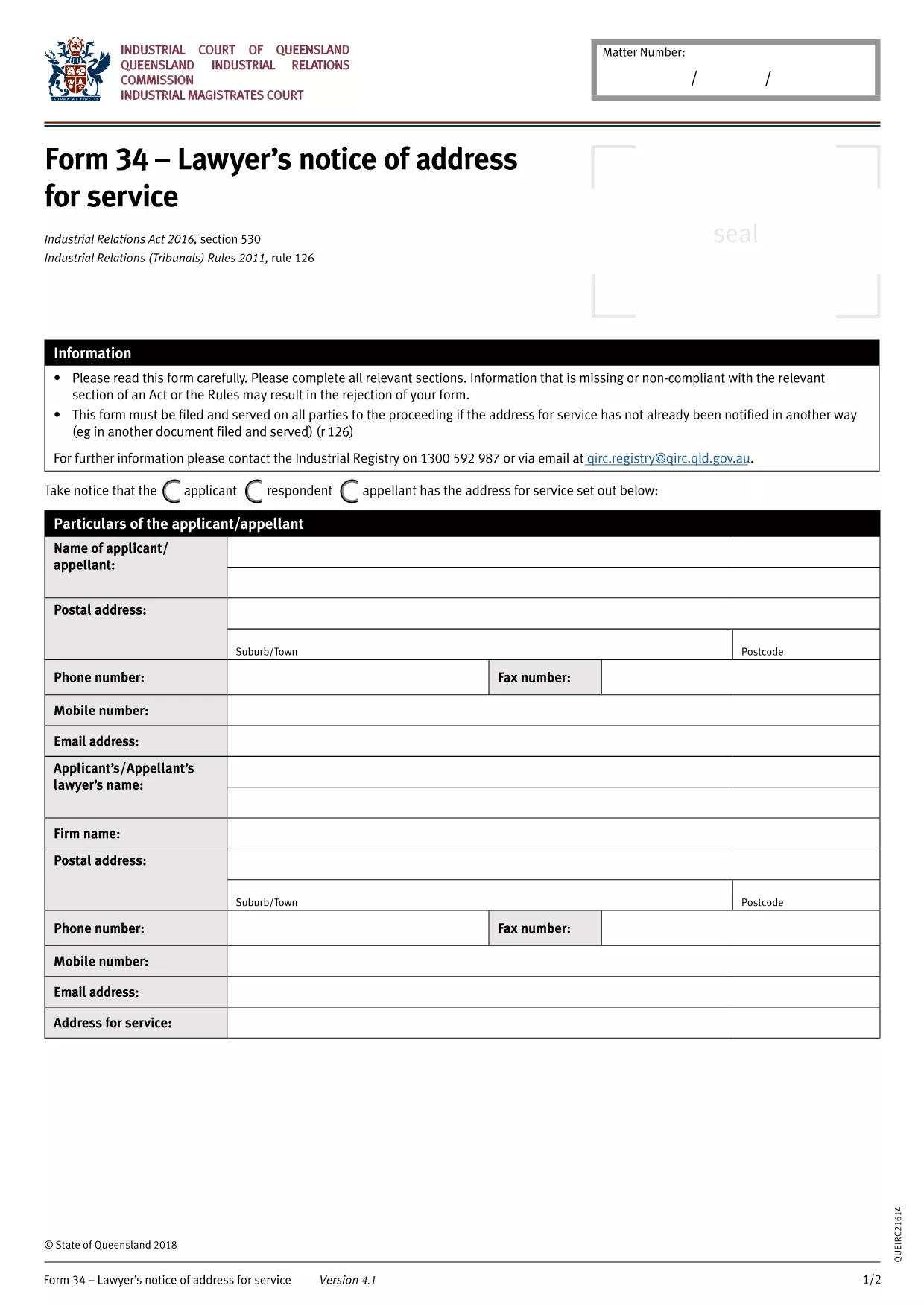
BLS‑34 Lawyer's Notice of Address – Fillable PDF Form

  1. Nyelv angol
  2. Ország Ausztrália
  3. Osztály Queensland Industrial Relations Commission
  4. Tevékenység Legal Forms
BLS‑34 Lawyer's Notice of Address – Fillable PDF Form

The BLS‑34 (Lawyer's Notice of Address for Service) is the standard document used in Queensland under the Industrial Relations Act 2016 to notify the tribunal of a lawyer’s address for service of legal documents. Instead of printing, printing, and scanning, you can now complete the form instantly with our online PDF filler.

What Is the BLS‑34 Form?

The BLS‑34 is required when a lawyer represents a party in an industrial relations matter. It provides the tribunal with a reliable address for service, ensuring that all notices, orders, and filings reach the correct legal representative.

How to Fill Out the BLS‑34 Online with Formize

Follow these simple steps to complete the form without leaving your browser:

  1. Click the "Fill out this form" button on this page.
  2. Wait a few seconds while the Formize PDF Filler app loads the fillable BLS‑34 template.
  3. Enter the required information (lawyer’s name, firm, address, contact details, client reference, etc.). All fields are clearly labelled.
  4. Review the entered data using the built‑in validation checks.
  5. Click Save & Download to get a completed PDF you can email or upload to the Queensland Industrial Relations Commission portal.

Common Mistakes & Tips for a Successful Submission

  • Incorrect address format: Use the full postal address, including suburb and postcode.
  • Missing client reference: The reference number must match the case file to avoid processing delays.
  • Leaving optional fields blank: Even optional fields help the tribunal locate the lawyer quickly; fill them if possible.
  • Signature requirement: After downloading, print, sign, and scan the signature page if the tribunal still requires a wet signature.

Where to Submit the Completed Form

Once you have the signed PDF, upload it through the Queensland Industrial Relations Commission online portal or email it to the case officer listed in your correspondence.

Need help? Review the FAQs below or contact your legal representative for guidance.

GYIK
  • Is the BLS‑34 form free to download?

    Yes. The fillable PDF is provided at no cost. You only need an internet connection to use the Formize online filler.

  • Can I submit the form electronically without printing?

    Most Queensland Industrial Relations Commission processes accept a digitally signed PDF. Check your specific case instructions; if a wet signature is required, print, sign, and scan the final page.

  • What if I make a mistake after downloading?

    You can reopen the saved PDF in Formize, correct the fields, and download a new version. No need to start over.

  • How long does the Formize filler take to load?

    Typically under 5 seconds on a standard broadband connection. Larger browsers or slower connections may take a few extra seconds.

  • Do I need a PDF reader to fill out the BLS‑34?

    No. The entire process happens in your web browser via Formize. A PDF reader is only needed if you want to view the final file offline.

  • Is my information secure while using Formize?

    Formize uses SSL encryption for all data transmitted between your browser and our servers. Your information is never stored permanently.

HOGYAN KELL

A(z) BLS-34 form ingyenes online kitöltése 3 egyszerű lépésben:

  1. 1
    Open the Fillable Form
    Click the "Fill out this form" button on the page. The Formize PDF Filler will load the BLS‑34 template directly in your browser.
  2. 2
    Enter Your Details
    Complete each highlighted field—lawyer’s name, firm address, phone, email, and client reference. The filler validates entries in real time.
  3. 3
    Save and Download
    After reviewing, click "Save & Download". The completed PDF will be saved to your device, ready for electronic submission or printing for a wet signature.
PDF-kitöltő alkalmazás formázása
RÓL RŐL

BLS-34 form sablon

A PDF-dokumentumok megtekintésére és kitöltésére szolgáló hagyományos funkciókkal, valamint a webalkalmazás és az adaptív elrendezés előnyeivel percek alatt teljesítheti a BLS-34 form.

JELLEMZŐK

PDF kitöltő

A PDF űrlapok online kitöltésének legegyszerűbb módja

  • Gyorsan töltse ki a következőt: BLS-34 form
    Módot keres a(z) BLS-34 form online gyors kitöltésére? Online ingyenes PDF űrlapkitöltőnkkel tudni fogja, hogyan kell szerkeszteni és kitölteni ezt a pdf dokumentumot kevesebb mint egy perc alatt.
  • Könnyen használható online PDF szerkesztő
    Eleged van abból, hogy kinyomtatja a PDF-fájlokat, hogy szerkeszthesse őket, mielőtt újra beolvassa és visszaküldi őket? PDF dokumentumok szerkesztése ingyen online. Használja online pdf-szerkesztőnket, hogy időt és papírt takarítson meg.
  • Remek eszközök, minden platformon
    Kíváncsi arra, hogyan töltse ki a BLS-34 form mezőt Mac számítógépen, vagy hogyan használhat ingyenes PDF-kitöltőt? Online PDF eszközeink minden platformon működnek.
  • Biztonságos fájltárolás
    A befejezett „BLS-34 form” fájlokat az Amazon Cloud hosting által kezelt, biztonságos adatbázisban tároljuk. Fájljait bármikor törölheti rendszerünkből. Mindenesetre ezek a fájlok 24 óra elteltével automatikusan törlődnek.
  • Csevegés BLS-34 form felhasználóval
    Csevegés "BLS-34 form" felhasználóval a Chatize oldalon, amely egy ingyenes PDF-olvasó segéd. Tegyen fel kérdéseket, és kapjon választ a következőtől: "BLS-34 form". Csak kattintson a fenti Csevegés dokumentummal gombra.

Kitöltési munkamenet törlése

Törli a kiválasztott kitöltési munkamenetet? Ebben az esetben az űrlap kitöltésének előrehaladása elvész.

Szerkesztési munkamenet törlése

Törli a kiválasztott szerkesztési munkamenetet? Ebben az esetben az űrlap létrehozásának és szerkesztésének előrehaladása elvész.