Select language

BLS‑34 Lawyer's Notice of Address – Fillable PDF Form

  1. Language English
  2. Country Australia
  3. Department Queensland Industrial Relations Commission
  4. Activity Legal Forms
Fill out this form
BLS‑34 Lawyer's Notice of Address – Fillable PDF Form

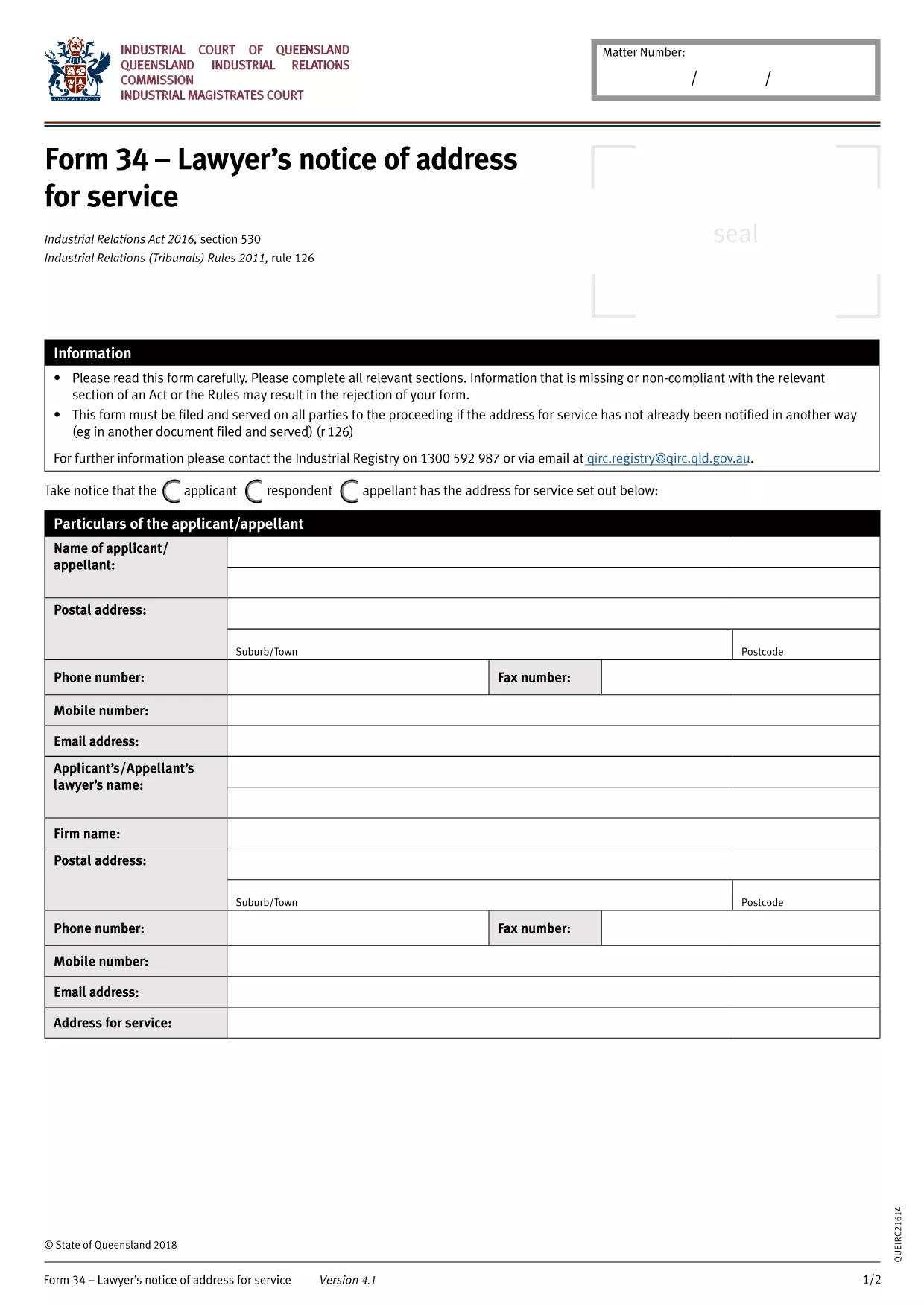
The BLS‑34 (Lawyer's Notice of Address for Service) is the standard document used in Queensland under the Industrial Relations Act 2016 to notify the tribunal of a lawyer’s address for service of legal documents. Instead of printing, printing, and scanning, you can now complete the form instantly with our online PDF filler.

What Is the BLS‑34 Form?

The BLS‑34 is required when a lawyer represents a party in an industrial relations matter. It provides the tribunal with a reliable address for service, ensuring that all notices, orders, and filings reach the correct legal representative.

How to Fill Out the BLS‑34 Online with Formize

Follow these simple steps to complete the form without leaving your browser:

  1. Click the "Fill out this form" button on this page.
  2. Wait a few seconds while the Formize PDF Filler app loads the fillable BLS‑34 template.
  3. Enter the required information (lawyer’s name, firm, address, contact details, client reference, etc.). All fields are clearly labelled.
  4. Review the entered data using the built‑in validation checks.
  5. Click Save & Download to get a completed PDF you can email or upload to the Queensland Industrial Relations Commission portal.

Common Mistakes & Tips for a Successful Submission

  • Incorrect address format: Use the full postal address, including suburb and postcode.
  • Missing client reference: The reference number must match the case file to avoid processing delays.
  • Leaving optional fields blank: Even optional fields help the tribunal locate the lawyer quickly; fill them if possible.
  • Signature requirement: After downloading, print, sign, and scan the signature page if the tribunal still requires a wet signature.

Where to Submit the Completed Form

Once you have the signed PDF, upload it through the Queensland Industrial Relations Commission online portal or email it to the case officer listed in your correspondence.

Need help? Review the FAQs below or contact your legal representative for guidance.

FAQ
  • Is the BLS‑34 form free to download?

    Yes. The fillable PDF is provided at no cost. You only need an internet connection to use the Formize online filler.

  • Can I submit the form electronically without printing?

    Most Queensland Industrial Relations Commission processes accept a digitally signed PDF. Check your specific case instructions; if a wet signature is required, print, sign, and scan the final page.

  • What if I make a mistake after downloading?

    You can reopen the saved PDF in Formize, correct the fields, and download a new version. No need to start over.

  • How long does the Formize filler take to load?

    Typically under 5 seconds on a standard broadband connection. Larger browsers or slower connections may take a few extra seconds.

  • Do I need a PDF reader to fill out the BLS‑34?

    No. The entire process happens in your web browser via Formize. A PDF reader is only needed if you want to view the final file offline.

  • Is my information secure while using Formize?

    Formize uses SSL encryption for all data transmitted between your browser and our servers. Your information is never stored permanently.

HOW TO

How to fill out BLS-34 form for free, online in 3 easy steps:

  1. 1
    Open the Fillable Form
    Click the "Fill out this form" button on the page. The Formize PDF Filler will load the BLS‑34 template directly in your browser.
  2. 2
    Enter Your Details
    Complete each highlighted field—lawyer’s name, firm address, phone, email, and client reference. The filler validates entries in real time.
  3. 3
    Save and Download
    After reviewing, click "Save & Download". The completed PDF will be saved to your device, ready for electronic submission or printing for a wet signature.
Formize PDF Filler app
ABOUT

BLS-34 form template

With the traditional set of features for viewing and filling out a PDF document, combined with the benefits of a web application and responsive layout, you can complete BLS-34 form in minutes.

FEATURES

PDF Filler

The easiest way to fill BLS-34 form online

  • Quickly fill out BLS-34 form
    Looking for a way to quickly fill BLS-34 form online? With our online free PDF form filler, you’ll know how to how to edit and fill this pdf document in less than a minute.
  • Easy to use online PDF editor
    Fed up with printing out PDF files so you can edit them, before rescanning and sending them back? Edit PDF documents for free online. Use our online pdf editor to save time and paper.
  • Great tools, all platforms
    Wondering how to fill in BLS-34 form on a Mac, or maybe how to use a PDF filler free? Our online PDF tools work on all platforms.
  • Secure file storage
    Completed "BLS-34 form" files are stored in a secured database managed by Amazon Cloud hosting. You can delete your files from our system anytime. In any case, these files are automatically deleted after 24 hours.
  • Chat with BLS-34 form
    Chat with "BLS-34 form" on Chatize that is a free PDF reader assistant. Ask questions and get answers from "BLS-34 form". Just click on Chat With Document button above.

Delete filling session

Delete the selected filling session? In this case, your progress in completing the form will be lost.

Delete editing session

Delete the selected editing session? In this case, your progress in creating and editing the form will be lost.