
Seleccione el idioma

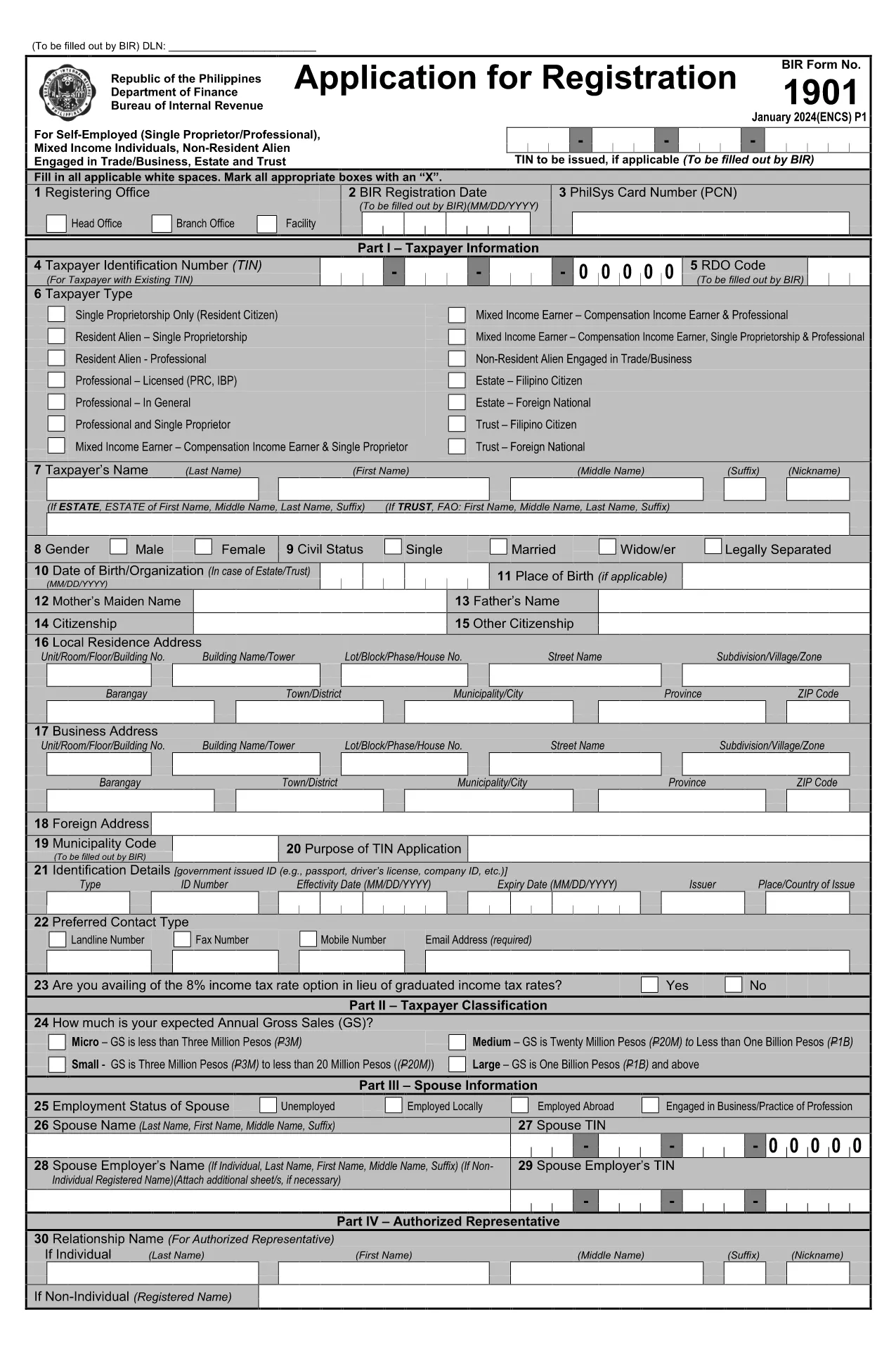
BIR Form 1901 – Fillable PDF Application Form

  1. Idioma Inglés
  2. País Philippines
  3. Departamento Bureau of Internal Revenue
  4. Actividad Impuestos
BIR Form 1901 – Fillable PDF Application Form

The BIR Form 1901 is the official application used in the Philippines to register a new business with the Bureau of Internal Revenue (BIR). This fillable PDF lets you enter all required information digitally, eliminating the need for paper copies and manual calculations.

What Is BIR Form 1901?

Form 1901, also known as the "Payment Order Form for New Business Registrant," captures essential details such as the Taxpayer Identification Number (TIN), branch code, RDO code, and the tax year. It is required for every new business entity before it can legally operate and issue official receipts.

How to Fill Out the BIR Form 1901 Online

Instead of downloading the file and opening it in a separate PDF editor, simply click the "Fill out this form" button on this page. The Formize PDF Filler app will load directly in your browser:

  1. Click Fill out this form and wait a few seconds for the Formize PDF Filler to appear.
  2. Enter your information in each highlighted field. The filler automatically validates TIN format and numeric fields.
  3. Use the Save button to download a completed copy to your device, or click Print to produce a hard‑copy for submission.

Common Mistakes to Avoid

  • Incorrect TIN or branch code: Double‑check numbers against your BIR Certificate of Registration.
  • Leaving mandatory fields blank: The Formize filler highlights missing entries before you can save.
  • Mismatched tax year: Ensure the year matches the fiscal year of your business start‑up.

Where to Submit the Completed Form

After filling out and saving the PDF, submit the original form to the BIR office that issued your RDO (Revenue District Office) code. You may also attach the electronic copy to your online BIR registration portal if you have one.

Download & Start Filling Instantly

Ready to begin? Click the button below and let Formize do the heavy lifting. No software download, no hassle—just a secure, browser‑based PDF filler.

PREGUNTAS MÁS FRECUENTES
  • Who needs to file BIR Form 1901?

    All newly registered businesses, partnerships, and corporations in the Philippines must submit Form 1901 before they can issue official receipts.

  • Can I edit the form after I save it?

    Yes. Open the saved PDF in any PDF editor or re‑load the form through Formize to make changes before final submission.

  • Is there a fee to download or fill the form?

    No. The PDF download and the Formize filler are completely free.

  • What is the difference between the branch code and RDO code?

    The branch code identifies your specific BIR office location, while the RDO (Revenue District Office) code designates the larger district that oversees several branches.

  • Where do I submit the completed Form 1901?

    Submit the original printed form to the BIR office that issued your RDO code. An electronic copy can be uploaded to the BIR online portal if available.

  • What common errors cause rejection?

    Incorrect TIN, missing mandatory fields, and mismatched tax year are the top reasons for rejection. Use the Formize validator to avoid them.

  • Do I need a digital signature?

    A handwritten signature is required on the printed copy. For electronic submissions, a qualified digital signature accepted by BIR can be used.

  • How long does it take for the BIR to process the form?

    Processing time varies by office, but most RDOs complete verification within 3‑5 business days after receipt.

  • Can I use this form for an existing business?

    No. Existing businesses should use the appropriate renewal or amendment forms. Form 1901 is strictly for new registrations.

  • Is the PDF compatible with mobile devices?

    Yes. The Formize filler works on smartphones and tablets, allowing you to complete the form on the go.

CÓMO

Cómo completar BIR Form 1901 gratis, en línea en 3 sencillos pasos:

  1. 1
    Click the Fill‑out Button
    Press the "Fill out this form" button on the page. The Formize PDF Filler will open in a new browser window.
  2. 2
    Enter Your Information
    Complete each highlighted field. The filler validates numbers and dates automatically.
  3. 3
    Save or Print
    When all fields are filled, click "Save" to download the completed PDF or "Print" to get a hard copy for BIR submission.
Aplicación Formize PDF Filler
SOBRE

Formularios de impuesto

BIR Form 1901 es uno de los formularios de impuestos que son documentos utilizados para informar ingresos, deducciones y obligaciones tributarias a la autoridad tributaria correspondiente. Estos formularios son una parte esencial del proceso de presentación de impuestos y se utilizan para garantizar que las personas y las empresas cumplan con las leyes tributarias y calculen con precisión sus obligaciones tributarias.

Los formularios de impuestos específicos requeridos pueden variar según factores como el estado civil para efectos de la declaración, las fuentes de ingresos y las leyes tributarias del país. Sin embargo, aquí hay algunos tipos comunes de formularios de impuestos:

Formularios de impuesto sobre la renta individual: estos formularios, como la serie 1040 en los Estados Unidos, se utilizan por individuos para declarar sus ingresos, reclamar deducciones y créditos, y calcular su obligación tributaria.

Formularios de impuestos comerciales: las empresas, incluidas las empresas unipersonales, las sociedades, las corporaciones y los trabajadores autónomos, pueden tener que presentar varios formularios para declarar sus ingresos, gastos e impuestos adeudados. Los ejemplos incluyen el Anexo C (Ganancias o pérdidas de negocios) y el Formulario 1120 (Declaración de impuestos sobre la renta de corporaciones de EE. UU.).

Formularios de impuestos sobre el empleo: los empleadores deben declarar los salarios de los empleados y retener y remitir los impuestos sobre la nómina. Para este propósito se utilizan formularios como W-2 (Declaración de salarios e impuestos) y 941 (Declaración de impuestos federales trimestral del empleador).

Formularios de cuentas de inversión y jubilación: estos formularios se utilizan para informar ingresos por inversiones, ganancias y pérdidas de capital, así como contribuciones y distribuciones de cuentas de jubilación. Los ejemplos incluyen el formulario 1099-DIV (dividendos y distribuciones) y Formulario 5498 (Información de contribución a IRA).

Formularios de impuestos sobre sucesiones y donaciones: cuando una persona fallece o hace donaciones importantes, se pueden utilizar formularios específicos como el formulario 706 (Declaración de impuestos sobre sucesiones (y transferencias con salto generacional) de los Estados Unidos) y Formulario 709 (Donación (y transferencia generacional) de los Estados Unidos Omisión de transferencia) Declaración de impuestos) se utilizan para informar y calcular cualquier impuesto aplicable sobre sucesiones o donaciones.

Es importante tener en cuenta que las leyes y formularios tributarios pueden cambiar con el tiempo, por lo que las personas y las empresas deben consultar a la autoridad tributaria correspondiente o buscar asesoramiento tributario profesional para garantizar el cumplimiento de los requisitos actuales.

CARACTERÍSTICAS

Relleno de PDF

La forma más fácil de llenar formularios PDF en línea

  • Rellene rápidamente BIR Form 1901
    ¿Está buscando una manera de llenar rápidamente BIR Form 1901 en línea? Con nuestro rellenador de formularios PDF gratuito en línea, sabrá cómo editar y rellenar este documento PDF en menos de un minuto.
  • Editor de PDF en línea fácil de usar
    ¿Cansado de imprimir archivos PDF para poder editarlos antes de volver a escanearlos y enviarlos de vuelta? Edite documentos PDF gratis en línea. Utilice nuestro editor de pdf en línea para ahorrar tiempo y papel.
  • Excelentes herramientas, todas las plataformas.
    ¿Se pregunta cómo completar BIR Form 1901 en una Mac, o tal vez cómo usar un relleno de PDF gratis? Nuestras herramientas de PDF en línea funcionan en todas las plataformas.
  • Almacenamiento seguro de archivos
    Los archivos "BIR Form 1901" completados se almacenan en una base de datos segura administrada por Amazon Cloud hosting. Puede eliminar sus archivos de nuestro sistema en cualquier momento. En cualquier caso, estos archivos se eliminan automáticamente después de 24 horas.
  • Chatea con {palabra clave}
    Chatea con "BIR Form 1901" en Chatize, que es un asistente de lectura de PDF gratuito. Haga preguntas y obtenga respuestas de "BIR Form 1901". Simplemente haga clic en el botón Chatear con documento de arriba.

Eliminar sesión de llenado

¿Eliminar la sesión de llenado seleccionada? En este caso, se perderá su progreso al completar el formulario.

Eliminar sesión de edición

¿Eliminar la sesión de edición seleccionada? En este caso, se perderá su progreso en la creación y edición del formulario.