
Choisir la langue

Fillable Form W-8ECI – Claim Effectively Connected Income

  1. De campagne Etats-Unis
  2. Langue Anglais
  3. Activité Impôts
  4. département Service des recettes internes
Fillable Form W-8ECI – Claim Effectively Connected Income

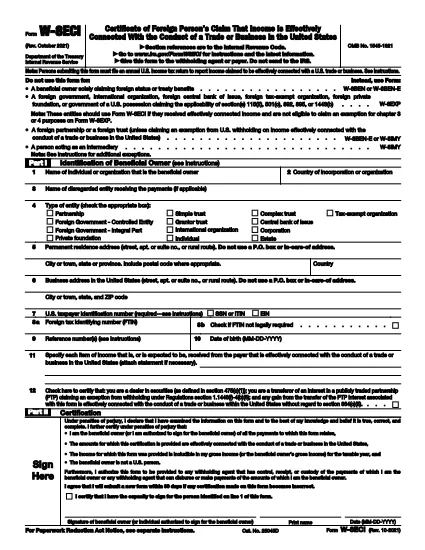
The IRS Form W-8ECI (Certificate of Foreign Person’s Claim That Income Is Effectively Connected With the Conduct of a Trade or Business in the United States) is required when a foreign individual or entity receives income that is effectively connected (ECI) with a U.S. trade or business. Using a fillable PDF saves time, reduces errors, and lets you submit the form electronically.

What Is Form W-8ECI?

Form W-8ECI certifies that the income you receive is ECI and therefore subject to regular U.S. income tax withholding rather than the 30% flat rate applied to non‑effectively connected payments. The form also provides the IRS with your taxpayer identification number (TIN) and details about the trade or business activities.

When and Who Must Use Form W-8ECI

  • Foreign individuals, corporations, partnerships, or trusts earning ECI from U.S. sources.
  • Payments such as rents, royalties, interest, or services that are connected to a U.S. trade or business.
  • When you are not eligible to claim a chapter 3 or 4 exemption on Form W-8EXP.

Step‑by‑Step Guide to Completing the Fillable PDF

Follow the simple steps below to fill out the form directly on our page without downloading any software.

Common Mistakes to Avoid

  • Leaving the U.S. TIN blank or entering an incorrect number.
  • Using the wrong version of the form (always choose the latest revision).
  • Failing to sign and date the form – an unsigned form is invalid.
  • Confusing “effectively connected income” with “portfolio interest” – the latter uses a different form.

Why Choose Formize’s Online PDF Filler

Our cloud‑based PDF Filler loads instantly, keeps your data secure, and lets you download a completed, IRS‑ready PDF in seconds. No extra plugins, no printing, no scanning.

Instructions

FAQ
  • Do I need a U.S. Social Security Number to file Form W-8ECI?

    No. Foreign entities can use an Individual Taxpayer Identification Number (ITIN) or an Employer Identification Number (EIN) issued by the IRS.

  • How often must I renew Form W-8ECI?

    The form is valid until the end of the third calendar year after the year it was signed, unless a change in circumstances makes the information incorrect.

  • Can I use Form W-8ECI for royalty payments?

    Yes, if the royalties are derived from a trade or business in the United States and are considered ECI. Otherwise, a different form may be required.

  • What happens if I submit an unsigned Form W-8ECI?

    The payer must treat the payment as non‑effectively connected and apply the 30% withholding rate, which could result in over‑withholding.

  • Is the fillable PDF on Formize compliant with IRS standards?

    Absolutely. The PDF mirrors the official IRS version (Rev. October 2021) and meets all formatting and field requirements.

  • Can I edit the form after I download it?

    Yes, the downloaded PDF remains fully editable with any standard PDF editor, but it’s best to complete the form online to avoid errors.

  • Do I need to send Form W-8ECI to the IRS directly?

    No. The completed form is provided to the U.S. withholding agent or payer, who then forwards the necessary information to the IRS.

  • Is there a fee to use Formize’s PDF filler for Form W-8ECI?

    Formize offers this fillable version for free. No hidden charges or subscription are required.

COMMENT

Comment remplir W-8ECI form gratuitement, en ligne en 4 étapes simples :

  1. 1
    Open the Fillable Form
    Click the “Fill out this form” button on the page. The Formize PDF Filler app will load in your browser within a few seconds.
  2. 2
    Enter Your Information
    Complete each field – name, address, U.S. TIN, and details of the effectively connected income. All fields are interactive and validated.
  3. 3
    Review and Sign
    Use the built‑in signature tool to add your electronic signature, then double‑check that every required box is filled.
  4. 4
    Download or Submit
    When the form is complete, click “Download PDF” to save a copy for your records, or use the “Submit to IRS” option if your payer accepts electronic submission.
Formize l'application PDF Filler
À PROPOS

Les formulaires d'impôt

W-8ECI form est l'un des formulaires fiscaux qui sont des documents utilisés pour déclarer des informations relatives aux impôts à l'autorité fiscale compétente. Il existe différents types de formulaires fiscaux, y compris les formulaires fiscaux fédéraux, étatiques et locaux, qui peuvent varier en fonction de la situation et de l'emplacement du contribuable.

CARACTÉRISTIQUES

Remplisseur de PDF

Le moyen le plus simple de remplir des formulaires PDF en ligne

  • Remplissez rapidement W-8ECI form
    Vous cherchez un moyen de remplir rapidement W-8ECI form en ligne ? Avec notre remplisseur de formulaire PDF gratuit en ligne, vous saurez comment éditer et remplir ce document pdf en moins d'une minute.
  • Éditeur PDF en ligne facile à utiliser
    Vous en avez assez d'imprimer des fichiers PDF pour pouvoir les modifier avant de les renumériser et de les renvoyer ? Modifiez des documents PDF gratuitement en ligne. Utilisez notre éditeur de pdf en ligne pour gagner du temps et du papier.
  • Excellents outils, toutes plateformes
    Vous vous demandez comment remplir W-8ECI form sur un Mac, ou peut-être comment utiliser un remplisseur PDF gratuit ? Nos outils PDF en ligne fonctionnent sur toutes les plateformes.
  • Stockage de fichiers sécurisé
    Les fichiers "W-8ECI form" terminés sont stockés dans une base de données sécurisée gérée par l'hébergement Amazon Cloud. Vous pouvez supprimer vos fichiers de notre système à tout moment. Dans tous les cas, ces fichiers sont automatiquement supprimés après 24 heures.
  • Discutez avec W-8ECI form
    Discutez avec "W-8ECI form" sur Chatize qui est un assistant de lecture PDF gratuit. Posez des questions et obtenez des réponses de "W-8ECI form". Cliquez simplement sur le bouton Discuter avec un document ci-dessus.

Supprimer la session de remplissage

Supprimer la session de remplissage sélectionnée ? Dans ce cas, votre progression dans le remplissage du formulaire sera perdue.

Supprimer la session d'édition

Supprimer la session de modification sélectionnée ? Dans ce cas, votre progression dans la création et la modification du formulaire sera perdue.