
Seleziona la lingua

M22 Tax File Number Form – Fillable PDF

  1. Paese Australia
  2. Lingua Inglese
  3. Attività Le tasse
  4. Dipartimento Superannuation
M22 Tax File Number Form – Fillable PDF

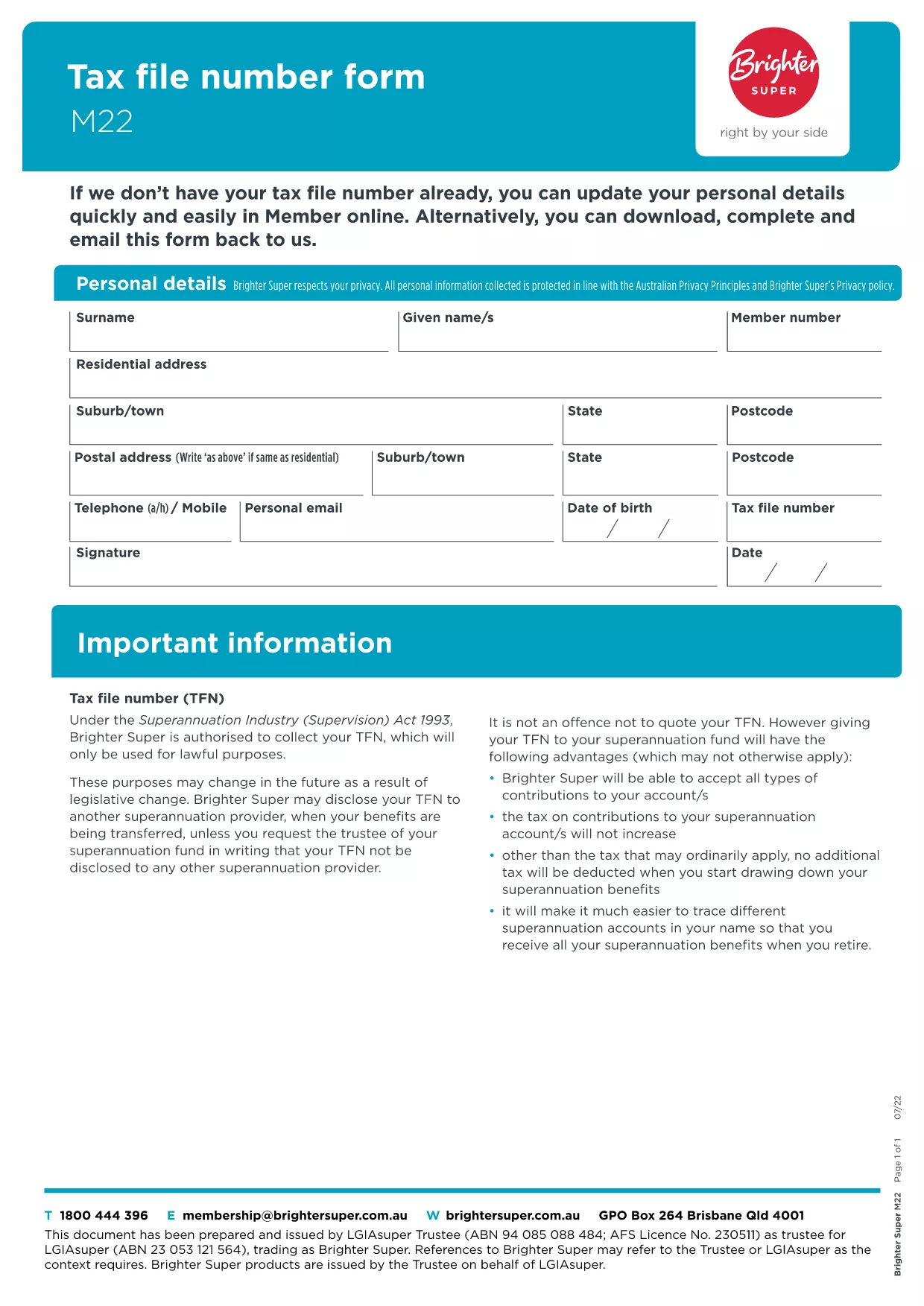
The M22 Tax File Number (TFN) form is the standard document used in Australia to provide or update your TFN with superannuation funds, employers, or government agencies. Whether you’re a new member of a super fund or need to correct details, the M22 form is required.

What Is the M22 Form?

The M22 collects personal details, your TFN, and contact information. It is a simple, one‑page form that can be completed digitally or on paper. Using a fillable PDF eliminates manual errors and speeds up processing.

How to Complete the M22 Form Online

With Formize’s built‑in PDF filler you can complete the M22 without leaving the page:

  • Click the "Fill out this form" button below.
  • Wait a few seconds while the Formize PDF Filler app loads.
  • Enter your information in the highlighted fields.
  • Save, download, or submit directly from the filler.

Common Mistakes to Avoid

  • Leaving the TFN field blank – the form will be rejected.
  • Using an outdated address – always double‑check your contact details.
  • Signing in the wrong place – the signature field is at the bottom of the page.
  • Submitting a scanned copy of a handwritten form – the fillable PDF is preferred.

Where to Submit Your Completed Form

After you’ve saved the completed PDF, you can:

  • Email it to your superannuation provider.
  • Upload it through the provider’s online portal.
  • Print and post it to the address listed on the form.

Download the Official M22 PDF

The version hosted by Brighter Super is the latest approved document. Click the button below to open the fillable version instantly.

FAQ
  • What is the purpose of the M22 form?

    The M22 is used to provide or update your Tax File Number with superannuation funds, employers, or government agencies in Australia.

  • Can I fill out the M22 form on a mobile device?

    Yes. The Formize PDF filler is responsive and works on smartphones and tablets.

  • Do I need to print the form after filling it online?

    Printing is optional. You can email or upload the completed PDF directly to the receiving organisation.

  • Is the information I enter secure?

    Formize uses SSL encryption, ensuring your personal data is transmitted securely.

  • What should I do if I make a mistake after submitting?

    Contact the organisation that received the form and request a replacement M22. You can fill out a new form using the same online filler.

  • Is there a fee to use the Formize filler for the M22?

    No. The filler is free for all users on Formize.com.

  • How long does it take for the form to be processed?

    Processing time depends on the receiving organisation, but most super funds acknowledge receipt within 2‑3 business days.

COME

Come compilare M22 form gratuitamente, online in 4 semplici passaggi:

  1. 1
    Open the Fillable Form
    Click the "Fill out this form" button on the page. The Formize PDF Filler app will load in a new window.
  2. 2
    Enter Your Details
    Type your personal information, TFN, and contact details into the highlighted fields. The form saves automatically as you type.
  3. 3
    Review & Sign
    Check every field for accuracy, then add your digital signature in the signature box at the bottom of the form.
  4. 4
    Save or Submit
    Choose to download the completed PDF, email it directly from the filler, or copy a secure link to submit via your super fund’s portal.
App Formize PDF Filler
DI

Moduli fiscali

M22 form è uno dei moduli fiscali che sono documenti utilizzati per segnalare redditi, detrazioni e passività fiscali all'autorità fiscale competente. Questi moduli costituiscono una parte essenziale del processo di dichiarazione dei redditi e vengono utilizzati per garantire che gli individui e le imprese rispettino le leggi fiscali e calcolino accuratamente i loro obblighi fiscali.

I moduli fiscali specifici richiesti possono variare a seconda di fattori quali lo stato di dichiarazione di un individuo, le fonti di reddito e le leggi fiscali del paese. Tuttavia, ecco alcuni tipi comuni di moduli fiscali:

Moduli per l'imposta sul reddito individuale: questi moduli, come la serie 1040 negli Stati Uniti, vengono utilizzati da parte degli individui per dichiarare il proprio reddito, richiedere detrazioni e crediti e calcolare la propria responsabilità fiscale.

Moduli fiscali aziendali: le aziende, comprese le imprese individuali, le società di persone, le società e i lavoratori autonomi, potrebbero dover compilare vari moduli per segnalare entrate, spese e imposte dovute. Gli esempi includono l'Allegato C (Profitti o perdite aziendali) e il Modulo 1120 (Dichiarazione dei redditi delle società statunitensi).

Moduli fiscali sul lavoro: i datori di lavoro sono tenuti a dichiarare le retribuzioni dei dipendenti e a trattenere e versare le imposte sui salari. A questo scopo vengono utilizzati moduli come W-2 (Dichiarazione salariale e fiscale) e 941 (Dichiarazione dei redditi federale trimestrale del datore di lavoro).

Moduli per conti pensionistici e di investimento: questi moduli vengono utilizzati per segnalare redditi da investimenti, plusvalenze e perdite, nonché contributi e distribuzioni dai conti pensionistici. Gli esempi includono il modulo 1099-DIV (Dividendi e distribuzioni) e Modulo 5498 (Informazioni sui contributi dell'IRA).

Moduli per imposte sulle successioni e sulle donazioni: quando una persona muore o fa donazioni significative, moduli specifici come il Modulo 706 (Dichiarazione dei redditi degli Stati Uniti sulle proprietà immobiliari (e trasferimento di generazione)) e Modulo 709 (Regali degli Stati Uniti (e generazione-trasferimento) Salto trasferimento) Dichiarazione dei redditi) vengono utilizzati per segnalare e calcolare eventuali imposte sulle successioni o sulle donazioni applicabili.

È importante notare che le leggi e i moduli fiscali possono cambiare nel tempo, pertanto i privati ​​e le imprese dovrebbero consultare l’autorità fiscale competente o richiedere una consulenza fiscale professionale per garantire la conformità ai requisiti attuali.

CARATTERISTICHE

Compilatore PDF

Il modo più semplice per compilare moduli PDF online

  • Compila rapidamente M22 form
    Cerchi un modo per compilare rapidamente M22 form online? Con il nostro compilatore di moduli PDF gratuito online, saprai come modificare e compilare questo documento PDF in meno di un minuto.
  • Editor PDF online facile da usare
    Stufo di stampare file PDF in modo da poterli modificare, prima di riscansionarli e rispedirli? Modifica documenti PDF gratuitamente online. Utilizza il nostro editor PDF online per risparmiare tempo e carta.
  • Grandi strumenti, tutte le piattaforme
    Ti stai chiedendo come inserire M22 form su un Mac o forse come utilizzare un riempitivo PDF gratuito? I nostri strumenti PDF online funzionano su tutte le piattaforme.
  • Archiviazione sicura dei file
    I file "M22 form" completati vengono archiviati in un database protetto gestito dall'hosting Amazon Cloud. Puoi eliminare i tuoi file dal nostro sistema in qualsiasi momento. In ogni caso, questi file vengono automaticamente cancellati dopo 24 ore.
  • Chatta con {parola chiave}
    Chatta con "M22 form" su Chatize che è un assistente di lettura PDF gratuito. Fai domande e ottieni risposte da "M22 form". Basta fare clic sul pulsante Chatta con il documento in alto.

Elimina sessione di riempimento

Eliminare la sessione di riempimento selezionata? In questo caso, i progressi nella compilazione del modulo andranno persi.

Elimina la sessione di modifica

Eliminare la sessione di editing selezionata? In questo caso, i tuoi progressi nella creazione e modifica del modulo andranno persi.