
Zvoľ jazyk

M22 Tax File Number Form – Fillable PDF

  1. Krajina Austrália
  2. Jazyk Angličtina
  3. Aktivita dane
  4. oddelenie Superannuation
M22 Tax File Number Form – Fillable PDF

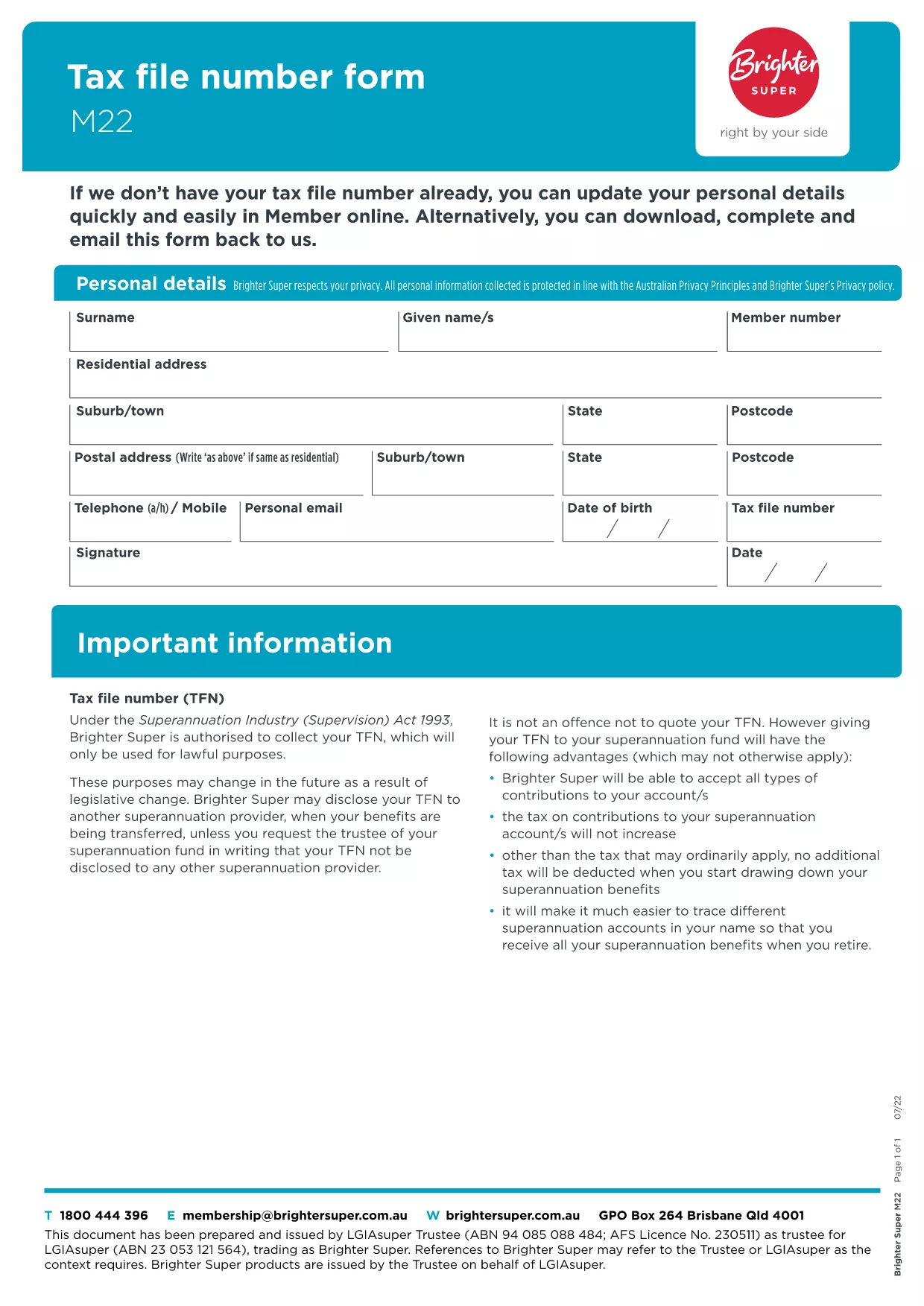
The M22 Tax File Number (TFN) form is the standard document used in Australia to provide or update your TFN with superannuation funds, employers, or government agencies. Whether you’re a new member of a super fund or need to correct details, the M22 form is required.

What Is the M22 Form?

The M22 collects personal details, your TFN, and contact information. It is a simple, one‑page form that can be completed digitally or on paper. Using a fillable PDF eliminates manual errors and speeds up processing.

How to Complete the M22 Form Online

With Formize’s built‑in PDF filler you can complete the M22 without leaving the page:

  • Click the "Fill out this form" button below.
  • Wait a few seconds while the Formize PDF Filler app loads.
  • Enter your information in the highlighted fields.
  • Save, download, or submit directly from the filler.

Common Mistakes to Avoid

  • Leaving the TFN field blank – the form will be rejected.
  • Using an outdated address – always double‑check your contact details.
  • Signing in the wrong place – the signature field is at the bottom of the page.
  • Submitting a scanned copy of a handwritten form – the fillable PDF is preferred.

Where to Submit Your Completed Form

After you’ve saved the completed PDF, you can:

  • Email it to your superannuation provider.
  • Upload it through the provider’s online portal.
  • Print and post it to the address listed on the form.

Download the Official M22 PDF

The version hosted by Brighter Super is the latest approved document. Click the button below to open the fillable version instantly.

FAQ
  • What is the purpose of the M22 form?

    The M22 is used to provide or update your Tax File Number with superannuation funds, employers, or government agencies in Australia.

  • Can I fill out the M22 form on a mobile device?

    Yes. The Formize PDF filler is responsive and works on smartphones and tablets.

  • Do I need to print the form after filling it online?

    Printing is optional. You can email or upload the completed PDF directly to the receiving organisation.

  • Is the information I enter secure?

    Formize uses SSL encryption, ensuring your personal data is transmitted securely.

  • What should I do if I make a mistake after submitting?

    Contact the organisation that received the form and request a replacement M22. You can fill out a new form using the same online filler.

  • Is there a fee to use the Formize filler for the M22?

    No. The filler is free for all users on Formize.com.

  • How long does it take for the form to be processed?

    Processing time depends on the receiving organisation, but most super funds acknowledge receipt within 2‑3 business days.

AKO

Ako bezplatne vyplniť M22 form online v 4 jednoduchých krokoch:

  1. 1
    Open the Fillable Form
    Click the "Fill out this form" button on the page. The Formize PDF Filler app will load in a new window.
  2. 2
    Enter Your Details
    Type your personal information, TFN, and contact details into the highlighted fields. The form saves automatically as you type.
  3. 3
    Review & Sign
    Check every field for accuracy, then add your digital signature in the signature box at the bottom of the form.
  4. 4
    Save or Submit
    Choose to download the completed PDF, email it directly from the filler, or copy a secure link to submit via your super fund’s portal.
Aplikácia Formize PDF Filler
O

Daňové formuláre

M22 form je jedným z daňových formulárov, ktoré sú dokumentmi používanými na oznamovanie informácií súvisiacich s daňami príslušnému daňovému úradu. Existujú rôzne typy daňových formulárov vrátane federálnych, štátnych a miestnych daňových formulárov, ktoré sa môžu líšiť v závislosti od okolností a miesta daňovníka.

VLASTNOSTI

PDF Filler

Najjednoduchší spôsob, ako vyplniť M22 form online

  • Rýchlo vyplňte M22 form
    Hľadáte spôsob, ako rýchlo vyplniť M22 form online? S našou online bezplatnou výplňou formulárov PDF budete vedieť, ako upraviť a vyplniť tento dokument PDF za menej ako minútu.
  • Ľahko použiteľný online editor PDF
    Nebaví vás tlačiť súbory PDF, aby ste ich mohli upravovať pred opätovným naskenovaním a odoslaním späť? Upravujte dokumenty PDF zadarmo online. Použite náš online editor PDF, aby ste ušetrili čas a papier.
  • Skvelé nástroje, všetky platformy
    Zaujíma vás, ako vyplniť M22 form na počítači Mac, alebo ako možno použiť bezplatný výplň PDF? Naše online nástroje PDF fungujú na všetkých platformách.
  • Bezpečné ukladanie súborov
    Dokončené súbory „M22 form“ sú uložené v zabezpečenej databáze spravovanej hostingom Amazon Cloud. Svoje súbory môžete z nášho systému kedykoľvek odstrániť. V každom prípade sa tieto súbory automaticky vymažú po 24 hodinách.
  • Četovať s M22 form
    Četujte s „M22 form“ na Chatize, čo je bezplatný pomocník na čítanie súborov PDF. Pýtajte sa otázky a získajte odpovede z „M22 form“. Stačí kliknúť na tlačidlo Rozhovor s dokumentom vyššie.

Odstrániť reláciu plnenia

Chcete odstrániť vybratú reláciu plnenia? V takom prípade sa stratí váš postup pri vypĺňaní formulára.

Odstrániť reláciu úprav

Chcete odstrániť vybratú reláciu úprav? V takom prípade sa stratí váš postup pri vytváraní a úprave formulára.