
언어 선택

IRS Form 4810 – Fillable Prompt Assessment Request

  1. 국가 미국
  2. 언어 영어
  3. 활동 구실
  4. 부서 IRS
IRS Form 4810 – Fillable Prompt Assessment Request

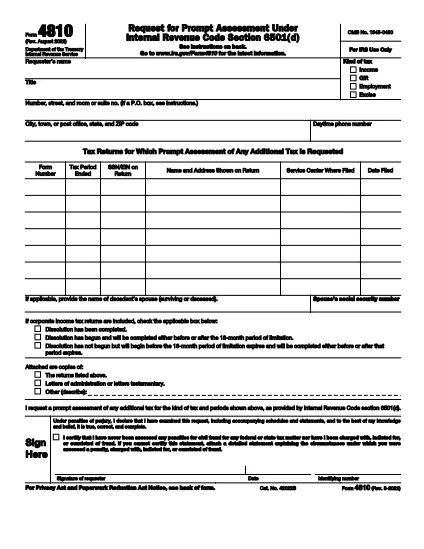
Form 4810, also known as the Prompt Assessment Request, lets taxpayers ask the Internal Revenue Service (IRS) for a faster determination of their tax liability. Whether you’re dealing with a complex audit, a disputed return, or need a quick ruling, the fillable PDF version on Formize makes the process simple and error‑free.

What Is IRS Form 4810?

Form 4810 is an official IRS document used to request a prompt assessment of tax. It requires detailed information about the taxpayer, the tax year in question, and the specific issue you want the IRS to address. The form also asks for supporting documentation and proof of authority if you’re filing on behalf of someone else.

How to Complete the Fillable PDF with Formize

Instead of downloading the PDF and opening it in a separate editor, you can fill it out directly on our page:

  1. Click the "Fill out this form" button on the page.
  2. Wait a few seconds while the Formize PDF Filler app loads.
  3. Enter your information in the highlighted fields. Navigation is keyboard‑friendly and auto‑saves as you go.
  4. Upload any required attachments (letters testamentary, prior notices, etc.).
  5. When finished, click Submit to download the completed PDF or to send it directly to the IRS via email.

Common Mistakes to Avoid on Form 4810

  • Missing authority documents: If you’re filing for another taxpayer, include letters testamentary or power of attorney.
  • Incorrect tax year: Double‑check the year you’re requesting assessment for; an error can delay processing.
  • Incomplete attachments: The IRS requires specific supporting documents; use the checklist on the form.
  • Illegible handwriting: With the fillable PDF, every entry is typed, eliminating this risk.

Where to Submit Your Completed Form

After you’ve saved the completed Form 4810, mail it to the address listed in the instructions, or fax it to the IRS office handling prompt assessments. Keep a copy for your records.

Need more help? Review the official IRS instructions for additional details.

자주하는 질문
  • Who can file IRS Form 4810?

    Any taxpayer, or a representative with proper authority (e.g., power of attorney), can request a prompt assessment using Form 4810.

  • Do I need to print the form after filling it online?

    No. The fillable PDF can be saved and submitted electronically, but the IRS still requires a hard copy for mailing in most cases.

  • What supporting documents are required?

    Typically you must include the tax return in question, any prior IRS notices, and proof of authority if filing for someone else.

  • How long does the IRS take to respond?

    A prompt assessment request is usually processed within 30 days, but timelines can vary based on case complexity.

  • Can I edit the form after I’ve saved it?

    Yes. Open the saved PDF in Formize again, make any changes, and re‑save before sending it to the IRS.

  • Is there a fee to file Form 4810?

    There is no filing fee for Form 4810 itself, but you may incur standard mailing costs.

어떻게

5개의 간단한 단계를 통해 온라인으로 IRS Form 4810를 무료로 작성하는 방법:

  1. 1
    Open the Fillable Form
    Click the "Fill out this form" button on the page. The Formize PDF Filler will appear in your browser.
  2. 2
    Enter Your Information
    Type directly into each highlighted field. Use the Tab key to move quickly between sections.
  3. 3
    Attach Required Documents
    Upload letters testamentary, prior notices, or any supporting paperwork using the attachment area.
  4. 4
    Review and Save
    Check all entries for accuracy, then click "Save" to download the completed PDF to your computer.
  5. 5
    Submit to the IRS
    Mail or fax the saved PDF to the IRS address indicated in the form instructions.
Formize PDF 필러 앱
에 대한

연방 세금 양식

IRS Form 4810는 미국 국세청(IRS)에 연방 소득세를 보고하고 제출하는 데 사용되는 문서인 연방 세금 양식 중 하나입니다. 이 양식은 개인, 기업 및 조직이 소득, 공제 및 연방 세금 납부액 계산에 필요한 기타 관련 정보를 보고하는 데 사용됩니다.

가장 일반적으로 사용되는 연방 세금 양식은 개인 납세자가 개인 소득세를 신고하는 데 사용하는 양식 1040입니다. 일반적으로 사용되는 기타 양식으로는 파트너십을 위한 양식 1065, 양식 1120, 면세 조직의 경우 양식 990.

연방 세금 양식에서는 일반적으로 납세자가 임금, 급여, 팁 등 다양한 소득원은 물론 투자 소득, 임대 부동산 및 기타 소득원을 보고하도록 요구합니다. 또한 이 양식을 통해 납세자는 자선 기부금, 모기지 이자, 의료비 등 다양한 비용에 대해 공제 및 세액공제를 청구할 수 있습니다.

연방 세금 양식을 정확하고 제때에 제출하는 것이 중요합니다. 그렇게 하지 않으면 IRS로부터 벌금과 이자가 부과될 수 있습니다.

특징

PDF 필러

온라인에서 PDF 양식을 채우는 가장 쉬운 방법

  • IRS Form 4810를 빠르게 작성하세요.
    온라인에서 IRS Form 4810을(를) 빠르게 채우는 방법을 찾고 계십니까? 온라인 무료 PDF 양식 필러를 사용하면 1분 이내에 이 PDF 문서를 편집하고 채우는 방법을 알 수 있습니다.
  • 사용하기 쉬운 온라인 PDF 편집기
    다시 스캔하여 다시 보내기 전에 편집할 수 있도록 PDF 파일을 인쇄하는 데 지쳤습니까? 온라인에서 무료로 PDF 문서를 편집하세요. 온라인 PDF 편집기를 사용하여 시간과 종이를 절약하십시오.
  • 훌륭한 도구, 모든 플랫폼
    Mac에서 IRS Form 4810를 채우는 방법이나 PDF 필러를 무료로 사용하는 방법이 궁금하십니까? 당사의 온라인 PDF 도구는 모든 플랫폼에서 작동합니다.
  • 안전한 파일 저장
    완료된 "IRS Form 4810" 파일은 Amazon 클라우드 호스팅에서 관리하는 보안 데이터베이스에 저장됩니다. 언제든지 시스템에서 파일을 삭제할 수 있습니다. 어쨌든 이러한 파일은 24시간 후에 자동으로 삭제됩니다.
  • IRS Form 4810님과 채팅
    무료 PDF 리더 도우미인 Chatize에서 "IRS Form 4810"와 채팅하세요. "IRS Form 4810"에서 질문하고 답변을 받으세요. 위의 문서와 채팅 버튼을 클릭하세요.

필링 세션 삭제

선택한 필링 세션을 삭제하시겠습니까?이 경우 양식 작성 진행 상황이 손실됩니다.

편집 세션 삭제

선택한 편집 세션을 삭제하시겠습니까? 이 경우 양식 작성 및 편집 진행 상황이 손실됩니다.