
Wybierz język

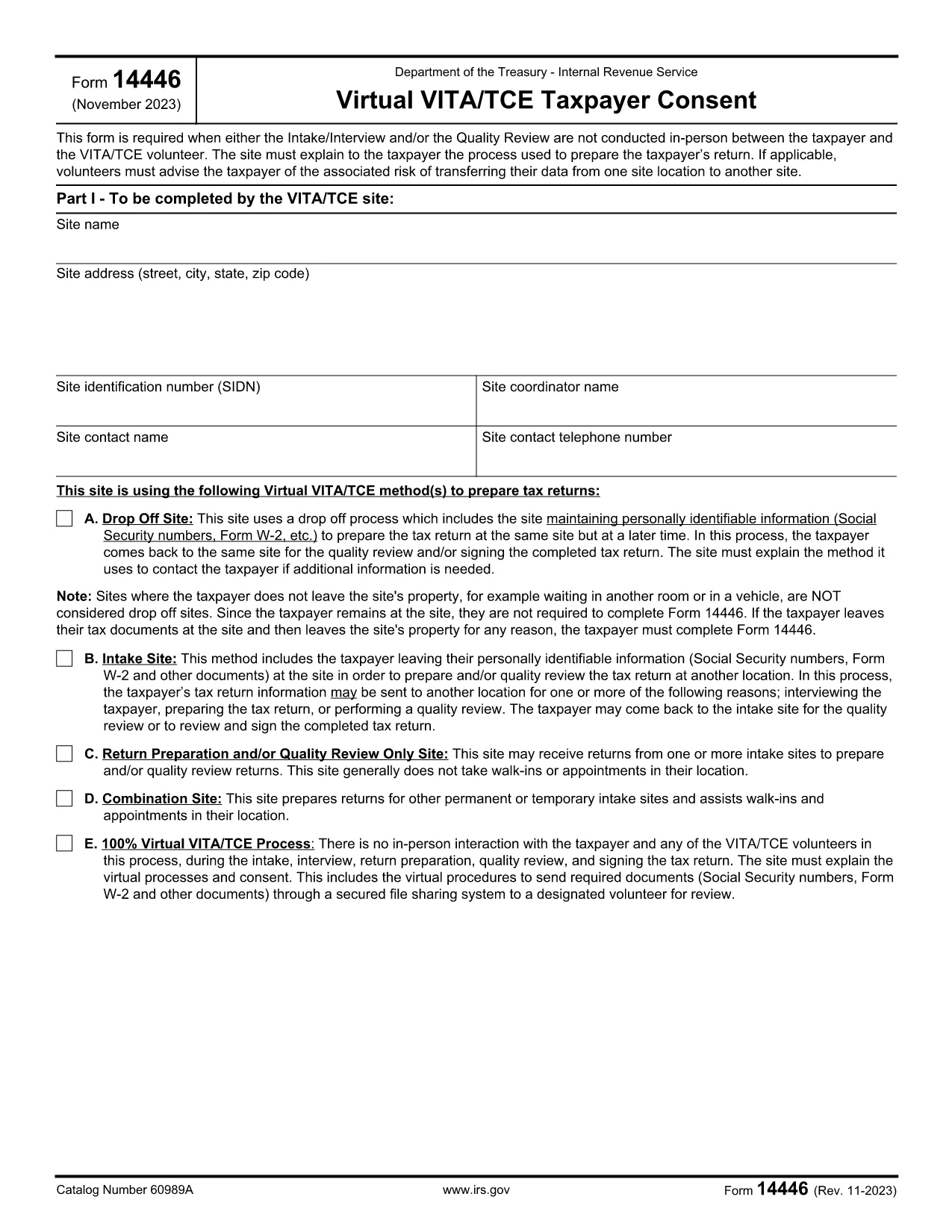
Form 14446 (FR) – Fillable PDF Form

  1. Kraj USA
  2. Język język angielski
  3. Działalność podatki
  4. Dział IRS
Form 14446 (FR) – Fillable PDF Form

Form 14446 (FR) – Fillable PDF Form

Form 14446 (FR) is the French‑language version of the IRS form used for tax‑exempt organization reporting. Whether you are a charity, a nonprofit, or a fiscal sponsor, you need a reliable way to complete the form accurately and submit it on time.

What is Form 14446 (FR)?

This form collects detailed financial information required by the Internal Revenue Service (IRS) for organizations that file a Form 990 in French. The French version is officially recognized for entities that operate primarily in French‑speaking territories of the United States.

How to Fill Out Form 14446 Online

Instead of downloading a static PDF and opening it in a separate editor, you can fill the form directly on this page. Click the "Fill out this form" button and wait for the Formize PDF Filler app to load. The entire process stays within your browser, keeping your data secure.

Common Mistakes to Avoid

  • Leaving required fields blank: The filler highlights missing entries before you can submit.
  • Using the wrong currency format: Enter amounts without commas (e.g., 12345.67) to prevent validation errors.
  • Submitting an unsigned form: The digital signature field must be completed; otherwise the IRS will reject the filing.

Where to Submit the Completed Form

After you finish, you can:

  • Download the completed PDF and mail it to the address indicated in the instructions.
  • Upload the file directly to the IRS e‑file portal (if you have an authorized e‑file account).

Formize stores the file securely for 30 days, giving you time to choose the submission method that works best for you.

Download vs. Fill Online – Why Choose Formize

Using the online filler eliminates version‑control issues, reduces the risk of corrupted files, and provides real‑time validation. It’s the fastest, safest way to complete Form 14446 (FR) without the hassle of external PDF editors.

Download the official PDF (for reference)

CZĘSTO ZADAWANE PYTANIA
  • Do I need to download the PDF before filling it out?

    No. Simply click the “Fill out this form” button and the Formize PDF Filler will load the form directly in your browser.

  • Is the French version of the form accepted by the IRS?

    Yes. Form 14446 (FR) is the officially sanctioned French translation for organizations that qualify for French‑language filing.

  • Can I save my progress and finish later?

    The filler allows you to download a partially completed PDF at any time. You can reopen it later in Formize to continue.

  • What browsers are supported?

    Formize works with the latest versions of Chrome, Edge, Firefox, and Safari. Ensure JavaScript is enabled.

  • Is my data secure while using the online filler?

    All data is processed locally in your browser and encrypted during any upload. Formize does not store personal information after the 30‑day retention period.

  • Do I need a digital signature?

    Yes. The form includes a built‑in digital signature field. You can sign using a mouse, touchpad, or by typing your name and selecting a signature style.

  • What if I make a mistake after submitting?

    If the form is already mailed, you’ll need to submit a corrected version. If you submit electronically, you can upload a revised PDF before the IRS processing deadline.

  • Where can I find the official instructions for Form 14446 (FR)?

    The official instruction booklet is linked at the bottom of this page and also available on the IRS website.

JAK

Jak wypełnić Form 14446 za darmo online w 5 prostych krokach:

  1. 1
    Click the Fill Button
    Press the bright “Fill out this form” button on the page. The Formize PDF Filler will open in a new tab.
  2. 2
    Wait for the Filler to Load
    A short loading screen appears while the secure filler app initializes. This ensures the latest version of Form 14446 (FR) is used.
  3. 3
    Complete Each Field
    Enter your organization’s information, financial figures, and signatures. Required fields are highlighted in red until filled.
  4. 4
    Review and Validate
    Click the “Validate” button. The app checks for missing data, format errors, and unsigned sections.
  5. 5
    Save or Submit
    When validation passes, download the completed PDF or upload it directly to the IRS e‑file portal from the same screen.
Aplikacja Formize PDF Filler
O

Formularze podatkowe

Form 14446 to jeden z formularzy podatkowych, które są dokumentami służącymi do zgłaszania informacji związanych z podatkami do właściwego organu podatkowego. Istnieją różne rodzaje formularzy podatkowych, w tym federalne, stanowe i lokalne formularze podatkowe, które mogą się różnić w zależności od sytuacji i lokalizacji podatnika.

CECHY

Wypełniacz PDF

Najłatwiejszy sposób wypełniania formularzy PDF online

  • Szybko wypełnij Form 14446
    Szukasz sposobu na szybkie wypełnienie Form 14446 online? Dzięki naszemu bezpłatnemu wypełniaczowi formularzy PDF online dowiesz się, jak edytować i wypełniać ten dokument PDF w mniej niż minutę.
  • Łatwy w użyciu edytor PDF online
    Masz dość drukowania plików PDF, aby móc je edytować przed ponownym zeskanowaniem i odesłaniem? Edytuj dokumenty PDF za darmo online. Skorzystaj z naszego internetowego edytora pdf, aby zaoszczędzić czas i papier.
  • Świetne narzędzia, wszystkie platformy
    Zastanawiasz się, jak wypełnić Form 14446 na komputerze Mac, a może jak bezpłatnie skorzystać z wypełniacza PDF? Nasze narzędzia PDF online działają na wszystkich platformach.
  • Bezpieczne przechowywanie plików
    Gotowe pliki „Form 14446” są przechowywane w zabezpieczonej bazie danych zarządzanej przez hosting Amazon Cloud. W każdej chwili możesz usunąć swoje pliki z naszego systemu. W każdym przypadku pliki te są automatycznie usuwane po 24 godzinach.
  • Czatuj z Form 14446
    Porozmawiaj z „Form 14446” na Chatize, który jest bezpłatnym asystentem czytnika plików PDF. Zadawaj pytania i uzyskuj odpowiedzi od „Form 14446”. Po prostu kliknij przycisk Czatuj z dokumentem powyżej.

Usuń sesję napełniania

Usunąć wybraną sesję napełniania? W takim przypadku Twoje postępy w wypełnianiu formularza zostaną utracone.

Usuń sesję edycji

Usunąć wybraną sesję edycji? W takim przypadku Twój postęp w tworzeniu i edytowaniu formularza zostanie utracony.