Zvoľ jazyk

Fillable IRS Form 5452 – Corporate No‑Tax‑Liability Return

  1. Krajina USA
  2. Jazyk Angličtina
  3. Aktivita dane
  4. oddelenie Internal Revenue Service
Fillable IRS Form 5452 – Corporate No‑Tax‑Liability Return

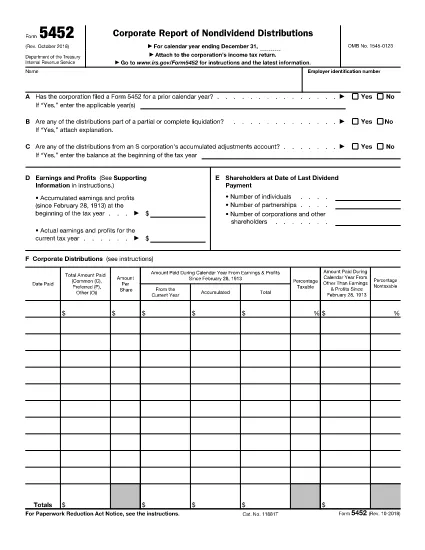
Form 5452 is the IRS corporate tax return for a corporation that has no tax liability. It is used by entities that are required to file a return but report zero tax due for the year. Rather than downloading a static PDF, you can complete the form directly in your browser with Formize’s secure fillable PDF tool.

What Is IRS Form 5452?

The form captures basic corporate information, such as the employer identification number (EIN), tax year, and a brief explanation of why the corporation owes no tax. It is typically filed alongside other informational returns, like Form 1120‑Z, when a corporation’s activities generate no taxable income.

How to Fill Out Form 5452 Online with Formize

Skip the download‑edit‑upload cycle. Follow the simple steps below to complete the form in minutes:

  1. Click the "Fill out this form" button on this page.
  2. Wait a few seconds while the Formize PDF Filler app loads the fillable version of Form 5452.
  3. Enter your corporation’s details directly into the on‑screen fields. The app validates entries in real time, reducing errors.
  4. When all required fields are completed, click Download Completed PDF to save a copy or Print to submit a hard copy.

Common Mistakes to Avoid

  • Leaving required fields blank: Even if the tax due is zero, the IRS still requires the EIN, tax year, and a brief statement of no liability.
  • Mismatched EIN format: Use the nine‑digit format (XX‑XXXXXXX) without spaces or extra characters.
  • Incorrect tax year: Ensure the year matches the corporation’s fiscal year end; the form does not accept future dates.
  • Signing errors: The form must be signed by an authorized officer. Use the electronic signature field in Formize if your organization accepts e‑signatures.

Where to Submit the Completed Form

After you download the filled PDF, mail it to the IRS address listed in the form’s instructions, or attach it to your e‑file package if you are filing electronically. Keep a copy for your records.

Helpful Tips & Resources

For additional guidance, review the official IRS Instructions for Form 5452. If you need clarification on eligibility, consult a tax professional.

Ready to start? Click the button below and let Formize do the heavy lifting.

FAQ
  • Do I need to sign Form 5452 electronically?

    If your organization accepts electronic signatures, you can use the signature field in Formize. Otherwise, print the completed form and sign it manually.

  • Can I file Form 5452 electronically?

    Form 5452 itself is not accepted through the IRS e‑file system, but you can attach the completed PDF to an electronic filing package for Form 1120‑Z if you file electronically.

  • What happens if I leave a required field blank?

    The IRS will reject the return and request the missing information, causing delays. Formize highlights required fields before you can download the PDF.

  • Is there a fee to use Formize’s PDF filler?

    No. Formize provides the fillable PDF for free; you only need an internet connection and a modern browser.

  • How do I know which tax year to select?

    Use the corporation’s fiscal year end. If the corporation follows the calendar year, select the year that ended on December 31.

  • Where can I find the official IRS instructions for Form 5452?

    Visit the IRS website at https://www.irs.gov/instructions/i5452.

  • Can I edit the PDF after I download it?

    Yes, but any changes must be made with a PDF editor that preserves the form’s integrity. It’s best to complete all fields in Formize before downloading.

AKO

Ako bezplatne vyplniť Form 5452 online v 4 jednoduchých krokoch:

  1. 1
    Click the Fill‑out Button
    Press the "Fill out this form" button on the page to launch the Formize PDF Filler.
  2. 2
    Wait for the Filler to Load
    A few seconds later the fillable version of Form 5452 appears in your browser.
  3. 3
    Enter Your Information
    Type the required corporate details into each field. The app checks for errors as you go.
  4. 4
    Save or Print
    When the form is complete, click "Download Completed PDF" to save a copy or "Print" to mail it to the IRS.
Aplikácia Formize PDF Filler
O

Daňové formuláre

Form 5452 je jedným z daňových formulárov, ktoré sú dokumentmi používanými na oznamovanie informácií súvisiacich s daňami príslušnému daňovému úradu. Existujú rôzne typy daňových formulárov vrátane federálnych, štátnych a miestnych daňových formulárov, ktoré sa môžu líšiť v závislosti od okolností a miesta daňovníka.

VLASTNOSTI

PDF Filler

Najjednoduchší spôsob, ako vyplniť Form 5452 online

  • Rýchlo vyplňte Form 5452
    Hľadáte spôsob, ako rýchlo vyplniť Form 5452 online? S našou online bezplatnou výplňou formulárov PDF budete vedieť, ako upraviť a vyplniť tento dokument PDF za menej ako minútu.
  • Ľahko použiteľný online editor PDF
    Nebaví vás tlačiť súbory PDF, aby ste ich mohli upravovať pred opätovným naskenovaním a odoslaním späť? Upravujte dokumenty PDF zadarmo online. Použite náš online editor PDF, aby ste ušetrili čas a papier.
  • Skvelé nástroje, všetky platformy
    Zaujíma vás, ako vyplniť Form 5452 na počítači Mac, alebo ako možno použiť bezplatný výplň PDF? Naše online nástroje PDF fungujú na všetkých platformách.
  • Bezpečné ukladanie súborov
    Dokončené súbory „Form 5452“ sú uložené v zabezpečenej databáze spravovanej hostingom Amazon Cloud. Svoje súbory môžete z nášho systému kedykoľvek odstrániť. V každom prípade sa tieto súbory automaticky vymažú po 24 hodinách.
  • Četovať s Form 5452
    Četujte s „Form 5452“ na Chatize, čo je bezplatný pomocník na čítanie súborov PDF. Pýtajte sa otázky a získajte odpovede z „Form 5452“. Stačí kliknúť na tlačidlo Rozhovor s dokumentom vyššie.

Odstrániť reláciu plnenia

Chcete odstrániť vybratú reláciu plnenia? V takom prípade sa stratí váš postup pri vypĺňaní formulára.

Odstrániť reláciu úprav

Chcete odstrániť vybratú reláciu úprav? V takom prípade sa stratí váš postup pri vytváraní a úprave formulára.