
选择语言

Fillable IRS Form 1042‑S (Foreign Person’s U.S. Source Income)

  1. 国家 美国
  2. 语言 英语
  3. 活动 税收
  4. 部门 国税局
Fillable IRS Form 1042‑S (Foreign Person’s U.S. Source Income)

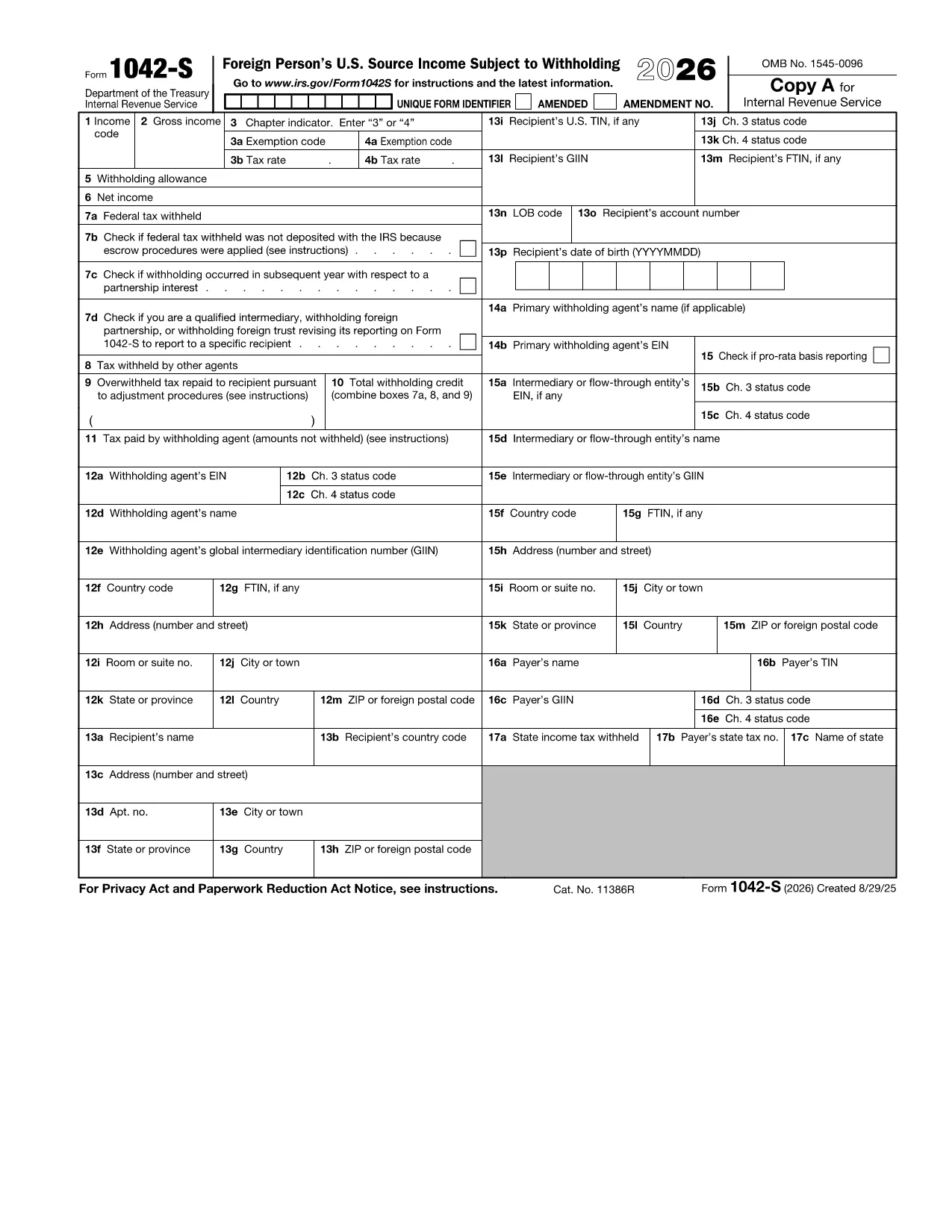
Form 1042‑S is the IRS information return used by withholding agents to report U.S. source income paid to foreign persons, such as dividends, royalties, scholarships, and interest. Accurate reporting is required to avoid penalties and to ensure the correct amount of tax is withheld.

With Formize’s fillable PDF, you can complete the official IRS Form 1042‑S directly in your browser. The layout matches the paper form, but you type into each field, add a digital signature, and export a finished PDF that complies with IRS filing rules.

Using an online filler reduces common errors like mis‑aligned text, missing boxes, or incorrect codes—issues that often cause rejections and delays.

Below you’ll find step‑by‑step instructions, tips for avoiding mistakes, and guidance on where to send the completed form.

常问问题
  • Who must file Form 1042‑S?

    Any withholding agent—such as a university, corporation, or financial institution—that pays U.S. source income to a foreign person must file Form 1042‑S.

  • What types of income are reported on Form 1042‑S?

    Dividends, interest, royalties, rents, scholarships, research prizes, and certain capital‑gain distributions are all reported on Form 1042‑S.

  • Can I file Form 1042‑S electronically?

    Yes. After completing the fillable PDF, you can upload the finished file to the IRS FIRE system or submit it via your tax software.

  • What is the deadline for filing Form 1042‑S?

    The form is generally due to the IRS by March 15 of the year following the calendar year in which the income was paid.

  • What happens if I make a mistake on the form?

    You can file a corrected Form 1042‑S using the same PDF template. Mark the “Corrected” box in Part I and provide the revised amounts.

  • Do I need to send a copy of Form 1042‑S to the recipient?

    Yes. Recipients must receive a copy of their Form 1042‑S by the same March 15 deadline so they can report the income on their own tax returns.

  • Is there a fee to use the Formize fillable PDF?

    No. The fillable PDF is free to use on Formize.com; you only need an internet connection and a modern browser.

如何

如何通过 4 个简单步骤在线免费填写 Form 1042-S:

  1. 1
    Click the Fillable Form Button
    On this page, press the blue “Fill out this form” button. The Formize PDF Filler app will open in a new tab.
  2. 2
    Wait for the Formize PDF Filler to Load
    The filler loads the exact IRS Form 1042‑S template. This may take a few seconds depending on your connection.
  3. 3
    Enter All Required Information
    Type directly into each box—payer details, recipient TIN, income codes, amounts, and tax withheld. Use the drop‑down menus for codes where provided.
  4. 4
    Review, Sign, and Download
    After completing the fields, review the form for accuracy, add a digital signature, then click “Save & Download” to get your finished PDF.
Formize PDF Filler 应用程序
关于

税务表格

Form 1042-S 是一种税表,用于向相关税务机关报告收入、扣除额和纳税义务的文件。这些表格是报税流程的重要组成部分,用于确保个人和企业遵守税法并准确计算其纳税义务。

所需的具体税表可能会有所不同,具体取决于个人的申报身份、收入来源和国家税法等因素。但是,以下是一些常见的税表类型:

个人所得税表格:使用这些表格,例如美国的1040系列个人报告其收入,申请扣除和抵免,并计算其纳税义务。

营业税表格:企业,包括独资企业、合伙企业、公司和个体经营者,可能需要提交各种表格来报告其收入、支出和所欠税款。示例包括附表 C(业务利润或损失)和表格 1120(美国公司所得税申报表)。

雇佣税表:雇主必须报告雇员工资并代扣代缴工资税。 W-2(工资和纳税报表)和 941(雇主季度联邦纳税申报表)等表格用于此目的。

投资和退休账户表格:这些表格用于报告投资收入、资本收益和损失,以及退休账户的供款和分配。示例包括表格 1099-DIV(股息和分配)和 5498 表格(IRA 捐款信息)。

遗产税和赠与税表格:当某人去世或赠送重要礼物时,需要填写特定表格,例如表格 706(美国遗产(和隔代转移)纳税申报表)和 709 表格(美国赠与(和隔代转移)纳税申报表)跳过转让)纳税申报表)用于报告和计算任何适用的遗产税或赠与税。

值得注意的是,税法和表格可能会随着时间的推移而发生变化,因此个人和企业应咨询相关税务机关或寻求专业税务建议,以确保符合现行要求。

特征

PDF 填充器

在线填写 PDF 表单的最简单方法

  • 快速填写Form 1042-S
    正在寻找一种在线快速填写 Form 1042-S 的方法?使用我们的在线免费 PDF 填表工具,您将在不到一分钟的时间内了解如何编辑和填写此 pdf 文档。
  • 易于使用的在线 PDF 编辑器
    是否厌倦了打印 PDF 文件以便在重新扫描并发回之前对其进行编辑?免费在线编辑 PDF 文档。使用我们的在线 pdf 编辑器可以节省时间和纸张。
  • 伟大的工具,所有平台
    想知道如何在 Mac 上填写 Form 1042-S,或者如何免费使用 PDF 填充程序?我们的在线 PDF 工具适用于所有平台。
  • 安全文件存储
    完成的“Form 1042-S”文件存储在由亚马逊云托管管理的安全数据库中。您可以随时从我们的系统中删除您的文件。在任何情况下,这些文件都会在 24 小时后自动删除。
  • 与 Form 1042-S 聊天
    在 Chatize 上与“Form 1042-S”聊天,这是一个免费的 PDF 阅读器助手。提出问题并从“Form 1042-S”获得答案。只需点击上面的与文档聊天按钮即可。

删除填充会话

删除选定的填充会话?在这种情况下,您填写表格的进度将丢失。

删除编辑会话

删除选定的编辑会话?在这种情况下,您创建和编辑表单的进度将会丢失。