
Избери език

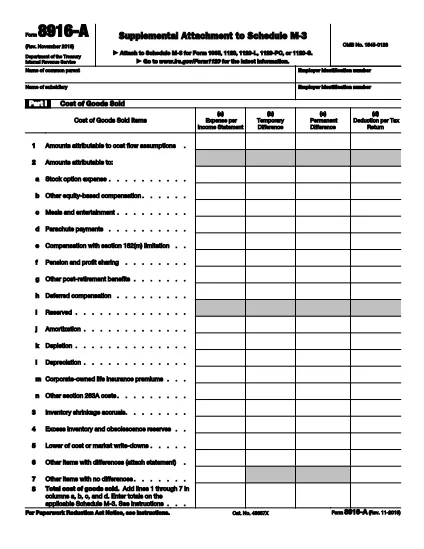
Form 8916-A – Fillable PDF for Schedule M‑3 Attachments

  1. Държава САЩ
  2. език Английски
  3. Дейност Данъци
  4. Отдел Служба за събиране на данъци
Form 8916-A – Fillable PDF for Schedule M‑3 Attachments

Form 8916‑A, Supplemental Attachment to Schedule M‑3, is the IRS‑approved schedule used to detail cost of goods sold, interest income, and interest expense when filing Schedule M‑3 with a partnership, corporation, or S‑corporation return.

This page provides a direct link to the official fillable PDF, step‑by‑step instructions for completing the form online with Formize, and answers to the most common questions taxpayers have.

Whether you are preparing a 1065, 1120, or 1120‑S return, the fillable version saves time, reduces errors, and lets you submit a clean, printable PDF straight from your browser.

ЧЗВ
  • What type of returns require Form 8916‑A?

    Form 8916‑A is required when a partnership (Form 1065), corporation (Form 1120), or S‑corporation (Form 1120‑S) includes cost of goods sold, interest income, or interest expense on Schedule M‑3.

  • Can I file Form 8916‑A electronically?

    Yes. The fillable PDF can be completed online with Formize and then uploaded with your electronic return through most tax software that supports Schedule M‑3.

  • Do I need to fill out all three parts of the form?

    Only the parts that apply to your return need to be completed. If you have no interest expense, for example, you can leave Part III blank.

  • What is the difference between columns (a)‑(d) on Schedule M‑3 and Form 8916‑A?

    Columns (a) and (d) are for the first year a corporation files Schedule M‑3 and are optional. Form 8916‑A focuses on columns (b) and (c), which capture adjustments between book and tax amounts.

  • Is there a printable version of the form after I finish?

    Yes. After completing the fillable PDF, you can click “Print” or “Download” to get a printer‑ready version that matches the IRS’s official layout.

  • Where can I find the official instructions for Form 8916‑A?

    The official IRS instructions are included in the PDF linked below and on the IRS website under “Form 8916‑A Instructions.”

КАК ДА

Как да попълните Form 8916-A безплатно онлайн в 5 лесни стъпки:

  1. 1
    Click the Fillable Form Button
    On this page, click the “Fill out this form” button. The Formize PDF Filler app will open in a new tab.
  2. 2
    Wait for the Formize PDF Filler to Load
    The app loads the official IRS Form 8916‑A PDF. You’ll see editable fields highlighted in blue.
  3. 3
    Enter Your Information
    Complete Part I (Cost of Goods Sold), Part II (Interest Income), and Part III (Interest Expense). Use positive numbers for over‑statements and negative numbers for under‑statements as the IRS instructions describe.
  4. 4
    Review and Validate
    After entering all amounts, click “Validate” to let Formize check for missing required fields or calculation errors.
  5. 5
    Save, Print, or Export
    When you’re satisfied, click “Save” to store the completed PDF in your browser, or choose “Print” or “Download” to keep a copy for your records.
Приложение Formize PDF Filler
ОТНОСНО

Данъчни формуляри

Form 8916-A е един от данъчните формуляри, които са документи, използвани за докладване на информация, свързана с данъци, на съответния данъчен орган. Има различни видове данъчни формуляри, включително федерални, щатски и местни данъчни формуляри, които могат да варират в зависимост от обстоятелствата и местоположението на данъкоплатеца.

ХАРАКТЕРИСТИКА

PDF пълнител

Най-лесният начин да попълните Form 8916-A онлайн

  • Бързо попълнете Form 8916-A
    Търсите начин бързо да попълните Form 8916-A онлайн? С нашия онлайн безплатен инструмент за попълване на PDF формуляри ще знаете как да редактирате и попълвате този PDF документ за по-малко от минута.
  • Лесен за използване онлайн PDF редактор
    Писнало ви е да разпечатвате PDF файлове, за да можете да ги редактирате, преди да сканирате повторно и да ги изпратите обратно? Редактирайте PDF документи безплатно онлайн. Използвайте нашия онлайн pdf редактор, за да спестите време и хартия.
  • Страхотни инструменти, всички платформи
    Чудите се как да попълните Form 8916-A на Mac или може би как да използвате PDF пълнител безплатно? Нашите онлайн PDF инструменти работят на всички платформи.
  • Сигурно съхранение на файлове
    Завършените „Form 8916-A“ файлове се съхраняват в защитена база данни, управлявана от Amazon Cloud хостинг. Можете да изтриете вашите файлове от нашата система по всяко време. Във всеки случай тези файлове се изтриват автоматично след 24 часа.
  • Чат с Form 8916-A
    Разговаряйте с „Form 8916-A“ в Chatize, който е безплатен асистент за четене на PDF файлове. Задавайте въпроси и получавайте отговори от „Form 8916-A“. Просто щракнете върху бутона Чат с документ по-горе.

Изтриване на сесията за пълнене

Изтриване на избраната сесия за пълнене? В този случай вашият напредък в попълването на формуляра ще бъде загубен.

Изтриване на сесия за редактиране

Изтриване на избраната сесия за редактиране? В този случай вашият напредък в създаването и редактирането на формуляра ще бъде загубен.