
Selecione o idioma

Form 8916-A – Fillable PDF for Schedule M‑3 Attachments

  1. País EUA
  2. Linguagem Inglês
  3. Atividade impostos
  4. Departamento Receita Federal
Form 8916-A – Fillable PDF for Schedule M‑3 Attachments

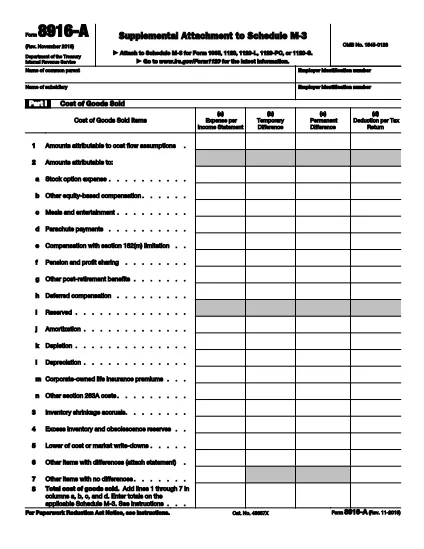
Form 8916‑A, Supplemental Attachment to Schedule M‑3, is the IRS‑approved schedule used to detail cost of goods sold, interest income, and interest expense when filing Schedule M‑3 with a partnership, corporation, or S‑corporation return.

This page provides a direct link to the official fillable PDF, step‑by‑step instructions for completing the form online with Formize, and answers to the most common questions taxpayers have.

Whether you are preparing a 1065, 1120, or 1120‑S return, the fillable version saves time, reduces errors, and lets you submit a clean, printable PDF straight from your browser.

PERGUNTAS FREQUENTES
  • What type of returns require Form 8916‑A?

    Form 8916‑A is required when a partnership (Form 1065), corporation (Form 1120), or S‑corporation (Form 1120‑S) includes cost of goods sold, interest income, or interest expense on Schedule M‑3.

  • Can I file Form 8916‑A electronically?

    Yes. The fillable PDF can be completed online with Formize and then uploaded with your electronic return through most tax software that supports Schedule M‑3.

  • Do I need to fill out all three parts of the form?

    Only the parts that apply to your return need to be completed. If you have no interest expense, for example, you can leave Part III blank.

  • What is the difference between columns (a)‑(d) on Schedule M‑3 and Form 8916‑A?

    Columns (a) and (d) are for the first year a corporation files Schedule M‑3 and are optional. Form 8916‑A focuses on columns (b) and (c), which capture adjustments between book and tax amounts.

  • Is there a printable version of the form after I finish?

    Yes. After completing the fillable PDF, you can click “Print” or “Download” to get a printer‑ready version that matches the IRS’s official layout.

  • Where can I find the official instructions for Form 8916‑A?

    The official IRS instructions are included in the PDF linked below and on the IRS website under “Form 8916‑A Instructions.”

COMO

Como preencher Form 8916-A gratuitamente, online em 5 etapas fáceis:

  1. 1
    Click the Fillable Form Button
    On this page, click the “Fill out this form” button. The Formize PDF Filler app will open in a new tab.
  2. 2
    Wait for the Formize PDF Filler to Load
    The app loads the official IRS Form 8916‑A PDF. You’ll see editable fields highlighted in blue.
  3. 3
    Enter Your Information
    Complete Part I (Cost of Goods Sold), Part II (Interest Income), and Part III (Interest Expense). Use positive numbers for over‑statements and negative numbers for under‑statements as the IRS instructions describe.
  4. 4
    Review and Validate
    After entering all amounts, click “Validate” to let Formize check for missing required fields or calculation errors.
  5. 5
    Save, Print, or Export
    When you’re satisfied, click “Save” to store the completed PDF in your browser, or choose “Print” or “Download” to keep a copy for your records.
Aplicativo Formize PDF Filler
SOBRE

formulários de impostos

Form 8916-A é um dos formulários fiscais que são documentos usados ​​para relatar informações relacionadas a impostos à autoridade fiscal relevante. Existem vários tipos de formulários fiscais, incluindo formulários fiscais federais, estaduais e locais, que podem variar dependendo das circunstâncias e localização do contribuinte.

RECURSOS

Preenchimento de PDF

A maneira mais fácil de preencher formulários PDF online

  • Preencha Form 8916-A rapidamente
    Procurando uma maneira de preencher rapidamente Form 8916-A online? Com nosso preenchedor de formulário PDF online gratuito, você saberá como editar e preencher este documento PDF em menos de um minuto.
  • Editor de PDF online fácil de usar
    Cansado de imprimir arquivos PDF para poder editá-los antes de digitalizá-los novamente e enviá-los de volta? Edite documentos PDF gratuitamente online. Use nosso editor de PDF online para economizar tempo e papel.
  • Ótimas ferramentas, todas as plataformas
    Quer saber como preencher Form 8916-A em um Mac, ou talvez como usar um preenchimento de PDF grátis? Nossas ferramentas online de PDF funcionam em todas as plataformas.
  • Armazenamento seguro de arquivos
    Os arquivos "Form 8916-A" concluídos são armazenados em um banco de dados seguro gerenciado pela hospedagem Amazon Cloud. Você pode excluir seus arquivos do nosso sistema a qualquer momento. Em qualquer caso, esses arquivos são excluídos automaticamente após 24 horas.
  • Converse com {palavra-chave}
    Converse com "Form 8916-A" no Chatize, que é um assistente gratuito de leitura de PDF. Faça perguntas e obtenha respostas de "Form 8916-A". Basta clicar no botão Bate-papo com documento acima.

Excluir sessão de preenchimento

Excluir a sessão de preenchimento selecionada? Nesse caso, seu progresso no preenchimento do formulário será perdido.

Excluir sessão de edição

Excluir a sessão de edição selecionada? Neste caso, o seu progresso na criação e edição do formulário será perdido.