Izaberi jezik

IRS Form 970 – Fillable PDF for LIFO Inventory Election

  1. Zemlja SAD
  2. Jezik Engleski
  3. Aktivnost Porezi
  4. Odjel Porezna uprava
IRS Form 970 – Fillable PDF for LIFO Inventory Election

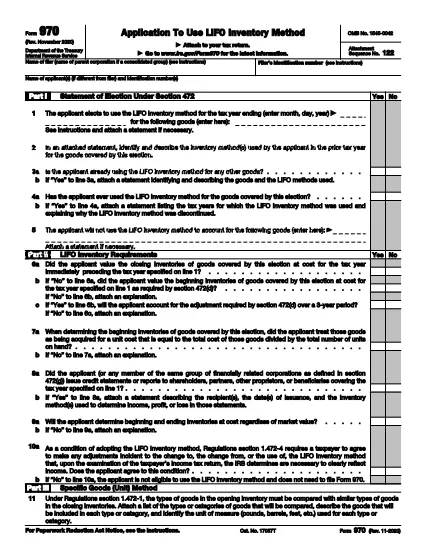
Form 970, Application to Use LIFO Inventory Method, is the official IRS document you file to elect the Last‑In, First‑Out (LIFO) inventory accounting method under Section 472 of the Internal Revenue Code. Whether you’re a corporation, partnership, or sole proprietor, filing Form 970 is the first step to start using LIFO and to protect your election for future tax years.

What Is Form 970 and When Do You Need It?

Form 970 is required the first year you intend to use LIFO for any inventory items. The election is irrevocable without IRS consent, so it’s critical to file accurately and on time with your tax return.

How to Complete the Fillable Form 970 Online

Instead of downloading a static PDF and editing it in a separate program, simply click the "Fill out this form" button on this page. The Formize PDF Filler app will load the fillable version of Form 970, allowing you to enter data directly in your browser.

  • Step 1: Click the "Fill out this form" button.
  • Step 2: Wait a few seconds while the Formize PDF Filler loads.
  • Step 3: Complete each field – name, EIN, tax year, inventory details, and method selection.
  • Step 4: Review for errors, then click Save & Download to get a completed PDF.
  • Step 5: Attach the finished Form 970 to your federal income tax return and file as instructed.

Common Mistakes & Tips for a Successful LIFO Election

Don’t forget the signature. An unsigned Form 970 is rejected.

Provide a detailed inventory analysis. Attach a separate statement showing opening and closing inventories for the first LIFO year.

Choose the correct LIFO method. Whether you use the specific‑goods (unit) method, dollar‑value method, or IPIC method, the corresponding parts of the form must be completed.

Download the Official Form 970 PDF

If you prefer the original IRS PDF, you can download it directly from the link below. The fillable version on Formize mirrors this official document, ensuring compliance with IRS requirements.

Download IRS Form 970 (PDF)

PITANJA
  • What is the purpose of IRS Form 970?

    Form 970 is used to formally elect the LIFO (Last‑In, First‑Out) inventory method for tax purposes. The election is irrevocable without IRS consent.

  • Who must file Form 970?

    Any taxpayer—individual, partnership, corporation, or S‑corporation—who wants to begin using LIFO for inventory valuation must file Form 970 with the tax return for the first LIFO year.

  • When is the deadline to file Form 970?

    Form 970 must be filed with the tax return for the first year you intend to use LIFO. If missed, you can file an amended return within 12 months of the original filing date.

  • Can I amend a LIFO election after filing Form 970?

    Yes, but only with IRS consent. You must submit a written request and may need to file Form 970 again, depending on the situation.

  • Is there a cost to download or fill Form 970?

    The IRS PDF is free to download. Using Formize’s online filler is also free for basic use; no additional fees are required to complete the form.

  • What are common errors that cause Form 970 to be rejected?

    Missing signature, incomplete inventory analysis, selecting the wrong LIFO method, or failing to attach required statements are the most frequent reasons for rejection.

  • Do I need a professional to complete Form 970?

    While you can complete it yourself, many taxpayers work with a CPA or tax advisor to ensure the election meets IRS requirements and to avoid costly mistakes.

  • Where do I send the completed Form 970?

    Attach Form 970 to your federal income tax return and mail it to the same IRS address where you file your return, or submit it electronically if filing electronically.

KAKO DA

Kako ispuniti Form 970 besplatno, online u 5 jednostavnih koraka:

  1. 1
    Open the Fillable Form
    Click the "Fill out this form" button on the page. The Formize PDF Filler will launch in your browser.
  2. 2
    Enter Required Information
    Fill in your name, EIN/SSN, tax year, and detailed inventory data exactly as requested on Form 970.
  3. 3
    Select the LIFO Method
    Choose between Specific Goods (Unit), Dollar‑Value, or IPIC method and complete the matching sections.
  4. 4
    Review and Sign
    Double‑check every entry, add your signature electronically, and ensure all required attachments are included.
  5. 5
    Save and Download
    Click "Save & Download" to get a completed PDF you can attach to your federal tax return.
Aplikacija Formize PDF Filler
OKO

Porezni obrasci

Form 970 je jedan od poreznih obrazaca koji su dokumenti koji se koriste za prijavu prihoda, odbitaka i poreznih obveza relevantnom poreznom tijelu. Ovi su obrasci bitan dio procesa podnošenja poreznih prijava i koriste se kako bi se osiguralo da pojedinci i tvrtke poštuju porezne zakone i točno izračunaju svoje porezne obveze.

Posebni potrebni porezni obrasci mogu se razlikovati ovisno o čimbenicima kao što su status prijave pojedinca, izvori prihoda i porezni zakoni zemlje. Međutim, evo nekih uobičajenih vrsta poreznih obrazaca:

Obrasci za porez na dohodak pojedinaca: Ovi se obrasci, poput serije 1040 u Sjedinjenim Državama, koriste pojedincima da prijave svoje prihode, traže odbitke i kredite te izračunaju svoje porezne obveze.

Poslovni porezni obrasci: Tvrtke, uključujući samostalne poduzetnike, partnerstva, korporacije i samozaposlene pojedince, možda će morati podnijeti različite obrasce za prijavu svojih prihoda, troškova i dugovanih poreza. Primjeri uključuju Prilog C (Dobit ili gubitak od poslovanja) i Obrazac 1120 (Prijava poreza na dobit korporacija u SAD-u).

Porezni obrasci za zaposlenje: Poslodavci su dužni prijaviti plaće zaposlenika te zadržati i doznačiti poreze na plaće. U tu svrhu koriste se obrasci kao što su W-2 (Izjava o plaći i porezu) i 941 (Kvartalna prijava saveznog poreza poslodavca).

Obrasci za investicijske i mirovinske račune: Ovi se obrasci koriste za prijavu prihoda od ulaganja, kapitalnih dobitaka i gubitaka, kao i doprinosa i raspodjela s mirovinskih računa. Primjeri uključuju obrazac 1099-DIV (Dividende i raspodjele) i Obrazac 5498 (Informacije o doprinosu IRA-e).

Obrasci za porez na nekretnine i darove: kada osoba premine ili da značajne darove, posebni obrasci kao što je Obrazac 706 (Povrat poreza na imovinu Sjedinjenih Država (i Generation-Skipping Transfer)) i Obrazac 709 (United States Gift (and Generation- Skipping Transfer) Tax Return) koriste se za prijavu i izračun svih primjenjivih poreza na nekretnine ili darove.

Važno je napomenuti da se porezni zakoni i obrasci mogu mijenjati tijekom vremena, pa bi se pojedinci i tvrtke trebali posavjetovati s nadležnim poreznim tijelima ili potražiti profesionalni porezni savjet kako bi osigurali usklađenost s trenutačnim zahtjevima.

ZNAČAJKE

PDF punilo

Najlakši način da ispunite Form 970 online

  • Brzo ispunite Form 970
    Tražite način da brzo ispunite Form 970 online? Uz naš online besplatni PDF obrazac za popunjavanje, znat ćete kako urediti i ispuniti ovaj pdf dokument za manje od minute.
  • Jednostavan za korištenje mrežni PDF uređivač
    Dosta vam je ispisivanja PDF datoteka kako biste ih mogli uređivati ​​prije ponovnog skeniranja i slanja natrag? Uređujte PDF dokumente besplatno na mreži. Upotrijebite naš online uređivač pdf-ova kako biste uštedjeli vrijeme i papir.
  • Sjajni alati, sve platforme
    Pitate se kako ispuniti Form 970 na Macu ili možda kako koristiti PDF filer besplatno? Naši online PDF alati rade na svim platformama.
  • Sigurno skladištenje datoteka
    Dovršene datoteke "Form 970" pohranjuju se u zaštićenu bazu podataka kojom upravlja Amazon Cloud hosting. Svoje datoteke možete izbrisati iz našeg sustava bilo kada. U svakom slučaju, te se datoteke automatski brišu nakon 24 sata.
  • Chat s Form 970
    Razgovarajte s "Form 970" na Chatize koji je besplatni pomoćnik za čitanje PDF-ova. Postavljajte pitanja i dobivajte odgovore od "Form 970". Samo kliknite gornji gumb Chat with Document.

Izbriši sesiju punjenja

Izbrisati odabranu sesiju punjenja? U tom će slučaju vaš napredak u ispunjavanju obrasca biti izgubljen.

Izbriši sesiju uređivanja

Izbrisati odabranu sesiju uređivanja? U tom će slučaju vaš napredak u stvaranju i uređivanju obrasca biti izgubljen.