
Ընտրել լեզուն

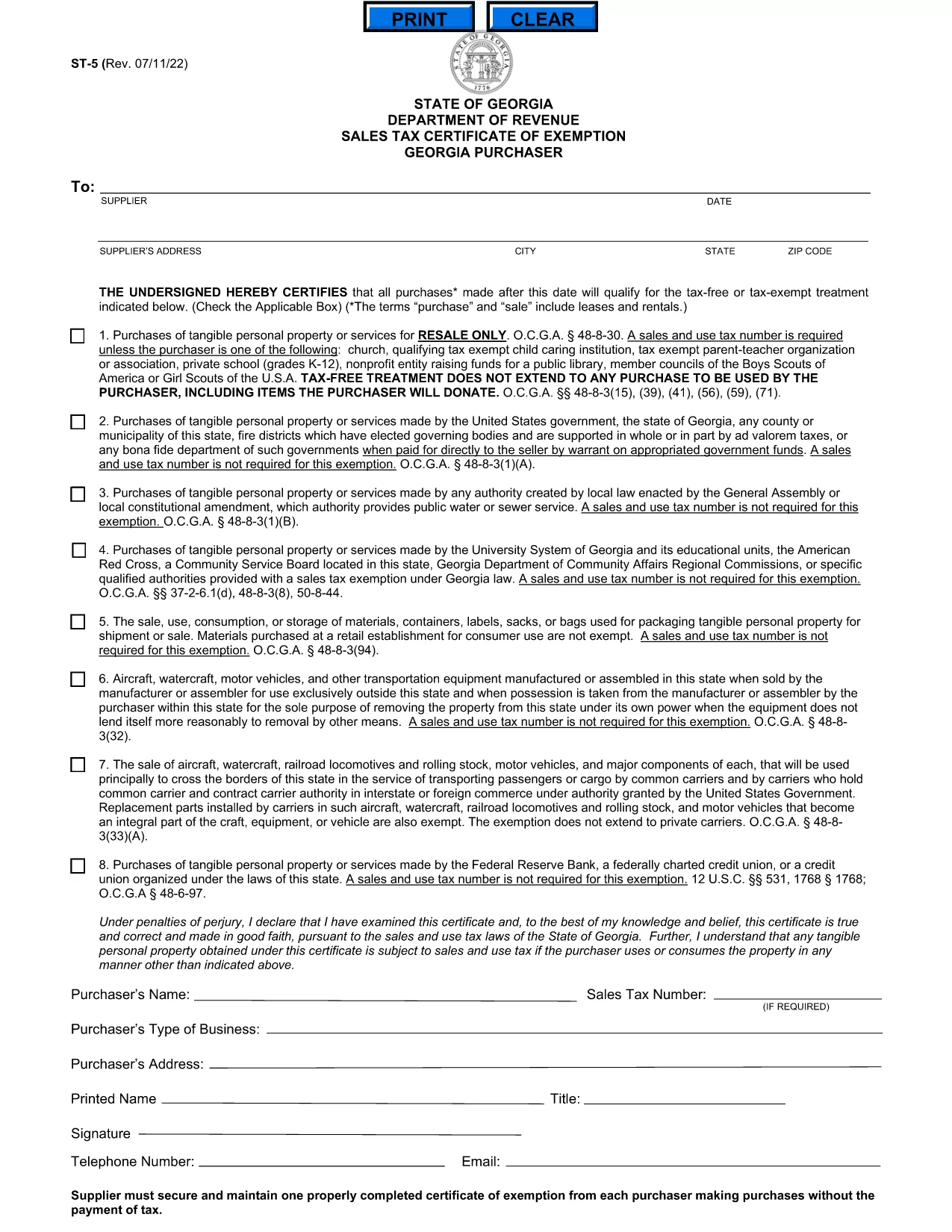
Georgia ST-5 Sales Tax Certificate of Exemption (Fillable PDF)

  1. Երկիր ԱՄՆ
  2. Լեզու Անգլերեն
  3. բաժին Georgia Department of Revenue
  4. Գործունեություն Հարկեր
Georgia ST-5 Sales Tax Certificate of Exemption (Fillable PDF)

What Is the ST-5 Form?

The ST-5 Sales Tax Certificate of Exemption is issued by the Georgia Department of Revenue. It allows qualifying businesses and organizations to purchase taxable goods without paying state sales tax, provided the items are used for exempt purposes.

How to Complete the ST-5 Online

Instead of downloading a static PDF and editing it with a third‑party editor, simply click the "Fill out this form" button on this page. The Formize PDF Filler app will load instantly, letting you type, select, and sign directly in your browser.

Step‑by‑Step Fillable PDF Guide

Follow these quick steps to submit a correct ST‑5:

  1. Click Fill out this form and wait for the Formize PDF Filler to appear.
  2. Enter your business name, Georgia tax ID, and contact information in the header section.
  3. Choose the exemption category that matches your purchase (e.g., manufacturing, resale, nonprofit).
  4. Provide details of the vendor, purchase date, and total amount.
  5. Read the certification statements, then type your name and the date, and click Sign using your mouse or finger.
  6. When all fields are filled, click Save & Download to get a completed PDF copy for your records.

Common Mistakes to Avoid

  • Leaving the "Exemption Code" blank – the code must match the category listed in the Georgia Tax Code.
  • Using an outdated tax ID – verify your Georgia Sales Tax Permit number before submitting.
  • Incorrect dates – the purchase date must be within the current tax year.
  • Missing signatures – both the purchaser and vendor must sign; unsigned forms are rejected.

Where to Submit the Completed Form

After saving the completed PDF, you can:

  • Email it to taxdept@gadoe.gov with a brief request for exemption verification.
  • Upload it through the Georgia Department of Revenue’s online portal under "Certificates of Exemption".
  • Print and hand‑deliver it to the vendor at the point of sale.

Retain a copy for your records in case of an audit.

ՀՏՀ
  • Who can use the Georgia ST‑5 certificate?

    Any Georgia-registered business, nonprofit, or government entity that qualifies for a sales‑tax exemption under state law can use the ST‑5.

  • Do I need a Georgia sales tax permit to complete the ST‑5?

    Yes. You must have a valid Georgia Sales Tax Permit (state tax ID) to claim an exemption on purchases.

  • Can I submit the ST‑5 electronically?

    Absolutely. After filling the form with Formize, you can email the PDF to the Department of Revenue or upload it through the online portal.

  • How long is an ST‑5 certificate valid?

    The certificate is valid for the calendar year in which it is issued. You must obtain a new ST‑5 each year.

  • What if I make a mistake after submitting?

    Contact the Georgia Department of Revenue promptly. You may need to submit a corrected ST‑5 or an amendment form.

  • Is there a fee to download the ST‑5 form?

    No. The fillable PDF is free to download and complete using the Formize PDF Filler.

ԻՆՉՊԵՍ

Ինչպես լրացնել ST-5 form-ն անվճար, առցանց՝ 4 հեշտ քայլերով.

  1. 1
    Open the Fillable Form
    Click the "Fill out this form" button on the page. The Formize PDF Filler will load in your browser.
  2. 2
    Enter Required Information
    Type your business details, exemption code, vendor information, and purchase amount into the highlighted fields.
  3. 3
    Sign and Date
    Use your mouse or finger to sign the certification sections, then add the current date.
  4. 4
    Save or Download
    When all fields are complete, click "Save & Download" to get a copy of the finished ST‑5 form.
Ձևավորել PDF Filler հավելվածը
ՄԱՍԻՆ

Հարկային ձևեր

ST-5 form-ը հարկային ձևերից մեկն է, որն օգտագործվում է համապատասխան հարկային մարմնին հարկերի հետ կապված տեղեկատվությունը զեկուցելու համար: Կան տարբեր տեսակի հարկային ձևեր, ներառյալ դաշնային, նահանգային և տեղական հարկային ձևերը, որոնք կարող են տարբեր լինել՝ կախված հարկ վճարողի հանգամանքներից և գտնվելու վայրից:

ՀԱՏԿՈՒԹՅՈՒՆՆԵՐ

PDF լցոնիչ

Առցանց ST-5 form-ը լրացնելու ամենահեշտ ձևը

  • Արագ լրացրեք ST-5 form
    Փնտրու՞մ եք միջոց՝ արագորեն լրացնելու ST-5 form առցանց: Մեր առցանց անվճար PDF ձևաթուղթ լրացնողի միջոցով դուք կիմանաք, թե ինչպես խմբագրել և լրացնել այս pdf փաստաթուղթը մեկ րոպեից պակաս ժամանակում:
  • Հեշտ օգտագործման առցանց PDF խմբագիր
    Հոգնե՞լ եք PDF ֆայլեր տպելուց, որպեսզի կարողանաք դրանք խմբագրել, նախքան նորից սկանավորելը և հետ ուղարկելը: Խմբագրել PDF փաստաթղթերը անվճար առցանց: Օգտագործեք մեր առցանց pdf խմբագրիչը ժամանակ և թուղթ խնայելու համար:
  • Հիանալի գործիքներ, բոլոր հարթակներ
    Զարմանում եք, թե ինչպես լրացնել ST-5 form-ը Mac-ում, կամ գուցե ինչպես անվճար օգտագործել PDF լցոնիչը: Մեր առցանց PDF գործիքներն աշխատում են բոլոր հարթակներում:
  • Անվտանգ ֆայլերի պահպանում
    Ավարտված «ST-5 form» ֆայլերը պահվում են պաշտպանված տվյալների բազայում, որը կառավարվում է Amazon Cloud հոսթինգի կողմից: Ցանկացած ժամանակ կարող եք ջնջել ձեր ֆայլերը մեր համակարգից: Ամեն դեպքում, այս ֆայլերը ավտոմատ կերպով ջնջվում են 24 ժամ հետո:
  • Զրուցեք ST-5 form-ի հետ
    Զրուցեք «ST-5 form»-ի հետ Chatize-ում, որը PDF ընթերցողի անվճար օգնական է: Հարցեր տվեք և ստացեք պատասխաններ «ST-5 form»-ից։ Պարզապես սեղմեք վերևում գտնվող Զրույց փաստաթղթի հետ կոճակը:

Ջնջել լրացման նիստը

Ջնջե՞լ ընտրված լրացման աշխատաշրջանը: Այս դեպքում ձևը լրացնելու ձեր առաջընթացը կկորչի:

Ջնջել խմբագրման նիստը

Ջնջե՞լ ընտրված խմբագրման աշխատաշրջանը: Այս դեպքում ձևը ստեղծելու և խմբագրելու ձեր առաջընթացը կկորչի: