
Pilih bahasa

Fillable Form 10AC – Order for Provisional Registration

  1. Bahasa Bahasa inggris
  2. Negara India
  3. Aktivitas Pajak
Isi formulir ini
Fillable Form 10AC – Order for Provisional Registration

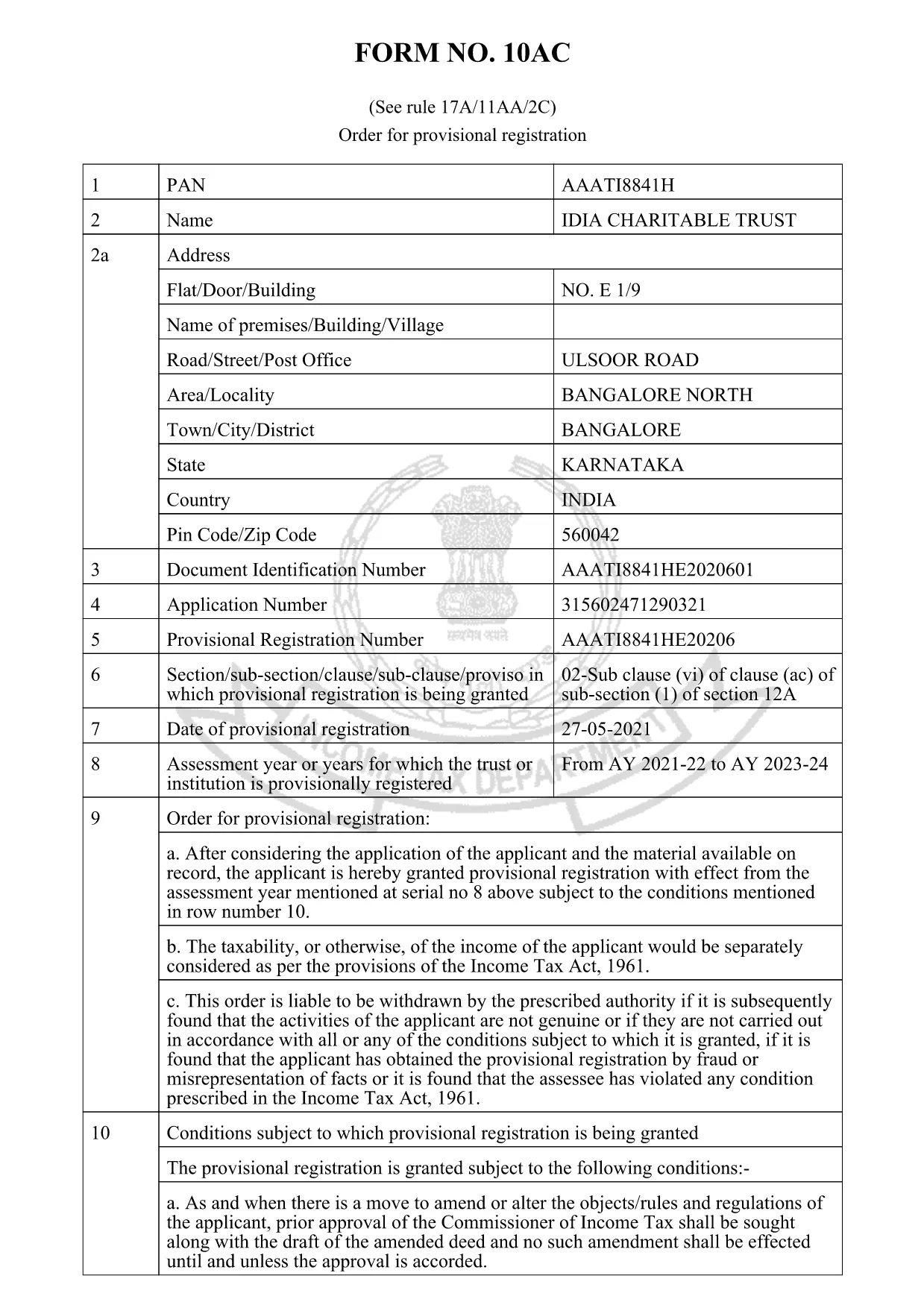
Form 10AC is the official “Order for Provisional Registration” used under Rule 17A/11AA/2C of the Income Tax Act, 1961. Trusts, charitable institutions, and religious societies file this form to obtain a temporary registration that allows them to operate while the final approval is processed.

What is Form 10AC?

The form records the applicant’s details, the purpose of the trust, and the provisional registration period. It also specifies conditions for asset disposal, dissolution, and compliance with Sections 13(3) and 115TD‑115TF of the Act.

Key Sections of Form 10AC

  • Applicant Information: Name, address, PAN, and registration number of the trust.
  • Objects of the Trust: Detailed description of charitable or religious activities.
  • Provisional Period: Start and end dates of the temporary registration.
  • Asset & Surplus Clauses: How surplus assets are to be transferred if the trust is dissolved.
  • Declaration: Signature of the authorized signatory and the jurisdiction officer.

How to Fill Form 10AC Online with Formize

Instead of downloading the PDF and opening a separate editor, simply click the “Fill out this form” button on this page. The Formize PDF Filler app will load automatically, letting you type directly into the fields, add dates, and sign electronically.

Common Mistakes to Avoid

  • Leaving any mandatory field blank – the system will highlight missing entries.
  • Using an incorrect PAN or registration number – verify numbers before submitting.
  • Not attaching the required supporting documents – upload them in the “Attachments” section.
  • Mistyping dates – the filler enforces the DD/MM/YYYY format.

Download & Save Your Completed Form

After completing the form, click Save to download a filled PDF copy. Keep a backup for your records and submit the original to the Income Tax Department as instructed.

Need a printable version? The link below provides the official PDF that powers the online filler.

FAQ
  • What is the purpose of Form 10AC?

    Form 10AC grants a provisional registration to trusts and charitable institutions, allowing them to operate while the final registration is being processed.

  • Can I fill Form 10AC on a mobile device?

    Yes. The Formize PDF Filler works on all modern browsers, including mobile Safari and Chrome.

  • Do I need a digital signature to submit the form?

    A digital signature is optional for the online filler, but the printed copy must be signed by an authorized signatory before submission.

  • How long is the provisional registration valid?

    The provisional period is usually six months from the date of issuance, but it can be extended by the jurisdiction officer.

  • What happens to surplus assets if the trust is dissolved?

    Surplus assets must be transferred to another organization with similar objectives, as stipulated in Section 13(3) of the Income Tax Act.

  • Is there a fee to download Form 10AC?

    No. The PDF is free to download and fill online using the Formize platform.

  • Can I edit the form after I have saved it?

    Yes. Open the saved PDF again with Formize’s filler to make any needed corrections before final submission.

BAGAIMANA CARANYA

Cara mengisi form 10ac gratis secara online dalam 5 langkah mudah:

  1. 1
    Open the Fillable Form
    Click the “Fill out this form” button on the page. The Formize PDF Filler loads instantly in your browser.
  2. 2
    Enter Your Details
    Type directly into each highlighted field – name, PAN, address, and trust objects. The filler validates entries in real time.
  3. 3
    Attach Supporting Documents
    Use the “Attachments” section to upload required certificates, PAN copies, and any other supporting paperwork.
  4. 4
    Review & Sign
    Check every field for accuracy, then add your electronic signature in the declaration box.
  5. 5
    Save or Submit
    Click “Save” to download the completed PDF for your records, or follow the on‑screen instructions to submit it to the Income Tax Department.
Bentuk aplikasi Pengisi PDF
TENTANG

Formulir Departemen Pajak Penghasilan

form 10ac adalah salah satu formulir resmi yang digunakan oleh Departemen Pajak Pendapatan India untuk mengelola dan memungut pajak pendapatan. Formulir ini digunakan oleh wajib pajak untuk melaporkan penghasilan, pemotongan, dan kewajiban perpajakannya kepada fiskus.

Berikut adalah beberapa formulir Departemen Pajak Penghasilan yang umum digunakan di India:

ITR-1 (Sahaj): Formulir ini digunakan oleh individu yang mempunyai penghasilan dari gaji, properti satu rumah, dan sumber lain seperti bunga, dana pensiun, atau dana pensiun keluarga. Ini berlaku untuk individu dengan total pendapatan hingga Rs. 50 lakh.

ITR-2: Formulir ini digunakan oleh perorangan dan umat Hindu Keluarga Tak Terbagi (HUFs) yang memiliki pendapatan dari sumber selain bisnis atau profesi. Ini berlaku untuk individu yang memiliki total pendapatan melebihi Rs. 50 lakh atau memiliki aset/pendapatan asing.

ITR-3: Formulir ini digunakan oleh individu dan HUF mempunyai penghasilan dari usaha atau profesi. Hal ini berlaku bagi individu yang mempunyai pendapatan dari perusahaan kemitraan dan profesional yang menjalankan suatu profesi.

ITR-4 (Sugam): Formulir ini digunakan oleh individu, HUF, dan perusahaan (selain LLP) yang telah memilih skema perpajakan dugaan berdasarkan pasal 44AD, 44ADA, atau 44AE Undang-Undang Pajak Penghasilan.

Formulir 16: Formulir ini diberikan oleh pemberi kerja kepada karyawan dan berisi rincian gaji, pajak dipotong pada sumbernya (TDS), dan informasi terkait lainnya. Ini membantu karyawan dalam mengajukan pengembalian pajak penghasilan mereka secara akurat.

Formulir 26AS: Ini bukan formulir melainkan laporan pajak konsolidasi tahunan yang memberikan ringkasan informasi terkait perpajakan seperti TDS, pajak di muka, dan pajak self-assessment yang dibayarkan oleh wajib pajak. Ini membantu pembayar pajak melakukan verifikasi silang atas kewajiban pajak mereka saat mengajukan pengembalian pajak penghasilan.

Ini hanyalah beberapa contoh formulir Departemen Pajak Penghasilan di India. Bentuk dan persyaratan khusus dapat bervariasi berdasarkan sifat pendapatan, kategori wajib pajak, dan undang-undang perpajakan yang berlaku di India. Penting untuk berkonsultasi dengan situs web resmi Departemen Pajak Pendapatan India (www.incometaxindia.gov.in) atau mencari nasihat profesional untuk mendapatkan informasi yang akurat dan terkini mengenai formulir pajak penghasilan spesifik yang relevan dengan situasi perpajakan Anda di India.

FITUR

Pengisi PDF

Cara termudah untuk mengisi formulir PDF secara online

  • Isi form 10ac dengan cepat
    Mencari cara mengisi form 10ac dengan cepat secara online? Dengan pengisi formulir PDF online gratis kami, Anda akan tahu cara mengedit dan mengisi dokumen pdf ini dalam waktu kurang dari satu menit.
  • Editor PDF online yang mudah digunakan
    Muak dengan mencetak file PDF sehingga Anda dapat mengeditnya, sebelum memindai ulang dan mengirimnya kembali? Edit dokumen PDF secara online gratis. Gunakan editor pdf online kami untuk menghemat waktu dan kertas.
  • Alat hebat, semua platform
    Ingin tahu cara mengisi form 10ac di Mac, atau mungkin cara menggunakan pengisi PDF gratis? Alat PDF online kami berfungsi di semua platform.
  • Penyimpanan file yang aman
    File "form 10ac" yang telah selesai disimpan dalam database aman yang dikelola oleh hosting Amazon Cloud. Anda dapat menghapus file Anda dari sistem kami kapan saja. Bagaimanapun, file-file ini secara otomatis dihapus setelah 24 jam.
  • Ngobrol dengan form 10ac
    Ngobrol dengan "form 10ac" di Chatize yang merupakan asisten pembaca PDF gratis. Ajukan pertanyaan dan dapatkan jawaban dari "form 10ac". Cukup klik tombol Chat Dengan Dokumen di atas.

Hapus sesi pengisian

Hapus sesi pengisian yang dipilih? Dalam hal ini, kemajuan Anda dalam menyelesaikan formulir akan hilang.

Hapus sesi pengeditan

Hapus sesi pengeditan yang dipilih? Dalam hal ini, kemajuan Anda dalam membuat dan mengedit formulir akan hilang.