
Pilih bahasa

Form 1040 Schedule 1 – Fillable PDF

  1. Negara Amerika Serikat
  2. Bahasa Bahasa inggris
  3. Aktivitas Pajak
  4. Departemen Layanan Pendapatan Internal
Form 1040 Schedule 1 – Fillable PDF

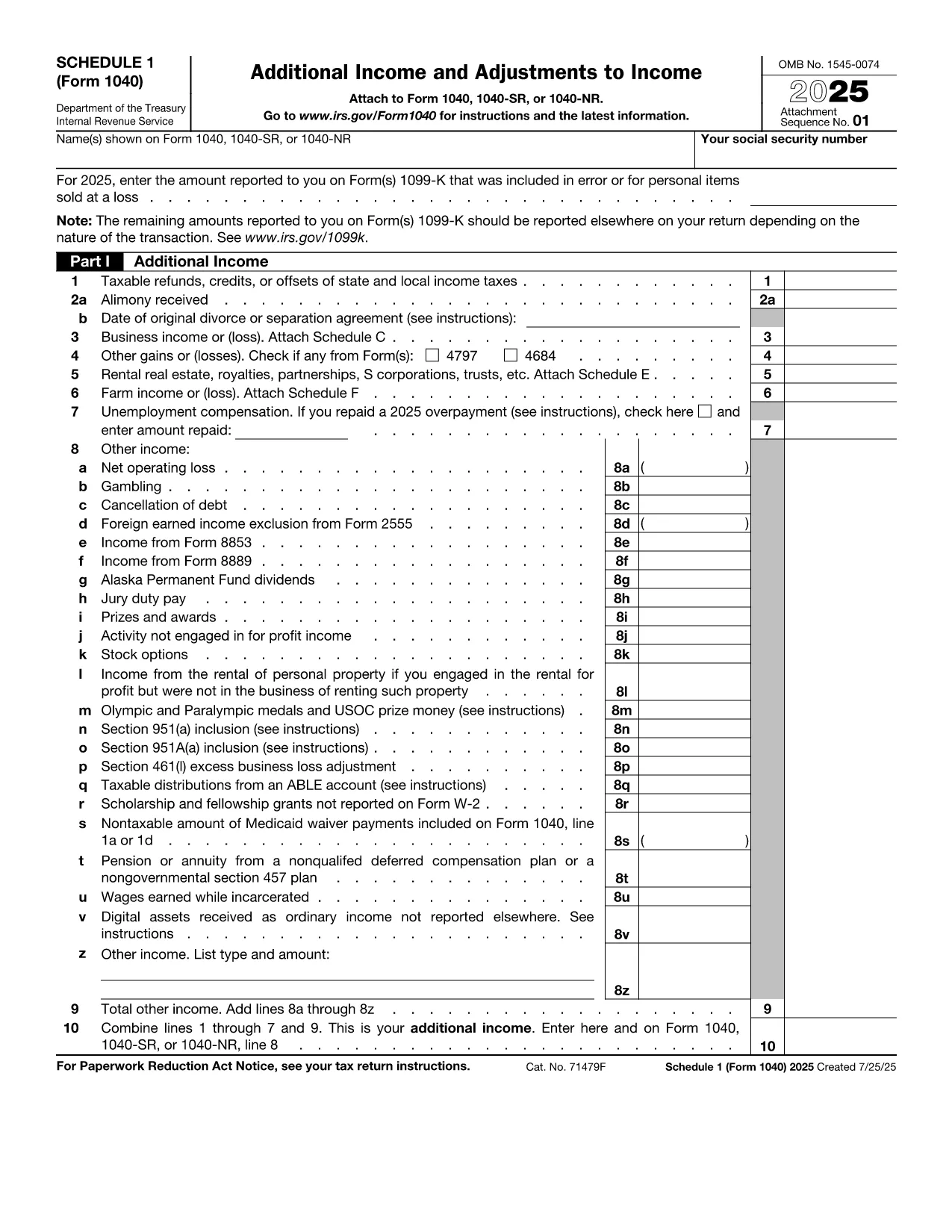
The IRS Form 1040 Schedule 1 is an essential supplement to the main U.S. Individual Income Tax Return (Form 1040). It captures additional income, adjustments to income, and certain credits that don’t fit on the primary form. With Formize’s fillable PDF, you can complete Schedule 1 directly in your browser—no extra software required.

What Is Form 1040 Schedule 1?

Schedule 1 (Form 1040) reports:

  • Business income or loss (self‑employment)
  • Rental real estate, royalties, partnerships, S corporations, trusts
  • Unemployment compensation, alimony received, and other income
  • Adjustments such as educator expenses, student loan interest, and IRA contributions

Filling this schedule accurately can lower your taxable income and increase your refund.

How to Complete the Fillable PDF on Formize

Follow the simple steps below to finish Schedule 1 online:

  1. Click the "Fill out this form" button on this page.
  2. Wait a few seconds while the Formize PDF Filler app loads the fillable version of Schedule 1.
  3. Enter your information in each field. The interface highlights required fields and validates numbers in real time.
  4. When you’re done, press Save & Download to get a completed PDF you can print or attach to your electronic filing.

Common Mistakes to Avoid

Even with a fillable form, errors can happen. Keep an eye out for these frequent pitfalls:

  • Leaving required fields blank – the Formize validator will flag them before you download.
  • Mismatching line numbers between Schedule 1 and the main Form 1040.
  • Using the wrong tax year version – always verify the year on the PDF header.
  • Forgetting signatures – the signature line must be signed by hand after printing.

Where to Submit Your Completed Form

After downloading the filled PDF, you can:

  • Attach it to your electronic filing through approved tax software.
  • Print, sign, and mail it with the rest of your Form 1040 package.

Make sure to keep a copy for your records.

instruksi

FAQ
  • Who must file Form 1040 Schedule 1?

    Anyone who has additional income, adjustments, or credits not reported on the main Form 1040 must attach Schedule 1. This includes self‑employment income, unemployment compensation, and certain deductions.

  • Can I file Schedule 1 electronically?

    Yes. Most tax software accepts the filled PDF as part of an electronic submission. Ensure you sign the final Form 1040 by hand after printing, if required.

  • What is the deadline for filing Schedule 1?

    Schedule 1 follows the same deadline as Form 1040 – typically April 15 of the year following the tax year, with extensions available until October 15.

  • Do I need a PDF reader to use the fillable form?

    No. The Formize filler runs entirely in your browser, so you don’t need Adobe Acrobat or any other PDF reader to complete the form.

  • Is the fillable PDF free to use?

    Yes. Formize provides the fillable version of Schedule 1 at no cost. You only pay if you choose premium services, which are optional.

  • What should I do if I make a mistake after downloading?

    You can reopen the saved PDF in any PDF editor, correct the fields, and re‑download. For major errors, it’s often easier to start a new fillable session.

BAGAIMANA CARANYA

Cara mengisi Form 1040 Schedule 1 gratis secara online dalam 4 langkah mudah:

  1. 1
    Click the Fill‑out Button
    Press the "Fill out this form" button on the page to launch the Formize PDF Filler.
  2. 2
    Wait for the Filler to Load
    A short loading screen appears while the fillable Schedule 1 PDF is prepared in the browser.
  3. 3
    Enter Your Information
    Complete each highlighted field. Required fields are marked with an asterisk and validated instantly.
  4. 4
    Save and Download
    When all data is entered, click "Save & Download" to obtain a completed PDF ready for printing or electronic filing.
Bentuk aplikasi Pengisi PDF
TENTANG

Formulir pajak

Form 1040 Schedule 1 adalah salah satu formulir Pajak yang merupakan dokumen yang digunakan untuk melaporkan informasi terkait pajak kepada otoritas pajak terkait. Ada berbagai jenis formulir pajak, termasuk formulir pajak federal, negara bagian, dan lokal, yang dapat bervariasi tergantung pada keadaan dan lokasi pembayar pajak.

FITUR

Pengisi PDF

Cara termudah untuk mengisi formulir PDF secara online

  • Isi Form 1040 Schedule 1 dengan cepat
    Mencari cara mengisi Form 1040 Schedule 1 dengan cepat secara online? Dengan pengisi formulir PDF online gratis kami, Anda akan tahu cara mengedit dan mengisi dokumen pdf ini dalam waktu kurang dari satu menit.
  • Editor PDF online yang mudah digunakan
    Muak dengan mencetak file PDF sehingga Anda dapat mengeditnya, sebelum memindai ulang dan mengirimnya kembali? Edit dokumen PDF secara online gratis. Gunakan editor pdf online kami untuk menghemat waktu dan kertas.
  • Alat hebat, semua platform
    Ingin tahu cara mengisi Form 1040 Schedule 1 di Mac, atau mungkin cara menggunakan pengisi PDF gratis? Alat PDF online kami berfungsi di semua platform.
  • Penyimpanan file yang aman
    File "Form 1040 Schedule 1" yang telah selesai disimpan dalam database aman yang dikelola oleh hosting Amazon Cloud. Anda dapat menghapus file Anda dari sistem kami kapan saja. Bagaimanapun, file-file ini secara otomatis dihapus setelah 24 jam.
  • Ngobrol dengan Form 1040 Schedule 1
    Ngobrol dengan "Form 1040 Schedule 1" di Chatize yang merupakan asisten pembaca PDF gratis. Ajukan pertanyaan dan dapatkan jawaban dari "Form 1040 Schedule 1". Cukup klik tombol Chat Dengan Dokumen di atas.

Hapus sesi pengisian

Hapus sesi pengisian yang dipilih? Dalam hal ini, kemajuan Anda dalam menyelesaikan formulir akan hilang.

Hapus sesi pengeditan

Hapus sesi pengeditan yang dipilih? Dalam hal ini, kemajuan Anda dalam membuat dan mengedit formulir akan hilang.