
hamburger-menu icon
Აირჩიეთ ენა

Form 8862 (SP) – Fillable PDF for Claiming Tax Credits

  1. ქვეყანა აშშ
  2. Ენა ესპანური
  3. აქტივობა Გადასახადები
  4. დეპარტამენტი შიდა შემოსავლების სამსახური
Form 8862 (SP) – Fillable PDF for Claiming Tax Credits

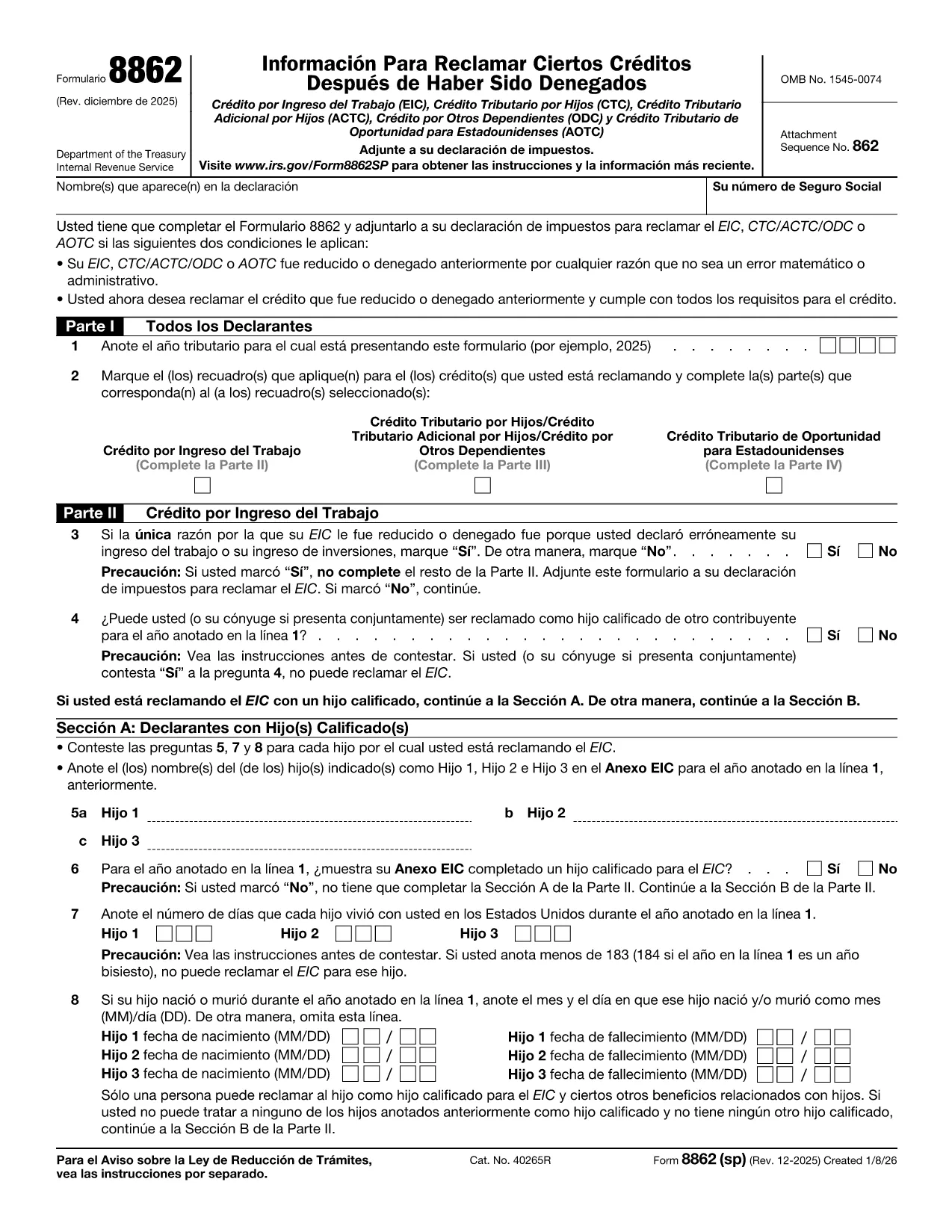
Form 8862 (SP) – "Información para reclamar ciertos créditos después de una denegación" – is the Spanish version of the IRS form used when a taxpayer wants to claim credits that were previously disallowed. It covers the Earned Income Credit (EIC), Child Tax Credit (CTC), American Opportunity Tax Credit (AOTC) and other important credits.

What Is Form 8862 (SP)?

This form tells the IRS that you now meet all eligibility requirements for the credits you are re‑claiming. You must file it with your tax return for the year you are correcting the earlier denial.

How to Complete Form 8862 (SP) Online

Instead of printing and filling out a paper copy, you can use Formize’s built‑in PDF filler:

  1. Click the **"Fill out this form"** button on this page.
  2. Wait a few seconds while the Formize PDF Filler app loads the fillable version of Form 8862 (SP).
  3. Enter the required information in each field. The form automatically validates dates and numeric entries.
  4. When you’re done, click **"Save & Download"** to get a completed PDF that you can attach to your tax return.

Common Mistakes to Avoid

  • Skipping Part IV (AOTC) questions. The IRS requires detailed answers for each student you are claiming.
  • Incorrect residency information. Make sure the days each child lived in the U.S. are accurate.
  • Leaving blanks. Even if a question does not apply, write “N/A” to avoid processing delays.

Download & Fill the Form in Seconds

The fillable PDF is hosted directly from the IRS, guaranteeing you have the latest revision (Rev. December 2025). Click the button below to start the online filling process – no PDF editor needed.

Where to Find Help

If you have questions about eligibility, consult the IRS instructions for Form 8862 or contact a qualified tax professional. Remember, Formize only provides the filling tool; it does not offer tax advice.

ინსტრუქციები

FAQ
  • Do I need to file Form 8862 (SP) for every credit I want to claim?

    Yes. You must attach a separate Form 8862 (SP) for each credit that was previously denied, unless the denial was due only to a math or clerical error.

  • Can I use the English version of Form 8862 instead of the Spanish one?

    If you filed your original return in Spanish, the IRS expects the Spanish version. Using the correct language avoids processing delays.

  • Is the Formize filler free to use?

    Filling out the form with Formize is free. You only need to download the completed PDF, which you can attach to your return at no cost.

  • What if I make a mistake after saving the PDF?

    Open the saved PDF in any PDF editor, correct the error, and re‑save. Or simply start a new fill session on Formize.

  • How long does it take for the IRS to process Form 8862 (SP)?

    Processing time varies, but most returns with a correctly completed Form 8862 are processed within 4‑6 weeks.

  • Do I need to attach supporting documents?

    Yes. Include any required statements, such as proof of residency or school enrollment for the AOTC, as indicated in the form instructions.

ᲠᲝᲒᲝᲠ

როგორ შეავსოთ Form 8862 SP უფასოდ, ონლაინ 4 მარტივი ნაბიჯებით:

  1. 1
    Click the Fill‑out Button
    Press the **"Fill out this form"** button on the page to launch the Formize PDF Filler.
  2. 2
    Wait for the Filler to Load
    The fillable version of Form 8862 (SP) loads in a few seconds—no download needed.
  3. 3
    Enter Your Information
    Complete each section, answering all eligibility questions. The tool validates dates and numbers automatically.
  4. 4
    Save and Download
    When finished, click **"Save & Download"** to get a completed PDF ready to attach to your tax return.
PDF შემავსებლის აპლიკაციის ფორმირება
ᲨᲔᲡᲐᲮᲔᲑ

ფედერალური საგადასახადო ფორმები

Form 8862 SP არის ერთ-ერთი ფედერალური საგადასახადო ფორმა, რომელიც წარმოადგენს დოკუმენტებს, რომლებიც გამოიყენება ფედერალური საშემოსავლო გადასახადის შესახებ ანგარიშგებისა და შესატანად აშშ-ს შიდა შემოსავლების სამსახურში (IRS). ამ ფორმებს იყენებენ ფიზიკური პირები, ბიზნესები და ორგანიზაციები თავიანთი შემოსავლის, გამოქვითვების და სხვა შესაბამისი ინფორმაციის მოსახსენებლად, რომელიც აუცილებელია მათი ფედერალური საგადასახადო ვალდებულების გამოსათვლელად.

ყველაზე ხშირად გამოყენებული ფედერალური საგადასახადო ფორმა არის ფორმა 1040, რომელიც გამოიყენება ინდივიდუალური გადასახადის გადამხდელების მიერ პირადი საშემოსავლო გადასახადის დასაფიქსირებლად. სხვა ხშირად გამოყენებული ფორმები მოიცავს ფორმა 1065 პარტნიორობისთვის, ფორმა 1120 კორპორაციებისთვის და ფორმა 990 გადასახადებისგან გათავისუფლებული ორგანიზაციებისთვის.

ფედერალური საგადასახადო ფორმები, როგორც წესი, მოითხოვს გადასახადის გადამხდელებს აცნობონ შემოსავლის სხვადასხვა წყაროს, როგორიცაა ხელფასები, ხელფასები და რჩევები, ასევე შემოსავალი ინვესტიციებიდან, ქონების გაქირავებით და სხვა წყაროებიდან. ფორმები ასევე საშუალებას აძლევს გადასახადის გადამხდელებს მოითხოვონ გამოქვითვები და კრედიტები სხვადასხვა ხარჯებისთვის, როგორიცაა საქველმოქმედო შენატანები, იპოთეკური პროცენტი და ჯანდაცვის ხარჯები.

მნიშვნელოვანია ფედერალური საგადასახადო ფორმების ზუსტად და დროულად წარდგენა, რადგან ამის შეუსრულებლობამ შეიძლება გამოიწვიოს ჯარიმები და საპროცენტო გადასახადი IRS-ისგან.

ᲛᲐᲮᲐᲡᲘᲐᲗᲔᲑᲚᲔᲑᲘ

PDF შემავსებელი

ონლაინ Form 8862 SP-ის შევსების უმარტივესი გზა

  • სწრაფად შეავსეთ Form 8862 SP
    ეძებთ გზას სწრაფად შეავსოთ Form 8862 SP ონლაინ? ჩვენი ონლაინ უფასო PDF ფორმის შემავსებლით, თქვენ გეცოდინებათ როგორ შეცვალოთ და შეავსოთ ეს pdf დოკუმენტი ერთ წუთზე ნაკლებ დროში.
  • მარტივი გამოსაყენებელი ონლაინ PDF რედაქტორი
    მოგბეზრდათ PDF ფაილების დაბეჭდვა, რათა მათი რედაქტირება შეძლოთ, ხელახლა სკანირებამდე და უკან გაგზავნამდე? შეცვალეთ PDF დოკუმენტები უფასოდ ონლაინ. გამოიყენეთ ჩვენი ონლაინ pdf რედაქტორი დროისა და ქაღალდის დაზოგვისთვის.
  • შესანიშნავი ხელსაწყოები, ყველა პლატფორმა
    გაინტერესებთ როგორ შეავსოთ Form 8862 SP Mac-ზე, ან იქნებ როგორ გამოიყენოთ PDF შემავსებელი უფასოდ? ჩვენი ონლაინ PDF ინსტრუმენტები მუშაობს ყველა პლატფორმაზე.
  • ფაილების უსაფრთხო შენახვა
    დასრულებული „Form 8862 SP“ ფაილები ინახება დაცულ მონაცემთა ბაზაში, რომელსაც მართავს Amazon Cloud ჰოსტინგი. თქვენ შეგიძლიათ წაშალოთ თქვენი ფაილები ჩვენი სისტემიდან ნებისმიერ დროს. ნებისმიერ შემთხვევაში, ეს ფაილები ავტომატურად იშლება 24 საათის შემდეგ.
  • ჩატი Form 8862 SP-ით
    ესაუბრეთ „Form 8862 SP“-ს Chatize-ზე, რომელიც არის PDF წამკითხველის უფასო ასისტენტი. დასვით კითხვები და მიიღეთ პასუხები „Form 8862 SP“-დან. უბრალოდ დააწკაპუნეთ ღილაკზე ჩატი დოკუმენტთან ზემოთ.

შევსების სესიის წაშლა

წაშალოთ არჩეული შევსების სესია? ამ შემთხვევაში, თქვენი პროგრესი ფორმის შევსებაში დაიკარგება.

რედაქტირების სესიის წაშლა

წაშალოთ არჩეული რედაქტირების სესია? ამ შემთხვევაში, თქვენი პროგრესი ფორმის შექმნასა და რედაქტირებაში დაიკარგება.