
选择语言

IRS Form 1045 – Fillable PDF for Tentative Refund

  1. 国家 美国
  2. 语言 英语
  3. 活动 税收
  4. 部门 国税局
IRS Form 1045 – Fillable PDF for Tentative Refund

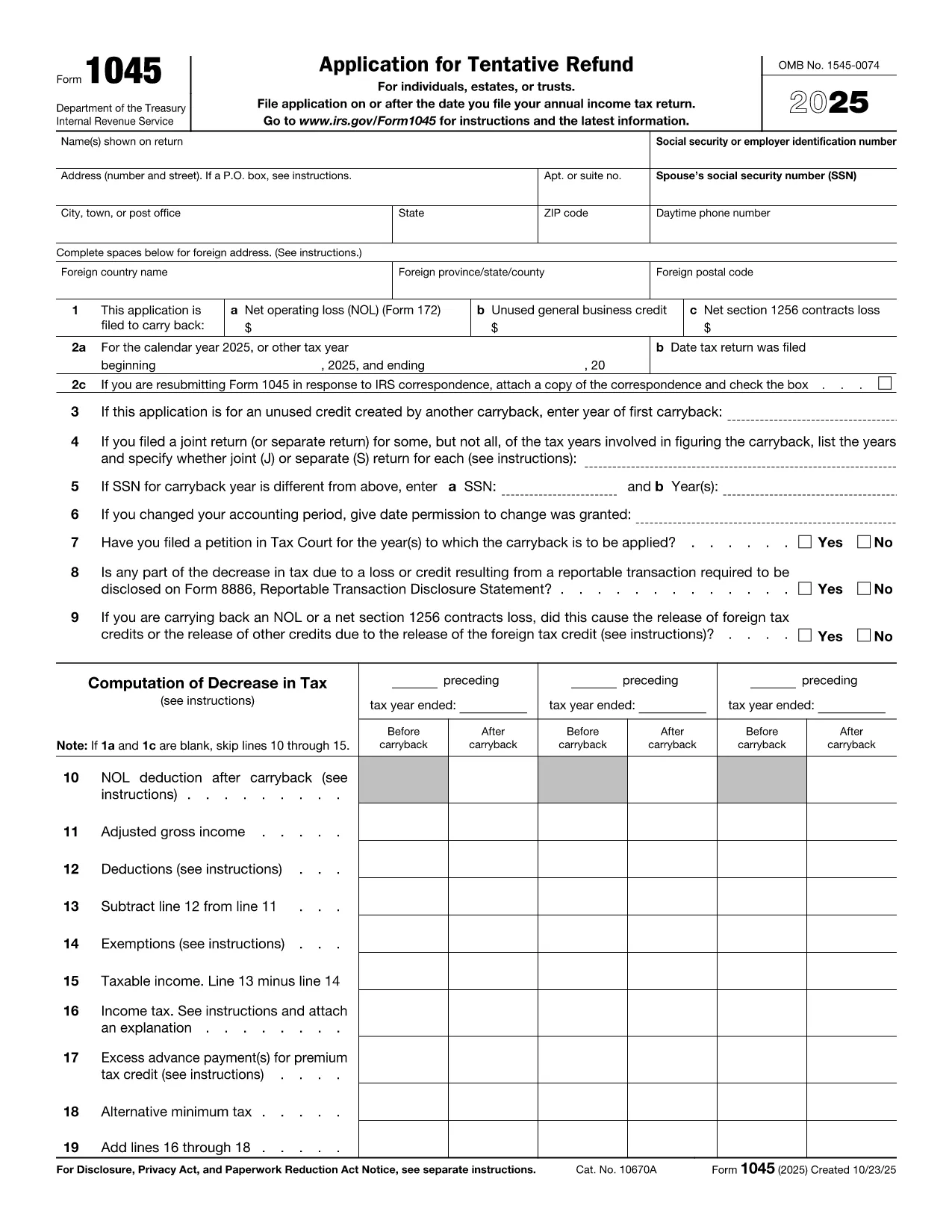
Form 1045, Application for Tentative Refund, lets individuals, estates, and trusts claim a fast refund when they have a net operating loss (NOL), an unused general business credit, or a Section 1256 contracts loss that can be carried back to a prior tax year. Instead of mailing a paper form, you can complete the official PDF instantly with Formize’s online PDF filler.

What Is Form 1045?

This two‑page IRS form is used to request a tentative refund before filing an amended return. It is ideal when you need to:

  • Carry back a net operating loss to a previous year.
  • Carry back an unused general business credit.
  • Carry back a net Section 1256 contracts loss.

How to Fill the Form Online with Formize

Formize turns the static PDF into a fully interactive, fillable document. Follow the simple steps below – no PDF editor required.

Common Mistakes to Avoid

  • Leaving required fields blank: Every line marked with an asterisk must be completed, otherwise the IRS will reject the application.
  • Mismatching tax years: Verify that the carry‑back year(s) you select match the year of the loss or credit.
  • Incorrect signatures: Both spouses must sign on joint returns; estates and trusts need the authorized representative’s signature.
  • Failing to attach supporting schedules: Attach Form 172 for NOL calculations, Form 3800 for business credits, and Form 6781 for Section 1256 losses.

Download the Fillable PDF

Click the button below to open the official IRS Form 1045 PDF in the Formize filler. The document is fully searchable, auto‑saves, and can be exported as a completed PDF ready for mailing.

指示

常问问题
  • Who can use Form 1045?

    Individuals, estates, and trusts that have a net operating loss, an unused general business credit, or a Section 1256 contracts loss that can be carried back to a prior tax year.

  • Do I need to file Form 1045 before filing an amended return?

    Yes. Form 1045 requests a tentative refund before you file an amended return (Form 1040‑X). It speeds up the refund process.

  • Can I file Form 1045 electronically?

    The IRS does not accept an electronic filing for Form 1045, but you can complete the PDF online with Formize, save it, and mail the printed copy.

  • How far back can I carry an NOL?

    Generally, you can carry an NOL back up to two years (or up to 20 years for certain farming losses) unless special relief applies.

  • What supporting documents are required?

    Attach Form 172 for NOL calculations, Form 3800 for unused general business credits, and Form 6781 plus Schedule D for Section 1256 losses.

  • Is there a filing fee for Form 1045?

    No. Form 1045 is free to file; you only pay any postage required to mail the completed form.

  • What if I make a mistake on the form?

    Correct the error, sign again, and resend the corrected form. The IRS may reject the submission if required fields are incomplete or inaccurate.

  • How long does it take to receive a tentative refund?

    The IRS typically processes a Form 1045 within 30 days, but processing times can vary based on workload.

如何

如何通过 5 个简单步骤在线免费填写 IRS Form 1045:

  1. 1
    Click the Fill‑out Button
    Press the “Fill out this form” button on the page. The Formize PDF Filler app will open the official Form 1045 PDF.
  2. 2
    Wait for the Filler to Load
    Give the app a few seconds to load all interactive fields. No download or extra software is required.
  3. 3
    Enter Your Information
    Complete each required field – taxpayer name, SSN, loss amounts, carry‑back years, and signatures. The filler validates entries in real time.
  4. 4
    Review and Save
    Double‑check all numbers, then click “Save” to generate a completed PDF. You can download, print, or email the file directly from Formize.
  5. 5
    Submit to the IRS
    Mail the completed Form 1045 to the address listed in the instructions, or submit it with any required supporting schedules.
Formize PDF Filler 应用程序
关于

联邦税表

IRS Form 1045 是联邦税表之一,用于向美国国税局 (IRS) 报告和提交联邦所得税。个人、企业和组织使用这些表格来报告他们的收入、扣除额以及计算联邦纳税义务所需的其他相关信息。

最常用的联邦税表是1040表,个人纳税人用它来申报个人所得税。其他常用表格包括用于合作伙伴关系的表格 1065适用于公司的表格 1120,适用于免税组织的表格 990

联邦税表通常要求纳税人报告各种收入来源,例如工资、薪水和小费,以及来自投资、租赁房产和其他来源的收入。这些表格还允许纳税人申请各种费用的扣除和抵免,例如慈善捐款、抵押贷款利息和医疗费用。

准确、及时地提交联邦税表非常重要,因为不这样做可能会导致美国国税局的罚款和利息费用。

特征

PDF 填充器

在线填写 PDF 表单的最简单方法

  • 快速填写IRS Form 1045
    正在寻找一种在线快速填写 IRS Form 1045 的方法?使用我们的在线免费 PDF 填表工具,您将在不到一分钟的时间内了解如何编辑和填写此 pdf 文档。
  • 易于使用的在线 PDF 编辑器
    是否厌倦了打印 PDF 文件以便在重新扫描并发回之前对其进行编辑?免费在线编辑 PDF 文档。使用我们的在线 pdf 编辑器可以节省时间和纸张。
  • 伟大的工具,所有平台
    想知道如何在 Mac 上填写 IRS Form 1045,或者如何免费使用 PDF 填充程序?我们的在线 PDF 工具适用于所有平台。
  • 安全文件存储
    完成的“IRS Form 1045”文件存储在由亚马逊云托管管理的安全数据库中。您可以随时从我们的系统中删除您的文件。在任何情况下,这些文件都会在 24 小时后自动删除。
  • 与 IRS Form 1045 聊天
    Chatize 上与“IRS Form 1045”聊天,这是一个免费的 PDF 阅读器助手。提出问题并从“IRS Form 1045”获得答案。只需点击上面的与文档聊天按钮即可。

删除填充会话

删除选定的填充会话?在这种情况下,您填写表格的进度将丢失。

删除编辑会话

删除选定的编辑会话?在这种情况下,您创建和编辑表单的进度将会丢失。