
언어 선택

IRS Form 1045 – Fillable PDF for Tentative Refund

  1. 국가 미국
  2. 언어 영어
  3. 활동 구실
  4. 부서 국세청
IRS Form 1045 – Fillable PDF for Tentative Refund

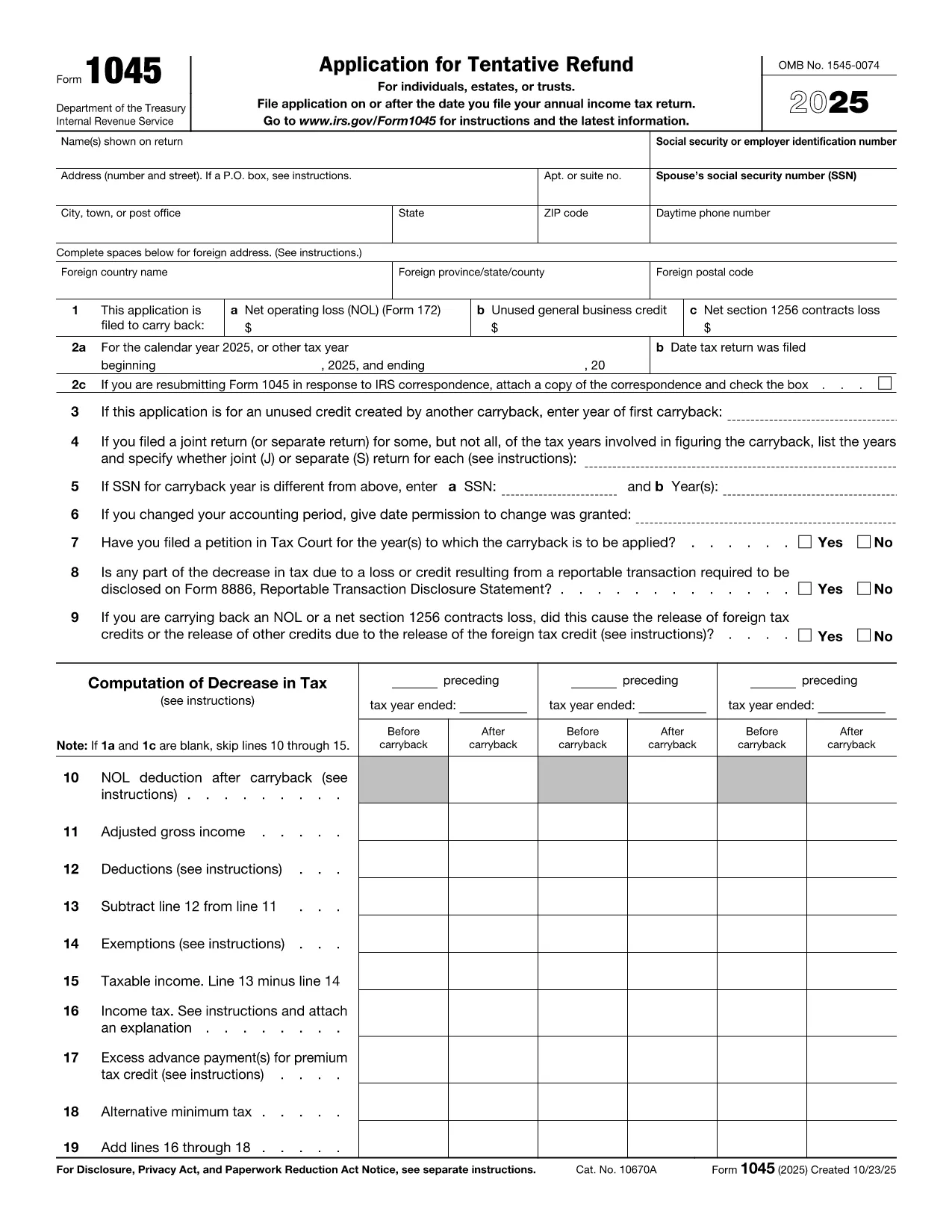
Form 1045, Application for Tentative Refund, lets individuals, estates, and trusts claim a fast refund when they have a net operating loss (NOL), an unused general business credit, or a Section 1256 contracts loss that can be carried back to a prior tax year. Instead of mailing a paper form, you can complete the official PDF instantly with Formize’s online PDF filler.

What Is Form 1045?

This two‑page IRS form is used to request a tentative refund before filing an amended return. It is ideal when you need to:

  • Carry back a net operating loss to a previous year.
  • Carry back an unused general business credit.
  • Carry back a net Section 1256 contracts loss.

How to Fill the Form Online with Formize

Formize turns the static PDF into a fully interactive, fillable document. Follow the simple steps below – no PDF editor required.

Common Mistakes to Avoid

  • Leaving required fields blank: Every line marked with an asterisk must be completed, otherwise the IRS will reject the application.
  • Mismatching tax years: Verify that the carry‑back year(s) you select match the year of the loss or credit.
  • Incorrect signatures: Both spouses must sign on joint returns; estates and trusts need the authorized representative’s signature.
  • Failing to attach supporting schedules: Attach Form 172 for NOL calculations, Form 3800 for business credits, and Form 6781 for Section 1256 losses.

Download the Fillable PDF

Click the button below to open the official IRS Form 1045 PDF in the Formize filler. The document is fully searchable, auto‑saves, and can be exported as a completed PDF ready for mailing.

지침

자주하는 질문
  • Who can use Form 1045?

    Individuals, estates, and trusts that have a net operating loss, an unused general business credit, or a Section 1256 contracts loss that can be carried back to a prior tax year.

  • Do I need to file Form 1045 before filing an amended return?

    Yes. Form 1045 requests a tentative refund before you file an amended return (Form 1040‑X). It speeds up the refund process.

  • Can I file Form 1045 electronically?

    The IRS does not accept an electronic filing for Form 1045, but you can complete the PDF online with Formize, save it, and mail the printed copy.

  • How far back can I carry an NOL?

    Generally, you can carry an NOL back up to two years (or up to 20 years for certain farming losses) unless special relief applies.

  • What supporting documents are required?

    Attach Form 172 for NOL calculations, Form 3800 for unused general business credits, and Form 6781 plus Schedule D for Section 1256 losses.

  • Is there a filing fee for Form 1045?

    No. Form 1045 is free to file; you only pay any postage required to mail the completed form.

  • What if I make a mistake on the form?

    Correct the error, sign again, and resend the corrected form. The IRS may reject the submission if required fields are incomplete or inaccurate.

  • How long does it take to receive a tentative refund?

    The IRS typically processes a Form 1045 within 30 days, but processing times can vary based on workload.

어떻게

5개의 간단한 단계를 통해 온라인으로 IRS Form 1045를 무료로 작성하는 방법:

  1. 1
    Click the Fill‑out Button
    Press the “Fill out this form” button on the page. The Formize PDF Filler app will open the official Form 1045 PDF.
  2. 2
    Wait for the Filler to Load
    Give the app a few seconds to load all interactive fields. No download or extra software is required.
  3. 3
    Enter Your Information
    Complete each required field – taxpayer name, SSN, loss amounts, carry‑back years, and signatures. The filler validates entries in real time.
  4. 4
    Review and Save
    Double‑check all numbers, then click “Save” to generate a completed PDF. You can download, print, or email the file directly from Formize.
  5. 5
    Submit to the IRS
    Mail the completed Form 1045 to the address listed in the instructions, or submit it with any required supporting schedules.
Formize PDF 필러 앱
에 대한

연방 세금 양식

IRS Form 1045는 미국 국세청(IRS)에 연방 소득세를 보고하고 제출하는 데 사용되는 문서인 연방 세금 양식 중 하나입니다. 이 양식은 개인, 기업 및 조직이 소득, 공제 및 연방 세금 납부액 계산에 필요한 기타 관련 정보를 보고하는 데 사용됩니다.

가장 일반적으로 사용되는 연방 세금 양식은 개인 납세자가 개인 소득세를 신고하는 데 사용하는 양식 1040입니다. 일반적으로 사용되는 기타 양식으로는 파트너십을 위한 양식 1065, 양식 1120, 면세 조직의 경우 양식 990.

연방 세금 양식에서는 일반적으로 납세자가 임금, 급여, 팁 등 다양한 소득원은 물론 투자 소득, 임대 부동산 및 기타 소득원을 보고하도록 요구합니다. 또한 이 양식을 통해 납세자는 자선 기부금, 모기지 이자, 의료비 등 다양한 비용에 대해 공제 및 세액공제를 청구할 수 있습니다.

연방 세금 양식을 정확하고 제때에 제출하는 것이 중요합니다. 그렇게 하지 않으면 IRS로부터 벌금과 이자가 부과될 수 있습니다.

특징

PDF 필러

온라인에서 PDF 양식을 채우는 가장 쉬운 방법

  • IRS Form 1045를 빠르게 작성하세요.
    온라인에서 IRS Form 1045을(를) 빠르게 채우는 방법을 찾고 계십니까? 온라인 무료 PDF 양식 필러를 사용하면 1분 이내에 이 PDF 문서를 편집하고 채우는 방법을 알 수 있습니다.
  • 사용하기 쉬운 온라인 PDF 편집기
    다시 스캔하여 다시 보내기 전에 편집할 수 있도록 PDF 파일을 인쇄하는 데 지쳤습니까? 온라인에서 무료로 PDF 문서를 편집하세요. 온라인 PDF 편집기를 사용하여 시간과 종이를 절약하십시오.
  • 훌륭한 도구, 모든 플랫폼
    Mac에서 IRS Form 1045를 채우는 방법이나 PDF 필러를 무료로 사용하는 방법이 궁금하십니까? 당사의 온라인 PDF 도구는 모든 플랫폼에서 작동합니다.
  • 안전한 파일 저장
    완료된 "IRS Form 1045" 파일은 Amazon 클라우드 호스팅에서 관리하는 보안 데이터베이스에 저장됩니다. 언제든지 시스템에서 파일을 삭제할 수 있습니다. 어쨌든 이러한 파일은 24시간 후에 자동으로 삭제됩니다.
  • IRS Form 1045님과 채팅
    무료 PDF 리더 도우미인 Chatize에서 "IRS Form 1045"와 채팅하세요. "IRS Form 1045"에서 질문하고 답변을 받으세요. 위의 문서와 채팅 버튼을 클릭하세요.

필링 세션 삭제

선택한 필링 세션을 삭제하시겠습니까?이 경우 양식 작성 진행 상황이 손실됩니다.

편집 세션 삭제

선택한 편집 세션을 삭제하시겠습니까? 이 경우 양식 작성 및 편집 진행 상황이 손실됩니다.