
Sprache auswählen

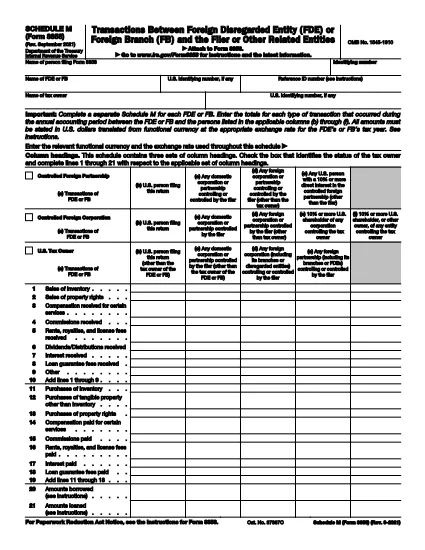
IRS Form 8858 Schedule M – Fillable PDF

  1. Land USA
  2. Sprache Englisch
  3. Aktivität Steuern
  4. Abteilung Finanzamt
IRS Form 8858 Schedule M – Fillable PDF

Form 8858 Schedule M is the IRS schedule used to report the assets and liabilities of a foreign disregarded entity (FDE) that is owned by a U.S. person. Completing this schedule accurately is essential for proper tax compliance and to avoid costly penalties.

What Is Form 8858 Schedule M?

Schedule M is part of IRS Form 8858. It requires detailed information about the FDE’s balance sheet, including cash, investments, real property, and any liabilities at the end of the tax year. The schedule helps the IRS assess the economic activity of foreign entities linked to U.S. taxpayers.

How to Fill Out Schedule M Online

Instead of downloading the PDF and opening it in a separate editor, simply click the "Fill out this form" button below. The Formize PDF Filler app will load directly in your browser, allowing you to complete every field, save progress, and download the finished document—all without installing software.

  • Click Fill out this form on the page.
  • Wait a few seconds for the Formize PDF Filler to appear.
  • Enter the requested information in each fillable field.
  • Use the Save button to download a copy for your records.

Common Mistakes to Avoid

  • Leaving fields blank – Even if an amount is zero, enter “0” to show that you reviewed the item.
  • Mismatching dates – The balance‑sheet date must match the tax year reported on Form 8858.
  • Incorrect currency conversion – Use the IRS‑approved exchange rate for the year; do not round prematurely.
  • Double‑counting assets – Ensure assets listed on Schedule M are not also reported on other schedules unless required.

Where to Submit the Completed Form

Attach the finished Schedule M to your Form 8858 filing and send the entire package to the IRS address indicated in the Form 8858 instructions. Most taxpayers file electronically using the IRS e‑file system; the fillable PDF can be uploaded directly.

Why Choose Formize’s Fillable PDF?

Formize provides a secure, browser‑based PDF filler that keeps your data private and eliminates the need for costly PDF editors. The interface is intuitive, supports auto‑save, and produces a final PDF that meets IRS formatting requirements.

Fill out this form

Anweisungen

  • Form 8858 Anleitung - Anweisungen für Form 8858, Informationsrückgabe von US-Personen mit Respekt vor fremden unberücksichtigten Einrichtungen (FDE) und ausländischen Zweigstellen (FBs)
FAQ
  • Do I need a PDF editor to complete Schedule M?

    No. Formize’s online filler lets you complete the schedule directly in your browser without any additional software.

  • Can I save my progress and finish later?

    Yes. The filler includes an auto‑save feature. You can download a draft PDF, reopen it later, and continue editing.

  • What currency should I use for foreign assets?

    Report all amounts in U.S. dollars using the IRS‑approved exchange rate for the tax year.

  • Is the filled PDF accepted by the IRS?

    Absolutely. The Formize filler produces a standard, IRS‑compatible PDF that meets all formatting requirements.

  • How do I know which assets belong on Schedule M?

    Schedule M covers balance‑sheet items of the foreign disregarded entity—cash, investments, real property, and liabilities. Review the Form 8858 instructions for detailed definitions.

  • What if I make a mistake after filing?

    You can file an amended Form 8858 with a corrected Schedule M. Include a brief explanation of the changes in the amendment cover letter.

WIE MAN

So füllen Sie Form 8858 Schedule M kostenlos online in 4 einfachen Schritten aus:

  1. 1
    Open the Fillable Form
    Click the “Fill out this form” button on the page. The Formize PDF Filler will load in a new browser tab.
  2. 2
    Enter Your Information
    Complete each field on Schedule M. The filler validates numbers and dates to help you avoid errors.
  3. 3
    Save and Download
    When all sections are filled, click the Save button to download the completed PDF to your computer.
  4. 4
    Submit to the IRS
    Attach the saved Schedule M to your Form 8858 and file electronically or mail to the IRS address shown in the instructions.
Formize PDF Filler-App
ÜBER

Steuerformulare

Form 8858 Schedule M ist eines der Steuerformulare, mit denen Informationen zu Steuern an die zuständige Steuerbehörde gemeldet werden. Es gibt verschiedene Arten von Steuerformularen, einschließlich bundesstaatlicher, bundesstaatlicher und lokaler Steuerformulare, die je nach den Umständen und dem Standort des Steuerzahlers variieren können.

MERKMALE

PDF-Filler

Der einfachste Weg, PDF-Formulare online auszufüllen

  • Füllen Sie schnell Form 8858 Schedule M aus
    Suchen Sie nach einer Möglichkeit, Form 8858 Schedule M schnell online auszufüllen? Mit unserem kostenlosen Online-PDF-Formularausfüller wissen Sie, wie Sie dieses PDF-Dokument in weniger als einer Minute bearbeiten und ausfüllen.
  • Einfach zu bedienender Online-PDF-Editor
    Haben Sie es satt, PDF-Dateien auszudrucken, damit Sie sie bearbeiten können, bevor Sie sie erneut scannen und zurücksenden? PDF-Dokumente kostenlos online bearbeiten. Nutzen Sie unseren Online-PDF-Editor, um Zeit und Papier zu sparen.
  • Tolle Tools, alle Plattformen
    Sie fragen sich, wie Sie Form 8858 Schedule M auf einem Mac ausfüllen oder vielleicht einen kostenlosen PDF-Ausfüller verwenden können? Unsere Online-PDF-Tools funktionieren auf allen Plattformen.
  • Sichere Dateispeicherung
    Fertige "Form 8858 Schedule M"-Dateien werden in einer gesicherten Datenbank gespeichert, die vom Amazon Cloud-Hosting verwaltet wird. Sie können Ihre Dateien jederzeit aus unserem System löschen. In jedem Fall werden diese Dateien nach 24 Stunden automatisch gelöscht.
  • Chatten Sie mit Form 8858 Schedule M
    Chatten Sie mit „Form 8858 Schedule M“ auf Chatize, einem kostenlosen PDF-Leseassistenten. Stellen Sie Fragen und erhalten Sie Antworten von „Form 8858 Schedule M“. Klicken Sie einfach oben auf die Schaltfläche Mit Dokument chatten.

Füllsitzung löschen

Die ausgewählte Füllsitzung löschen? In diesem Fall gehen Ihre Fortschritte beim Ausfüllen des Formulars verloren.

Bearbeitungssitzung löschen

Ausgewählte Bearbeitungssitzung löschen? In diesem Fall geht Ihr Fortschritt beim Erstellen und Bearbeiten des Formulars verloren.