
hamburger-menu icon
भाषा का चयन करें

Form 4461-C Fillable PDF – Download & Complete Online

  1. देश अमेरीका
  2. भाषा अंग्रेज़ी
  3. गतिविधि करों
  4. विभाग आंतरिक राजस्व सेवा
फार्म को भरो
Form 4461-C Fillable PDF – Download & Complete Online

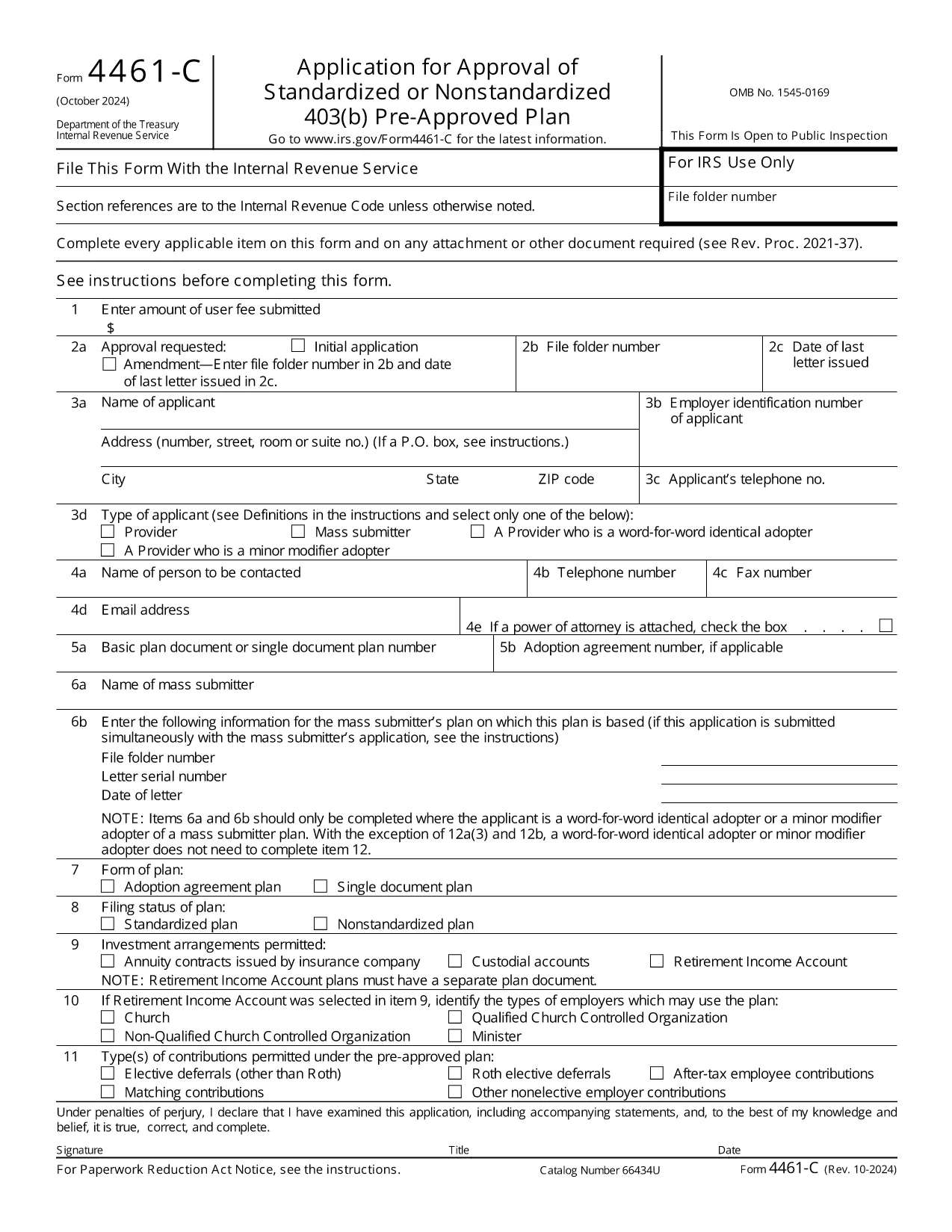
The IRS Form 4461‑C is the official application used by providers or mass submitters of a 403(b) pre‑approved plan. It must be filed for each separate adoption agreement or for each single‑document plan where no adoption agreement is used. Our fillable PDF lets you complete the form quickly, accurately, and securely.

What Is Form 4461‑C?

Form 4461‑C is part of the IRS’s pre‑approval process for employee benefit plans under section 401(a) of the Internal Revenue Code. It captures essential plan details, adoption agreements, and supporting documentation required for IRS approval.

How to Fill Out Form 4461‑C Online

Instead of downloading the PDF and opening a separate editor, simply click the "Fill out this form" button on this page. The Formize PDF Filler will load in your browser, allowing you to:

  1. Enter information directly into each field.
  2. Save your progress automatically.
  3. Validate entries with built‑in checks.
  4. Download the completed, IRS‑ready PDF or submit it electronically.

Common Mistakes to Avoid

  • Leaving required fields blank: The filler highlights missing data before you can save.
  • Mismatched plan numbers: Double‑check the plan identification numbers on line 12(a).
  • Incorrect signatures: Use the electronic signature option or print and sign where required.
  • Submitting outdated versions: This page always provides the latest revision (Rev. 10‑2024).

Submission & Acceptance Guidelines

After completing the form, you can either:

  • Download the PDF and mail it to the IRS address listed in the instructions.
  • Upload the PDF through the IRS e‑file portal if you have an authorized transmitter.

Keep a copy for your records and track the submission status using the IRS’s online tools.

FAQs About Form 4461‑C

For quick answers, scroll down to the FAQ section below.

सामान्य प्रश्न
  • Who must file Form 4461‑C?

    Any provider or mass submitter of a 403(b) pre‑approved plan must file Form 4461‑C for each separate adoption agreement or single‑document plan.

  • Can I file Form 4461‑C electronically?

    Yes. After completing the fillable PDF, you can upload it through the IRS e‑file portal if you have an authorized transmitter.

  • How many copies of Form 4461‑C are required?

    Submit one copy of Form 4461‑C for each adoption agreement or each single‑document plan, plus any supporting documents listed on line 12(a).

  • What is the latest revision of Form 4461‑C?

    The current version is Rev. 10‑2024, which is the PDF linked on this page.

  • Do I need a signature on the PDF?

    Yes. The form requires the plan sponsor’s signature. You can use the electronic signature feature in Formize or print, sign, and scan the completed form.

  • Where do I send the completed form?

    Mail the completed form to the address specified in the IRS instructions, or submit it electronically via the IRS e‑file system.

कैसे करें

Form 4461-C को मुफ़्त में, ऑनलाइन 4 आसान स्टेप्स में कैसे भरें:

  1. 1
    Open the Fillable Form
    Click the "Fill out this form" button on the page. The Formize PDF Filler loads instantly in your browser.
  2. 2
    Enter Your Information
    Complete each field. Required fields are highlighted. Use the auto‑save feature to protect your data.
  3. 3
    Review & Sign
    Check all entries for accuracy, add electronic signatures where allowed, and correct any validation warnings.
  4. 4
    Download or Submit
    When finished, download the completed PDF for mailing or upload it to the IRS e‑file system.
पीडीएफ फिलर एप तैयार करें
के बारे में

कर प्रपत्र

Form 4461-C टैक्स फॉर्मों में से एक है जो किसी व्यक्ति या व्यवसाय की आय, कटौती और कर देनदारी के बारे में संबंधित कर प्राधिकरण को जानकारी रिपोर्ट करने के लिए उपयोग किए जाने वाले दस्तावेज़ हैं। कर कानूनों का अनुपालन करने और कर दायित्वों को पूरा करने के लिए ये फॉर्म आवश्यक हैं। कर प्रपत्र देश और वहां की विशिष्ट कर आवश्यकताओं के आधार पर भिन्न-भिन्न होते हैं। यहां कुछ सामान्य प्रकार के कर फ़ॉर्म दिए गए हैं:

व्यक्तिगत कर फॉर्म: इन फॉर्मों का उपयोग व्यक्तिगत करदाताओं द्वारा अपनी व्यक्तिगत आय की रिपोर्ट करने और कटौती, क्रेडिट और छूट का दावा करने के लिए किया जाता है। उदाहरणों में संयुक्त राज्य अमेरिका में 1040 फॉर्म या यूनाइटेड किंगडम में सेल्फ-असेसमेंट टैक्स रिटर्न फॉर्म शामिल हैं।

बिजनेस टैक्स फॉर्म: बिजनेस टैक्स फॉर्म का उपयोग कंपनियों, साझेदारियों या स्व-रोज़गार व्यक्तियों द्वारा अपनी व्यावसायिक आय, व्यय और अन्य कर-संबंधित जानकारी की रिपोर्ट करने के लिए किया जाता है। उदाहरणों में संयुक्त राज्य अमेरिका में शेड्यूल सी फॉर्म (व्यापार से लाभ या हानि) या यूनाइटेड किंगडम में CT600 फॉर्म (कंपनी टैक्स रिटर्न) शामिल हैं।

पेरोल टैक्स फॉर्म: इन फॉर्मों का उपयोग नियोक्ताओं द्वारा अपने कर्मचारियों के वेतन से रोके गए वेतन, वेतन और करों की रिपोर्ट करने के लिए किया जाता है। उदाहरणों में संयुक्त राज्य अमेरिका में W-2 फॉर्म या यूनाइटेड किंगडम में P60 फॉर्म शामिल हैं।

बिक्री कर फॉर्म: बिक्री कर फॉर्म का उपयोग व्यवसायों द्वारा कर योग्य वस्तुओं या सेवाओं पर एकत्रित बिक्री कर की रिपोर्ट करने और जमा करने के लिए किया जाता है। विशिष्ट बिक्री कर फॉर्म क्षेत्राधिकार के अनुसार भिन्न-भिन्न होते हैं।

मूल्य वर्धित कर (वैट) फॉर्म: वैट फॉर्म का उपयोग उन देशों में किया जाता है जो बिक्री पर एकत्रित वैट की रिपोर्ट करने और जमा करने और खरीदारी के लिए वैट क्रेडिट का दावा करने के लिए मूल्य वर्धित कर लगाते हैं। उदाहरणों में कई देशों में उपयोग किए जाने वाले वैट रिटर्न फॉर्म शामिल हैं।

अनुमानित कर फ़ॉर्म: अनुमानित कर फ़ॉर्म का उपयोग उस आय पर अनुमानित करों की रिपोर्ट करने और भुगतान करने के लिए किया जाता है जो रोके जाने के अधीन नहीं हैं, जैसे कि स्व-रोज़गार आय या निवेश आय।

ये मौजूद असंख्य कर रूपों के कुछ उदाहरण मात्र हैं। आवश्यक विशिष्ट प्रपत्र आपके देश या अधिकार क्षेत्र में कर कानूनों और विनियमों पर निर्भर करते हैं। यह निर्धारित करने के लिए कि आपकी स्थिति पर कौन से फॉर्म लागू होते हैं, कर प्राधिकरण के दिशानिर्देशों से परामर्श लेना या पेशेवर सलाह लेना महत्वपूर्ण है।

विशेषताएं

पीडीएफ भराव

पीडीएफ फॉर्म ऑनलाइन भरने का सबसे आसान तरीका

  • जल्दी से Form 4461-C भरें
    Form 4461-C को जल्दी से ऑनलाइन भरने का कोई तरीका खोज रहे हैं? हमारे ऑनलाइन नि:शुल्क पीडीएफ फॉर्म फिलर के साथ, आप एक मिनट से भी कम समय में इस पीडीएफ दस्तावेज़ को संपादित करने और भरने का तरीका जानेंगे।
  • ऑनलाइन पीडीएफ संपादक का उपयोग करना आसान है
    पीडीएफ फाइलों को प्रिंट करने से तंग आ गए हैं ताकि आप उन्हें फिर से स्कैन करने और उन्हें वापस भेजने से पहले संपादित कर सकें? PDF दस्तावेज़ों को निःशुल्क ऑनलाइन संपादित करें। समय और कागज बचाने के लिए हमारे ऑनलाइन पीडीएफ संपादक का प्रयोग करें।
  • महान उपकरण, सभी प्लेटफार्म
    आश्चर्य है कि मैक पर Form 4461-C कैसे भरें, या शायद पीडीएफ फिलर का मुफ्त में उपयोग कैसे करें? हमारे ऑनलाइन पीडीएफ टूल सभी प्लेटफॉर्म पर काम करते हैं।
  • सुरक्षित फ़ाइल भंडारण
    पूर्ण की गई "Form 4461-C" फ़ाइलें Amazon क्लाउड होस्टिंग द्वारा प्रबंधित एक सुरक्षित डेटाबेस में संग्रहीत की जाती हैं। आप कभी भी अपनी फाइलों को हमारे सिस्टम से हटा सकते हैं। किसी भी स्थिति में, ये फ़ाइलें 24 घंटे के बाद स्वतः हटा दी जाती हैं।
  • {कीवर्ड} से चैट करें
    Chatize पर "Form 4461-C" के साथ चैट करें, जो एक निःशुल्क पीडीएफ रीडर सहायक है। प्रश्न पूछें और "Form 4461-C" से उत्तर प्राप्त करें। बस ऊपर दस्तावेज़ के साथ चैट करें बटन पर क्लिक करें।

फ़िलिंग सत्र मिटाएँ

चयनित फ़िलिंग सत्र को मिटाएँ? इस स्थिति में, फ़ॉर्म को पूरा करने में आपकी प्रगति खो जाएगी।

संपादन सत्र हटाएँ

चयनित संपादन सत्र हटाएँ? इस स्थिति में, फ़ॉर्म बनाने और संपादित करने में आपकी प्रगति नष्ट हो जाएगी।