
Seleziona la lingua

IRS Form 56F – Fillable PDF Fiduciary Notice

  1. Paese Stati Uniti d'America
  2. Lingua Inglese
  3. Attività Le tasse
  4. Dipartimento IRS
Compila questo modulo
IRS Form 56F – Fillable PDF Fiduciary Notice

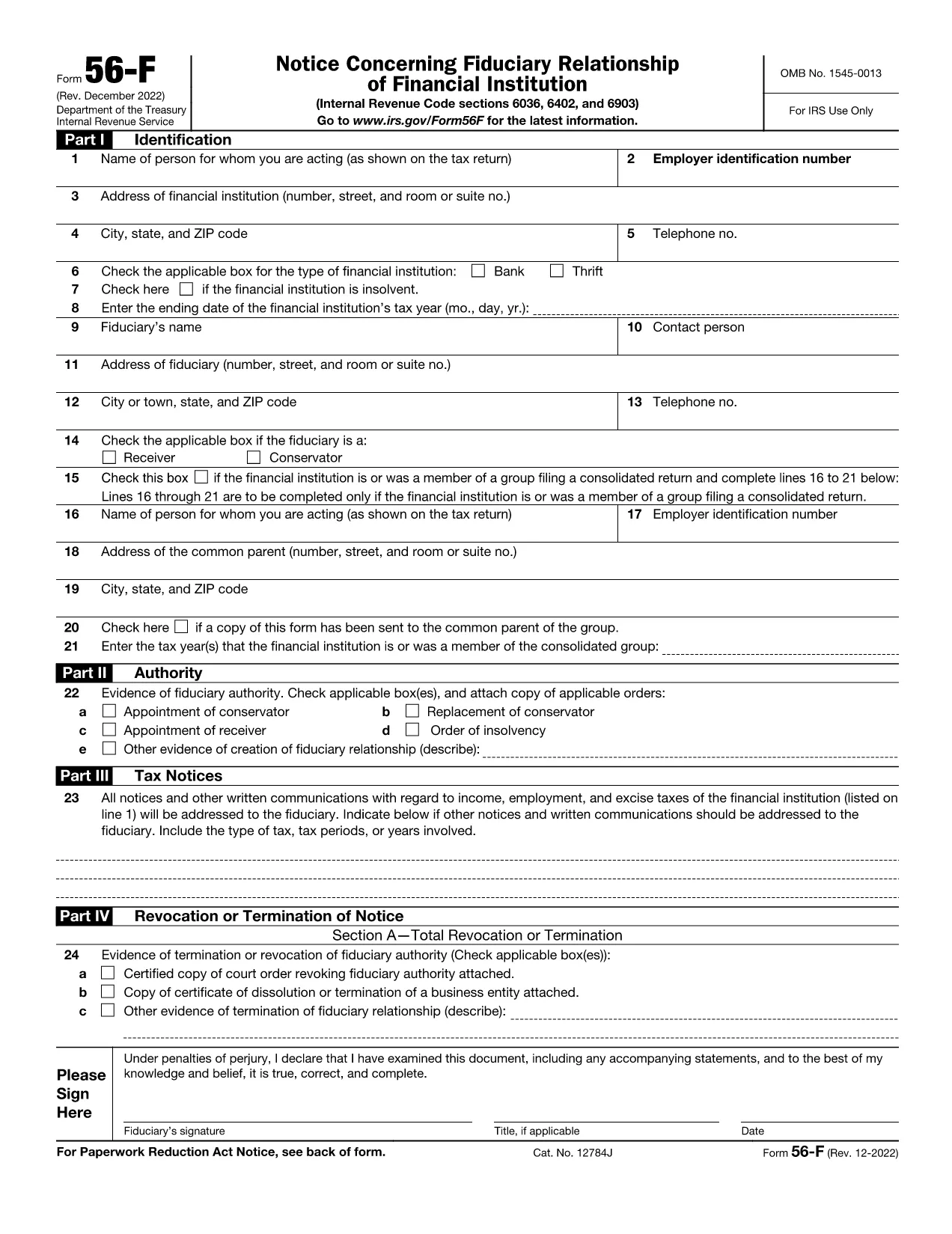
The IRS Form 56F (Fiduciary Notice) is used to inform the Internal Revenue Service of a fiduciary relationship for tax purposes. Whether you are an executor, trustee, or administrator, the form lets the IRS know who is responsible for filing tax returns on behalf of another person or estate.

What Is IRS Form 56F?

Form 56F is required when a fiduciary is appointed to manage the tax affairs of a decedent, an estate, a trust, or another taxpayer. It establishes a clear line of communication between the fiduciary and the IRS, helping prevent mis‑filings and potential penalties.

How to Fill Out Form 56F Online

Instead of downloading the PDF and opening a separate editor, simply click the "Fill out this form" button on this page. The Formize PDF Filler app loads directly in your browser, allowing you to:

  • Enter information into each field with auto‑save.
  • Upload supporting documents.
  • Add an electronic signature that meets IRS requirements.
  • Download, print, or email the completed form instantly.

Common Mistakes to Avoid

  • Leaving fields blank: Every required box must be completed; otherwise, the IRS may reject the submission.
  • Missing signature: Both the fiduciary and, when applicable, the person for whom you act must sign.
  • Incorrect SSN/EIN: Double‑check the numbers to avoid processing delays.
  • Outdated form version: Use the latest PDF (linked below) to ensure compliance.

Where to Submit the Completed Form

After you finish the online fillable version, you can:

  • Mail the printed form to the IRS service center listed in the instructions.
  • Fax the form if you have a fax number for the relevant IRS office.
  • Submit electronically through the IRS e‑file system (if your tax professional supports it).

Download the Fillable PDF

For users who prefer a traditional download, the official fillable PDF is available below. It is the same document that powers the Formize online editor.

Download IRS Form 56F (PDF)

FAQ
  • Who must file IRS Form 56F?

    Any fiduciary—such as an executor, administrator, or trustee—who is responsible for filing tax returns on behalf of another person, estate, or trust must file Form 56F.

  • Can I submit Form 56F electronically?

    Yes. After completing the fillable PDF with Formize, you can download the file and submit it electronically through an authorized e‑file service or fax it to the IRS if permitted.

  • Do I need a wet ink signature?

    The IRS accepts electronic signatures that meet the requirements of the Electronic Signatures in Global and National Commerce (ESIGN) Act. Formize’s e‑sign tool provides a compliant signature.

  • What supporting documents should I attach?

    Attach a copy of the legal document that appointed you as fiduciary (will, court order, trust agreement) and a valid ID for the fiduciary. Include the decedent’s Social Security number or EIN.

  • How long does it take for the IRS to process Form 56F?

    Processing time varies, but the IRS typically acknowledges receipt within 30 days. Keep a copy of the filed form for your records.

  • Is there a fee to use Formize’s fillable PDF editor?

    Formize offers a free, no‑login version for basic fillable forms like Form 56F. Advanced features are available in paid plans, but the basic fill‑out and e‑sign functions are free.

  • What if I make a mistake after submitting?

    You can file a corrected Form 56F using the same process. Clearly mark the corrected form as “Amended” in the top margin and include an explanation of the changes.

  • Where can I find the official instructions for Form 56F?

    The official IRS instructions are included in the PDF linked above or can be accessed on the IRS website under “Form 56F Instructions.”

COME

Come compilare IRS Form 56F gratuitamente, online in 5 semplici passaggi:

  1. 1
    Click the Fill‑out Button
    Press the “Fill out this form” button on the page. The Formize PDF Filler loads instantly in your browser.
  2. 2
    Enter Your Information
    Complete each field. The editor auto‑saves your entries, so you won’t lose data if you navigate away.
  3. 3
    Add Your Electronic Signature
    Use the built‑in e‑sign tool to sign the form. The signature complies with IRS electronic filing rules.
  4. 4
    Review and Submit
    Double‑check all entries, then click “Download” to save a copy, or use the “Email” option to send it directly to your tax professional.
  5. 5
    Print or Mail (if required)
    If the IRS requires a hard copy, print the completed PDF and mail it to the address indicated in the form instructions.
App Formize PDF Filler
DI

Moduli fiscali

IRS Form 56F è uno dei moduli fiscali che sono documenti utilizzati per segnalare informazioni relative alle imposte all'autorità fiscale competente. Esistono vari tipi di moduli fiscali, inclusi moduli fiscali federali, statali e locali, che possono variare a seconda delle circostanze e dell'ubicazione del contribuente.

CARATTERISTICHE

Compilatore PDF

Il modo più semplice per compilare moduli PDF online

  • Compila rapidamente IRS Form 56F
    Cerchi un modo per compilare rapidamente IRS Form 56F online? Con il nostro compilatore di moduli PDF gratuito online, saprai come modificare e compilare questo documento PDF in meno di un minuto.
  • Editor PDF online facile da usare
    Stufo di stampare file PDF in modo da poterli modificare, prima di riscansionarli e rispedirli? Modifica documenti PDF gratuitamente online. Utilizza il nostro editor PDF online per risparmiare tempo e carta.
  • Grandi strumenti, tutte le piattaforme
    Ti stai chiedendo come inserire IRS Form 56F su un Mac o forse come utilizzare un riempitivo PDF gratuito? I nostri strumenti PDF online funzionano su tutte le piattaforme.
  • Archiviazione sicura dei file
    I file "IRS Form 56F" completati vengono archiviati in un database protetto gestito dall'hosting Amazon Cloud. Puoi eliminare i tuoi file dal nostro sistema in qualsiasi momento. In ogni caso, questi file vengono automaticamente cancellati dopo 24 ore.
  • Chatta con {parola chiave}
    Chatta con "IRS Form 56F" su Chatize che è un assistente di lettura PDF gratuito. Fai domande e ottieni risposte da "IRS Form 56F". Basta fare clic sul pulsante Chatta con il documento in alto.

Elimina sessione di riempimento

Eliminare la sessione di riempimento selezionata? In questo caso, i progressi nella compilazione del modulo andranno persi.

Elimina la sessione di modifica

Eliminare la sessione di editing selezionata? In questo caso, i tuoi progressi nella creazione e modifica del modulo andranno persi.