
Επιλέξτε γλώσσα

IRS Form 56F – Fillable PDF Fiduciary Notice

  1. Χώρα ΗΠΑ
  2. Γλώσσα Αγγλικά
  3. Δραστηριότητα Φόροι
  4. Τμήμα IRS
IRS Form 56F – Fillable PDF Fiduciary Notice

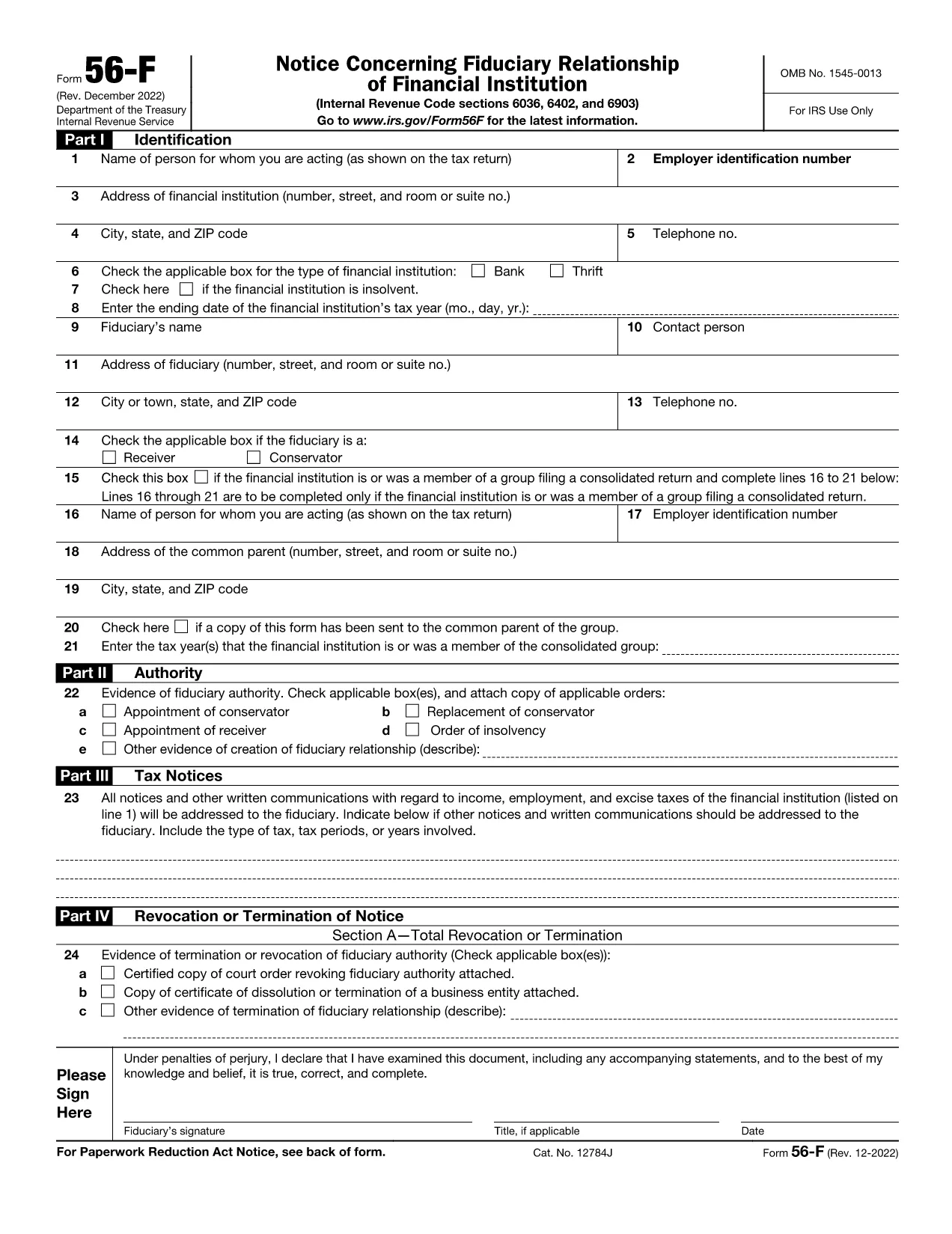
The IRS Form 56F (Fiduciary Notice) is used to inform the Internal Revenue Service of a fiduciary relationship for tax purposes. Whether you are an executor, trustee, or administrator, the form lets the IRS know who is responsible for filing tax returns on behalf of another person or estate.

What Is IRS Form 56F?

Form 56F is required when a fiduciary is appointed to manage the tax affairs of a decedent, an estate, a trust, or another taxpayer. It establishes a clear line of communication between the fiduciary and the IRS, helping prevent mis‑filings and potential penalties.

How to Fill Out Form 56F Online

Instead of downloading the PDF and opening a separate editor, simply click the "Fill out this form" button on this page. The Formize PDF Filler app loads directly in your browser, allowing you to:

  • Enter information into each field with auto‑save.
  • Upload supporting documents.
  • Add an electronic signature that meets IRS requirements.
  • Download, print, or email the completed form instantly.

Common Mistakes to Avoid

  • Leaving fields blank: Every required box must be completed; otherwise, the IRS may reject the submission.
  • Missing signature: Both the fiduciary and, when applicable, the person for whom you act must sign.
  • Incorrect SSN/EIN: Double‑check the numbers to avoid processing delays.
  • Outdated form version: Use the latest PDF (linked below) to ensure compliance.

Where to Submit the Completed Form

After you finish the online fillable version, you can:

  • Mail the printed form to the IRS service center listed in the instructions.
  • Fax the form if you have a fax number for the relevant IRS office.
  • Submit electronically through the IRS e‑file system (if your tax professional supports it).

Download the Fillable PDF

For users who prefer a traditional download, the official fillable PDF is available below. It is the same document that powers the Formize online editor.

Download IRS Form 56F (PDF)

FAQ
  • Who must file IRS Form 56F?

    Any fiduciary—such as an executor, administrator, or trustee—who is responsible for filing tax returns on behalf of another person, estate, or trust must file Form 56F.

  • Can I submit Form 56F electronically?

    Yes. After completing the fillable PDF with Formize, you can download the file and submit it electronically through an authorized e‑file service or fax it to the IRS if permitted.

  • Do I need a wet ink signature?

    The IRS accepts electronic signatures that meet the requirements of the Electronic Signatures in Global and National Commerce (ESIGN) Act. Formize’s e‑sign tool provides a compliant signature.

  • What supporting documents should I attach?

    Attach a copy of the legal document that appointed you as fiduciary (will, court order, trust agreement) and a valid ID for the fiduciary. Include the decedent’s Social Security number or EIN.

  • How long does it take for the IRS to process Form 56F?

    Processing time varies, but the IRS typically acknowledges receipt within 30 days. Keep a copy of the filed form for your records.

  • Is there a fee to use Formize’s fillable PDF editor?

    Formize offers a free, no‑login version for basic fillable forms like Form 56F. Advanced features are available in paid plans, but the basic fill‑out and e‑sign functions are free.

  • What if I make a mistake after submitting?

    You can file a corrected Form 56F using the same process. Clearly mark the corrected form as “Amended” in the top margin and include an explanation of the changes.

  • Where can I find the official instructions for Form 56F?

    The official IRS instructions are included in the PDF linked above or can be accessed on the IRS website under “Form 56F Instructions.”

ΠΩΣ ΝΑ

Πώς να συμπληρώσετε το IRS Form 56F δωρεάν, στο διαδίκτυο με 5 εύκολα βήματα:

  1. 1
    Click the Fill‑out Button
    Press the “Fill out this form” button on the page. The Formize PDF Filler loads instantly in your browser.
  2. 2
    Enter Your Information
    Complete each field. The editor auto‑saves your entries, so you won’t lose data if you navigate away.
  3. 3
    Add Your Electronic Signature
    Use the built‑in e‑sign tool to sign the form. The signature complies with IRS electronic filing rules.
  4. 4
    Review and Submit
    Double‑check all entries, then click “Download” to save a copy, or use the “Email” option to send it directly to your tax professional.
  5. 5
    Print or Mail (if required)
    If the IRS requires a hard copy, print the completed PDF and mail it to the address indicated in the form instructions.
Διαμορφώστε την εφαρμογή Filler PDF
ΣΧΕΤΙΚΆ ΜΕ

Ομοσπονδιακά φορολογικά έντυπα

Το IRS Form 56F είναι ένα από τα ομοσπονδιακά φορολογικά έντυπα που είναι έγγραφα που χρησιμοποιούνται για την αναφορά και την υποβολή ομοσπονδιακών φόρων εισοδήματος στην Υπηρεσία Εσωτερικών Εσόδων (IRS) στις Ηνωμένες Πολιτείες. Αυτά τα έντυπα χρησιμοποιούνται από άτομα, επιχειρήσεις και οργανισμούς για να αναφέρουν το εισόδημά τους, τις κρατήσεις και άλλες σχετικές πληροφορίες που είναι απαραίτητες για τον υπολογισμό της ομοσπονδιακής φορολογικής τους υποχρέωσης.

Το πιο συχνά χρησιμοποιούμενο ομοσπονδιακό φορολογικό έντυπο είναι το Έντυπο 1040, το οποίο χρησιμοποιείται από μεμονωμένους φορολογούμενους για να αναφέρουν τον φόρο εισοδήματος φυσικών προσώπων. Άλλες φόρμες που χρησιμοποιούνται συνήθως περιλαμβάνουν το Φόρμα 1065 για συνεργασίες, Έντυπο 1120 για εταιρείες και Έντυπο 990 για οργανισμούς που απαλλάσσονται από φόρους.

Τα ομοσπονδιακά φορολογικά έντυπα απαιτούν συνήθως από τους φορολογούμενους να αναφέρουν διάφορες πηγές εισοδήματος, όπως μισθούς, μισθούς και φιλοδωρήματα, καθώς και εισόδημα από επενδύσεις, ενοικιάσεις ακινήτων και άλλες πηγές. Τα έντυπα επιτρέπουν επίσης στους φορολογούμενους να διεκδικούν εκπτώσεις και πιστώσεις για διάφορα έξοδα, όπως φιλανθρωπικές εισφορές, τόκους στεγαστικών δανείων και έξοδα υγειονομικής περίθαλψης.

Είναι σημαντικό να υποβάλλετε τα ομοσπονδιακά φορολογικά έντυπα με ακρίβεια και έγκαιρα, καθώς η αποτυχία να το κάνετε μπορεί να οδηγήσει σε κυρώσεις και τόκους από το IRS.

ΧΑΡΑΚΤΗΡΙΣΤΙΚΆ

Πλήρωση PDF

Ο ευκολότερος τρόπος για να συμπληρώσετε το IRS Form 56F στο διαδίκτυο

  • Συμπληρώστε γρήγορα IRS Form 56F
    Αναζητάτε έναν τρόπο να γεμίσετε γρήγορα το IRS Form 56F στο διαδίκτυο; Με το ηλεκτρονικό μας δωρεάν συμπλήρωμα φόρμας PDF, θα ξέρετε πώς να επεξεργαστείτε και να συμπληρώσετε αυτό το έγγραφο pdf σε λιγότερο από ένα λεπτό.
  • Εύκολο στη χρήση διαδικτυακό πρόγραμμα επεξεργασίας PDF
    Βαρεθήκατε να εκτυπώνετε αρχεία PDF ώστε να μπορείτε να τα επεξεργαστείτε, πριν τα σαρώσετε ξανά και τα στείλετε πίσω; Επεξεργαστείτε έγγραφα PDF δωρεάν online. Χρησιμοποιήστε το ηλεκτρονικό μας πρόγραμμα επεξεργασίας pdf για να εξοικονομήσετε χρόνο και χαρτί.
  • Υπέροχα εργαλεία, όλες οι πλατφόρμες
    Αναρωτιέστε πώς να συμπληρώσετε το IRS Form 56F σε Mac ή μήπως πώς να χρησιμοποιήσετε ένα πρόγραμμα πλήρωσης PDF δωρεάν; Τα διαδικτυακά μας εργαλεία PDF λειτουργούν σε όλες τις πλατφόρμες.
  • Ασφαλής αποθήκευση αρχείων
    Τα ολοκληρωμένα αρχεία "IRS Form 56F" αποθηκεύονται σε μια ασφαλή βάση δεδομένων που διαχειρίζεται η φιλοξενία Amazon Cloud. Μπορείτε να διαγράψετε τα αρχεία σας από το σύστημά μας ανά πάσα στιγμή. Σε κάθε περίπτωση, αυτά τα αρχεία διαγράφονται αυτόματα μετά από 24 ώρες.
  • Συζήτηση με IRS Form 56F
    Συνομιλήστε με το "IRS Form 56F" στο Chatize που είναι ένας δωρεάν βοηθός ανάγνωσης PDF. Κάντε ερωτήσεις και λάβετε απαντήσεις από το "IRS Form 56F". Απλώς κάντε κλικ στο κουμπί Συζήτηση με έγγραφο παραπάνω.

Διαγραφή συνεδρίας συμπλήρωσης

Διαγραφή της επιλεγμένης περιόδου συμπλήρωσης; Σε αυτήν την περίπτωση, η πρόοδός σας στη συμπλήρωση της φόρμας θα χαθεί.

Διαγραφή συνεδρίας επεξεργασίας

Διαγραφή της επιλεγμένης συνεδρίας επεξεργασίας; Σε αυτήν την περίπτωση, η πρόοδός σας στη δημιουργία και την επεξεργασία της φόρμας θα χαθεί.