
Выберите язык

Fillable IRS Form 941‑SS (Quarterly Federal Tax Return)

  1. Страна США
  2. Язык Английский
  3. Вид деятельности Налоги
  4. Департамент Служба внутренних доходов
Fillable IRS Form 941‑SS (Quarterly Federal Tax Return)

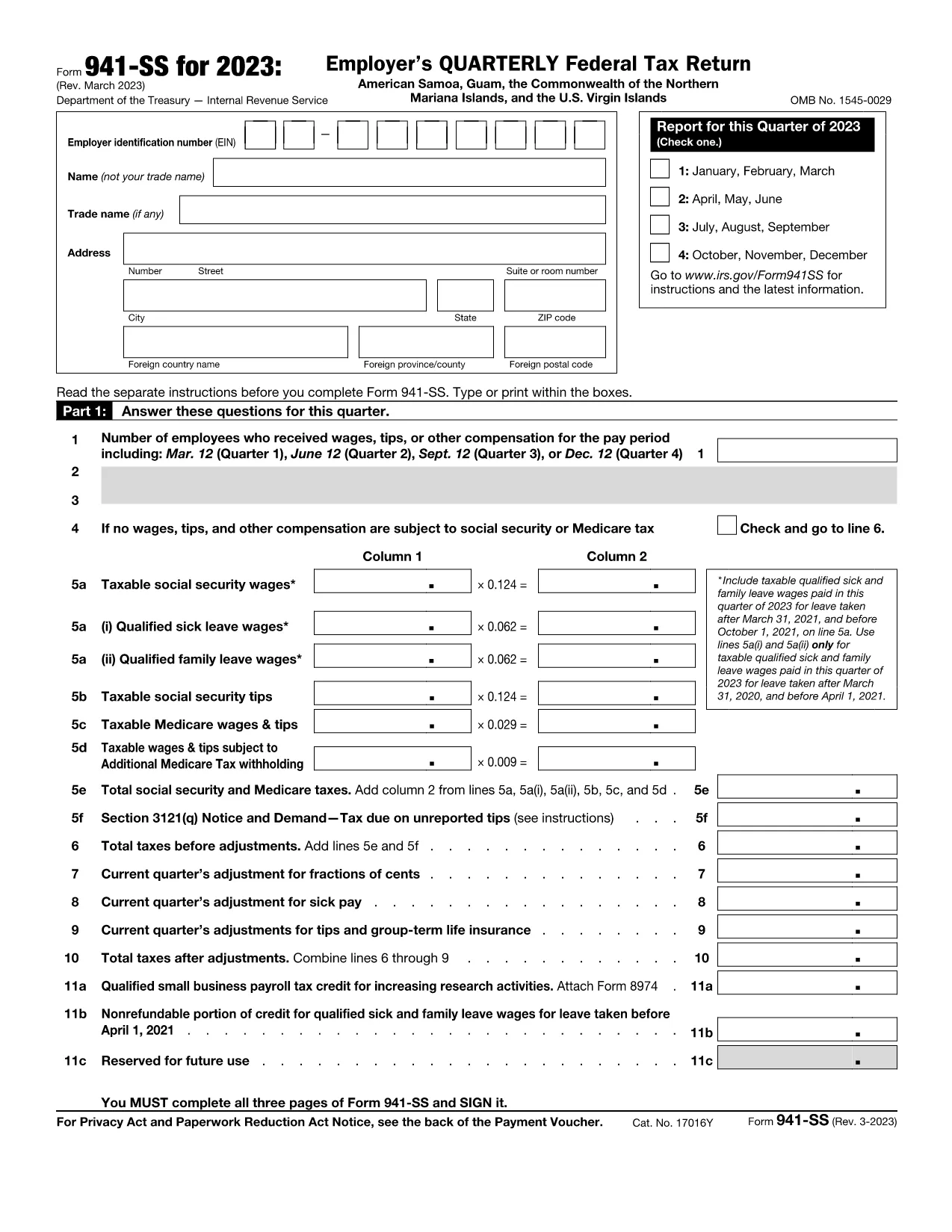
Form 941‑SS is the Employer’s Quarterly Federal Tax Return used by businesses operating in U.S. territories (American Samoa, Guam, the Northern Mariana Islands, and the U.S. Virgin Islands). This fillable PDF lets you enter payroll data quickly, save a digital copy, and print or e‑file without the hassle of paper forms.

What Is Form 941‑SS and Who Needs It?

Employers who pay wages to employees in the territories must file Form 941‑SS each quarter. The form reports income tax, Social Security tax, and Medicare tax withheld from employee wages, as well as the employer’s share of those taxes.

Key Sections and Required Information

The form is divided into clear sections:

  • Employer Information – EIN, name, address, and filing quarter.
  • Wage & Tax Data – Total wages, tips, other compensation, and taxes withheld.
  • Adjustments – Corrections for prior quarters, tax credits, and overpayments.
  • Tax Liability – Calculations for Social Security, Medicare, and additional taxes.
  • Signature – Authorized officer’s signature and date.

How to Complete the Fillable PDF with Formize

Instead of downloading the PDF and opening a separate editor, simply click the “Fill out this form” button on this page. The Formize PDF Filler app loads instantly, providing an intuitive, web‑based interface.

Common Mistakes to Avoid

  • Leaving the EIN blank or entering an incorrect number.
  • Mis‑reporting the quarter (e.g., using Q1 dates for a Q2 filing).
  • Failing to include adjustments from prior quarters.
  • Submitting without a signature or date.

Where to Submit Your Completed Form

After filling out and saving the form, you can:

  • Print and mail it to the IRS processing center listed in the instructions for your territory.
  • Upload the PDF through the IRS e‑file system if you have an approved electronic filing method.

Always keep a copy for your records and verify the filing deadline (the last day of the month following the quarter).

Инструкции

  • Форма 941-СС Инструкции - Инструкция по форме 941-СС для работодателя Американское Самоа, Гуам, Содружество Северных Марианских островов и Виргинские острова США
ЧАСТО ЗАДАВАЕМЫЕ ВОПРОСЫ
  • Who must file Form 941‑SS?

    All employers who have employees in U.S. territories and are subject to federal employment taxes must file Form 941‑SS each quarter.

  • What is the filing deadline for Form 941‑SS?

    The form is due by the last day of the month following the end of the quarter (e.g., April 30 for Q1).

  • Can I file Form 941‑SS electronically?

    Yes, if you have an approved e‑file provider. You can also submit a printed copy to the IRS address for your territory.

  • What if I have no employees for a quarter?

    You can file a “zero” return, indicating no wages or taxes were paid, to avoid penalties.

  • How do I correct an error on a previously filed Form 941‑SS?

    File Form 941‑SSX (adjusted return) for the quarter with the mistake, or amend the original filing following IRS instructions.

  • Is there a penalty for late filing?

    Yes. The IRS may assess a penalty of 5% of the unpaid tax per month, up to 25%, plus interest on the outstanding amount.

  • Do I need to attach supporting documents?

    Generally, you do not attach supporting schedules with the PDF, but keep them on file in case the IRS requests them.

  • Can I use the same form for all U.S. territories?

    Form 941‑SS is specifically designed for all U.S. territories; the same PDF applies to American Samoa, Guam, NMI, and the U.S. Virgin Islands.

КАК ПОЛЬЗОВАТЬСЯ

Как бесплатно заполнить Form 941-SS онлайн за 4 простых шагов:

  1. 1
    Click the Fillable Form Button
    On this page, click the bright “Fill out this form” button. The Formize PDF Filler app will open in a new tab.
  2. 2
    Enter Your Payroll Data
    Use your keyboard to type directly into each field. The form automatically saves your progress as you go.
  3. 3
    Review and Sign
    Check all entries for accuracy, then add your electronic signature using the built‑in signature tool.
  4. 4
    Save, Print or Submit
    When finished, click “Save PDF” to download a copy, or choose “Print” to mail a hard copy. You can also export the file for electronic filing.
Приложение Formize PDF Filler
О ПРИЛОЖЕНИИ

Налоговые формы

Form 941-SS — это одна из налоговых форм, которые представляют собой документы, используемые для предоставления информации, связанной с налогами, в соответствующий налоговый орган. Существуют различные типы налоговых форм, в том числе федеральные, государственные и местные налоговые формы, которые могут различаться в зависимости от обстоятельств и местонахождения налогоплательщика.

ФУНКЦИИ

Инструмент для запролнения PDF форм

Самый простой способ заполнить Form 941-SS онлайн

  • Быстрое заполнение Form 941-SS
    Ищете способ быстро заполнить Form 941-SS онлайн? С нашим бесплатным онлайн-инструментом вы узнаете, как редактировать заполнить этот PDF-документ менее чем за минуту.
  • Простой в использовании онлайн-редактор PDF
    Надоело распечатывать PDF-файлы, чтобы их можно было отредактировать перед повторным сканированием и отправкой обратно? Редактируйте документы PDF бесплатно онлайн. Используйте наш онлайн-редактор PDF, чтобы сэкономить время и бумагу.
  • Отличные инструменты, все платформы
    Хотите знать, как заполнить Form 941-SS на Mac или, может быть, как использовать бесплатный заполнитель PDF? Наши онлайн-инструменты PDF работают на всех платформах.
  • Безопасное хранение файлов
    Файлы заполненных "Form 941-SS" хранятся в защищенной базе данных, управляемой облачным хостингом Amazon. Вы можете удалить свои файлы из нашей системы в любое время. В любом случае эти файлы автоматически удаляются через 24 часа.
  • Чат с Form 941-SS
    Откройте чат с "Form 941-SS" в Chatize — бесплатном помощнике для чтения PDF-файлов. Задавайте вопросы и получайте ответы от "Form 941-SS". Просто нажмите кнопку Чат с документом выше.

Удалить данные о заполненной форме

Удалить данные о заполненной форме? В этом случае Ваш прогресс заполнения этой формы будет утерян.

Удалить сеанс редактирования

Удалить выбранный сеанс редактирования? В этом случае ваш прогресс в создании и редактировании формы будет утерян.