
Оберіть мову

Fillable IRS Form 843 – Claim Refund or Request Abatement

  1. Країна США
  2. Мова англійська
  3. діяльність податки
  4. відділ Служба внутрішніх доходів
Fillable IRS Form 843 – Claim Refund or Request Abatement

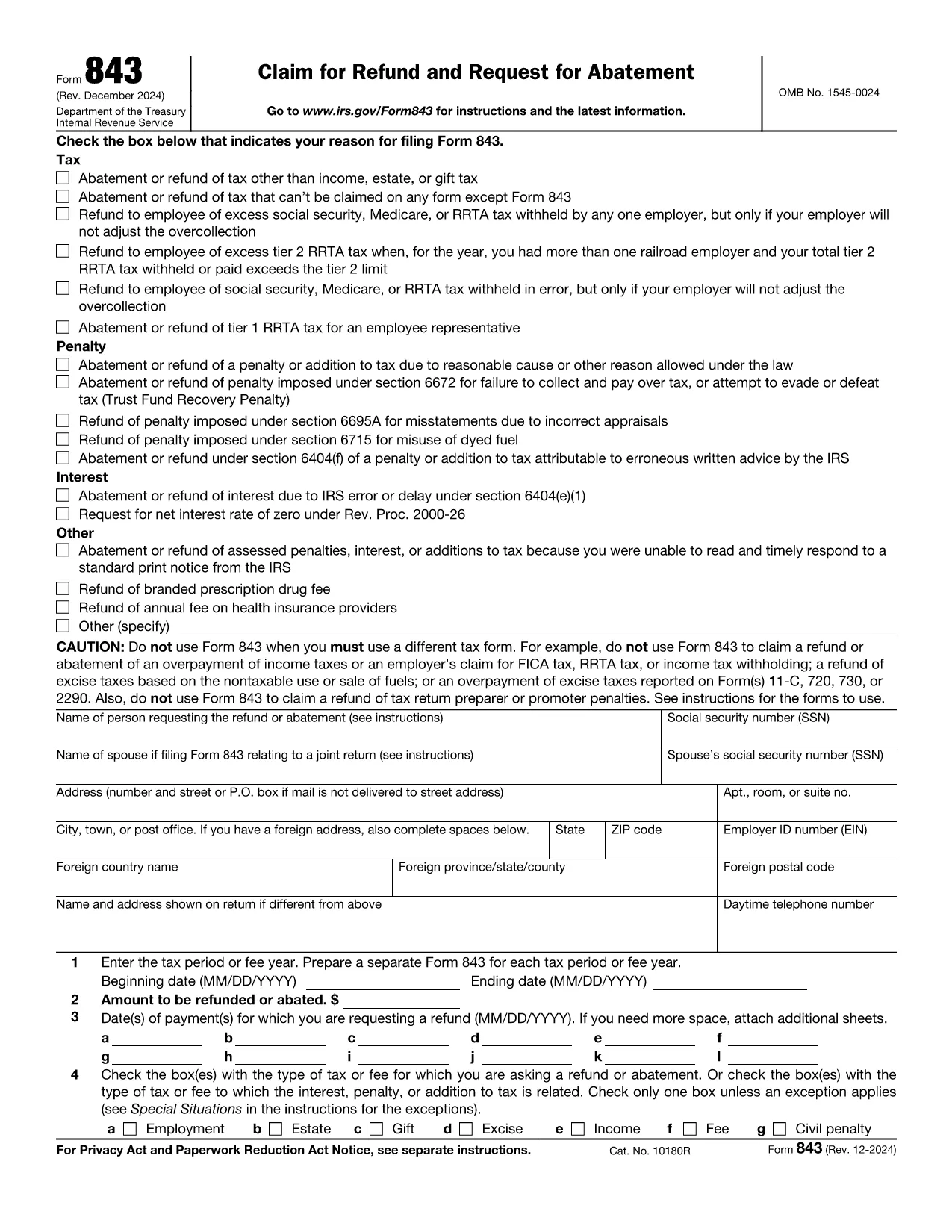
Form 843 (Claim for Refund and Request for Abatement) lets taxpayers ask the Internal Revenue Service for a refund of taxes, penalties, interest, or fees that were paid in error. Whether you’re seeking a refund on an employment tax, an excise tax, or a penalty, this two‑page form is the official way to make the request.

What Is IRS Form 843?

Form 843 is a multipurpose tax document used for:

  • Refunding overpaid taxes (e.g., employment, estate, gift, excise).
  • Requesting abatement of penalties or interest.
  • Claiming refunds for specific fees such as the branded prescription drug fee.

When Should You Use Form 843?

You should file Form 843 when you have a legitimate reason to believe the IRS collected more than it was entitled to, or when an error caused an improper penalty or interest assessment. Typical scenarios include:

  • Incorrect calculation of employment taxes.
  • Excess Tier 2 RRTA tax.
  • Interest charged due to IRS processing delays.
  • Fee refunds for prescription drug fees.

How to Complete Form 843 Online with Formize

Formize makes the process painless. Follow these simple steps:

  1. Click the "Fill out this form" button on this page.
  2. The Formize PDF Filler app loads in your browser – no download needed.
  3. Enter your taxpayer information, tax period, amount, and reason for the claim.
  4. Attach any supporting documents (e.g., W‑2s, Form 8947) using the attachment field.
  5. Review, sign electronically, and submit directly to the IRS or download the completed PDF for mailing.

Common Mistakes to Avoid

  • Leaving lines blank: Every applicable line must be completed, even if the answer is “0”.
  • Incorrect tax type selection: Choose the exact tax or fee from the list on Line 4.
  • Missing signatures: Both the taxpayer and, if applicable, the authorized representative must sign.
  • Insufficient documentation: Attach copies of the original tax return or related forms to support your claim.

Where to Submit Your Completed Form

After filling out Form 843, you have two options:

  • Mail: Send the signed PDF to the address listed in the form’s instructions for your tax type.
  • Electronic submission: Use the IRS’s secure e‑file portal if you have a valid e‑file account.

Using Formize’s online filler ensures the PDF is correctly formatted for both mailing and electronic submission.

Інструкції

  • Форма 843 Інструкція - Інструкції щодо форми 843, Клейм для повернення коштів та запиту на отримання
FAQ
  • What tax types can I claim on Form 843?

    Form 843 covers employment tax, estate tax, gift tax, excise tax, fee refunds, and certain interest or penalty abatements. It does not apply to regular income tax refunds.

  • Do I need a certified tax professional to fill out Form 843?

    No. The form is straightforward, and with Formize’s fillable PDF you can complete it yourself. However, consult a tax professional if your situation is complex.

  • How long does the IRS take to process a Form 843 request?

    Processing time varies, but most refunds or abatements are issued within 60–90 days after the IRS receives a complete and accurate submission.

  • Can I file Form 843 electronically?

    Yes. After completing the form with Formize, you can upload the PDF to the IRS e‑file portal if you have an active e‑file account.

  • What supporting documents should I include?

    Attach copies of the original tax return, payment receipts, related forms (e.g., W‑2, Form 8947), and any IRS notices that explain the penalty or interest.

  • Is there a filing fee for Form 843?

    No. There is no fee to file Form 843; however, you may incur postage costs if mailing a paper copy.

  • Can I request a refund for a penalty that was assessed in error?

    Yes. If you can demonstrate that the penalty was incorrectly assessed, you can use Form 843 to request an abatement.

ЯК

Як безкоштовно заповнити Form 843 онлайн за 5 простих кроків:

  1. 1
    Open the Fillable Form
    Click the "Fill out this form" button on this page. The Formize PDF Filler app will load directly in your browser.
  2. 2
    Enter Your Information
    Complete each section of Form 843 – taxpayer details, tax period, amount, and reason for the claim – using the on‑screen fields.
  3. 3
    Attach Supporting Documents
    Use the attachment option to upload copies of W‑2s, prior tax returns, or any other documents that support your refund or abatement request.
  4. 4
    Review and Sign
    Double‑check all entries, then apply your electronic signature in the signature field.
  5. 5
    Submit or Download
    Choose to submit the completed form directly to the IRS through the portal, or download the PDF to mail it yourself.
Програма Formize PDF Filler
ПРО

Податкові форми

Form 843 – це одна з податкових форм, які є документами, які використовуються для подання відомостей про податки до відповідного податкового органу. Існують різні типи податкових форм, у тому числі федеральні, штатні та місцеві податкові форми, які можуть відрізнятися залежно від обставин і місцезнаходження платника податків.

ОСОБЛИВОСТІ

Наповнювач PDF

Найпростіший спосіб заповнювати PDF-форми онлайн

  • Швидко заповніть Form 843
    Шукаєте спосіб швидко заповнити Form 843 онлайн? За допомогою нашого безкоштовного онлайн-заповнювача PDF-форм ви знатимете, як редагувати та заповнювати цей PDF-документ менш ніж за хвилину.
  • Простий у використанні онлайн-редактор PDF
    Набридло роздруковувати PDF-файли, щоб ви могли їх редагувати, перш ніж сканувати повторно та надсилати назад? Безкоштовно редагуйте PDF-документи онлайн. Використовуйте наш онлайн-редактор PDF, щоб заощадити час і папір.
  • Чудові інструменти, усі платформи
    Хочете знати, як заповнити Form 843 на комп’ютері Mac або, можливо, як використовувати PDF-заповнювач безкоштовно? Наші онлайн-інструменти PDF працюють на всіх платформах.
  • Безпечне зберігання файлів
    Завершені файли "Form 843" зберігаються в захищеній базі даних, якою керує хостинг Amazon Cloud. Ви можете будь-коли видалити свої файли з нашої системи. У будь-якому випадку ці файли автоматично видаляються через 24 години.
  • Чат із Form 843
    Спілкуйтеся з "Form 843" у Chatize, який є безкоштовним помічником для читання PDF. Ставте запитання та отримуйте відповіді від "Form 843". Просто натисніть кнопку Chat With Document вище.

Видалити сеанс заповнення

Видалити вибраний сеанс заповнення? В цьому випадку ваш прогрес у заповненні форми буде втрачений.

Видалити сеанс редагування

Видалити вибраний сеанс редагування? У цьому випадку ваш прогрес у створенні та редагуванні форми буде втрачено.