
Sprache auswählen

Fillable IRS Form 843 – Claim Refund or Request Abatement

  1. Land USA
  2. Sprache Englisch
  3. Aktivität Steuern
  4. Abteilung Finanzamt
Fillable IRS Form 843 – Claim Refund or Request Abatement

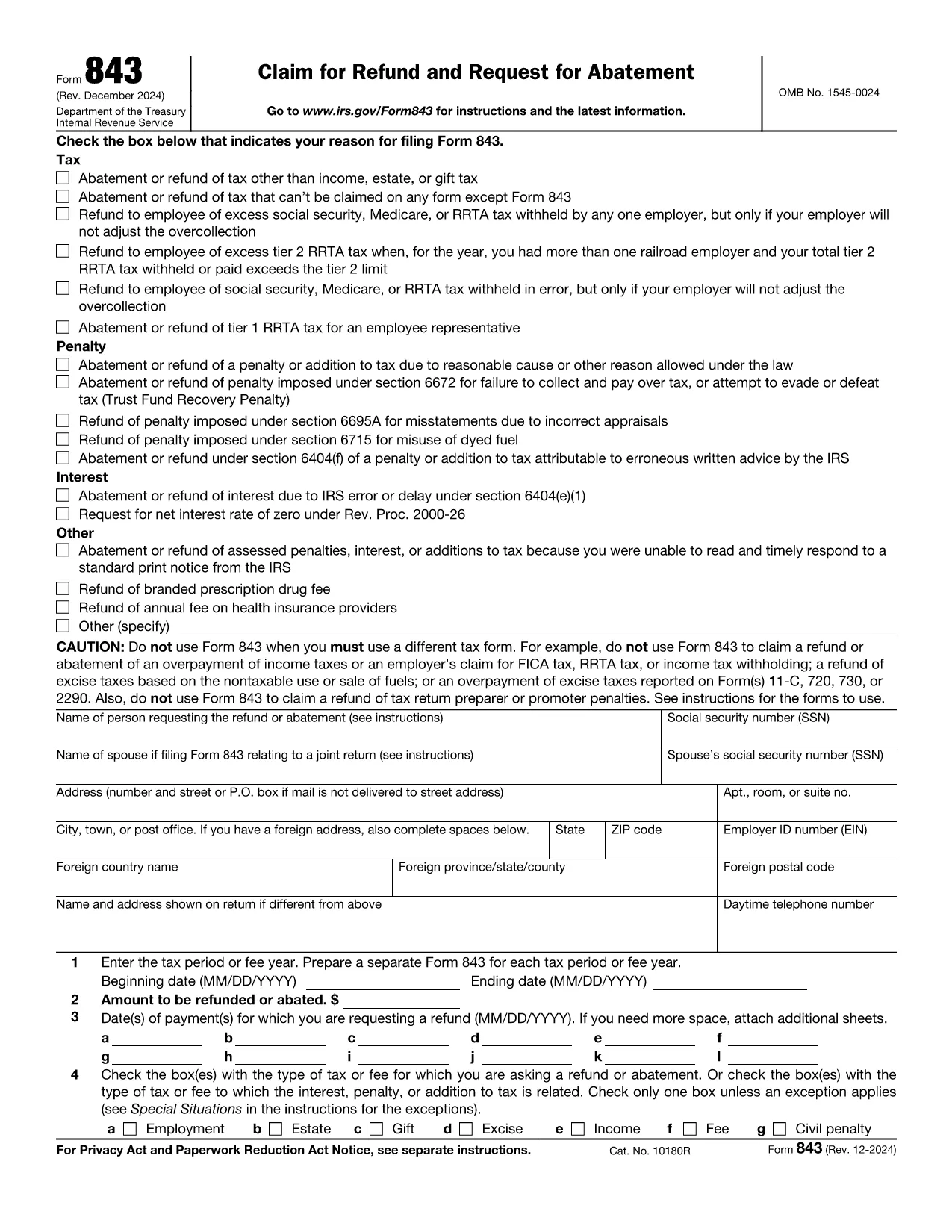
Form 843 (Claim for Refund and Request for Abatement) lets taxpayers ask the Internal Revenue Service for a refund of taxes, penalties, interest, or fees that were paid in error. Whether you’re seeking a refund on an employment tax, an excise tax, or a penalty, this two‑page form is the official way to make the request.

What Is IRS Form 843?

Form 843 is a multipurpose tax document used for:

  • Refunding overpaid taxes (e.g., employment, estate, gift, excise).
  • Requesting abatement of penalties or interest.
  • Claiming refunds for specific fees such as the branded prescription drug fee.

When Should You Use Form 843?

You should file Form 843 when you have a legitimate reason to believe the IRS collected more than it was entitled to, or when an error caused an improper penalty or interest assessment. Typical scenarios include:

  • Incorrect calculation of employment taxes.
  • Excess Tier 2 RRTA tax.
  • Interest charged due to IRS processing delays.
  • Fee refunds for prescription drug fees.

How to Complete Form 843 Online with Formize

Formize makes the process painless. Follow these simple steps:

  1. Click the "Fill out this form" button on this page.
  2. The Formize PDF Filler app loads in your browser – no download needed.
  3. Enter your taxpayer information, tax period, amount, and reason for the claim.
  4. Attach any supporting documents (e.g., W‑2s, Form 8947) using the attachment field.
  5. Review, sign electronically, and submit directly to the IRS or download the completed PDF for mailing.

Common Mistakes to Avoid

  • Leaving lines blank: Every applicable line must be completed, even if the answer is “0”.
  • Incorrect tax type selection: Choose the exact tax or fee from the list on Line 4.
  • Missing signatures: Both the taxpayer and, if applicable, the authorized representative must sign.
  • Insufficient documentation: Attach copies of the original tax return or related forms to support your claim.

Where to Submit Your Completed Form

After filling out Form 843, you have two options:

  • Mail: Send the signed PDF to the address listed in the form’s instructions for your tax type.
  • Electronic submission: Use the IRS’s secure e‑file portal if you have a valid e‑file account.

Using Formize’s online filler ensures the PDF is correctly formatted for both mailing and electronic submission.

Anweisungen

FAQ
  • What tax types can I claim on Form 843?

    Form 843 covers employment tax, estate tax, gift tax, excise tax, fee refunds, and certain interest or penalty abatements. It does not apply to regular income tax refunds.

  • Do I need a certified tax professional to fill out Form 843?

    No. The form is straightforward, and with Formize’s fillable PDF you can complete it yourself. However, consult a tax professional if your situation is complex.

  • How long does the IRS take to process a Form 843 request?

    Processing time varies, but most refunds or abatements are issued within 60–90 days after the IRS receives a complete and accurate submission.

  • Can I file Form 843 electronically?

    Yes. After completing the form with Formize, you can upload the PDF to the IRS e‑file portal if you have an active e‑file account.

  • What supporting documents should I include?

    Attach copies of the original tax return, payment receipts, related forms (e.g., W‑2, Form 8947), and any IRS notices that explain the penalty or interest.

  • Is there a filing fee for Form 843?

    No. There is no fee to file Form 843; however, you may incur postage costs if mailing a paper copy.

  • Can I request a refund for a penalty that was assessed in error?

    Yes. If you can demonstrate that the penalty was incorrectly assessed, you can use Form 843 to request an abatement.

WIE MAN

So füllen Sie Form 843 kostenlos online in 5 einfachen Schritten aus:

  1. 1
    Open the Fillable Form
    Click the "Fill out this form" button on this page. The Formize PDF Filler app will load directly in your browser.
  2. 2
    Enter Your Information
    Complete each section of Form 843 – taxpayer details, tax period, amount, and reason for the claim – using the on‑screen fields.
  3. 3
    Attach Supporting Documents
    Use the attachment option to upload copies of W‑2s, prior tax returns, or any other documents that support your refund or abatement request.
  4. 4
    Review and Sign
    Double‑check all entries, then apply your electronic signature in the signature field.
  5. 5
    Submit or Download
    Choose to submit the completed form directly to the IRS through the portal, or download the PDF to mail it yourself.
Formize PDF Filler-App
ÜBER

Steuerformulare

Form 843 ist eines der Steuerformulare, mit denen Informationen zu Steuern an die zuständige Steuerbehörde gemeldet werden. Es gibt verschiedene Arten von Steuerformularen, einschließlich bundesstaatlicher, bundesstaatlicher und lokaler Steuerformulare, die je nach den Umständen und dem Standort des Steuerzahlers variieren können.

MERKMALE

PDF-Filler

Der einfachste Weg, PDF-Formulare online auszufüllen

  • Füllen Sie schnell Form 843 aus
    Suchen Sie nach einer Möglichkeit, Form 843 schnell online auszufüllen? Mit unserem kostenlosen Online-PDF-Formularausfüller wissen Sie, wie Sie dieses PDF-Dokument in weniger als einer Minute bearbeiten und ausfüllen.
  • Einfach zu bedienender Online-PDF-Editor
    Haben Sie es satt, PDF-Dateien auszudrucken, damit Sie sie bearbeiten können, bevor Sie sie erneut scannen und zurücksenden? PDF-Dokumente kostenlos online bearbeiten. Nutzen Sie unseren Online-PDF-Editor, um Zeit und Papier zu sparen.
  • Tolle Tools, alle Plattformen
    Sie fragen sich, wie Sie Form 843 auf einem Mac ausfüllen oder vielleicht einen kostenlosen PDF-Ausfüller verwenden können? Unsere Online-PDF-Tools funktionieren auf allen Plattformen.
  • Sichere Dateispeicherung
    Fertige "Form 843"-Dateien werden in einer gesicherten Datenbank gespeichert, die vom Amazon Cloud-Hosting verwaltet wird. Sie können Ihre Dateien jederzeit aus unserem System löschen. In jedem Fall werden diese Dateien nach 24 Stunden automatisch gelöscht.
  • Chatten Sie mit Form 843
    Chatten Sie mit „Form 843“ auf Chatize, einem kostenlosen PDF-Leseassistenten. Stellen Sie Fragen und erhalten Sie Antworten von „Form 843“. Klicken Sie einfach oben auf die Schaltfläche Mit Dokument chatten.

Füllsitzung löschen

Die ausgewählte Füllsitzung löschen? In diesem Fall gehen Ihre Fortschritte beim Ausfüllen des Formulars verloren.

Bearbeitungssitzung löschen

Ausgewählte Bearbeitungssitzung löschen? In diesem Fall geht Ihr Fortschritt beim Erstellen und Bearbeiten des Formulars verloren.