
Chọn ngôn ngữ

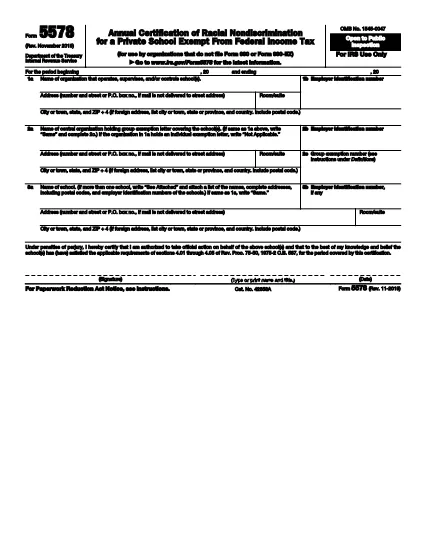
Form 5578 – Annual Certification of Racial Nondiscrimination (Fillable PDF)

  1. Quốc gia Hoa Kỳ
  2. Ngôn ngữ Tiếng Anh
  3. Hoạt động thuế
  4. Phòng Internal Revenue Service
Form 5578 – Annual Certification of Racial Nondiscrimination (Fillable PDF)

The IRS Form 5578 is the Annual Certification of Racial Nondiscrimination required for tax‑exempt private schools and other qualifying organizations. By filing this form, schools confirm they do not discriminate on the basis of race, color, or national origin, as mandated by Rev. Proc. 75‑50.

What Is Form 5578 and Who Must File?

Form 5578 must be filed by any organization that operates a tax‑exempt private school and does not file Form 990 or Form 990‑EZ. The certification is an annual requirement to maintain exemption status and avoid penalties.

How to Complete Form 5578 Online

Instead of downloading the PDF and editing it manually, simply click the "Fill out this form" button on this page. The Formize PDF Filler app will load the official fillable version, letting you enter data, sign, and save without leaving your browser.

Common Mistakes to Avoid

  • Entering an incorrect Employer Identification Number (EIN).
  • Leaving any required field blank, especially the signature block.
  • Using an outdated PDF version (always use the latest IRS file linked below).
  • Failing to review the form for spelling or address errors before signing.

Download the Official Fillable PDF

For reference or offline completion, you can download the current IRS version of Form 5578 directly from the link below. The file is a fully fillable PDF that works with any standard PDF editor.

Download Form 5578 (PDF)

CÂU HỎI THƯỜNG GẶP
  • Who is required to file Form 5578?

    Any tax‑exempt private school that does not file Form 990 or Form 990‑EZ must submit Form 5578 each year to certify compliance with racial nondiscrimination rules.

  • Can I file Form 5578 electronically?

    Yes. Using the Formize Fillable PDF, you can complete, sign, and save the form electronically. The IRS still requires a paper copy or electronic submission through your usual filing method.

  • What happens if I miss the filing deadline?

    Late filing may result in a penalty of $50 per day (up to $5,000) and could jeopardize your organization’s tax‑exempt status.

  • Do I need to attach any supporting documents?

    No supporting documents are required with Form 5578. However, keep records of your nondiscrimination policies and enrollment data in case the IRS requests verification.

  • Is the Form 5578 version from 2009 still valid?

    No. Always use the most recent version of the form—currently the PDF linked above—to ensure compliance with current IRS regulations.

  • Can I use a PDF editor like Adobe Acrobat to fill the form?

    You can, but the Formize fillable version eliminates the need for a separate editor and ensures all fields are correctly mapped for electronic signing.

LÀM THẾ NÀO ĐỂ

Cách điền Form 5578 miễn phí, trực tuyến trong 5 bước đơn giản:

  1. 1
    Open the Fillable Form
    Click the "Fill out this form" button on the page. The Formize PDF Filler app will launch in your browser.
  2. 2
    Enter Organization Details
    Fill in the school name, EIN, address, and any other required fields directly in the online form.
  3. 3
    Review for Accuracy
    Double‑check every entry for typos, correct EIN format, and complete all mandatory sections.
  4. 4
    Add Your Electronic Signature
    Sign the form using the electronic signature field. The signature is legally binding under penalty of perjury.
  5. 5
    Save or Submit
    When finished, either download the completed PDF for your records or submit it electronically according to your IRS filing process.
Định dạng ứng dụng PDF Filler
TRONG KHOẢNG

Đơn thuế

Form 5578 là một trong những Biểu mẫu khai thuế là văn bản dùng để khai báo các thông tin liên quan đến thuế với cơ quan thuế liên quan. Có nhiều loại biểu mẫu thuế khác nhau, bao gồm biểu mẫu thuế liên bang, tiểu bang và địa phương, có thể khác nhau tùy thuộc vào hoàn cảnh và địa điểm của người nộp thuế.

ĐẶC TRƯNG

Trình điền PDF

Cách dễ nhất để điền vào các mẫu PDF trực tuyến

  • Nhanh chóng điền vào Form 5578
    Bạn đang tìm cách điền nhanh Form 5578 trực tuyến? Với trình điền biểu mẫu PDF miễn phí trực tuyến của chúng tôi, bạn sẽ biết cách chỉnh sửa và điền vào tài liệu pdf này trong vòng chưa đầy một phút.
  • Trình chỉnh sửa PDF trực tuyến dễ sử dụng
    Chán nản với việc in ra các tệp PDF để bạn có thể chỉnh sửa chúng trước khi quét lại và gửi lại? Chỉnh sửa tài liệu PDF trực tuyến miễn phí. Sử dụng trình chỉnh sửa pdf trực tuyến của chúng tôi để tiết kiệm thời gian và giấy.
  • Công cụ tuyệt vời, tất cả các nền tảng
    Bạn muốn biết cách điền Form 5578 trên máy Mac hoặc có thể là cách sử dụng trình điền PDF miễn phí? Các công cụ PDF trực tuyến của chúng tôi hoạt động trên tất cả các nền tảng.
  • Lưu trữ tệp an toàn
    Các tệp "Form 5578" đã hoàn thành được lưu trữ trong cơ sở dữ liệu bảo mật do dịch vụ lưu trữ Amazon Cloud quản lý. Bạn có thể xóa các tệp của mình khỏi hệ thống của chúng tôi bất cứ lúc nào. Trong mọi trường hợp, các tệp này sẽ tự động bị xóa sau 24 giờ.
  • Trò chuyện với Form 5578
    Trò chuyện với "Form 5578" trên Trò chuyện, một trợ lý đọc PDF miễn phí. Đặt câu hỏi và nhận câu trả lời từ "Form 5578". Chỉ cần nhấp vào nút Trò chuyện với tài liệu ở trên.

Xóa phiên điền

Xóa phiên điền đã chọn? Trong trường hợp này, tiến độ của bạn trong việc hoàn thành biểu mẫu sẽ bị mất.

Xóa phiên chỉnh sửa

Xóa phiên chỉnh sửa đã chọn? Trong trường hợp này, tiến trình tạo và chỉnh sửa biểu mẫu của bạn sẽ bị mất.