选择语言

Form 1120-F Schedule V – Fillable PDF

  1. 国家 美国
  2. 语言 英语
  3. 活动 税收
  4. 部门 国税局
Form 1120-F Schedule V – Fillable PDF

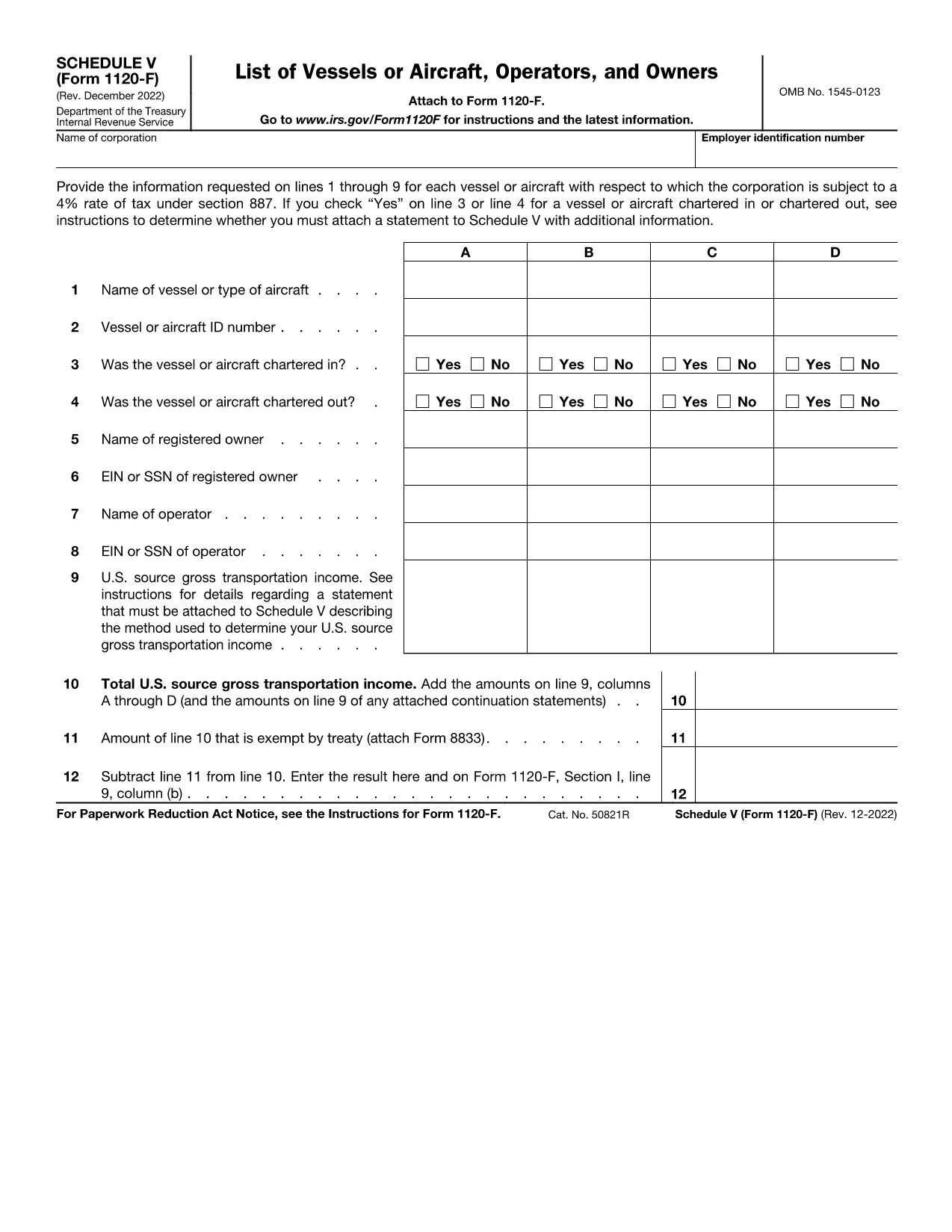
Schedule V (Form 1120-F) is the supplemental schedule used by foreign corporations to report vessel or aircraft activities that are subject to the 4% tax rate under IRC §887. If your corporation owns, charters, or operates any qualifying vessel or aircraft, you must fill out lines 1‑9 for each asset.

What Is Schedule V?

Schedule V captures detailed information about each vessel or aircraft, including identification numbers, charter status, and the amount of tax owed. The IRS requires this schedule to be attached to Form 1120-F when the 4% tax applies.

How to Complete Schedule V Online

With Formize’s fillable PDF, you can complete Schedule V directly in your browser—no download‑edit‑upload cycle needed. Simply click the "Fill out this form" button, wait for the Formize PDF Filler app to load, and start entering your data.

  • Enter the vessel or aircraft name and identification number.
  • Indicate whether the asset was chartered in, chartered out, or both.
  • Provide the tax‑calculating figures for each line as instructed.
  • Review the completed schedule and use the built‑in validation to catch common errors.

Common Mistakes to Avoid

Even experienced filers slip up. Keep an eye on these frequent errors:

  • Leaving line 3 or line 4 blank when a charter exists.
  • Entering the wrong vessel identification number (e.g., IMO vs. registration).
  • Mis‑calculating the 4% tax amount—use the Formize calculator for accuracy.
  • Forgetting to attach an additional statement when the schedule requires it.

Where to Submit Your Completed Form

After you’ve saved the filled Schedule V, attach it to your Form 1120-F filing. Submit the combined package to the IRS address listed in the Form 1120-F instructions or upload it through the IRS e‑file system if you’re filing electronically.

Need a printable copy? The fillable PDF also offers a Download button so you can keep a hard copy for your records.

指示

常问问题
  • What is the purpose of Schedule V on Form 1120-F?

    Schedule V reports vessel or aircraft activities that trigger the 4% foreign corporation tax under IRC §887. It must be attached to Form 1120‑F when applicable.

  • Can I fill out Schedule V directly in my browser?

    Yes. Using Formize’s fillable PDF, you can complete Schedule V online without downloading any software.

  • Do I need to attach a separate statement if I answer “Yes” on line 3 or 4?

    If you answer “Yes” to chartering in or out, the IRS instructions require an additional statement with more details. The Formize app provides a template you can fill and attach.

  • Is the fillable PDF version the same as the IRS paper form?

    The fillable PDF is an exact replica of the IRS Schedule V (Form 1120‑F) with interactive fields, ensuring compliance with the official format.

  • How do I submit the completed Schedule V with my Form 1120-F?

    Attach the saved PDF to your Form 1120‑F filing and submit it either by mail to the IRS address in the instructions or electronically through the IRS e‑file system.

  • What if I make a mistake after submitting?

    You can file an amended Form 1120‑F with a corrected Schedule V. Keep a copy of the original filing for reference.

如何

如何通过 4 个简单步骤在线免费填写 Form 1120-F Schedule V:

  1. 1
    Open the Fillable Form
    Click the “Fill out this form” button on the page. The Formize PDF Filler app will load in your browser.
  2. 2
    Enter Vessel or Aircraft Details
    Fill in each line (1‑9) with the required information, such as identification numbers and charter status.
  3. 3
    Validate and Review
    Use the built‑in validation to check for missing fields or calculation errors. Correct any issues before saving.
  4. 4
    Save or Download
    When finished, click “Save” to store the completed Schedule V in your Formize account, or click “Download” to get a PDF copy for printing or offline filing.
Formize PDF Filler 应用程序
关于

税务表格

Form 1120-F Schedule V 是一种税表,是用于向相关税务机关报告与税收相关的信息的文件。有多种类型的税表,包括联邦、州和地方税表,它们可能因纳税人的情况和地点而异。

特征

PDF 填充器

在线填写 PDF 表单的最简单方法

  • 快速填写Form 1120-F Schedule V
    正在寻找一种在线快速填写 Form 1120-F Schedule V 的方法?使用我们的在线免费 PDF 填表工具,您将在不到一分钟的时间内了解如何编辑和填写此 pdf 文档。
  • 易于使用的在线 PDF 编辑器
    是否厌倦了打印 PDF 文件以便在重新扫描并发回之前对其进行编辑?免费在线编辑 PDF 文档。使用我们的在线 pdf 编辑器可以节省时间和纸张。
  • 伟大的工具,所有平台
    想知道如何在 Mac 上填写 Form 1120-F Schedule V,或者如何免费使用 PDF 填充程序?我们的在线 PDF 工具适用于所有平台。
  • 安全文件存储
    完成的“Form 1120-F Schedule V”文件存储在由亚马逊云托管管理的安全数据库中。您可以随时从我们的系统中删除您的文件。在任何情况下,这些文件都会在 24 小时后自动删除。
  • 与 Form 1120-F Schedule V 聊天
    Chatize 上与“Form 1120-F Schedule V”聊天,这是一个免费的 PDF 阅读器助手。提出问题并从“Form 1120-F Schedule V”获得答案。只需点击上面的与文档聊天按钮即可。

删除填充会话

删除选定的填充会话?在这种情况下,您填写表格的进度将丢失。

删除编辑会话

删除选定的编辑会话?在这种情况下,您创建和编辑表单的进度将会丢失。