
Избери език

Application Form for Registration of Vendors under the Tourist VAT Refund Scheme

  1. език Английски
  2. Държава United Kingdom
  3. Отдел HM Revenue & Customs
  4. Дейност Данъци
Application Form for Registration of Vendors under the Tourist VAT Refund Scheme

Welcome to Formize's dedicated page for the application form for registration of vendors under the Tourist VAT Refund Scheme. This form allows eligible businesses to claim refunds on VAT paid by overseas visitors when they leave the United Kingdom. Below you will find everything you need to know – from why you should register, to step‑by‑step instructions and answers to the most frequently asked questions.

Why Register Your Business for the Tourist VAT Refund?

Registering under the Tourist VAT Refund Scheme helps you:

  • Attract more international customers by offering VAT‑free shopping.
  • Improve cash flow with timely refunds on eligible sales.
  • Comply with HM Revenue & Customs (HMRC) requirements and avoid penalties.

How to Complete the VAT65A Vendor Registration Form

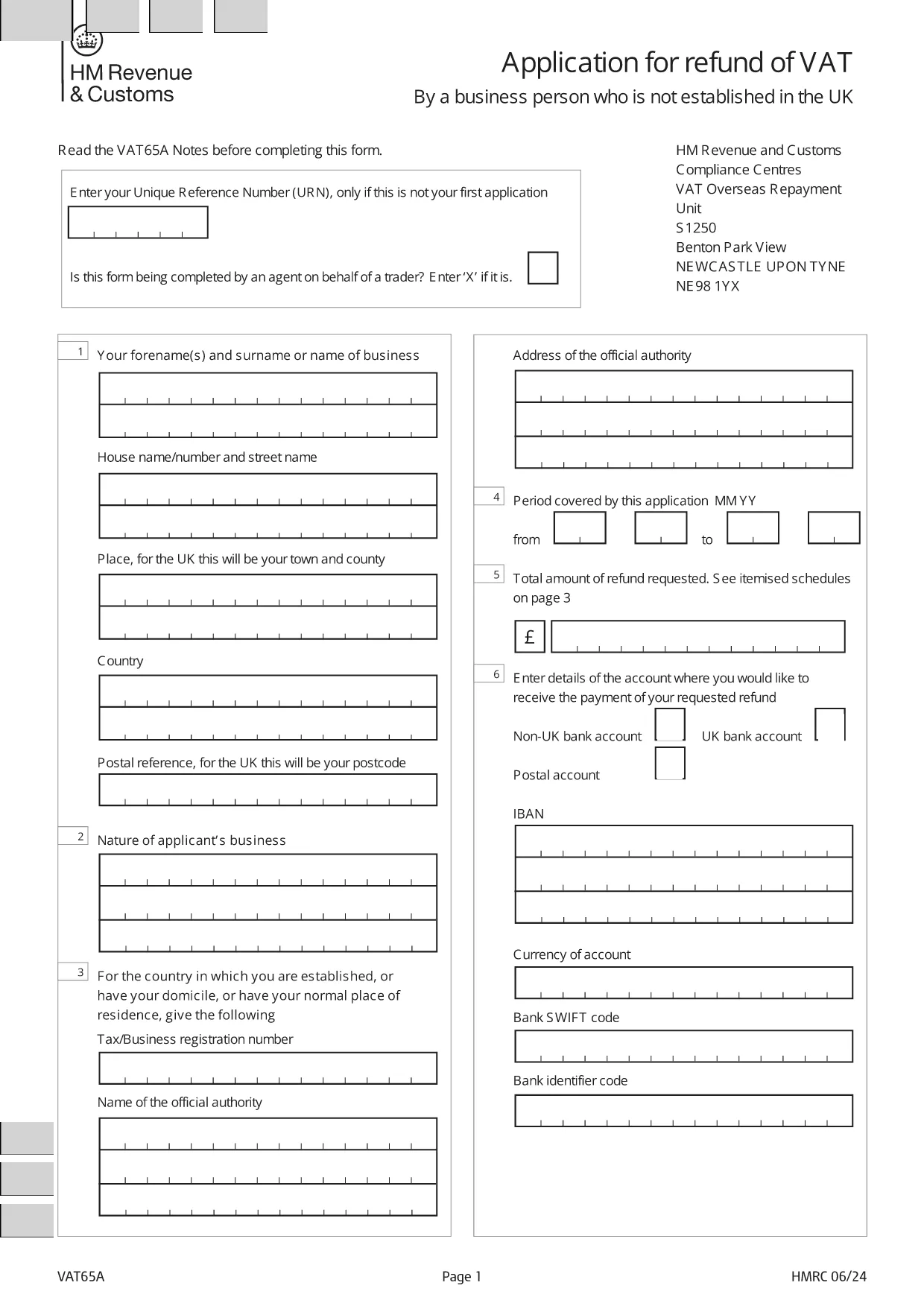
The form you need is the official HMRC VAT65A PDF. Instead of downloading and editing it manually, simply click the "Fill out this form" button on this page. The Formize PDF Filler will load instantly, letting you type directly into the fields, save, and export a completed PDF.

Common Mistakes & Tips for a Successful Submission

Avoid these pitfalls to speed up approval:

  • Missing URN: Enter your Unique Reference Number only if this isn’t your first application.
  • Agent indication: If an agent completes the form on your behalf, mark the appropriate box with an “X”.
  • Incorrect business details: Double‑check your company name, VAT registration number, and address.
  • Unsupported file format: Use the Formize online filler; do not convert the PDF to Word.

Once you have filled out the form, download the completed PDF and submit it to HMRC as instructed in the guidance notes.

ЧЗВ
  • Who can use the Tourist VAT Refund Vendor Registration form?

    Any UK‑registered business that sells goods to non‑UK residents and wishes to reclaim VAT on those sales can apply.

  • Do I need a Unique Reference Number (URN) for my first application?

    No. The URN is only required for subsequent applications. Leave the field blank on your first submission.

  • Can an agent complete the form on my behalf?

    Yes. Mark the agent box with an “X” and provide the agent’s details in the designated section.

  • Is there a fee to use the Formize PDF Filler?

    No. Formize provides the filler for free; you only need internet access and a modern browser.

  • What happens after I submit the completed VAT65A form?

    HMRC will review your application, may request additional information, and then issue a VAT refund if you meet all criteria.

  • How long does the refund process take?

    Typical processing time is 4‑6 weeks, but it can vary depending on the volume of applications.

  • Can I edit the form after downloading it?

    Yes, you can reopen the saved PDF in the Formize filler to make changes before final submission.

  • What supporting documents should I attach?

    Include copies of sales invoices, proof of export (e.g., customs declarations), and your VAT registration certificate.

КАК ДА

Как да попълните tourist VAT refund form безплатно онлайн в 5 лесни стъпки:

  1. 1
    Open the Formize filler
    Click the "Fill out this form" button on the page. The Formize PDF Filler loads in your browser.
  2. 2
    Enter your details
    Type directly into each field: business name, VAT number, Unique Reference Number (if applicable), and agent information.
  3. 3
    Review and validate
    Check all entries for accuracy. The filler highlights required fields and common errors.
  4. 4
    Download the completed form
    When satisfied, click "Download PDF" to save the filled form to your computer.
  5. 5
    Submit to HMRC
    Follow HMRC's submission instructions – usually by post or secure upload – and keep a copy for your records.
Приложение Formize PDF Filler
ОТНОСНО

Данъчни формуляри

tourist VAT refund form е един от данъчните формуляри, които са документи, използвани за докладване на информация, свързана с данъци, на съответния данъчен орган. Има различни видове данъчни формуляри, включително федерални, щатски и местни данъчни формуляри, които могат да варират в зависимост от обстоятелствата и местоположението на данъкоплатеца.

ХАРАКТЕРИСТИКА

PDF пълнител

Най-лесният начин да попълните tourist VAT refund form онлайн

  • Бързо попълнете tourist VAT refund form
    Търсите начин бързо да попълните tourist VAT refund form онлайн? С нашия онлайн безплатен инструмент за попълване на PDF формуляри ще знаете как да редактирате и попълвате този PDF документ за по-малко от минута.
  • Лесен за използване онлайн PDF редактор
    Писнало ви е да разпечатвате PDF файлове, за да можете да ги редактирате, преди да сканирате повторно и да ги изпратите обратно? Редактирайте PDF документи безплатно онлайн. Използвайте нашия онлайн pdf редактор, за да спестите време и хартия.
  • Страхотни инструменти, всички платформи
    Чудите се как да попълните tourist VAT refund form на Mac или може би как да използвате PDF пълнител безплатно? Нашите онлайн PDF инструменти работят на всички платформи.
  • Сигурно съхранение на файлове
    Завършените „tourist VAT refund form“ файлове се съхраняват в защитена база данни, управлявана от Amazon Cloud хостинг. Можете да изтриете вашите файлове от нашата система по всяко време. Във всеки случай тези файлове се изтриват автоматично след 24 часа.
  • Чат с tourist VAT refund form
    Разговаряйте с „tourist VAT refund form“ в Chatize, който е безплатен асистент за четене на PDF файлове. Задавайте въпроси и получавайте отговори от „tourist VAT refund form“. Просто щракнете върху бутона Чат с документ по-горе.

Изтриване на сесията за пълнене

Изтриване на избраната сесия за пълнене? В този случай вашият напредък в попълването на формуляра ще бъде загубен.

Изтриване на сесия за редактиране

Изтриване на избраната сесия за редактиране? В този случай вашият напредък в създаването и редактирането на формуляра ще бъде загубен.