
Seleccione el idioma

Application Form for Registration of Vendors under the Tourist VAT Refund Scheme

  1. Idioma Inglés
  2. País United Kingdom
  3. Departamento HM Revenue & Customs
  4. Actividad Impuestos
Application Form for Registration of Vendors under the Tourist VAT Refund Scheme

Welcome to Formize's dedicated page for the application form for registration of vendors under the Tourist VAT Refund Scheme. This form allows eligible businesses to claim refunds on VAT paid by overseas visitors when they leave the United Kingdom. Below you will find everything you need to know – from why you should register, to step‑by‑step instructions and answers to the most frequently asked questions.

Why Register Your Business for the Tourist VAT Refund?

Registering under the Tourist VAT Refund Scheme helps you:

  • Attract more international customers by offering VAT‑free shopping.
  • Improve cash flow with timely refunds on eligible sales.
  • Comply with HM Revenue & Customs (HMRC) requirements and avoid penalties.

How to Complete the VAT65A Vendor Registration Form

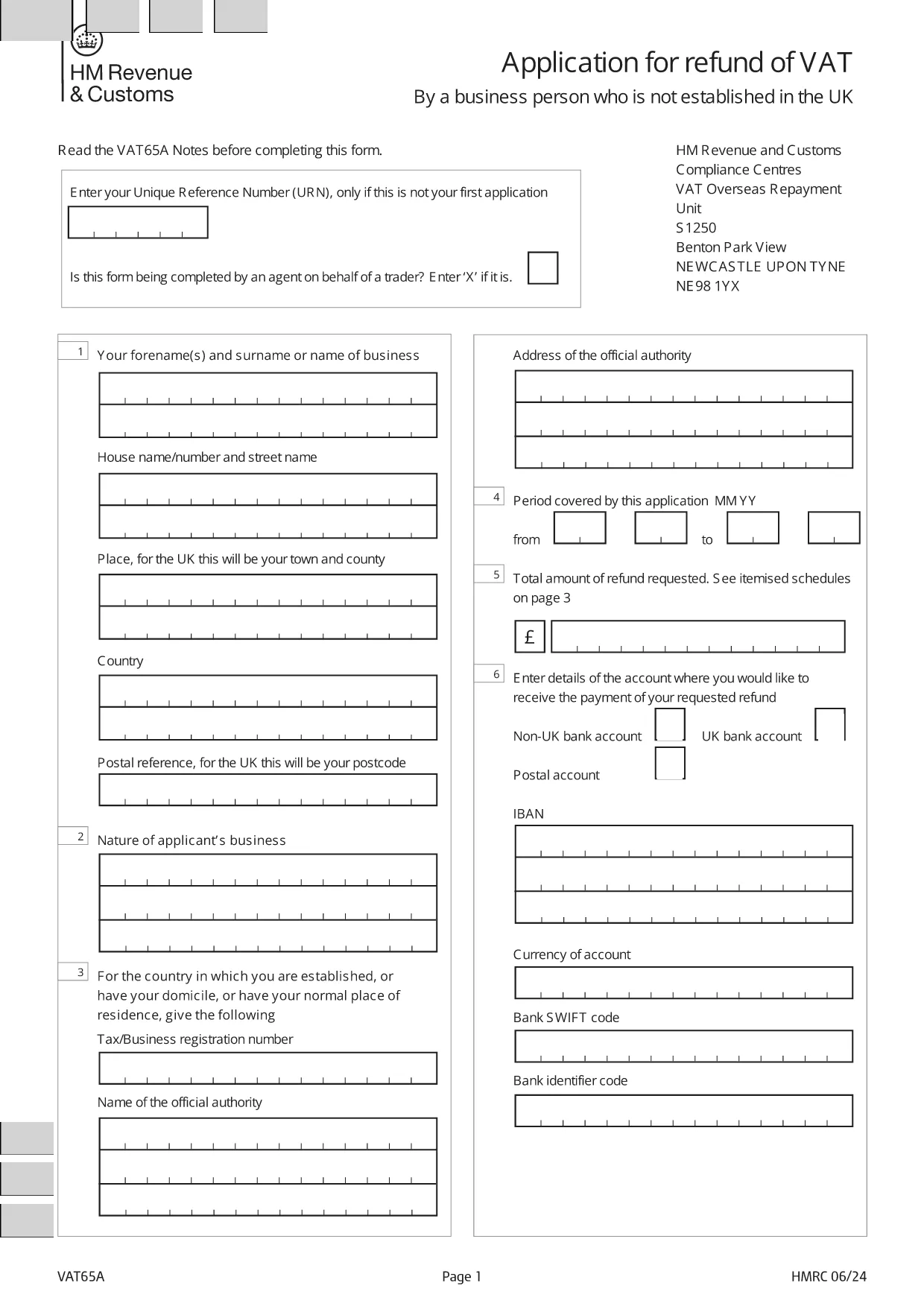
The form you need is the official HMRC VAT65A PDF. Instead of downloading and editing it manually, simply click the "Fill out this form" button on this page. The Formize PDF Filler will load instantly, letting you type directly into the fields, save, and export a completed PDF.

Common Mistakes & Tips for a Successful Submission

Avoid these pitfalls to speed up approval:

  • Missing URN: Enter your Unique Reference Number only if this isn’t your first application.
  • Agent indication: If an agent completes the form on your behalf, mark the appropriate box with an “X”.
  • Incorrect business details: Double‑check your company name, VAT registration number, and address.
  • Unsupported file format: Use the Formize online filler; do not convert the PDF to Word.

Once you have filled out the form, download the completed PDF and submit it to HMRC as instructed in the guidance notes.

PREGUNTAS MÁS FRECUENTES
  • Who can use the Tourist VAT Refund Vendor Registration form?

    Any UK‑registered business that sells goods to non‑UK residents and wishes to reclaim VAT on those sales can apply.

  • Do I need a Unique Reference Number (URN) for my first application?

    No. The URN is only required for subsequent applications. Leave the field blank on your first submission.

  • Can an agent complete the form on my behalf?

    Yes. Mark the agent box with an “X” and provide the agent’s details in the designated section.

  • Is there a fee to use the Formize PDF Filler?

    No. Formize provides the filler for free; you only need internet access and a modern browser.

  • What happens after I submit the completed VAT65A form?

    HMRC will review your application, may request additional information, and then issue a VAT refund if you meet all criteria.

  • How long does the refund process take?

    Typical processing time is 4‑6 weeks, but it can vary depending on the volume of applications.

  • Can I edit the form after downloading it?

    Yes, you can reopen the saved PDF in the Formize filler to make changes before final submission.

  • What supporting documents should I attach?

    Include copies of sales invoices, proof of export (e.g., customs declarations), and your VAT registration certificate.

CÓMO

Cómo completar tourist VAT refund form gratis, en línea en 5 sencillos pasos:

  1. 1
    Open the Formize filler
    Click the "Fill out this form" button on the page. The Formize PDF Filler loads in your browser.
  2. 2
    Enter your details
    Type directly into each field: business name, VAT number, Unique Reference Number (if applicable), and agent information.
  3. 3
    Review and validate
    Check all entries for accuracy. The filler highlights required fields and common errors.
  4. 4
    Download the completed form
    When satisfied, click "Download PDF" to save the filled form to your computer.
  5. 5
    Submit to HMRC
    Follow HMRC's submission instructions – usually by post or secure upload – and keep a copy for your records.
Aplicación Formize PDF Filler
SOBRE

Formularios de impuesto

tourist VAT refund form es uno de los formularios de impuestos que son documentos utilizados para reportar información relacionada con los impuestos a la autoridad fiscal correspondiente. Hay varios tipos de formularios de impuestos, incluidos los formularios de impuestos federales, estatales y locales, que pueden variar según las circunstancias y la ubicación del contribuyente.

CARACTERÍSTICAS

Relleno de PDF

La forma más fácil de llenar formularios PDF en línea

  • Rellene rápidamente tourist VAT refund form
    ¿Está buscando una manera de llenar rápidamente tourist VAT refund form en línea? Con nuestro rellenador de formularios PDF gratuito en línea, sabrá cómo editar y rellenar este documento PDF en menos de un minuto.
  • Editor de PDF en línea fácil de usar
    ¿Cansado de imprimir archivos PDF para poder editarlos antes de volver a escanearlos y enviarlos de vuelta? Edite documentos PDF gratis en línea. Utilice nuestro editor de pdf en línea para ahorrar tiempo y papel.
  • Excelentes herramientas, todas las plataformas.
    ¿Se pregunta cómo completar tourist VAT refund form en una Mac, o tal vez cómo usar un relleno de PDF gratis? Nuestras herramientas de PDF en línea funcionan en todas las plataformas.
  • Almacenamiento seguro de archivos
    Los archivos "tourist VAT refund form" completados se almacenan en una base de datos segura administrada por Amazon Cloud hosting. Puede eliminar sus archivos de nuestro sistema en cualquier momento. En cualquier caso, estos archivos se eliminan automáticamente después de 24 horas.
  • Chatea con {palabra clave}
    Chatea con "tourist VAT refund form" en Chatize, que es un asistente de lectura de PDF gratuito. Haga preguntas y obtenga respuestas de "tourist VAT refund form". Simplemente haga clic en el botón Chatear con documento de arriba.

Eliminar sesión de llenado

¿Eliminar la sesión de llenado seleccionada? En este caso, se perderá su progreso al completar el formulario.

Eliminar sesión de edición

¿Eliminar la sesión de edición seleccionada? En este caso, se perderá su progreso en la creación y edición del formulario.