
Sprache auswählen

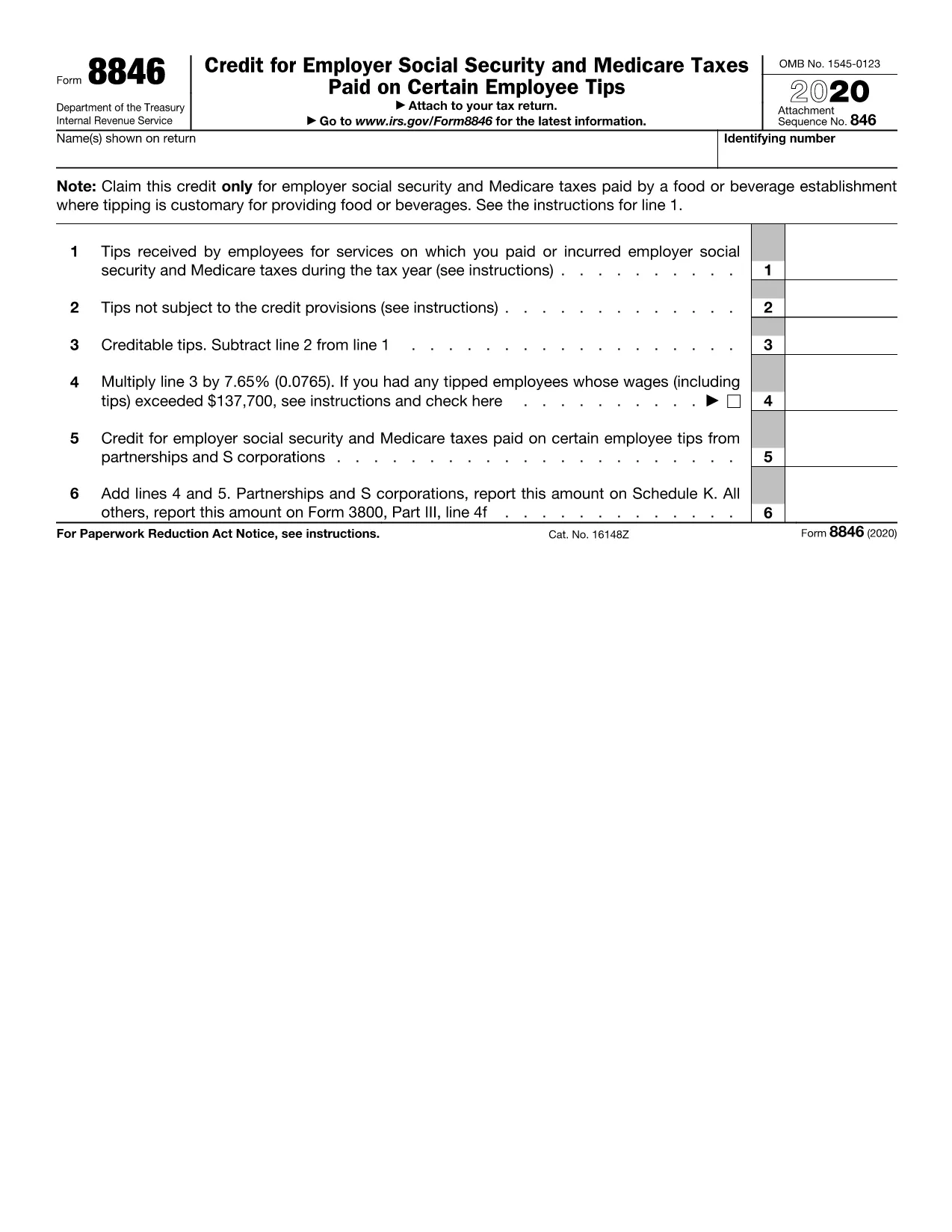
IRS Form 8846 – Fillable PDF for Employer Tip Credit

  1. Land USA
  2. Sprache Englisch
  3. Aktivität Steuern
  4. Abteilung Finanzamt
IRS Form 8846 – Fillable PDF for Employer Tip Credit

What Is Form 8846?

Form 8846 is the IRS Employer Credit for Social Security and Medicare Taxes Paid on Employee Tips. It allows businesses in the food‑service, beverage, and beauty‑service industries to claim a credit for the employer portion of Social Security and Medicare taxes on qualified tips.

How to Complete the Fillable Form Online

Instead of downloading the PDF and opening it in a separate editor, simply click the "Fill out this form" button on this page. The Formize PDF Filler app will load in your browser, letting you:

  • Enter business information, EIN, and tip totals.
  • Calculate the credit automatically.
  • eSign the form with a legally binding electronic signature.
  • Save or download the completed form in seconds.

Common Mistakes to Avoid

Even a small error can delay processing. Keep these tips in mind:

  • Incorrect tip totals: Verify the sum of all employee tip reports before entering the amount.
  • Missing EIN: The employer identification number must match the one on the tax return.
  • Wrong credit calculation: Use the built‑in calculator in the Formize filler to ensure accuracy.
  • Skipping the "Tips not subject to credit" section: If any tips are excluded, they must be reported.

Where to Submit Form 8846

Attach the completed Form 8846 to your business income tax return (Form 1120, 1120‑S, 1065, or 1040 Schedule C). You may file electronically through the IRS e‑file system or mail the paper form to the address listed in the IRS Instructions for Form 8846.

Download the Official PDF

If you prefer the original IRS PDF, you can download it directly from the link below. The file is the official 2020 version, which remains valid for the current tax year.

Download IRS Form 8846 (2020) PDF

FAQ
  • Who is eligible to use Form 8846?

    Employers in industries where tipping is customary (restaurants, bars, beauty salons, etc.) who pay Social Security and Medicare taxes on employee tips.

  • Can I use the 2020 PDF for the 2024 tax year?

    Yes. The IRS has not released a new version for recent years, so the 2020 form remains the current official version.

  • Do I need to file Form 8846 separately?

    No. Form 8846 is attached to your business income tax return (Form 1120, 1120‑S, 1065, or Schedule C).

  • What happens if I report the wrong tip amount?

    An incorrect amount can delay the credit and may trigger an IRS audit. Always verify tip totals before submitting.

  • Is an electronic signature accepted on Form 8846?

    Yes. The Formize filler uses a compliant e‑signature that meets IRS e‑file requirements.

  • Can I file Form 8846 electronically?

    When you attach the completed PDF to an electronically filed return, the credit is processed electronically.

  • How long does the credit take to reflect on my tax account?

    Typically 4‑6 weeks after the IRS processes your return, assuming the form is completed correctly.

WIE MAN

So füllen Sie Form 8846 kostenlos online in 5 einfachen Schritten aus:

  1. 1
    Click the Fill Out Button
    On this page, click the "Fill out this form" button. The Formize PDF Filler will open directly in your browser.
  2. 2
    Enter Your Business Information
    Fill in the required fields such as business name, EIN, and total employee tips. The form guides you through each section.
  3. 3
    Calculate and Review the Credit
    Use the automatic calculator to see the credit amount. Double‑check all numbers for accuracy.
  4. 4
    eSign and Save
    Add your electronic signature, then click "Save" or "Download" to store the completed Form 8846 on your device.
  5. 5
    Submit with Your Tax Return
    Attach the saved PDF to your federal tax return (e‑file or paper) and keep a copy for your records.
Formize PDF Filler-App
ÜBER

Steuerformulare

Form 8846 ist eines der Steuerformulare, bei denen es sich um Dokumente handelt, mit denen Informationen über das Einkommen, die Abzüge und die Steuerschuld einer Einzelperson oder eines Unternehmens an die zuständige Steuerbehörde gemeldet werden. Diese Formulare sind zur Einhaltung der Steuergesetze und zur Erfüllung steuerlicher Pflichten erforderlich. Die Steuerformulare variieren je nach Land und den spezifischen Steueranforderungen. Hier sind einige gängige Arten von Steuerformularen:

Individuelle Steuerformulare: Diese Formulare werden von einzelnen Steuerzahlern verwendet, um ihr persönliches Einkommen anzugeben und Abzüge, Gutschriften und Befreiungen zu beantragen. Beispiele hierfür sind das Formular 1040 in den Vereinigten Staaten oder das Formular „Self-Assessment Tax Return“ im Vereinigten Königreich.

Gewerbesteuerformulare: Gewerbesteuerformulare werden von Unternehmen, Personengesellschaften oder Selbständigen verwendet, um ihre Geschäftseinnahmen, -ausgaben und andere steuerbezogene Informationen anzugeben. Beispiele hierfür sind das Schedule C-Formular (Profit or Loss from Business) in den Vereinigten Staaten oder das CT600-Formular (Company Tax Return) im Vereinigten Königreich.

Lohnsteuerformulare: Diese Formulare werden von Arbeitgebern verwendet, um die von den Gehaltsschecks ihrer Mitarbeiter einbehaltenen Löhne, Gehälter und Steuern anzugeben. Beispiele hierfür sind das W-2-Formular in den Vereinigten Staaten oder das P60-Formular im Vereinigten Königreich.

Umsatzsteuerformulare: Umsatzsteuerformulare werden von Unternehmen verwendet, um die auf steuerpflichtige Waren oder Dienstleistungen erhobene Umsatzsteuer zu melden und abzuführen. Die spezifischen Umsatzsteuerformulare variieren je nach Gerichtsbarkeit.

Mehrwertsteuerformulare (MwSt.): Mehrwertsteuerformulare werden in Ländern verwendet, die eine Mehrwertsteuer erheben, um die auf Verkäufe erhobene Mehrwertsteuer zu melden und abzuführen und Mehrwertsteuergutschriften für Einkäufe zu beantragen. Beispiele hierfür sind die in vielen Ländern verwendeten Mehrwertsteuererklärungsformulare.

Schätzungssteuerformulare: Schätzsteuerformulare werden verwendet, um geschätzte Steuern auf Einkünfte zu melden und zu zahlen, die nicht der Quellensteuer unterliegen, beispielsweise Einkünfte aus selbständiger Tätigkeit oder Kapitalerträge.

Dies sind nur einige Beispiele für die zahlreichen Steuerformulare, die es geben kann. Welche konkreten Formulare erforderlich sind, hängt von den Steuergesetzen und -vorschriften in Ihrem Land oder Ihrer Gerichtsbarkeit ab. Es ist wichtig, die Richtlinien der Steuerbehörde zu konsultieren oder professionellen Rat einzuholen, um festzustellen, welche Formulare auf Ihre Situation anwendbar sind.

MERKMALE

PDF-Filler

Der einfachste Weg, PDF-Formulare online auszufüllen

  • Füllen Sie schnell Form 8846 aus
    Suchen Sie nach einer Möglichkeit, Form 8846 schnell online auszufüllen? Mit unserem kostenlosen Online-PDF-Formularausfüller wissen Sie, wie Sie dieses PDF-Dokument in weniger als einer Minute bearbeiten und ausfüllen.
  • Einfach zu bedienender Online-PDF-Editor
    Haben Sie es satt, PDF-Dateien auszudrucken, damit Sie sie bearbeiten können, bevor Sie sie erneut scannen und zurücksenden? PDF-Dokumente kostenlos online bearbeiten. Nutzen Sie unseren Online-PDF-Editor, um Zeit und Papier zu sparen.
  • Tolle Tools, alle Plattformen
    Sie fragen sich, wie Sie Form 8846 auf einem Mac ausfüllen oder vielleicht einen kostenlosen PDF-Ausfüller verwenden können? Unsere Online-PDF-Tools funktionieren auf allen Plattformen.
  • Sichere Dateispeicherung
    Fertige "Form 8846"-Dateien werden in einer gesicherten Datenbank gespeichert, die vom Amazon Cloud-Hosting verwaltet wird. Sie können Ihre Dateien jederzeit aus unserem System löschen. In jedem Fall werden diese Dateien nach 24 Stunden automatisch gelöscht.
  • Chatten Sie mit Form 8846
    Chatten Sie mit „Form 8846“ auf Chatize, einem kostenlosen PDF-Leseassistenten. Stellen Sie Fragen und erhalten Sie Antworten von „Form 8846“. Klicken Sie einfach oben auf die Schaltfläche Mit Dokument chatten.

Füllsitzung löschen

Die ausgewählte Füllsitzung löschen? In diesem Fall gehen Ihre Fortschritte beim Ausfüllen des Formulars verloren.

Bearbeitungssitzung löschen

Ausgewählte Bearbeitungssitzung löschen? In diesem Fall geht Ihr Fortschritt beim Erstellen und Bearbeiten des Formulars verloren.