
Seleccione el idioma

Form 1040‑NR Schedule NEC (SP) – Fillable PDF

  1. País EE.UU
  2. Idioma Español
  3. Actividad Impuestos
  4. Departamento Servicio de ingresos internos
Form 1040‑NR Schedule NEC (SP) – Fillable PDF

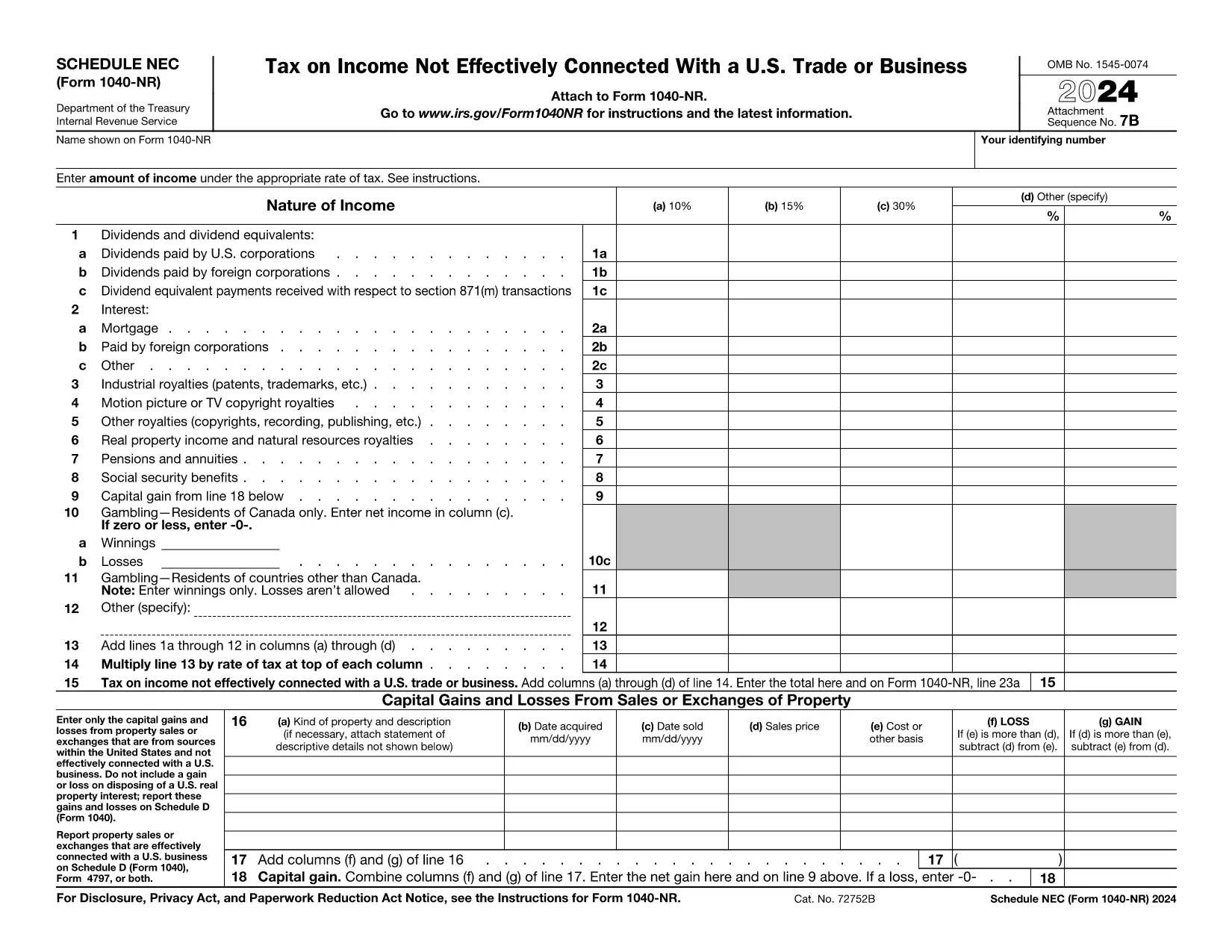
The Schedule NEC (SP) is the supplemental page attached to the Form 1040‑NR that reports income not effectively connected with a U.S. trade or business (non‑ECI). It is used by nonresident aliens to calculate the tax on U.S. source income such as dividends, interest, and certain capital gains.

This page lets you access a fillable PDF version of Schedule NEC (SP) that works directly with Formize’s online PDF Filler. No extra software is required – simply click the button, fill in your numbers, and download the completed form.

What Is Schedule NEC (SP)?

Schedule NEC (SP) separates taxable U.S. source income into three rate columns (10 %, 15 %, 30 % or a treaty‑adjusted rate). Each line corresponds to a specific type of income, allowing you to apply the correct withholding or treaty rate before the total is carried to Form 1040‑NR.

How to Fill Out Schedule NEC (SP) Online

Using Formize’s PDF filler, the process is streamlined:

  • Enter your personal information at the top of the form.
  • Select the appropriate tax‑rate column for each income item.
  • Enter the dollar amount for each line (dividends, interest, royalties, etc.).
  • The filler automatically totals each column and calculates the overall tax liability.
  • Save or download the completed PDF to attach to your Form 1040‑NR filing.

Common Mistakes to Avoid

  • Mixing ECI with non‑ECI income: Only non‑effectively connected items belong on Schedule NEC.
  • Using the wrong tax‑rate column: Verify treaty rates before selecting columns (a‑d).
  • Leaving lines blank: Even a $0 entry should be entered to keep the form complete.
  • Forgetting to attach Schedule NEC to Form 1040‑NR: The Schedule is not filed separately.

Where to Find Tax Treaty Information

The IRS maintains a list of current U.S. tax treaties. Visit the IRS Tax Treaties page to confirm the reduced rate or exemption that applies to your country of residence.

Download the Fillable PDF

Ready to start? Click the button below, let Formize load the fillable version of Schedule NEC (SP), and complete your non‑resident tax reporting in minutes.

Instrucciones

PREGUNTAS MÁS FRECUENTES
  • Who must file Schedule NEC (SP) with Form 1040‑NR?

    Any nonresident alien who has U.S. source income that is not effectively connected with a U.S. trade or business must report that income on Schedule NEC (SP).

  • What is the difference between columns (a)–(d) on the schedule?

    Columns (a)–(c) represent the standard 10 %, 15 %, and 30 % tax rates. Column (d) is for a treaty‑adjusted rate or another special rate specified by a tax treaty.

  • Can I use the same PDF for the 2023 and 2024 tax years?

    The Schedule NEC layout changes only rarely. Verify the year on the PDF header; the linked fillable version is the most recent version available.

  • Do I need to attach supporting documents for each income line?

    Generally, you do not attach separate documents to Schedule NEC, but keep the source statements (e.g., 1099‑INT, 1099‑DIV) in case the IRS requests verification.

  • How do I know which treaty rate applies to me?

    Check the IRS “U.S. Tax Treaties” webpage for the treaty between the United States and your country of residence. The treaty will specify reduced rates or exemptions for each type of income.

  • Is the fillable PDF compatible with Mac and Windows?

    Yes. Formize’s online filler works in all modern browsers on macOS, Windows, and Linux without additional software.

CÓMO

Cómo completar Form 1040-NR Schedule NEC gratis, en línea en 5 sencillos pasos:

  1. 1
    Open the Fillable Form
    Click the “Fill out this form” button on the page. The Formize PDF Filler will open in a new window.
  2. 2
    Wait for the Filler to Load
    A brief loading screen appears while the fillable PDF is prepared. This only takes a few seconds.
  3. 3
    Enter Your Information
    Type your personal details and income amounts directly into the fields. The filler automatically formats numbers and totals columns.
  4. 4
    Review and Save
    Double‑check all entries, then click “Save” or “Download” to obtain the completed Schedule NEC (SP) PDF.
  5. 5
    Attach to Form 1040‑NR
    Print or electronically attach the finished Schedule NEC to your Form 1040‑NR when filing your U.S. nonresident tax return.
Aplicación Formize PDF Filler
SOBRE

Formularios de impuesto

Form 1040-NR Schedule NEC es uno de los formularios de impuestos que son documentos utilizados para reportar información relacionada con los impuestos a la autoridad fiscal correspondiente. Hay varios tipos de formularios de impuestos, incluidos los formularios de impuestos federales, estatales y locales, que pueden variar según las circunstancias y la ubicación del contribuyente.

CARACTERÍSTICAS

Relleno de PDF

La forma más fácil de llenar formularios PDF en línea

  • Rellene rápidamente Form 1040-NR Schedule NEC
    ¿Está buscando una manera de llenar rápidamente Form 1040-NR Schedule NEC en línea? Con nuestro rellenador de formularios PDF gratuito en línea, sabrá cómo editar y rellenar este documento PDF en menos de un minuto.
  • Editor de PDF en línea fácil de usar
    ¿Cansado de imprimir archivos PDF para poder editarlos antes de volver a escanearlos y enviarlos de vuelta? Edite documentos PDF gratis en línea. Utilice nuestro editor de pdf en línea para ahorrar tiempo y papel.
  • Excelentes herramientas, todas las plataformas.
    ¿Se pregunta cómo completar Form 1040-NR Schedule NEC en una Mac, o tal vez cómo usar un relleno de PDF gratis? Nuestras herramientas de PDF en línea funcionan en todas las plataformas.
  • Almacenamiento seguro de archivos
    Los archivos "Form 1040-NR Schedule NEC" completados se almacenan en una base de datos segura administrada por Amazon Cloud hosting. Puede eliminar sus archivos de nuestro sistema en cualquier momento. En cualquier caso, estos archivos se eliminan automáticamente después de 24 horas.
  • Chatea con {palabra clave}
    Chatea con "Form 1040-NR Schedule NEC" en Chatize, que es un asistente de lectura de PDF gratuito. Haga preguntas y obtenga respuestas de "Form 1040-NR Schedule NEC". Simplemente haga clic en el botón Chatear con documento de arriba.

Eliminar sesión de llenado

¿Eliminar la sesión de llenado seleccionada? En este caso, se perderá su progreso al completar el formulario.

Eliminar sesión de edición

¿Eliminar la sesión de edición seleccionada? En este caso, se perderá su progreso en la creación y edición del formulario.