
Ընտրել լեզուն

Fillable Form 1118 Schedule K – Download & Complete Online

  1. Երկիր ԱՄՆ
  2. Լեզու Անգլերեն
  3. Գործունեություն Հարկեր
  4. բաժին Ներքին եկամուտների ծառայություն
Fillable Form 1118 Schedule K – Download & Complete Online

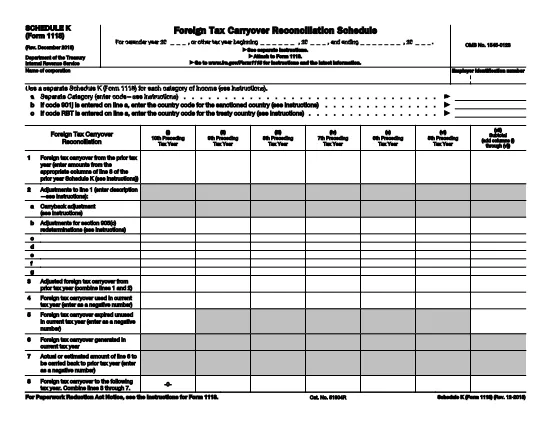
Schedule K (Form 1118) is the supplemental worksheet used by U.S. corporations to report foreign tax credits for each category of income. Whether you’re preparing a corporate tax return or need to amend a prior year, having a fillable PDF version saves time and reduces errors.

Our online Form 1118 Schedule K is hosted on Formize.com, so you can complete the entire form in your browser—no Adobe Acrobat or desktop editor required. Just click the "Fill out this form" button, wait for the Formize PDF Filler to load, and start entering your data.

What Is Schedule K (Form 1118)?

Schedule K breaks down foreign taxes paid, accrued, or deemed paid by a domestic corporation into distinct income categories such as general earnings, passive income, and foreign oil and gas. The IRS uses this detail to calculate the allowable foreign tax credit under sections 901 and 960(b).

How to Fill the Schedule K PDF on Formize

Follow the simple steps below to complete the form quickly and accurately.

Common Mistakes to Avoid on Schedule K

Missing a box, entering an amount in the wrong column, or using the wrong tax year are frequent errors that can delay processing. Double‑check each line against your source documents before submitting.

Where to Find Additional Help

For detailed instructions, refer to the official IRS instructions linked on the page, or consult a qualified tax professional. The IRS also provides a complete Form 1118 guide for broader context.

Հրահանգներ

ՀՏՀ
  • Is the Schedule K PDF on Formize truly fillable?

    Yes, the PDF is fully interactive. All numeric fields, checkboxes, and signature lines can be completed directly in your web browser.

  • Do I need an Adobe Acrobat subscription?

    No. Formize’s online filler works in any modern browser, so you can fill the form for free without installing additional software.

  • Can I save my progress and return later?

    Absolutely. Use the "Save" button to download a partially completed PDF, then reopen it later in Formize to continue.

  • What if I make a mistake after saving?

    Simply reopen the saved PDF in Formize, edit the incorrect fields, and save a new version. The original file remains unchanged.

  • Is the data I enter secure?

    Formize uses SSL encryption for all data transmitted between your browser and our servers, ensuring your tax information stays private.

  • Do I need to print the form after filling it online?

    Only if the IRS specifically requires a paper copy. Most corporate filings can be submitted electronically with the completed PDF attached.

  • Where can I find the official IRS instructions for Schedule K?

    The official instructions are linked on the page and can also be downloaded from the IRS website at https://www.irs.gov/pub/irs-pdf/f1118.pdf.

ԻՆՉՊԵՍ

Ինչպես լրացնել Form 1118 Schedule K-ն անվճար, առցանց՝ 3 հեշտ քայլերով.

  1. 1
    Click the Fill‑out Button
    On the Formize page, click the bright "Fill out this form" button to launch the online PDF filler.
  2. 2
    Wait for the Formize PDF Filler to Load
    The app loads the fillable Schedule K PDF in your browser. No download or installation is needed.
  3. 3
    Complete the Fields and Save
    Enter the required numbers, double‑check for accuracy, then click "Save" to download the completed PDF or submit it directly to the IRS portal.
Ձևավորել PDF Filler հավելվածը
ՄԱՍԻՆ

Դաշնային հարկային ձևեր

Form 1118 Schedule K-ը դաշնային հարկային ձևերից մեկն է, որն օգտագործվում է Միացյալ Նահանգների Ներքին եկամուտների ծառայությանը (IRS) դաշնային եկամտահարկը զեկուցելու և ներկայացնելու համար: Այս ձևաթղթերն օգտագործվում են անհատների, ձեռնարկությունների և կազմակերպությունների կողմից՝ իրենց եկամուտները, պահումները և այլ համապատասխան տեղեկատվություն, որոնք անհրաժեշտ են իրենց դաշնային հարկային պարտավորությունը հաշվարկելու համար:

Ամենատարածված դաշնային հարկի ձևը Ձև 1040ն է, որն օգտագործվում է անհատ հարկատուների կողմից` իրենց անձնական եկամտահարկը հայտնելու համար: Այլ սովորաբար օգտագործվող ձևերը ներառում են Ձև 1065 գործընկերության համար, Ձև 1120 կորպորացիաների համար, և Ձև 990 հարկերից ազատված կազմակերպությունների համար:

Դաշնային հարկային ձևերը սովորաբար պահանջում են հարկ վճարողներից զեկուցել եկամտի տարբեր աղբյուրների մասին, ինչպիսիք են աշխատավարձերը, աշխատավարձերը և թեյավճարները, ինչպես նաև եկամուտները ներդրումներից, վարձակալած գույքից և այլ աղբյուրներից: Ձևաթղթերը նաև թույլ են տալիս հարկ վճարողներին պահանջել պահումներ և վարկեր տարբեր ծախսերի համար, ինչպիսիք են բարեգործական ներդրումները, հիփոթեքային տոկոսները և առողջապահական ծախսերը:

Կարևոր է ճշգրիտ և ժամանակին ներկայացնել դաշնային հարկային ձևերը, քանի որ դա չկատարելը կարող է հանգեցնել տույժերի և տոկոսների գանձման IRS-ից:

ՀԱՏԿՈՒԹՅՈՒՆՆԵՐ

PDF լցոնիչ

Առցանց Form 1118 Schedule K-ը լրացնելու ամենահեշտ ձևը

  • Արագ լրացրեք Form 1118 Schedule K
    Փնտրու՞մ եք միջոց՝ արագորեն լրացնելու Form 1118 Schedule K առցանց: Մեր առցանց անվճար PDF ձևաթուղթ լրացնողի միջոցով դուք կիմանաք, թե ինչպես խմբագրել և լրացնել այս pdf փաստաթուղթը մեկ րոպեից պակաս ժամանակում:
  • Հեշտ օգտագործման առցանց PDF խմբագիր
    Հոգնե՞լ եք PDF ֆայլեր տպելուց, որպեսզի կարողանաք դրանք խմբագրել, նախքան նորից սկանավորելը և հետ ուղարկելը: Խմբագրել PDF փաստաթղթերը անվճար առցանց: Օգտագործեք մեր առցանց pdf խմբագրիչը ժամանակ և թուղթ խնայելու համար:
  • Հիանալի գործիքներ, բոլոր հարթակներ
    Զարմանում եք, թե ինչպես լրացնել Form 1118 Schedule K-ը Mac-ում, կամ գուցե ինչպես անվճար օգտագործել PDF լցոնիչը: Մեր առցանց PDF գործիքներն աշխատում են բոլոր հարթակներում:
  • Անվտանգ ֆայլերի պահպանում
    Ավարտված «Form 1118 Schedule K» ֆայլերը պահվում են պաշտպանված տվյալների բազայում, որը կառավարվում է Amazon Cloud հոսթինգի կողմից: Ցանկացած ժամանակ կարող եք ջնջել ձեր ֆայլերը մեր համակարգից: Ամեն դեպքում, այս ֆայլերը ավտոմատ կերպով ջնջվում են 24 ժամ հետո:
  • Զրուցեք Form 1118 Schedule K-ի հետ
    Զրուցեք «Form 1118 Schedule K»-ի հետ Chatize-ում, որը PDF ընթերցողի անվճար օգնական է: Հարցեր տվեք և ստացեք պատասխաններ «Form 1118 Schedule K»-ից։ Պարզապես սեղմեք վերևում գտնվող Զրույց փաստաթղթի հետ կոճակը:

Ջնջել լրացման նիստը

Ջնջե՞լ ընտրված լրացման աշխատաշրջանը: Այս դեպքում ձևը լրացնելու ձեր առաջընթացը կկորչի:

Ջնջել խմբագրման նիստը

Ջնջե՞լ ընտրված խմբագրման աշխատաշրջանը: Այս դեպքում ձևը ստեղծելու և խմբագրելու ձեր առաջընթացը կկորչի: