
Seleziona la lingua

Form 6729-D – Fillable PDF for VITA/TCE Site Review

  1. Paese Stati Uniti d'America
  2. Lingua Inglese
  3. Attività Le tasse
  4. Dipartimento Agenzia delle Entrate
Compila questo modulo
Form 6729-D – Fillable PDF for VITA/TCE Site Review

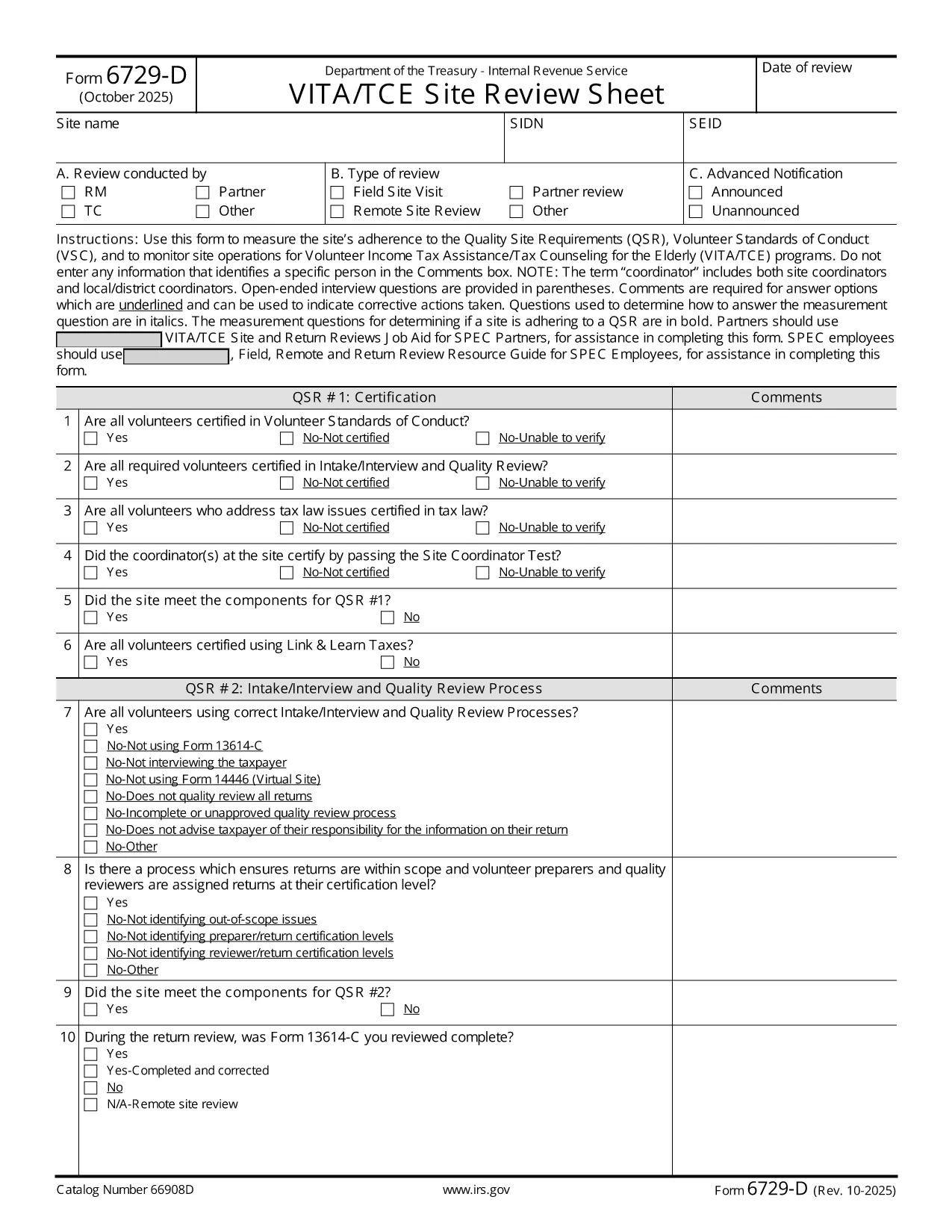
The IRS Form 6729-D (Site Review Sheet) is used by Volunteer Income Tax Assistance (VITA) and Tax Counseling for the Elderly (TCE) programs to evaluate a site’s compliance with the Quality Site Requirements (QSR) and Volunteer Standards of Conduct (VSC). This fillable PDF version lets you complete the form instantly in your browser—no extra PDF editor required.

What Is Form 6729-D?

Form 6729-D records the results of a site review, covering:

  • Adherence to Quality Site Requirements (QSR)
  • Volunteer Standards of Conduct (VSC)
  • Operational observations for VITA/TCE sites
  • Comments from the site coordinator (without personal identifiers)

The form is mandatory for any VITA/TCE location that receives IRS funding or oversight.

How to Complete the Form Online

Instead of downloading the PDF and opening a separate editor, simply click the "Fill out this form" button on this page. Our Formize PDF Filler app will load the document directly in your browser. Follow these steps:

  1. Click the blue Fill out this form button.
  2. Wait a few seconds while the Formize PDF Filler loads.
  3. Enter the required information in each field. Required fields are marked with an asterisk (*).
  4. Use the Comments box for observations—avoid entering names or personal data.
  5. When finished, click Save & Download to get a completed copy, or click Submit if your organization has integrated a secure upload.

Common Mistakes to Avoid

  • Including personal identifiers in the Comments section – the IRS prohibits names, SSNs, or any data that could identify a specific volunteer or client.
  • Leaving required fields blank – an asterisk (*) indicates a mandatory entry; the form will not save until these are completed.
  • Using an outdated version – always verify the revision date (current revision is Rev. 10‑2025).
  • Incorrect date format – use MM/DD/YYYY as shown in the example field.

Where to Submit the Completed Form

After saving the filled PDF, email it to your regional VITA/TCE coordinator or upload it through your organization’s secure portal. Keep a copy for your records in case the IRS requests follow‑up documentation.

Need more guidance? Review the IRS instructions linked below or contact your local VITA/TCE supervisor.

FAQ
  • Do I need Adobe Acrobat to fill Form 6729-D?

    No. The Formize PDF Filler works in any modern browser, so you can complete the form without installing additional software.

  • Can I edit the form after I download it?

    Yes, you can reopen the saved PDF in the Formize filler or any compatible PDF editor, but it’s easier to make changes before downloading.

  • What revision of Form 6729-D is this?

    The PDF linked is the latest revision, Rev. 10‑2025, as published by the IRS.

  • Is it okay to type a volunteer’s name in the Comments box?

    No. The IRS explicitly forbids entering any personal identifiers, including names, in the Comments section.

  • Where should I send the completed form?

    Email the saved PDF to your regional VITA/TCE coordinator or upload it via your organization’s secure portal, following your local procedures.

  • What if I make a mistake after submitting?

    Contact your coordinator immediately. You can submit a corrected version of the form with a brief note explaining the change.

  • Is there a paper version of Form 6729-D?

    Yes, the IRS provides a printable PDF, but the fillable version saves time and reduces errors.

  • Do I need to sign the form electronically?

    If your organization requires an electronic signature, use the signature field provided in the filler. Otherwise, a printed signature after printing is acceptable.

COME

Come compilare Form 6729-D gratuitamente, online in 3 semplici passaggi:

  1. 1
    Open the Fillable Form
    Click the blue “Fill out this form” button on the page. The Formize PDF Filler loads the Form 6729-D directly in your browser.
  2. 2
    Enter Required Information
    Complete each field marked with an asterisk (*). Use the Comments box for observations, but do not include personal identifiers.
  3. 3
    Save or Submit
    When all fields are filled, click “Save & Download” to keep a copy, or click “Submit” if your organization provides a secure upload option.
App Formize PDF Filler
DI

Moduli fiscali

Form 6729-D è uno dei moduli fiscali che sono documenti utilizzati per segnalare informazioni relative alle imposte all'autorità fiscale competente. Esistono vari tipi di moduli fiscali, inclusi moduli fiscali federali, statali e locali, che possono variare a seconda delle circostanze e dell'ubicazione del contribuente.

CARATTERISTICHE

Compilatore PDF

Il modo più semplice per compilare moduli PDF online

  • Compila rapidamente Form 6729-D
    Cerchi un modo per compilare rapidamente Form 6729-D online? Con il nostro compilatore di moduli PDF gratuito online, saprai come modificare e compilare questo documento PDF in meno di un minuto.
  • Editor PDF online facile da usare
    Stufo di stampare file PDF in modo da poterli modificare, prima di riscansionarli e rispedirli? Modifica documenti PDF gratuitamente online. Utilizza il nostro editor PDF online per risparmiare tempo e carta.
  • Grandi strumenti, tutte le piattaforme
    Ti stai chiedendo come inserire Form 6729-D su un Mac o forse come utilizzare un riempitivo PDF gratuito? I nostri strumenti PDF online funzionano su tutte le piattaforme.
  • Archiviazione sicura dei file
    I file "Form 6729-D" completati vengono archiviati in un database protetto gestito dall'hosting Amazon Cloud. Puoi eliminare i tuoi file dal nostro sistema in qualsiasi momento. In ogni caso, questi file vengono automaticamente cancellati dopo 24 ore.
  • Chatta con {parola chiave}
    Chatta con "Form 6729-D" su Chatize che è un assistente di lettura PDF gratuito. Fai domande e ottieni risposte da "Form 6729-D". Basta fare clic sul pulsante Chatta con il documento in alto.

Elimina sessione di riempimento

Eliminare la sessione di riempimento selezionata? In questo caso, i progressi nella compilazione del modulo andranno persi.

Elimina la sessione di modifica

Eliminare la sessione di editing selezionata? In questo caso, i tuoi progressi nella creazione e modifica del modulo andranno persi.