
Selecteaza limba

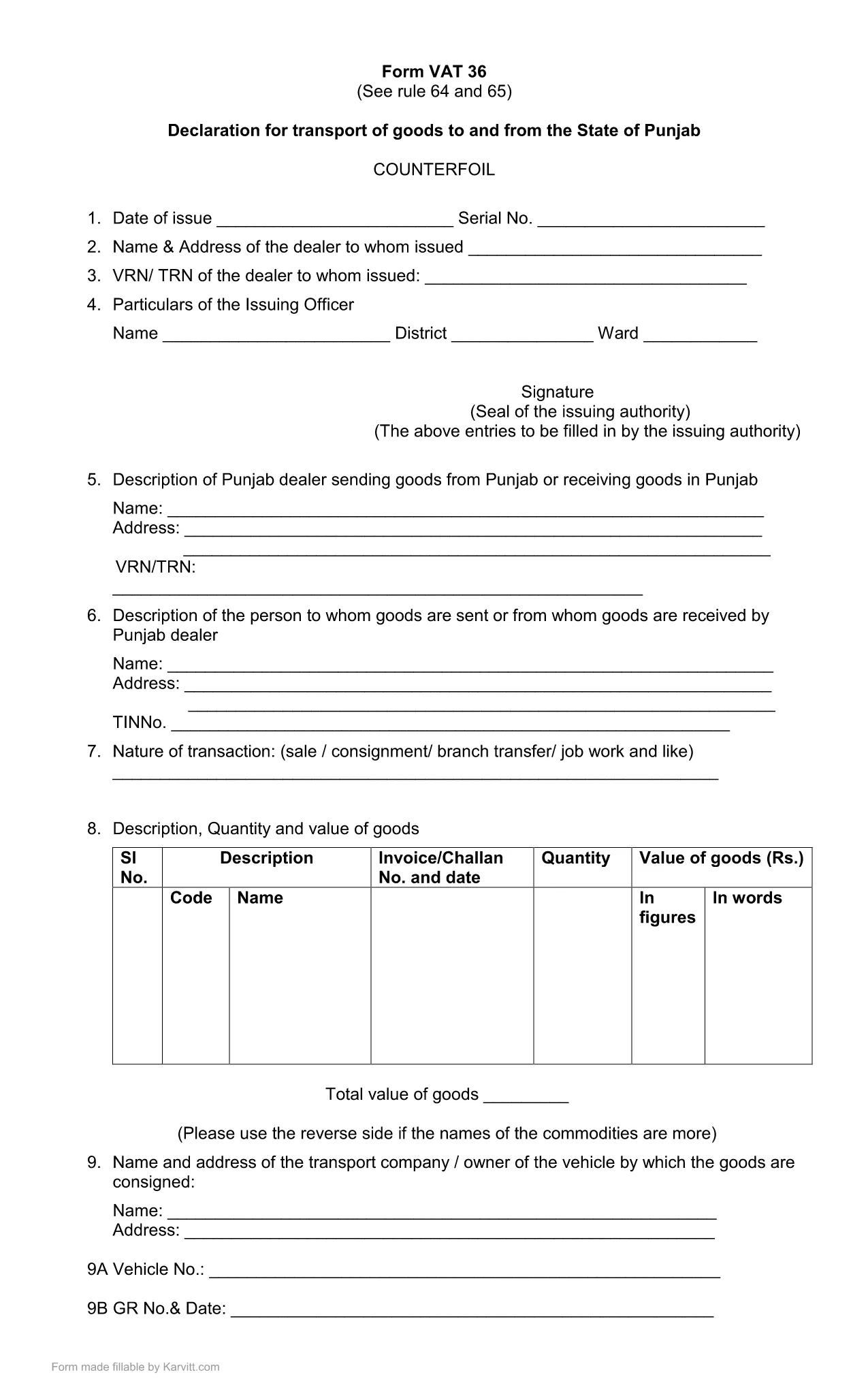
Punjab Form No. 36 – Fillable PDF for Transport Declaration

  1. Limba Engleză
  2. Țară India
  3. Activitate Impozite
  4. Departament Punjab Revenue Department
Punjab Form No. 36 – Fillable PDF for Transport Declaration

Punjab Form No. 36 is the official declaration required for the transport of goods to and from the State of Punjab. The form is used by traders, logistics companies, and anyone moving taxable goods across state borders. Our fillable PDF keeps the original layout while allowing you to type, select, and calculate directly in the browser.

What Is Punjab Form 36?

The form is part of the Punjab VAT (Value Added Tax) system. It captures details such as the consignor, consignee, vehicle number, goods description, and the tax amount payable for each shipment. Submitting a correctly completed Form 36 helps avoid penalties and ensures smooth clearance of goods.

How to Fill Punjab Form 36 Online

Instead of downloading the PDF and opening a separate editor, simply click the "Fill out this form" button on this page. The Formize PDF Filler app will load in your browser, presenting the same fields you see in the official PDF. Follow the steps below to complete the form:

  1. Click Fill out this form and wait for the Formize PDF Filler to load.
  2. Enter all required information: trader details, vehicle registration, goods description, and tax calculations.
  3. Review the auto‑calculated totals. Adjust any entries if needed.
  4. Click Save & Download to get a completed PDF you can print or email to the Punjab Revenue Department.

Common Mistakes & Tips for Accurate Submission

  • Incorrect GSTIN or PAN: Double‑check the numbers before saving.
  • Vehicle number format: Use the exact format as on the registration certificate.
  • Missing signatures: The form requires the authorized signatory’s signature; you can add a digital signature in the filler.
  • Tax calculation errors: The filler automatically calculates totals—verify the base amount and applicable rate.

By following these guidelines, you can submit Punjab Form 36 quickly, accurately, and without the need for additional software.

FAQ
  • What is the purpose of Punjab Form No. 36?

    Form 36 is a declaration for the transport of taxable goods to and from Punjab. It records details of the shipment and calculates the applicable VAT.

  • Do I need Adobe Acrobat to fill this form?

    No. With Formize you can fill the form directly in your browser without installing any additional software.

  • Can I submit the form electronically?

    The form must be printed and signed, then submitted to the Punjab Revenue Department as per their guidelines. The filled PDF can be saved for your records.

  • What if I make a mistake after saving?

    Open the saved PDF again in the Formize filler, correct the fields, and re‑save. Ensure the final version is the one you submit.

  • Is there a fee to download Punjab Form 36?

    No, the fillable PDF is provided free of charge for personal and business use.

  • Which version of the form is the latest?

    The PDF linked on this page is the most recent version (updated March 2021). Check the top of the form for the revision date.

  • Do I need a digital signature?

    A digital signature is optional in the filler. The final printed form must be signed by an authorized signatory before submission.

CUM SĂ

Cum să completați Punjab Form 36 gratuit, online, în 4 pași simpli:

  1. 1
    Open the Formize PDF Filler
    Click the "Fill out this form" button on the page. The Formize PDF Filler loads directly in your browser.
  2. 2
    Enter Required Details
    Fill in trader information, vehicle number, goods description, and tax amounts in the highlighted fields.
  3. 3
    Verify Auto‑Calculations
    The filler automatically totals the tax. Double‑check the numbers before proceeding.
  4. 4
    Save and Download
    When all fields are completed, click "Save & Download" to obtain a printable PDF copy for submission.
Aplicația Formize PDF Filler
DESPRE

Formulare Departamentul Impozit pe Venit

Punjab Form 36 este unul dintre formularele oficiale care sunt utilizate de Departamentul de impozitare pe venit din India pentru a administra și colecta impozite pe venit. Aceste formulare sunt folosite de contribuabili pentru a-și raporta veniturile, deducerile și obligațiile fiscale către autoritățile fiscale.

Iată câteva formulare utilizate în mod obișnuit ale departamentului de impozit pe venit în India:

ITR-1 (Sahaj): acest formular este folosit de persoane fizice care au venituri din salariu, proprietatea unei case și alte surse precum dobândă, pensie sau pensie familială. Se aplică persoanelor cu venituri totale de până la Rs. 50 de lakhs.

ITR-2: acest formular este folosit de persoane fizice și hinduși Familii indivize (HUF) care au venituri din alte surse decât afaceri sau profesie. Se aplică persoanelor fizice care au un venit total care depășește Rs. 50 de lakhs sau având active/venituri străine.

ITR-3: acest formular este folosit de persoane fizice și HUF având venituri din afacere sau profesie. Se aplică persoanelor fizice care au venituri dintr-o firmă de parteneriat și profesioniștilor care exercită o profesie.

ITR-4 (Sugam): acest formular este folosit de persoane fizice, HUF și firme (altele decât LLP) care au optat pentru schema de impozitare prezumtivă în conformitate cu secțiunile 44AD, 44ADA sau 44AE din Legea privind impozitul pe venit.

Formular 16: acest formular este furnizat de angajatori angajaților și conține detalii de salariu, impozit dedus la sursă (TDS) și alte informații conexe. Ajută angajații să depună cu acuratețe declarațiile de impozit pe venit.

Formular 26AS: acesta nu este un formular, ci o declarație fiscală anuală consolidată care oferă un rezumat al informațiilor legate de impozite, cum ar fi TDS, impozitul în avans și impozitul de autoevaluare plătit de contribuabil. Îi ajută pe contribuabili să-și verifice încrucișat obligațiile fiscale în timp ce își depun declarațiile de impozit pe venit.

Acestea sunt doar câteva exemple de formulare ale departamentului de impozit pe venit din India. Formele și cerințele specifice pot varia în funcție de natura venitului, categoria de contribuabil și legile fiscale în vigoare în India. Este important să consultați site-ul web oficial al Departamentului de impozitare pe venit din India (www.incometaxindia.gov.in) sau să căutați sfaturi profesionale pentru a obține informații exacte și actualizate cu privire la formularele specifice de impozit pe venit relevante pentru situația dvs. fiscală din India.

CARACTERISTICI

Filler PDF

Cel mai simplu mod de a completa Punjab Form 36 online

  • Completați rapid Punjab Form 36
    Căutați o modalitate de a completa rapid Punjab Form 36 online? Cu ajutorul nostru online gratuit de completare a formularelor PDF, veți ști cum să editați și să completați acest document pdf în mai puțin de un minut.
  • Editor PDF online ușor de utilizat
    Sătul de tipărirea fișierelor PDF pentru a le putea edita, înainte de a le rescana și a le trimite înapoi? Editați documente PDF gratuit online. Utilizați editorul nostru online de pdf pentru a economisi timp și hârtie.
  • Instrumente grozave, toate platformele
    Vă întrebați cum să completați Punjab Form 36 pe un Mac sau poate cum să utilizați un fișier PDF gratuit? Instrumentele noastre PDF online funcționează pe toate platformele.
  • Stocare securizată a fișierelor
    Fișierele „Punjab Form 36” finalizate sunt stocate într-o bază de date securizată gestionată de Amazon Cloud hosting. Puteți șterge oricând fișierele din sistemul nostru. În orice caz, aceste fișiere sunt șterse automat după 24 de ore.
  • Chat cu Punjab Form 36
    Conversați cu „Punjab Form 36” pe Chatize, care este un asistent de citire PDF gratuit. Puneți întrebări și obțineți răspunsuri de la „Punjab Form 36”. Doar faceți clic pe butonul Conversați cu documentul de mai sus.

Ștergeți sesiunea de umplere

Ștergeți sesiunea de umplere selectată? În acest caz, progresul dumneavoastră în completarea formularului se va pierde.

Ștergeți sesiunea de editare

Ștergeți sesiunea de editare selectată? În acest caz, progresul dvs. în crearea și editarea formularului se va pierde.