
Выберите язык

Fillable IRS Form 8824 – Like‑Kind Exchange PDF

  1. Страна США
  2. Язык Английский
  3. Вид деятельности Налоги
  4. Департамент Служба внутренних доходов
Fillable IRS Form 8824 – Like‑Kind Exchange PDF

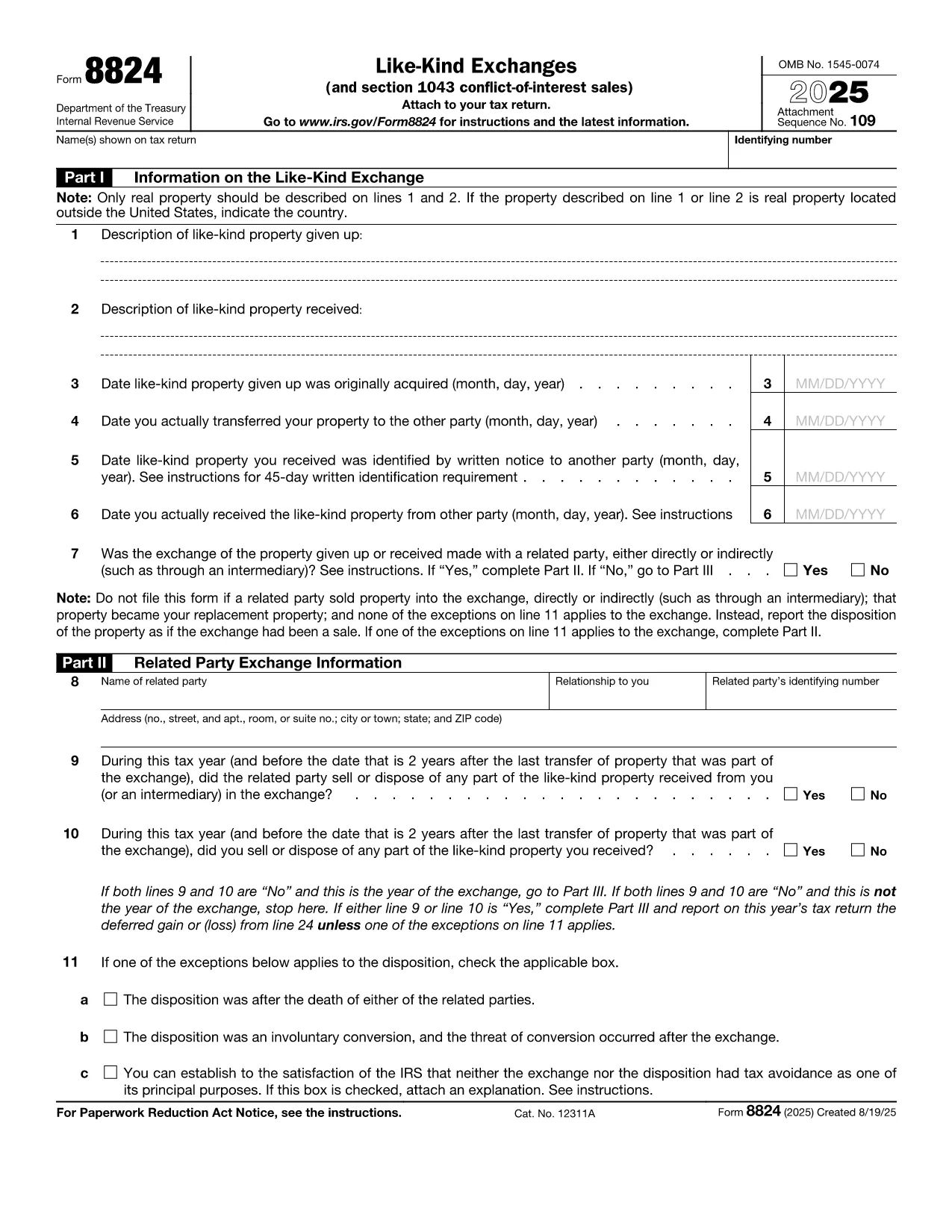
IRS Form 8824 is the official tax document used to report like‑kind exchanges of real property under Section 1031 of the Internal Revenue Code. Whether you’re swapping a rental house for a commercial building or exchanging raw land, the form lets you defer capital‑gain tax when the transaction qualifies.

What Is IRS Form 8824?

The form captures essential details about the property you gave up, the property you received, and the dates that trigger the 45‑day identification and 180‑day exchange periods. It also includes a separate section for related‑party exchanges and for Section 1043 conflict‑of‑interest sales.

How to Complete the Fillable Form Online

Instead of downloading the PDF and opening a separate editor, simply click the "Fill out this form" button on this page. The Formize PDF Filler app will load the official fillable version instantly. Follow these steps:

  • Enter the description of the relinquished property (address, legal description, or a brief identifier).
  • Enter the description of the replacement property you received.
  • Provide acquisition dates, transfer dates, and identification dates as required on Lines 3‑6.
  • Answer the related‑party question and, if "Yes," complete Part II.
  • Calculate realized gain or loss in Part III and indicate any deferral on Part IV.

Common Mistakes & Tips for Accuracy

  • Missing dates: The 45‑day and 180‑day deadlines are strict. Double‑check the calendar entries.
  • Incorrect property description: Use the legal description or street address; vague terms can trigger IRS queries.
  • Related‑party errors: If the exchange involves a family member or a disqualified person, you must complete Part II.
  • Math errors: Use the worksheet in the instructions to verify gain/loss calculations before entering them.

Download & Print Options

If you prefer a hard copy, you can still download the official PDF from the IRS link below. After filling it out online, click Export → PDF to save a printable version that you can sign and mail.

Ready to start? Click the button, complete the fields, and submit your Form 8824 with confidence.

Инструкции

ЧАСТО ЗАДАВАЕМЫЕ ВОПРОСЫ
  • Do I need to file Form 8824 for every property exchange?

    Yes. Any like‑kind exchange of real property that you want to defer under Section 1031 must be reported on Form 8824, even if no gain is recognized.

  • Can I file Form 8824 electronically?

    Most tax software accepts the filled‑out PDF as an attachment to your return. You can also upload the PDF directly through the IRS e‑file system if supported.

  • What is the 45‑day identification rule?

    You must identify the replacement property in writing within 45 days after the transfer of the relinquished property. The identified property must be clearly described in the document.

  • What happens if I miss the 180‑day exchange deadline?

    Missing the 180‑day deadline generally means the exchange is not qualified, and the entire gain becomes taxable in the year of the transfer.

  • Do I need to complete Part II for unrelated parties?

    No. Part II is only required if the exchange is with a related party (family member, corporation owned >50%, etc.). Skip it if the answer to the related‑party question is "No."

  • Where can I find the official PDF for Form 8824?

    The official, fillable PDF is available directly from the IRS at the link provided below.

КАК ПОЛЬЗОВАТЬСЯ

Как бесплатно заполнить IRS Form 8824 онлайн за 4 простых шагов:

  1. 1
    Open the Fillable Form
    Click the "Fill out this form" button on the page. The Formize PDF Filler app loads the official IRS Form 8824 automatically.
  2. 2
    Enter Your Exchange Details
    Complete each section—property descriptions, dates, and related‑party information—using the on‑screen fields.
  3. 3
    Review Calculations
    Use the built‑in calculator or the IRS worksheet to verify realized gain, recognized gain, and basis amounts.
  4. 4
    Save or Print
    When finished, click "Export → PDF" to download a printable copy, or submit the form electronically if your tax software supports it.
Приложение Formize PDF Filler
О ПРИЛОЖЕНИИ

Налоговые формы

IRS Form 8824 — это одна из налоговых форм, которые представляют собой документы, используемые для предоставления информации, связанной с налогами, в соответствующий налоговый орган. Существуют различные типы налоговых форм, в том числе федеральные, государственные и местные налоговые формы, которые могут различаться в зависимости от обстоятельств и местонахождения налогоплательщика.

ФУНКЦИИ

Инструмент для запролнения PDF форм

Самый простой способ заполнить IRS Form 8824 онлайн

  • Быстрое заполнение IRS Form 8824
    Ищете способ быстро заполнить IRS Form 8824 онлайн? С нашим бесплатным онлайн-инструментом вы узнаете, как редактировать заполнить этот PDF-документ менее чем за минуту.
  • Простой в использовании онлайн-редактор PDF
    Надоело распечатывать PDF-файлы, чтобы их можно было отредактировать перед повторным сканированием и отправкой обратно? Редактируйте документы PDF бесплатно онлайн. Используйте наш онлайн-редактор PDF, чтобы сэкономить время и бумагу.
  • Отличные инструменты, все платформы
    Хотите знать, как заполнить IRS Form 8824 на Mac или, может быть, как использовать бесплатный заполнитель PDF? Наши онлайн-инструменты PDF работают на всех платформах.
  • Безопасное хранение файлов
    Файлы заполненных "IRS Form 8824" хранятся в защищенной базе данных, управляемой облачным хостингом Amazon. Вы можете удалить свои файлы из нашей системы в любое время. В любом случае эти файлы автоматически удаляются через 24 часа.
  • Чат с IRS Form 8824
    Откройте чат с "IRS Form 8824" в Chatize — бесплатном помощнике для чтения PDF-файлов. Задавайте вопросы и получайте ответы от "IRS Form 8824". Просто нажмите кнопку Чат с документом выше.

Удалить данные о заполненной форме

Удалить данные о заполненной форме? В этом случае Ваш прогресс заполнения этой формы будет утерян.

Удалить сеанс редактирования

Удалить выбранный сеанс редактирования? В этом случае ваш прогресс в создании и редактировании формы будет утерян.