
Sprache auswählen

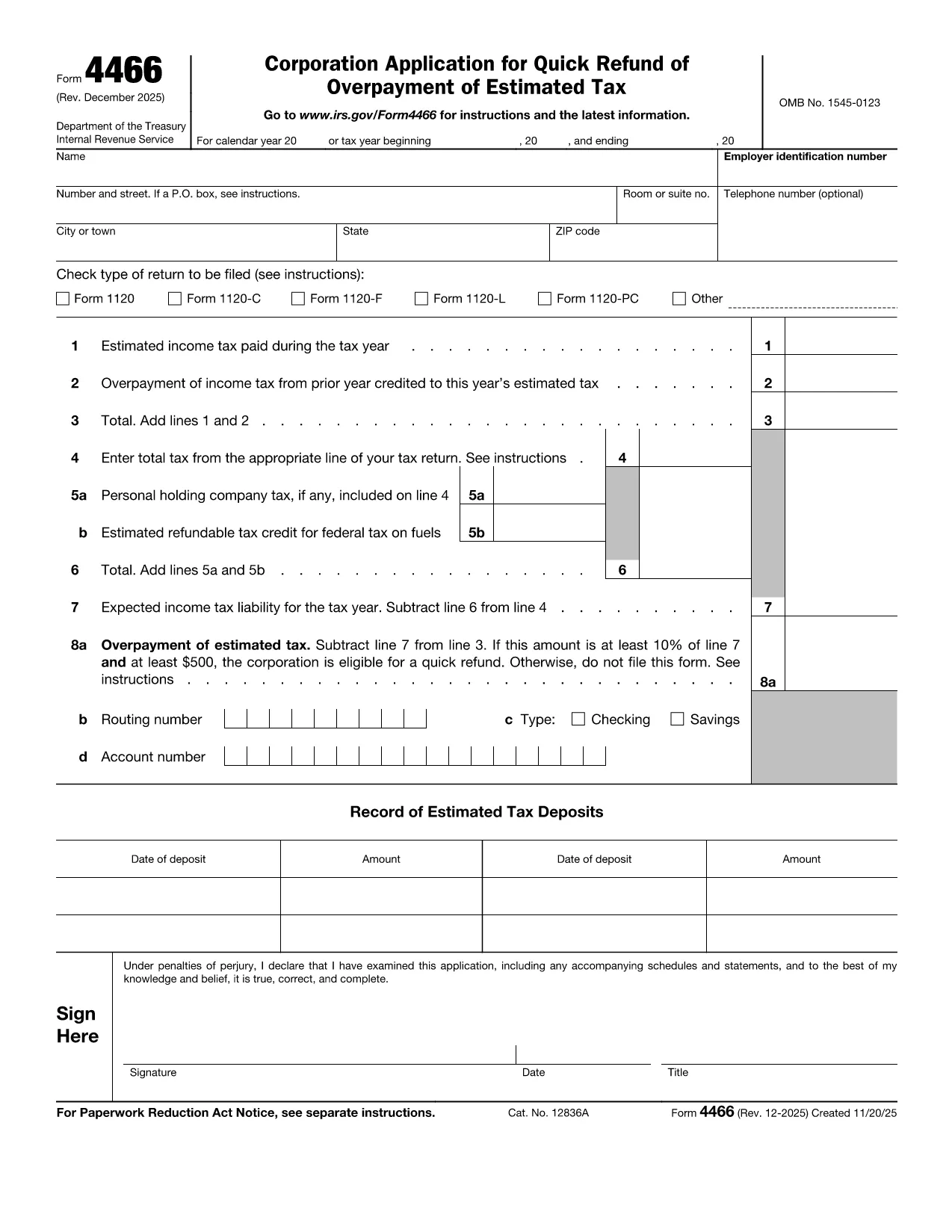
Form 4466 – Corporation Application for Quick Refund of Overpayment

  1. Land USA
  2. Sprache Englisch
  3. Aktivität Steuern
  4. Abteilung Finanzamt
Form 4466 – Corporation Application for Quick Refund of Overpayment

Form 4466 is the IRS’s official Corporation Application for Quick Refund of Overpayment of Estimated Tax. Corporations that have over‑paid their estimated taxes can use this form to request a fast cash refund, helping maintain cash flow and avoid unnecessary interest.

Who Can Use Form 4466?

Only corporations (C‑corporations) that have filed a complete tax return for the year in question are eligible. Partnerships, S‑corporations, and individuals must use other refund procedures.

Key Eligibility Requirements

  • The overpayment must be at least 10 % of the expected tax liability AND at least $500.
  • The corporation must have a filed tax return (Form 1120) for the year the overpayment occurred.
  • The request must be made within the time limits set by the IRS (generally within 45 days of filing the return).

How to Complete and Submit Form 4466

Instead of downloading, printing, and scanning the PDF, simply click the "Fill out this form" button on this page. The Formize PDF Filler will load instantly, allowing you to enter data directly on the screen and submit electronically.

Common Mistakes to Avoid

  • Leaving any required field blank – the filler will highlight missing information.
  • Submitting the form before the corporate tax return is filed – the IRS will reject the application.
  • Mis‑calculating the overpayment amount – double‑check lines 9 and 10 of your return.

Processing Time & What Happens Next

The IRS aims to process Form 4466 within 45 days. You will receive a notice confirming the refund amount or explaining any issues. If you filed an extension for your tax return, it does NOT extend the deadline for Form 4466.

Ready to get your refund? Click the button below, fill the form in minutes, and let Formize handle the rest.

FAQ
  • What is the deadline to file Form 4466?

    Form 4466 must be filed before the corporation files its tax return for the year, and the IRS processes it within 45 days of receipt.

  • Can I file Form 4466 electronically?

    Yes. With Formize you can fill and submit the form online; the IRS still receives a paper copy via mail, but the online process speeds up data entry.

  • Do I need to attach my Form 1120?

    A copy of the filed corporate tax return (Form 1120) must be attached to verify the overpayment.

  • What if my overpayment is less than $500?

    The corporation does not qualify for the quick refund program; you must wait for the standard refund process.

  • How long does the IRS take to issue the refund?

    The IRS aims to process the request within 45 days, after which the refund is issued by check or direct deposit.

  • Is there a fee to use the Formize filler?

    No. Formize provides the fillable PDF for free; you only pay any standard mailing costs if you choose to mail a paper copy.

  • Can I correct a mistake after submitting?

    If you discover an error, contact the IRS immediately and submit a corrected Form 4466 with a cover letter explaining the change.

WIE MAN

So füllen Sie Form 4466 kostenlos online in 5 einfachen Schritten aus:

  1. 1
    Open the Fillable Form
    Click the "Fill out this form" button on this page. The Formize PDF Filler loads in your browser.
  2. 2
    Enter Corporate Information
    Fill in the corporation’s name, EIN, tax year, and overpayment amount exactly as shown on your filed Form 1120.
  3. 3
    Attach Required Documents
    Upload a copy of the corporate tax return and any payment receipts that verify the overpayment.
  4. 4
    Review and Submit
    Use the built‑in validation to check for missing fields, then click Submit. The form will be securely transmitted to the IRS address.
  5. 5
    Track Your Refund
    After submission, you’ll receive a confirmation email with a tracking number. Keep it for any follow‑up with the IRS.
Formize PDF Filler-App
ÜBER

Steuerformulare

Form 4466 ist eines der Steuerformulare, bei denen es sich um Dokumente handelt, die zur Meldung von Einkünften, Abzügen und Steuerschulden an die zuständige Steuerbehörde verwendet werden. Diese Formulare sind ein wesentlicher Bestandteil des Steuererklärungsprozesses und werden verwendet, um sicherzustellen, dass Einzelpersonen und Unternehmen die Steuergesetze einhalten und ihre Steuerpflichten genau berechnen.

Die spezifischen erforderlichen Steuerformulare können je nach Faktoren wie dem Anmeldestatus einer Person, den Einkommensquellen und den Steuergesetzen des Landes variieren. Hier sind jedoch einige gängige Arten von Steuerformularen:

Individuelle Einkommensteuerformulare: Diese Formulare, beispielsweise die Serie 1040 in den Vereinigten Staaten, werden verwendet Einzelpersonen müssen ihr Einkommen melden, Abzüge und Gutschriften geltend machen und ihre Steuerschuld berechnen.

Unternehmenssteuerformulare: Unternehmen, einschließlich Einzelunternehmen, Personengesellschaften, Kapitalgesellschaften und Selbstständige, müssen möglicherweise verschiedene Formulare einreichen, um ihre Einnahmen, Ausgaben und geschuldeten Steuern zu melden. Beispiele hierfür sind Anhang C (Gewinn oder Verlust aus dem Geschäft) und Formular 1120 (US-Körperschaftssteuererklärung).

Arbeitssteuerformulare: Arbeitgeber sind verpflichtet, die Löhne der Arbeitnehmer zu melden und Lohnsteuern einzubehalten und abzuführen. Zu diesem Zweck werden Formulare wie W-2 (Lohn- und Steuererklärung) und 941 (vierteljährliche Bundessteuererklärung des Arbeitgebers) verwendet.

Formulare für Anlage- und Altersvorsorgekonten: Diese Formulare werden zur Meldung von Kapitalerträgen, Kapitalgewinnen und -verlusten sowie Beiträgen und Ausschüttungen von Altersvorsorgekonten verwendet. Beispiele hierfür sind das Formular 1099-DIV (Dividenden und Ausschüttungen) und Formular 5498 (IRA-Beitragsinformationen).

Erbschafts- und Schenkungssteuerformulare: Wenn eine Person verstirbt oder bedeutende Schenkungen macht, sind bestimmte Formulare wie Formular 706 (Steuererklärung für Erbschaft (und Generation-Skipping-Transfer) der Vereinigten Staaten) und Formular 709 (Steuererklärung für Schenkung (und Generation-Skipping-Transfer) der Vereinigten Staaten) Die Steuererklärung (Skipping Transfer) wird zur Meldung und Berechnung aller anfallenden Erbschafts- oder Schenkungssteuern verwendet.

Es ist wichtig zu beachten, dass sich Steuergesetze und -formen im Laufe der Zeit ändern können. Einzelpersonen und Unternehmen sollten sich daher an die zuständige Steuerbehörde wenden oder professionellen Steuerrat einholen, um die Einhaltung der aktuellen Anforderungen sicherzustellen.

MERKMALE

PDF-Filler

Der einfachste Weg, PDF-Formulare online auszufüllen

  • Füllen Sie schnell Form 4466 aus
    Suchen Sie nach einer Möglichkeit, Form 4466 schnell online auszufüllen? Mit unserem kostenlosen Online-PDF-Formularausfüller wissen Sie, wie Sie dieses PDF-Dokument in weniger als einer Minute bearbeiten und ausfüllen.
  • Einfach zu bedienender Online-PDF-Editor
    Haben Sie es satt, PDF-Dateien auszudrucken, damit Sie sie bearbeiten können, bevor Sie sie erneut scannen und zurücksenden? PDF-Dokumente kostenlos online bearbeiten. Nutzen Sie unseren Online-PDF-Editor, um Zeit und Papier zu sparen.
  • Tolle Tools, alle Plattformen
    Sie fragen sich, wie Sie Form 4466 auf einem Mac ausfüllen oder vielleicht einen kostenlosen PDF-Ausfüller verwenden können? Unsere Online-PDF-Tools funktionieren auf allen Plattformen.
  • Sichere Dateispeicherung
    Fertige "Form 4466"-Dateien werden in einer gesicherten Datenbank gespeichert, die vom Amazon Cloud-Hosting verwaltet wird. Sie können Ihre Dateien jederzeit aus unserem System löschen. In jedem Fall werden diese Dateien nach 24 Stunden automatisch gelöscht.
  • Chatten Sie mit Form 4466
    Chatten Sie mit „Form 4466“ auf Chatize, einem kostenlosen PDF-Leseassistenten. Stellen Sie Fragen und erhalten Sie Antworten von „Form 4466“. Klicken Sie einfach oben auf die Schaltfläche Mit Dokument chatten.

Füllsitzung löschen

Die ausgewählte Füllsitzung löschen? In diesem Fall gehen Ihre Fortschritte beim Ausfüllen des Formulars verloren.

Bearbeitungssitzung löschen

Ausgewählte Bearbeitungssitzung löschen? In diesem Fall geht Ihr Fortschritt beim Erstellen und Bearbeiten des Formulars verloren.