
Selecteaza limba

Fillable IRS Form 8925 – Report Employer‑Owned Life Insurance Contracts

  1. Țară STATELE UNITE ALE AMERICII
  2. Limba Engleză
  3. Activitate Impozite
  4. Departament Serviciul de Venituri Interne
Fillable IRS Form 8925 – Report Employer‑Owned Life Insurance Contracts

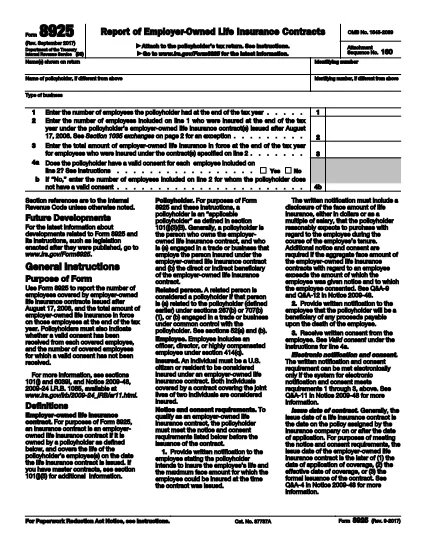
Form 8925, Report of Employer‑Owned Life Insurance Contracts, is required for any policyholder that owns one or more employer‑owned life insurance contracts issued after August 17, 2006. The form captures the number of employees covered, the total amount of insurance in force, and whether valid employee consents were obtained.

Using Formize’s cloud‑based PDF filler, you can complete the form directly in your browser – no Adobe Acrobat or other editor needed. Just click the “Fill out this form” button, wait for the Formize app to load, and start entering your data.

What Is Form 8925 and Who Needs It?

This IRS form is attached to the policyholder’s tax return. It applies to:

  • Businesses that own life‑insurance contracts on employees.
  • Contracts issued after August 17, 2006.
  • Any tax year where the contracts are still in force.

How to Complete Form 8925 Online with Formize

Follow these simple steps to fill out the form without downloading any software:

  • Click the “Fill out this form” button on this page.
  • Wait a few seconds for the Formize PDF Filler to load.
  • Enter the policyholder’s name, identifying number, and type of business.
  • Provide the total number of employees and the number covered by the insurance contracts.
  • Enter the total amount of insurance in force for the covered employees.
  • Answer the consent questions (Yes/No) and specify any employees without valid consent.
  • Review the completed form, then save, download, or submit it directly to the IRS portal.

Common Mistakes to Avoid When Filing Form 8925

  • Missing consent information: The IRS checks that each employee has a valid written consent. Incomplete answers can trigger an audit.
  • Incorrect employee counts: Double‑check the total employees versus those covered; mismatches cause delays.
  • Using an outdated PDF version: Always use the latest IRS version – the link below points to the current 2023 revision.
  • Failing to attach the form: Form 8925 must be attached to the policyholder’s income tax return (Form 1040, 1120, etc.).

Download the Official Fillable PDF

If you prefer to work offline, you can download the official IRS PDF directly. The file is fully fillable and compatible with Formize’s online editor.

Download IRS Form 8925 (PDF)

FAQ
  • Who must file Form 8925?

    Any policyholder that owns employer‑owned life insurance contracts issued after August 17, 2006 must attach Form 8925 to their tax return for each year the contracts are in force.

  • Is there a penalty for not filing Form 8925?

    There is no specific monetary penalty, but failure to report can lead to the IRS questioning the validity of employee consents and may result in tax adjustments or an audit.

  • Can I file Form 8925 electronically?

    Yes. Fill the form using Formize’s online PDF filler, save the completed PDF, and attach it when you e‑file your tax return.

  • What is considered a valid employee consent?

    A written, signed consent that meets IRS requirements – typically a separate consent form signed by each employee covered under the policy.

  • Do I need a separate Form 8925 for each insurance contract?

    No. One Form 8925 covers all employer‑owned life insurance contracts owned by the policyholder for the tax year.

  • Where can I find the latest version of Form 8925?

    The most recent version is available from the IRS website. Use the download link provided on this page.

CUM SĂ

Cum să completați Form 8925 gratuit, online, în 5 pași simpli:

  1. 1
    Open the Fillable Form
    Click the “Fill out this form” button on the page. The Formize PDF Filler will open in a new tab.
  2. 2
    Enter Policyholder Information
    Type the name, identifying number, and business type exactly as they appear on the tax return.
  3. 3
    Provide Employee & Insurance Details
    Enter total employees, number covered, and total amount of insurance in force for the covered employees.
  4. 4
    Answer Consent Questions
    Select “Yes” or “No” for each consent question and specify any employees lacking valid consent.
  5. 5
    Review, Save, and Submit
    Double‑check all entries, then save the completed PDF or download it to attach to your tax return.
Aplicația Formize PDF Filler
DESPRE

Formulare fiscale

Form 8925 este unul dintre formularele fiscale care sunt documente utilizate pentru a raporta autorității fiscale relevante informații despre veniturile, deducerile și obligațiile fiscale ale unei persoane sau întreprinderi. Aceste formulare sunt necesare pentru a respecta legile fiscale și pentru a îndeplini obligațiile fiscale. Formele fiscale variază în funcție de țară și de cerințele fiscale specifice în vigoare. Iată câteva tipuri comune de formulare fiscale:

Formulare de impozitare individuale: aceste formulare sunt folosite de contribuabilii individuali pentru a-și raporta venitul personal și pentru a solicita deduceri, credite și scutiri. Exemplele includ formularul 1040 în Statele Unite sau formularul de autoevaluare a impozitului în Regatul Unit.

Formulare de impozitare pentru afaceri: formularele de impozit pentru afaceri sunt folosite de companii, parteneriate sau persoane care desfășoară activități independente pentru a-și raporta veniturile, cheltuielile și alte informații legate de impozite. Exemplele includ formularul Schedule C (Profit sau Pierdere din afaceri) în Statele Unite sau formularul CT600 (Company Tax Return) în Regatul Unit.

Formulare de impozit pe salariu: aceste formulare sunt folosite de angajatori pentru a raporta salariile, salariile și impozitele reținute din salariile angajaților lor. Exemplele includ formularul W-2 în Statele Unite sau formularul P60 în Regatul Unit.

Formulare de taxă pe vânzări: formularele de taxă pe vânzări sunt folosite de companii pentru a raporta și a remite impozitul pe vânzări colectat pentru bunuri sau servicii taxabile. Formularele specifice de taxe pe vânzări variază în funcție de jurisdicție.

Formulare privind taxa pe valoarea adăugată (TVA): formularele cu TVA sunt utilizate în țările care impun o taxă pe valoarea adăugată pentru a raporta și a remite TVA-ul colectat la vânzări și pentru a solicita credite de TVA pentru achiziții. Exemplele includ formularele de decontare TVA utilizate în multe țări.

Formulare de impozit estimat: formularele de impozit estimat sunt utilizate pentru a raporta și a plăti impozite estimate pe venitul care nu este supus reținerii la sursă, cum ar fi venitul din activități independente sau venitul din investiții.

Acestea sunt doar câteva exemple din numeroasele forme fiscale care pot exista. Formularele specifice necesare depind de legile și reglementările fiscale din țara sau jurisdicția dvs. Este important să consultați instrucțiunile autorității fiscale sau să solicitați sfaturi profesionale pentru a determina ce formulare sunt aplicabile situației dvs.

CARACTERISTICI

Filler PDF

Cel mai simplu mod de a completa Form 8925 online

  • Completați rapid Form 8925
    Căutați o modalitate de a completa rapid Form 8925 online? Cu ajutorul nostru online gratuit de completare a formularelor PDF, veți ști cum să editați și să completați acest document pdf în mai puțin de un minut.
  • Editor PDF online ușor de utilizat
    Sătul de tipărirea fișierelor PDF pentru a le putea edita, înainte de a le rescana și a le trimite înapoi? Editați documente PDF gratuit online. Utilizați editorul nostru online de pdf pentru a economisi timp și hârtie.
  • Instrumente grozave, toate platformele
    Vă întrebați cum să completați Form 8925 pe un Mac sau poate cum să utilizați un fișier PDF gratuit? Instrumentele noastre PDF online funcționează pe toate platformele.
  • Stocare securizată a fișierelor
    Fișierele „Form 8925” finalizate sunt stocate într-o bază de date securizată gestionată de Amazon Cloud hosting. Puteți șterge oricând fișierele din sistemul nostru. În orice caz, aceste fișiere sunt șterse automat după 24 de ore.
  • Chat cu Form 8925
    Conversați cu „Form 8925” pe Chatize, care este un asistent de citire PDF gratuit. Puneți întrebări și obțineți răspunsuri de la „Form 8925”. Doar faceți clic pe butonul Conversați cu documentul de mai sus.

Ștergeți sesiunea de umplere

Ștergeți sesiunea de umplere selectată? În acest caz, progresul dumneavoastră în completarea formularului se va pierde.

Ștergeți sesiunea de editare

Ștergeți sesiunea de editare selectată? În acest caz, progresul dvs. în crearea și editarea formularului se va pierde.