
Выберите язык

Form 14446 (zh‑t) – Fillable PDF & Instructions

  1. Страна США
  2. Язык Китайский традиционный)
  3. Вид деятельности Налоги
  4. Департамент Служба внутренних доходов
Form 14446 (zh‑t) – Fillable PDF & Instructions

What Is Form 14446 (zh‑t)?

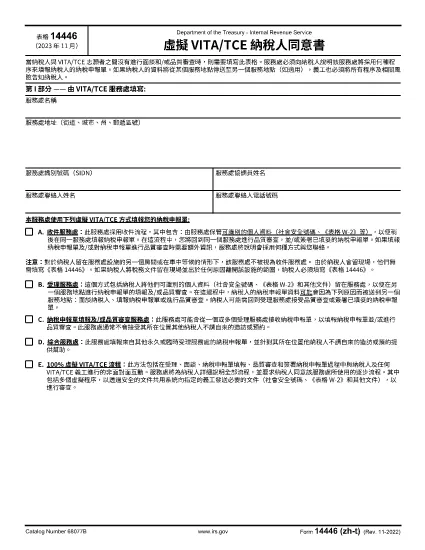
Form 14446, also known as the Taxpayer Site Retention Form, is required when a taxpayer leaves tax documents at an IRS service location and then departs the premises. The zh‑t version is the Traditional Chinese translation, making it accessible for Chinese‑speaking taxpayers.

How to Complete the Form Online

Instead of downloading the PDF and editing it with a desktop editor, use Formize’s built‑in PDF filler:

  1. Click the "Fill out this form" button on this page.
  2. Wait a few seconds while the Formize PDF Filler app loads.
  3. Enter the required information in each fillable field. The interface automatically saves your progress.
  4. When finished, click Submit to download a completed copy or print it directly.

Common Mistakes to Avoid

  • Leaving fields blank: Every required field must be completed; otherwise the form will be rejected.
  • Using the wrong language version: Ensure you are on the zh‑t (Traditional Chinese) PDF if you need it in Chinese.
  • Submitting the form before signing: The signature field is mandatory; use the digital signature option in Formize.
  • Incorrect dates: Use the exact date you left the documents at the site.

Where to Submit the Completed Form

After filling out Form 14446 (zh‑t), mail or deliver the completed form to the IRS office where the documents were left. Keep a copy for your records. If you are unsure which office to send it to, contact the IRS Service Center listed on the notice you received.

Download the PDF

For users who prefer a local copy, the official Traditional Chinese PDF is available below. The file is fully fillable and compatible with most PDF readers.

Download Form 14446 (zh‑t) PDF

ЧАСТО ЗАДАВАЕМЫЕ ВОПРОСЫ
  • Do I need to fill out Form 14446 if I stay on the IRS premises?

    No. The form is required only when the taxpayer leaves the site after leaving documents there. Staying in the same location does not trigger the requirement.

  • Can I submit the form electronically?

    The IRS currently requires a printed and signed copy. Use Formize to fill it out, then print and mail it to the appropriate IRS office.

  • Is the zh‑t version the same as the English version?

    Yes. The content is identical; only the language differs. Use the version that matches your preferred language.

  • What happens if I forget to sign the form?

    An unsigned Form 14446 will be considered incomplete and will be returned, causing delays in processing your tax documents.

  • How long should I keep a copy of the completed form?

    Retain a copy for at least three years, the standard period for IRS record‑keeping.

  • Can I fill out Form 14446 on a mobile device?

    Yes. Formize’s PDF filler works on most modern browsers, including mobile browsers, allowing you to complete the form on a phone or tablet.

  • Where can I find the IRS office address to send the form?

    The address is listed on any notice you received from the IRS service location. If you don’t have a notice, call the IRS helpline for guidance.

КАК ПОЛЬЗОВАТЬСЯ

Как бесплатно заполнить Form 14446 онлайн за 4 простых шагов:

  1. 1
    Open the Fillable Form
    Click the "Fill out this form" button on the page. The Formize PDF Filler will open in your browser.
  2. 2
    Enter Your Information
    Fill each required field. The filler autosaves, so you won’t lose data if you navigate away.
  3. 3
    Add Your Signature
    Use the digital signature tool inside Formize to sign the form electronically.
  4. 4
    Download or Print
    When all fields are complete, click "Download" to save a copy or "Print" to get a hard‑copy for mailing.
Приложение Formize PDF Filler
О ПРИЛОЖЕНИИ

Налоговые формы

Form 14446 — это одна из налоговых форм, которые представляют собой документы, используемые для предоставления информации, связанной с налогами, в соответствующий налоговый орган. Существуют различные типы налоговых форм, в том числе федеральные, государственные и местные налоговые формы, которые могут различаться в зависимости от обстоятельств и местонахождения налогоплательщика.

ФУНКЦИИ

Инструмент для запролнения PDF форм

Самый простой способ заполнить Form 14446 онлайн

  • Быстрое заполнение Form 14446
    Ищете способ быстро заполнить Form 14446 онлайн? С нашим бесплатным онлайн-инструментом вы узнаете, как редактировать заполнить этот PDF-документ менее чем за минуту.
  • Простой в использовании онлайн-редактор PDF
    Надоело распечатывать PDF-файлы, чтобы их можно было отредактировать перед повторным сканированием и отправкой обратно? Редактируйте документы PDF бесплатно онлайн. Используйте наш онлайн-редактор PDF, чтобы сэкономить время и бумагу.
  • Отличные инструменты, все платформы
    Хотите знать, как заполнить Form 14446 на Mac или, может быть, как использовать бесплатный заполнитель PDF? Наши онлайн-инструменты PDF работают на всех платформах.
  • Безопасное хранение файлов
    Файлы заполненных "Form 14446" хранятся в защищенной базе данных, управляемой облачным хостингом Amazon. Вы можете удалить свои файлы из нашей системы в любое время. В любом случае эти файлы автоматически удаляются через 24 часа.
  • Чат с Form 14446
    Откройте чат с "Form 14446" в Chatize — бесплатном помощнике для чтения PDF-файлов. Задавайте вопросы и получайте ответы от "Form 14446". Просто нажмите кнопку Чат с документом выше.

Удалить данные о заполненной форме

Удалить данные о заполненной форме? В этом случае Ваш прогресс заполнения этой формы будет утерян.

Удалить сеанс редактирования

Удалить выбранный сеанс редактирования? В этом случае ваш прогресс в создании и редактировании формы будет утерян.