
Zvoľ jazyk

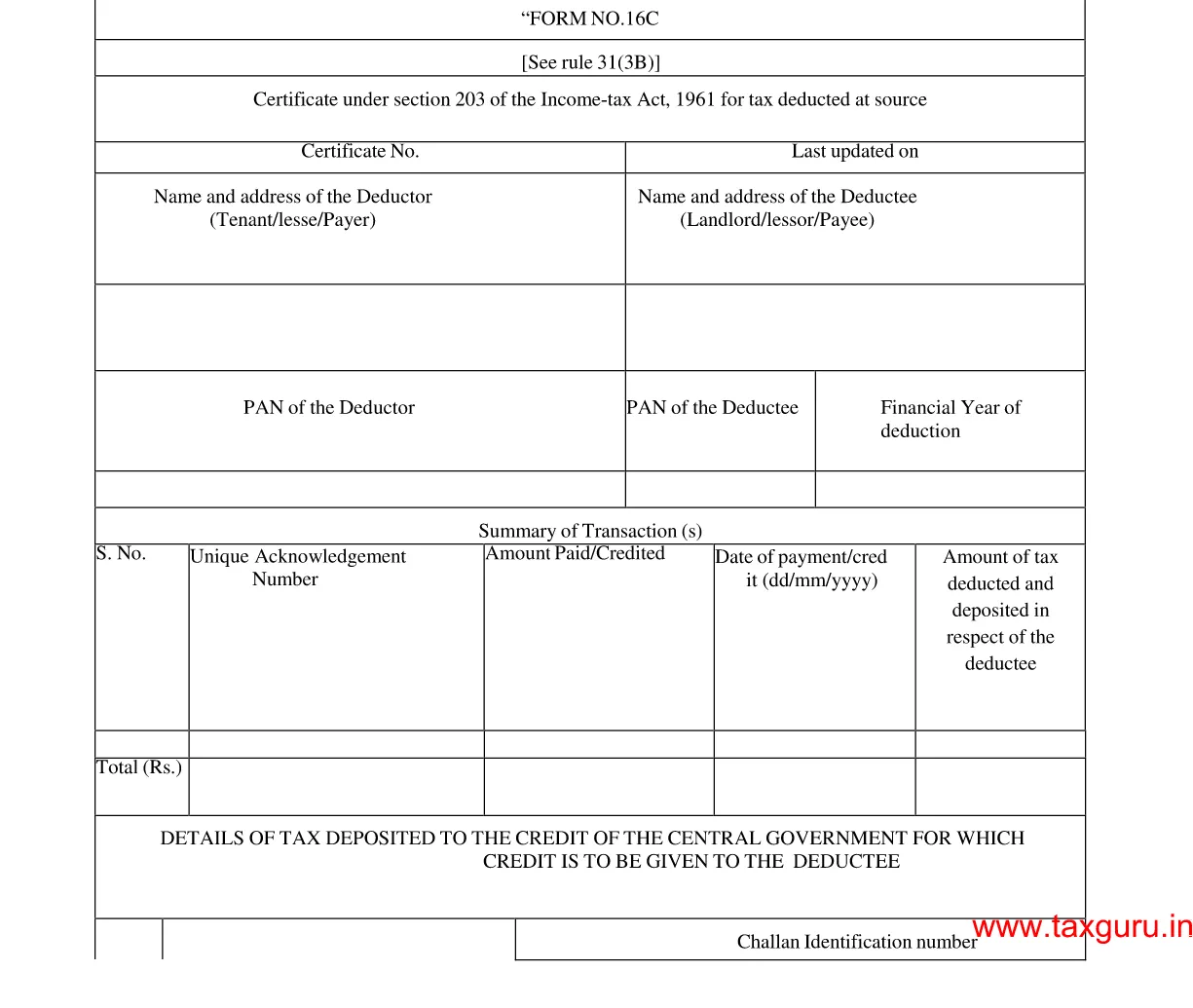
Form 16C – Fillable Tax Deduction Statement (Section 194‑IB)

  1. Krajina India
  2. Jazyk Angličtina
  3. oddelenie Income Tax Department
  4. Aktivita dane
Form 16C – Fillable Tax Deduction Statement (Section 194‑IB)

Form 16C is the official statement used by deductors to report tax deducted at source (TDS) under Section 194‑IB of the Income Tax Act, India. It details the amount deducted, the recipient’s PAN, and the date of deduction. With Formize’s fillable PDF, you can complete and submit the form in minutes—no paper, no hassle.

What is Form 16C?

Form 16C serves as a challan‑cum‑statement that records TDS on payments such as interest on securities, dividends, and other specified incomes. The form must be filed electronically with the Income Tax Department after the deduction is made.

Who Needs to File Form 16C?

  • Any person or entity deducting tax under Section 194‑IB.
  • Financial institutions, mutual funds, and companies paying interest or dividend income.
  • Businesses that have made taxable payments to residents or non‑residents.

How to Fill Form 16C Online

Follow these simple steps to complete the form without leaving the page:

  1. Click the "Fill out this form" button below.
  2. The Formize PDF Filler app loads automatically in your browser.
  3. Enter the required details (deductor name, PAN, amount, etc.) in the fillable fields.
  4. Review the information, then click Save or Download to get a completed PDF.

Common Mistakes to Avoid

  • Incorrect PAN: Double‑check the PAN of both deductor and deductee.
  • Wrong financial year: Ensure the year matches the period of deduction.
  • Missing signatures: The form requires the signature of the person responsible for deduction.
  • Incomplete head codes: Use the correct major and minor head codes as per the Income Tax rules.

Download the Fillable PDF

Ready to start? Click the button below to open the fillable version of Form 16C directly in your browser.

Fill out this form

FAQ
  • What is the purpose of Form 16C?

    Form 16C records tax deducted at source under Section 194‑IB and serves as a challan‑cum‑statement for the Income Tax Department.

  • Who is required to file Form 16C?

    Any person or entity that deducts tax on interest, dividends, or similar payments under Section 194‑IB must file Form 16C.

  • Can I edit the PDF on a mobile device?

    Yes. The Formize PDF Filler works on all modern browsers, including mobile Chrome and Safari.

  • Do I need a digital signature to submit Form 16C?

    A physical signature is required on the printed form. For electronic filing, the form can be uploaded without a digital signature, but the deductor’s signature must be present on the original copy.

  • What are the major and minor head codes?

    These codes classify the nature of the payment. For example, major head code 2 and minor head code 0 are commonly used for interest payments.

  • How do I correct a mistake after submission?

    File a revised Form 16C with the corrected details before the end of the financial year, and inform the deductee of the changes.

AKO

Ako bezplatne vyplniť Form 16C online v 4 jednoduchých krokoch:

  1. 1
    Open the Fillable Form
    Click the "Fill out this form" button. The Formize PDF Filler loads instantly in your browser.
  2. 2
    Enter Required Information
    Complete each fillable field—deductor details, PAN, amount deducted, and the applicable head codes.
  3. 3
    Validate and Save
    Review the entered data, ensure no fields are missing, then click Save to store the completed PDF on your device.
  4. 4
    Submit to the Tax Department
    Upload the saved PDF through the Income Tax e‑filing portal as per the filing deadline.
Aplikácia Formize PDF Filler
O

Daňové formuláre

Form 16C je jedným z daňových formulárov, ktoré sú dokumentmi používanými na oznamovanie informácií súvisiacich s daňami príslušnému daňovému úradu. Existujú rôzne typy daňových formulárov vrátane federálnych, štátnych a miestnych daňových formulárov, ktoré sa môžu líšiť v závislosti od okolností a miesta daňovníka.

VLASTNOSTI

PDF Filler

Najjednoduchší spôsob, ako vyplniť Form 16C online

  • Rýchlo vyplňte Form 16C
    Hľadáte spôsob, ako rýchlo vyplniť Form 16C online? S našou online bezplatnou výplňou formulárov PDF budete vedieť, ako upraviť a vyplniť tento dokument PDF za menej ako minútu.
  • Ľahko použiteľný online editor PDF
    Nebaví vás tlačiť súbory PDF, aby ste ich mohli upravovať pred opätovným naskenovaním a odoslaním späť? Upravujte dokumenty PDF zadarmo online. Použite náš online editor PDF, aby ste ušetrili čas a papier.
  • Skvelé nástroje, všetky platformy
    Zaujíma vás, ako vyplniť Form 16C na počítači Mac, alebo ako možno použiť bezplatný výplň PDF? Naše online nástroje PDF fungujú na všetkých platformách.
  • Bezpečné ukladanie súborov
    Dokončené súbory „Form 16C“ sú uložené v zabezpečenej databáze spravovanej hostingom Amazon Cloud. Svoje súbory môžete z nášho systému kedykoľvek odstrániť. V každom prípade sa tieto súbory automaticky vymažú po 24 hodinách.
  • Četovať s Form 16C
    Četujte s „Form 16C“ na Chatize, čo je bezplatný pomocník na čítanie súborov PDF. Pýtajte sa otázky a získajte odpovede z „Form 16C“. Stačí kliknúť na tlačidlo Rozhovor s dokumentom vyššie.

Odstrániť reláciu plnenia

Chcete odstrániť vybratú reláciu plnenia? V takom prípade sa stratí váš postup pri vypĺňaní formulára.

Odstrániť reláciu úprav

Chcete odstrániť vybratú reláciu úprav? V takom prípade sa stratí váš postup pri vytváraní a úprave formulára.