
Chọn ngôn ngữ

IRS Form 14157‑A (SP) – Fillable PDF

  1. Quốc gia Hoa Kỳ
  2. Ngôn ngữ người Tây Ban Nha
  3. Hoạt động thuế
  4. Phòng Internal Revenue Service
IRS Form 14157‑A (SP) – Fillable PDF

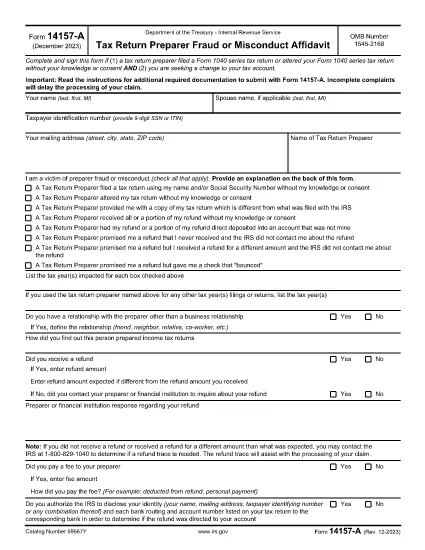
Form 14157‑A (SP) is the IRS’s official affidavit used to report fraud, misconduct, or other serious issues involving a tax return preparer. The “(SP)” designation indicates the Spanish‑language version of the form, but the same filing requirements apply to all taxpayers.

What Is Form 14157‑A (SP)?

This form must be submitted together with Form 14157 and any supporting documentation referenced in the instructions. It provides the IRS with detailed information about the alleged misconduct, allowing the agency to investigate and take corrective action.

How to Complete the Fillable PDF on Formize

Instead of downloading the PDF and opening it in a separate editor, you can fill it out directly on our site:

  1. Click the **"Fill out this form"** button below.
  2. Wait a few seconds while the Formize PDF Filler app loads.
  3. Enter all required information in the highlighted fields.
  4. Upload or draw your electronic signature in the signature field.
  5. Review the completed form for accuracy, then click **Submit** to download the signed PDF.

Common Mistakes to Avoid

  • Leaving fields blank: Every required field must be completed; otherwise the IRS will reject the form.
  • Incorrect SSN or EIN: Double‑check numbers to prevent processing delays.
  • Missing signature: The form must be signed under penalty of perjury. Use the built‑in e‑signature tool.
  • Failing to attach supporting documents: Include copies of any notices, letters, or evidence referenced in the affidavit.

Where to Send Your Completed Form

After you download the signed PDF, mail it to the address listed in the official Form 14157‑A instructions. The address varies by state, so be sure to consult the latest IRS guidance before sending.

Key Keywords for Quick Reference

Use these terms when searching for help or additional resources:

  • IRS Form 14157‑A
  • tax preparer fraud affidavit
  • fill‑able 14157‑A PDF
  • Spanish form 14157‑A
  • IRS fraud reporting form
  • electronic signature IRS form

Ready to start? Click the button below to open the fillable version instantly.

CÂU HỎI THƯỜNG GẶP
  • Do I need to file Form 14157‑A if I’m not sure the preparer committed fraud?

    Only file the form when you have concrete evidence or a strong belief that a preparer engaged in fraud, misconduct, or willful non‑compliance. Unsubstantiated claims may delay investigations.

  • Can I submit the form electronically?

    The IRS currently requires a printed, signed copy mailed to the appropriate address. However, you can use the fillable PDF to ensure accuracy before printing.

  • What supporting documents should I attach?

    Attach any IRS notices, correspondence, receipts, or other evidence that supports your claim. Clearly label each attachment.

  • Is the Spanish version (SP) any different from the English version?

    The content and required information are identical; only the language of the instructions and field labels changes.

  • How long does the IRS take to respond?

    Response times vary. The IRS typically acknowledges receipt within 30 days, but investigations can take several months depending on complexity.

  • What penalties exist for filing a false affidavit?

    Providing false information under penalty of perjury can result in criminal charges, fines, and possible imprisonment.

  • Do I need a tax professional to help me fill out Form 14157‑A?

    While not required, a tax professional can help ensure accuracy, especially if the case involves complex issues.

LÀM THẾ NÀO ĐỂ

Cách điền IRS Form 14157-A miễn phí, trực tuyến trong 5 bước đơn giản:

  1. 1
    Open the Fillable Form
    Click the "Fill out this form" button on the page. The Formize PDF Filler will open in a new window.
  2. 2
    Load the Form
    Wait a few seconds while the fillable PDF loads completely.
  3. 3
    Enter Your Information
    Complete each highlighted field with accurate data, including SSN, tax year, and details of the alleged misconduct.
  4. 4
    Add an Electronic Signature
    Use the built‑in e‑signature tool to sign under penalty of perjury.
  5. 5
    Download and Submit
    Review the form, then click "Submit" to download the signed PDF. Mail it to the IRS address shown in the official instructions.
Định dạng ứng dụng PDF Filler
TRONG KHOẢNG

Biểu mẫu thuế liên bang

IRS Form 14157-A là một trong những biểu mẫu thuế Liên bang là tài liệu dùng để báo cáo và nộp thuế thu nhập liên bang với Sở Thuế vụ (IRS) tại Hoa Kỳ. Những biểu mẫu này được các cá nhân, doanh nghiệp và tổ chức sử dụng để báo cáo thu nhập, các khoản khấu trừ và thông tin liên quan khác cần thiết để tính nghĩa vụ thuế liên bang của họ.

Biểu mẫu thuế liên bang được sử dụng phổ biến nhất là Biểu mẫu 1040, được cá nhân nộp thuế sử dụng để báo cáo thuế thu nhập cá nhân của họ. Các biểu mẫu thường được sử dụng khác bao gồm Biểu mẫu 1065 dành cho quan hệ đối tác, Biểu mẫu 1120 dành cho các công ty và Mẫu 990 dành cho các tổ chức được miễn thuế.

Các biểu mẫu thuế liên bang thường yêu cầu người nộp thuế báo cáo nhiều nguồn thu nhập khác nhau, chẳng hạn như tiền lương, tiền lương và tiền boa, cũng như thu nhập từ đầu tư, tài sản cho thuê và các nguồn khác. Các biểu mẫu này cũng cho phép người nộp thuế yêu cầu các khoản khấu trừ và tín dụng cho các chi phí khác nhau, chẳng hạn như đóng góp từ thiện, lãi suất thế chấp và chi phí chăm sóc sức khỏe.

Điều quan trọng là phải nộp các biểu mẫu thuế liên bang một cách chính xác và đúng hạn, vì nếu không làm như vậy có thể bị IRS phạt và tính lãi.

ĐẶC TRƯNG

Trình điền PDF

Cách dễ nhất để điền vào các mẫu PDF trực tuyến

  • Nhanh chóng điền vào IRS Form 14157-A
    Bạn đang tìm cách điền nhanh IRS Form 14157-A trực tuyến? Với trình điền biểu mẫu PDF miễn phí trực tuyến của chúng tôi, bạn sẽ biết cách chỉnh sửa và điền vào tài liệu pdf này trong vòng chưa đầy một phút.
  • Trình chỉnh sửa PDF trực tuyến dễ sử dụng
    Chán nản với việc in ra các tệp PDF để bạn có thể chỉnh sửa chúng trước khi quét lại và gửi lại? Chỉnh sửa tài liệu PDF trực tuyến miễn phí. Sử dụng trình chỉnh sửa pdf trực tuyến của chúng tôi để tiết kiệm thời gian và giấy.
  • Công cụ tuyệt vời, tất cả các nền tảng
    Bạn muốn biết cách điền IRS Form 14157-A trên máy Mac hoặc có thể là cách sử dụng trình điền PDF miễn phí? Các công cụ PDF trực tuyến của chúng tôi hoạt động trên tất cả các nền tảng.
  • Lưu trữ tệp an toàn
    Các tệp "IRS Form 14157-A" đã hoàn thành được lưu trữ trong cơ sở dữ liệu bảo mật do dịch vụ lưu trữ Amazon Cloud quản lý. Bạn có thể xóa các tệp của mình khỏi hệ thống của chúng tôi bất cứ lúc nào. Trong mọi trường hợp, các tệp này sẽ tự động bị xóa sau 24 giờ.
  • Trò chuyện với IRS Form 14157-A
    Trò chuyện với "IRS Form 14157-A" trên Trò chuyện, một trợ lý đọc PDF miễn phí. Đặt câu hỏi và nhận câu trả lời từ "IRS Form 14157-A". Chỉ cần nhấp vào nút Trò chuyện với tài liệu ở trên.

Xóa phiên điền

Xóa phiên điền đã chọn? Trong trường hợp này, tiến độ của bạn trong việc hoàn thành biểu mẫu sẽ bị mất.

Xóa phiên chỉnh sửa

Xóa phiên chỉnh sửa đã chọn? Trong trường hợp này, tiến trình tạo và chỉnh sửa biểu mẫu của bạn sẽ bị mất.