
اختار اللغة

IRS Form 8834 – Fillable PDF for Qualified Electric Vehicle Credit

  1. دولة الولايات المتحدة الأمريكية
  2. لغة إنجليزي
  3. نشاط الضرائب
  4. قسم دائرة الإيرادات الداخلية
IRS Form 8834 – Fillable PDF for Qualified Electric Vehicle Credit

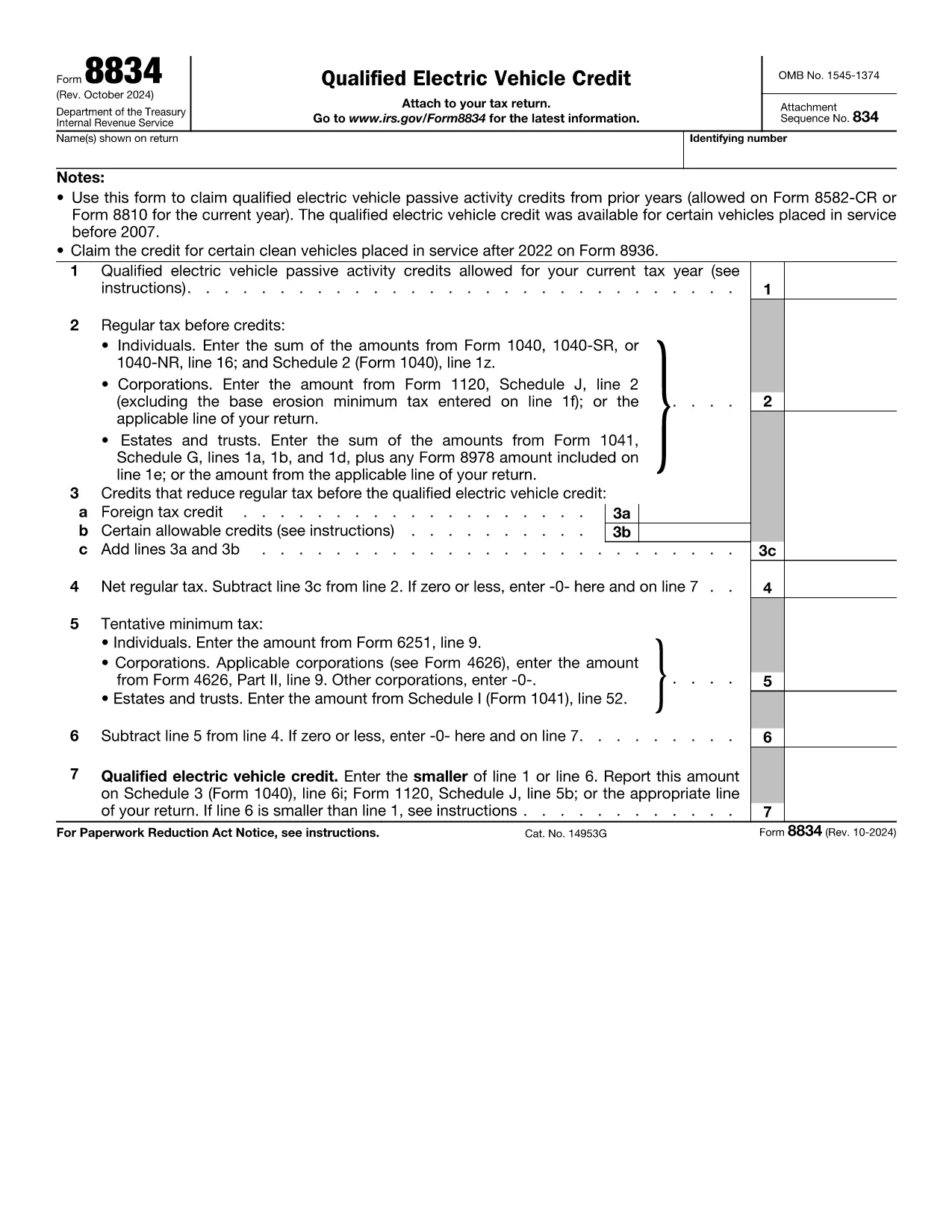
Form 8834, officially titled Qualified Electric Vehicle Credit, is used by taxpayers to claim passive activity credits from qualified electric vehicles placed in service before 2007. Although newer EV credits are reported on Form 8936, many taxpayers still have carry‑forward credits that belong on Form 8834.

What Is Form 8834?

This one‑page IRS form calculates the amount of qualified electric vehicle passive activity credit you can apply to your current tax year. It interacts with other forms such as Form 8582‑CR (individuals) or Form 8810 (corporations) to determine the credit limit.

How to Complete Form 8834 Online

Instead of downloading the PDF and editing it manually, simply click the "Fill out this form" button on this page. The Formize PDF Filler app will load instantly, allowing you to enter data directly in your browser.

  • Enter taxpayer information (name, SSN/EIN) exactly as it appears on your tax return.
  • Provide the credit amount allowed from prior years (Line 1).
  • Input your regular tax before credits (Line 2) and any other credits that reduce your tax (Line 3).
  • Follow the automatic calculations for net regular tax, tentative minimum tax, and the final credit amount.

Common Mistakes to Avoid

  • Using the wrong form: Form 8834 is only for pre‑2007 EV credits. New EV purchases require Form 8936.
  • Incorrect credit limit: Always reference the latest Form 8582‑CR or Form 8810 for the allowable amount.
  • Mismatching tax year: Credits must be claimed in the year you are allowed to use them, not the year the vehicle was purchased.
  • Leaving lines blank: Even a zero value must be entered to avoid IRS processing delays.

Where to Submit the Completed Form

After you finish in Formize, download the completed PDF. Attach it to your federal tax return:

  • Individuals – attach to Schedule 3 (Form 1040), line 6i.
  • Corporations – attach to Form 1120, Schedule J.
  • Estates & Trusts – attach to Form 1041, Schedule G.

Download the Fillable PDF

If you prefer to work offline, you can download the official IRS fillable PDF below. The same file is used by the Formize online filler.

التعليمات
  • Who should use Form 8834?

    Taxpayers who have qualified electric vehicle passive activity credits from vehicles placed in service before 2007 and need to claim any unused credit in the current tax year.

  • Can I use Form 8834 for a 2023 EV purchase?

    No. Vehicles placed in service after 2022 are claimed on Form 8936. Form 8834 only covers pre‑2007 credits.

  • Do I need to attach supporting schedules?

    Yes. Include the relevant credit limitation schedules (Form 8582‑CR for individuals or Form 8810 for corporations) that show the allowable credit amount.

  • What if my regular tax is lower than the credit amount?

    The credit you can claim is the lesser of the allowable credit (Line 1) or your net regular tax after other credits (Line 6). Any excess can be carried forward.

  • Is the Formize filler secure?

    Formize uses SSL encryption and processes data locally in your browser, ensuring your personal information remains private.

  • Can I e‑file Form 8834?

    Most commercial tax software accepts the completed PDF as an attachment. Check your software’s instructions for attaching supplemental forms.

  • What common errors cause IRS rejections?

    Missing SSN/EIN, entering a zero on Line 1 when a credit exists, or failing to include the required supporting schedules.

كيف

كيفية ملء Form 8834 مجانًا عبر الإنترنت في 6 خطوات سهلة:

  1. 1
    Click the Fill‑out Button
    Press the “Fill out this form” button on the page to launch the Formize PDF Filler.
  2. 2
    Wait for the Filler to Load
    The web‑based filler loads in seconds; no download or installation is required.
  3. 3
    Enter Your Information
    Fill in taxpayer name, SSN/EIN, credit amounts, and tax liability fields exactly as shown on your return.
  4. 4
    Review Calculations
    The filler automatically computes net regular tax, tentative minimum tax, and the final credit amount.
  5. 5
    Save or Download
    When finished, click “Save” to store the completed PDF in your browser or “Download” to get a copy for your records.
  6. 6
    Submit with Your Tax Return
    Attach the completed Form 8834 to the appropriate schedule of your federal tax return and file as usual.
Formize تطبيق PDF Filler
حول

استمارات الضرائب

Form 8834 هي أحد النماذج الضريبية التي تُستخدم للإبلاغ عن المعلومات المتعلقة بالضرائب إلى مصلحة الضرائب ذات الصلة. هناك أنواع مختلفة من أشكال الضرائب ، بما في ذلك أشكال الضرائب الفيدرالية والولائية والمحلية ، والتي يمكن أن تختلف تبعًا لظروف دافع الضرائب وموقعه.

سمات

حشو PDF

أسهل طريقة لملء نماذج PDF عبر الإنترنت

  • املأ بسرعة Form 8834
    هل تبحث عن طريقة لملء كلمة Form 8834 بسرعة عبر الإنترنت؟ من خلال برنامج تعبئة نماذج PDF المجاني عبر الإنترنت ، ستعرف كيفية تحرير وتعبئة مستند pdf هذا في أقل من دقيقة.
  • محرر PDF سهل الاستخدام عبر الإنترنت
    هل سئمت طباعة ملفات PDF حتى تتمكن من تحريرها قبل إعادة مسحها ضوئيًا وإرسالها مرة أخرى؟ تحرير مستندات PDF مجانًا عبر الإنترنت. استخدم محرر pdf على الإنترنت لتوفير الوقت والورق.
  • أدوات رائعة ، جميع المنصات
    هل تتساءل عن كيفية ملء Form 8834 على جهاز Mac ، أو ربما كيفية استخدام حشو PDF مجانًا؟ تعمل أدوات PDF الخاصة بنا عبر الإنترنت على جميع الأنظمة الأساسية.
  • تخزين الملفات الآمن
    يتم تخزين ملفات "Form 8834" المكتملة في قاعدة بيانات آمنة تديرها استضافة Amazon Cloud. يمكنك حذف ملفاتك من نظامنا في أي وقت. على أي حال ، يتم حذف هذه الملفات تلقائيًا بعد 24 ساعة.
  • الدردشة مع {كلمة رئيسية}
    قم بالدردشة مع "Form 8834" على Chatize وهو مساعد مجاني لقارئ PDF. اطرح الأسئلة واحصل على الإجابات من "Form 8834". فقط انقر على زر الدردشة مع المستند أعلاه.

حذف جلسة التعبئة

حذف جلسة التعبئة المحددة؟ في هذه الحالة، سيتم فقد تقدمك في إكمال النموذج.

حذف جلسة التحرير

هل تريد حذف جلسة التحرير المحددة؟ في هذه الحالة، سيتم فقدان التقدم الذي أحرزته في إنشاء النموذج وتحريره.