
Choisir la langue

Form 8554‑EP – Enrolled Retirement Plan Agent Renewal (Fillable PDF)

  1. De campagne Etats-Unis
  2. Langue Anglais
  3. Activité Impôts
  4. département Service des recettes internes
Remplissez ce formulaire
Form 8554‑EP – Enrolled Retirement Plan Agent Renewal (Fillable PDF)

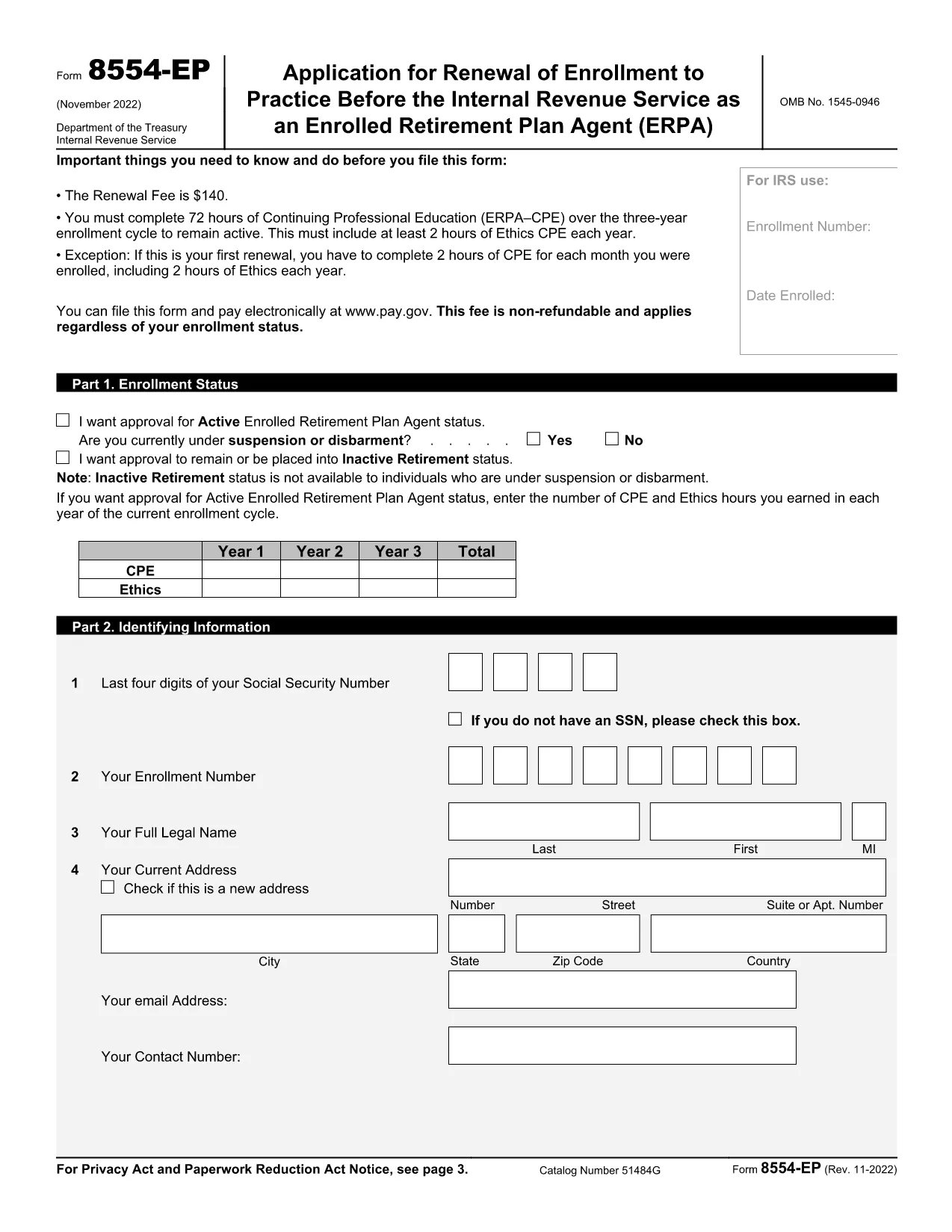
The Form 8554‑EP is the official IRS renewal application for Enrolled Retirement Plan Agents (ERPA). Every three years, ERPA‑qualified tax professionals must submit this form to maintain their ability to practice before the IRS on retirement plan matters.

What Is Form 8554‑EP?

Form 8554‑EP (Rev. 11‑2022) collects information about your credentials, continuing professional education (CPE) credits, and any changes to your practice. The form ensures you remain in good standing with the IRS.

Who Must File This Form?

  • Individuals who are currently enrolled as Retirement Plan Agents.
  • Those whose enrollment expired or will expire within the next three years.
  • Tax professionals seeking to reactivate an inactive ERPA status.

How to Complete the Fillable PDF

Our online Formize PDF Filler loads the official IRS PDF directly in your browser. No extra software is required.

Common Mistakes to Avoid

  • Leaving any required field blank – the IRS will reject incomplete submissions.
  • Failing to attach proof of CPE credits when required.
  • Signing the form with an unauthorized signature.

Submission & Deadlines

Submit the completed form to the IRS address listed on the last page of the PDF. Keep a copy for your records. The renewal deadline is the last day of the three‑year enrollment cycle.

Ready to start? Click the button below to launch the fillable version instantly.

FAQ
  • How often do I need to renew my ERPA enrollment?

    Renewal is required every three (3) years. The IRS will notify you when your current enrollment is approaching expiration.

  • Can I submit Form 8554‑EP electronically?

    The IRS currently accepts only paper submissions for Form 8554‑EP. Use the fillable PDF to ensure accuracy, then mail the printed form.

  • What CPE documentation must I attach?

    Attach copies of certificates or transcripts that verify you have completed the required 15 CPE hours in retirement plan practice for the enrollment cycle.

  • What happens if I miss the renewal deadline?

    Your ERPA status becomes inactive, and you cannot represent clients before the IRS on retirement‑plan matters until you re‑apply and receive approval.

  • Do I need a signature on the form?

    Yes. The form must be signed by the applicant or an authorized representative. Electronic signatures are not accepted; a handwritten signature is required.

  • Is there a fee to renew my ERPA status?

    No fee is required for the renewal of Form 8554‑EP. The IRS may assess penalties only if the form is incomplete or submitted late.

  • Where can I find the official instructions for Form 8554‑EP?

    The instructions are included in the PDF itself, beginning on page 3. Additional guidance is available on the IRS website under the Retirement Plan Community section.

COMMENT

Comment remplir Form 8554-EP gratuitement, en ligne en 5 étapes simples :

  1. 1
    Click the Fillable Form Button
    On this page, click the bright “Fill out this form” button. The Formize PDF Filler app will open the official Form 8554‑EP in your browser.
  2. 2
    Wait for the PDF Filler to Load
    A loading screen appears while the PDF is prepared. This only takes a few seconds.
  3. 3
    Enter Your Information
    Navigate through each field, entering your personal data, CPE credits, and any changes to your practice. Required fields are highlighted.
  4. 4
    Validate and Correct Errors
    The filler automatically checks for missing or incorrectly formatted entries. Fix any highlighted issues before proceeding.
  5. 5
    Save, Download, and Submit
    When all fields are complete, click “Save & Download.” Keep the saved copy for your records and mail the printed form to the IRS address shown on page 2.
Formize l'application PDF Filler
À PROPOS

Les formulaires d'impôt

Form 8554-EP est l'un des formulaires fiscaux qui sont des documents utilisés pour déclarer des informations relatives aux impôts à l'autorité fiscale compétente. Il existe différents types de formulaires fiscaux, y compris les formulaires fiscaux fédéraux, étatiques et locaux, qui peuvent varier en fonction de la situation et de l'emplacement du contribuable.

CARACTÉRISTIQUES

Remplisseur de PDF

Le moyen le plus simple de remplir des formulaires PDF en ligne

  • Remplissez rapidement Form 8554-EP
    Vous cherchez un moyen de remplir rapidement Form 8554-EP en ligne ? Avec notre remplisseur de formulaire PDF gratuit en ligne, vous saurez comment éditer et remplir ce document pdf en moins d'une minute.
  • Éditeur PDF en ligne facile à utiliser
    Vous en avez assez d'imprimer des fichiers PDF pour pouvoir les modifier avant de les renumériser et de les renvoyer ? Modifiez des documents PDF gratuitement en ligne. Utilisez notre éditeur de pdf en ligne pour gagner du temps et du papier.
  • Excellents outils, toutes plateformes
    Vous vous demandez comment remplir Form 8554-EP sur un Mac, ou peut-être comment utiliser un remplisseur PDF gratuit ? Nos outils PDF en ligne fonctionnent sur toutes les plateformes.
  • Stockage de fichiers sécurisé
    Les fichiers "Form 8554-EP" terminés sont stockés dans une base de données sécurisée gérée par l'hébergement Amazon Cloud. Vous pouvez supprimer vos fichiers de notre système à tout moment. Dans tous les cas, ces fichiers sont automatiquement supprimés après 24 heures.
  • Discutez avec Form 8554-EP
    Discutez avec "Form 8554-EP" sur Chatize qui est un assistant de lecture PDF gratuit. Posez des questions et obtenez des réponses de "Form 8554-EP". Cliquez simplement sur le bouton Discuter avec un document ci-dessus.

Supprimer la session de remplissage

Supprimer la session de remplissage sélectionnée ? Dans ce cas, votre progression dans le remplissage du formulaire sera perdue.

Supprimer la session d'édition

Supprimer la session de modification sélectionnée ? Dans ce cas, votre progression dans la création et la modification du formulaire sera perdue.