Izaberi jezik

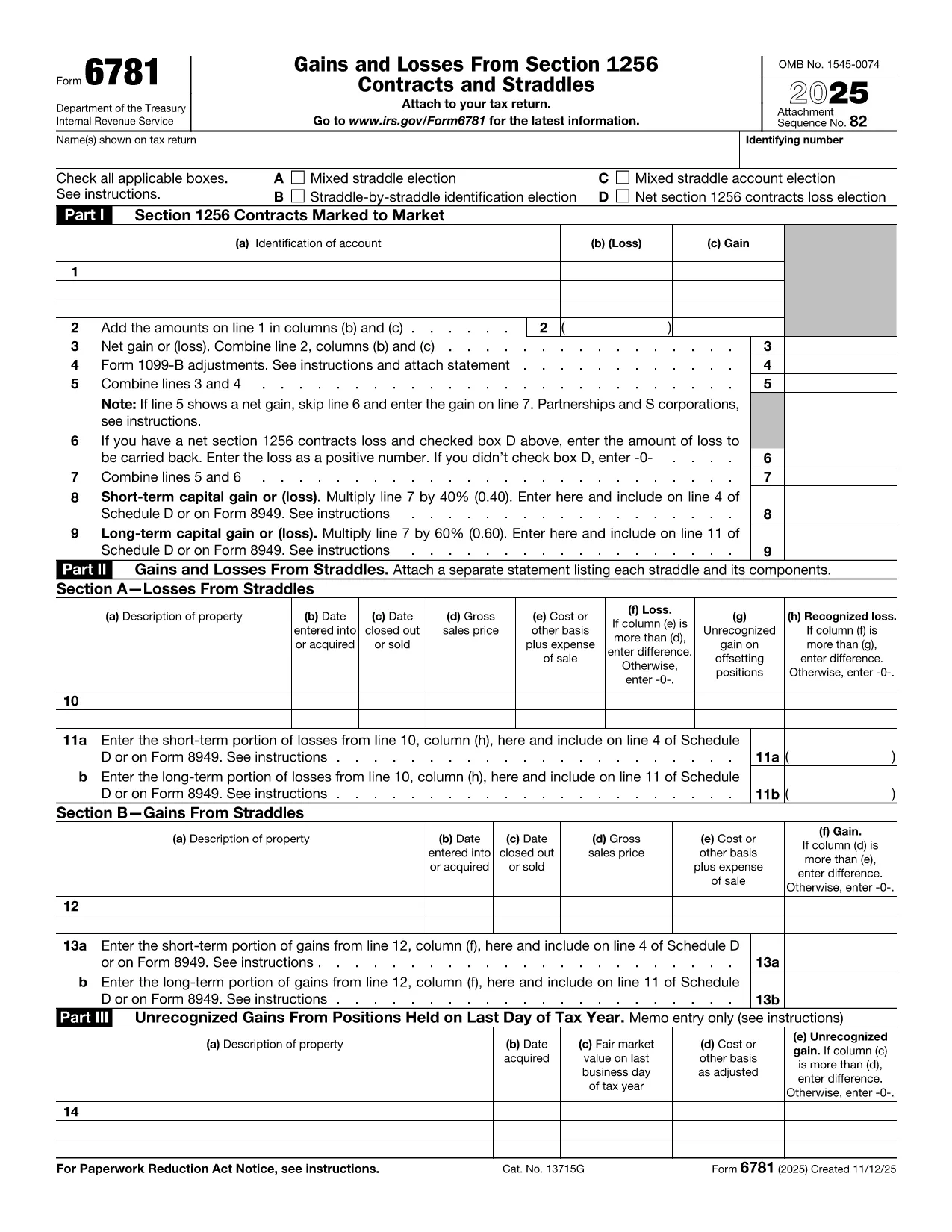
IRS Form 6781 – Fillable PDF for Gains & Losses from Section 1256 Contracts

  1. Zemlja SAD
  2. Jezik Engleski
  3. Aktivnost Porezi
  4. Odjel Porezna uprava
IRS Form 6781 – Fillable PDF for Gains & Losses from Section 1256 Contracts

Form 6781, officially titled Gains and Losses From Section 1256 Contracts and Straddles, is required for traders, investors, and any taxpayer who holds regulated futures, options, foreign‑currency contracts, or other Section 1256 instruments. This one‑page form reports both short‑term and long‑term capital results, and it includes election boxes for mixed‑straddle and loss‑carryback options.

What Is IRS Form 6781?

The form captures three distinct sections:

  • Part I – Section 1256 Contracts Marked to Market
  • Part II – Gains and Losses from Straddles
  • Part III – Unrecognized Gains on Positions Held at Year‑End

Each part helps the IRS calculate the correct mix of short‑term (40%) and long‑term (60%) capital treatment, regardless of the actual holding period.

How to Fill Out the Form Using Formize

Instead of printing, scanning, or editing the PDF in a desktop editor, you can complete the form directly in your browser:

  1. Click "Fill out this form" on the page – the Formize PDF Filler loads instantly.
  2. Enter your name, Social Security or EIN, and the tax year.
  3. Select any applicable election boxes (Mixed Straddle, Straddle‑by‑Straddle, etc.).
  4. Enter contract identifiers, gains, and losses for each line item.
  5. Review the calculations, then click Save to download a completed PDF or Print to file with your return.

The online filler validates numeric fields and ensures required boxes are checked, reducing the chance of IRS rejections.

Common Mistakes to Avoid

  • Leaving election boxes unchecked when a mixed straddle exists.
  • Reporting the same contract in both Part I and Part II.
  • Mis‑calculating the 60/40 split of long‑term vs. short‑term gains.
  • Forgetting to attach a statement when you elect a net Section 1256 loss carryback.

When to File and Who Needs This Form

Form 6781 is attached to your individual, corporate, partnership, or trust tax return (Form 1040, 1120, 1065, or 1041). The filing deadline matches the underlying return – typically April 15 for individuals, with extensions available.

If you traded any Section 1256 contracts during the tax year, you must file Form 6781, even if the net result is a zero gain or loss.

Ready to get started? Click the button below to open the fillable version and complete it in seconds.

PITANJA
  • What types of contracts are reported on Form 6781?

    Section 1256 contracts include regulated futures, foreign‑currency contracts, non‑equity options, dealer equity options, and dealer securities futures contracts.

  • Do I need to file Form 6781 if I had no gain or loss?

    Yes. If you held any Section 1256 contracts during the year, you must file Form 6781 even if the net result is zero.

  • Can I e‑file Form 6781 with my return?

    Form 6781 is attached to the main tax return (Form 1040, 1120, etc.). When you e‑file the return, the completed PDF is included automatically.

  • What is the deadline for filing Form 6781?

    The deadline matches the filing deadline of the associated tax return – typically April 15 for individuals, with extensions available.

  • How does the 60/40 long‑term/short‑term split work?

    Regardless of how long you held the contract, 60% of the gain or loss is treated as long‑term capital, and 40% as short‑term capital.

  • Can I carry back a net Section 1256 loss?

    Yes, individuals may carry back a net Section 1256 loss up to three prior years, but corporations, partnerships, estates, and trusts are not eligible.

  • What common errors should I watch for?

    Common mistakes include forgetting to check required election boxes, double‑reporting contracts in both Part I and Part II, and mis‑calculating the 60/40 split.

  • Is there a printable version if I prefer paper?

    The fillable PDF can be downloaded, printed, and mailed, but using the online filler reduces errors and speeds up the process.

KAKO DA

Kako ispuniti Form 6781 besplatno, online u 5 jednostavnih koraka:

  1. 1
    Open the Fillable Form
    Click the "Fill out this form" button on the page. The Formize PDF Filler will load instantly in your browser.
  2. 2
    Enter Taxpayer Information
    Provide your name, Social Security Number (or EIN), and the tax year at the top of the form.
  3. 3
    Select Election Boxes
    Check any applicable boxes for mixed straddle elections, straddle‑by‑straddle identification, or net loss carryback.
  4. 4
    Report Gains and Losses
    Enter each contract’s identification, mark‑to‑market gain or loss, and let the filler calculate the 60% long‑term / 40% short‑term split.
  5. 5
    Save or Print
    When all fields are complete, click "Save" to download the finished PDF or "Print" to attach it to your tax return.
Aplikacija Formize PDF Filler
OKO

Porezni obrasci

Form 6781 je jedan od poreznih obrazaca koji su dokumenti koji se koriste za prijavu informacija o prihodima pojedinca ili tvrtke, odbicima i poreznim obvezama relevantnim poreznim vlastima. Ovi su obrasci nužni za usklađivanje s poreznim zakonima i ispunjavanje poreznih obveza. Porezni obrasci razlikuju se ovisno o zemlji i posebnim poreznim zahtjevima. Evo nekih uobičajenih vrsta poreznih obrazaca:

Individualni porezni obrasci: Ove obrasce koriste pojedinačni porezni obveznici za prijavu osobnog dohotka i traženje odbitaka, kredita i izuzeća. Primjeri uključuju obrazac 1040 u Sjedinjenim Američkim Državama ili obrazac povrata poreza za samoprocjenu u Ujedinjenom Kraljevstvu.

Poslovni porezni obrasci: Poslovni porezni obrasci koriste se od strane tvrtki, partnerstava ili samozaposlenih pojedinaca za prijavu poslovnih prihoda, troškova i drugih podataka povezanih s porezom. Primjeri uključuju obrazac iz Priloga C (Dobit ili gubitak od poslovanja) u Sjedinjenim Državama ili obrazac CT600 (Povrat poreza tvrtke) u Ujedinjenom Kraljevstvu.

Obrasci za porez na plaće: Ove obrasce koriste poslodavci za prijavu plaća, nadnica i poreza zadržanih na plaćama svojih zaposlenika. Primjeri uključuju obrazac W-2 u Sjedinjenim Državama ili obrazac P60 u Ujedinjenom Kraljevstvu.

Obrasci za porez na promet: tvrtke koriste obrasce za porez na promet za prijavu i uplatu poreza na promet prikupljenog na oporezivu robu ili usluge. Posebni obrasci poreza na promet razlikuju se ovisno o jurisdikciji.

Obrasci za porez na dodanu vrijednost (PDV): PDV obrasci koriste se u zemljama koje nameću porez na dodanu vrijednost za prijavu i uplatu PDV-a prikupljenog od prodaje i traženje PDV kredita za kupnje. Primjeri uključuju obrasce za povrat PDV-a koji se koriste u mnogim zemljama.

Procijenjeni porezni obrasci: Procijenjeni porezni obrasci koriste se za prijavu i plaćanje procijenjenih poreza na prihod koji ne podliježe zadržavanju, kao što je prihod od samozapošljavanja ili prihod od ulaganja.

Ovo je samo nekoliko primjera od brojnih poreznih oblika koji mogu postojati. Konkretni potrebni obrasci ovise o poreznim zakonima i propisima u vašoj zemlji ili jurisdikciji. Važno je konzultirati se sa smjernicama porezne uprave ili potražiti stručni savjet kako biste utvrdili koji su obrasci primjenjivi u vašoj situaciji.

ZNAČAJKE

PDF punilo

Najlakši način da ispunite Form 6781 online

  • Brzo ispunite Form 6781
    Tražite način da brzo ispunite Form 6781 online? Uz naš online besplatni PDF obrazac za popunjavanje, znat ćete kako urediti i ispuniti ovaj pdf dokument za manje od minute.
  • Jednostavan za korištenje mrežni PDF uređivač
    Dosta vam je ispisivanja PDF datoteka kako biste ih mogli uređivati ​​prije ponovnog skeniranja i slanja natrag? Uređujte PDF dokumente besplatno na mreži. Upotrijebite naš online uređivač pdf-ova kako biste uštedjeli vrijeme i papir.
  • Sjajni alati, sve platforme
    Pitate se kako ispuniti Form 6781 na Macu ili možda kako koristiti PDF filer besplatno? Naši online PDF alati rade na svim platformama.
  • Sigurno skladištenje datoteka
    Dovršene datoteke "Form 6781" pohranjuju se u zaštićenu bazu podataka kojom upravlja Amazon Cloud hosting. Svoje datoteke možete izbrisati iz našeg sustava bilo kada. U svakom slučaju, te se datoteke automatski brišu nakon 24 sata.
  • Chat s Form 6781
    Razgovarajte s "Form 6781" na Chatize koji je besplatni pomoćnik za čitanje PDF-ova. Postavljajte pitanja i dobivajte odgovore od "Form 6781". Samo kliknite gornji gumb Chat with Document.

Izbriši sesiju punjenja

Izbrisati odabranu sesiju punjenja? U tom će slučaju vaš napredak u ispunjavanju obrasca biti izgubljen.

Izbriši sesiju uređivanja

Izbrisati odabranu sesiju uređivanja? U tom će slučaju vaš napredak u stvaranju i uređivanju obrasca biti izgubljen.