Seleziona la lingua

IRS Form 6781 – Fillable PDF for Gains & Losses from Section 1256 Contracts

  1. Paese Stati Uniti d'America
  2. Lingua Inglese
  3. Attività Le tasse
  4. Dipartimento Agenzia delle Entrate
Compila questo modulo
IRS Form 6781 – Fillable PDF for Gains & Losses from Section 1256 Contracts

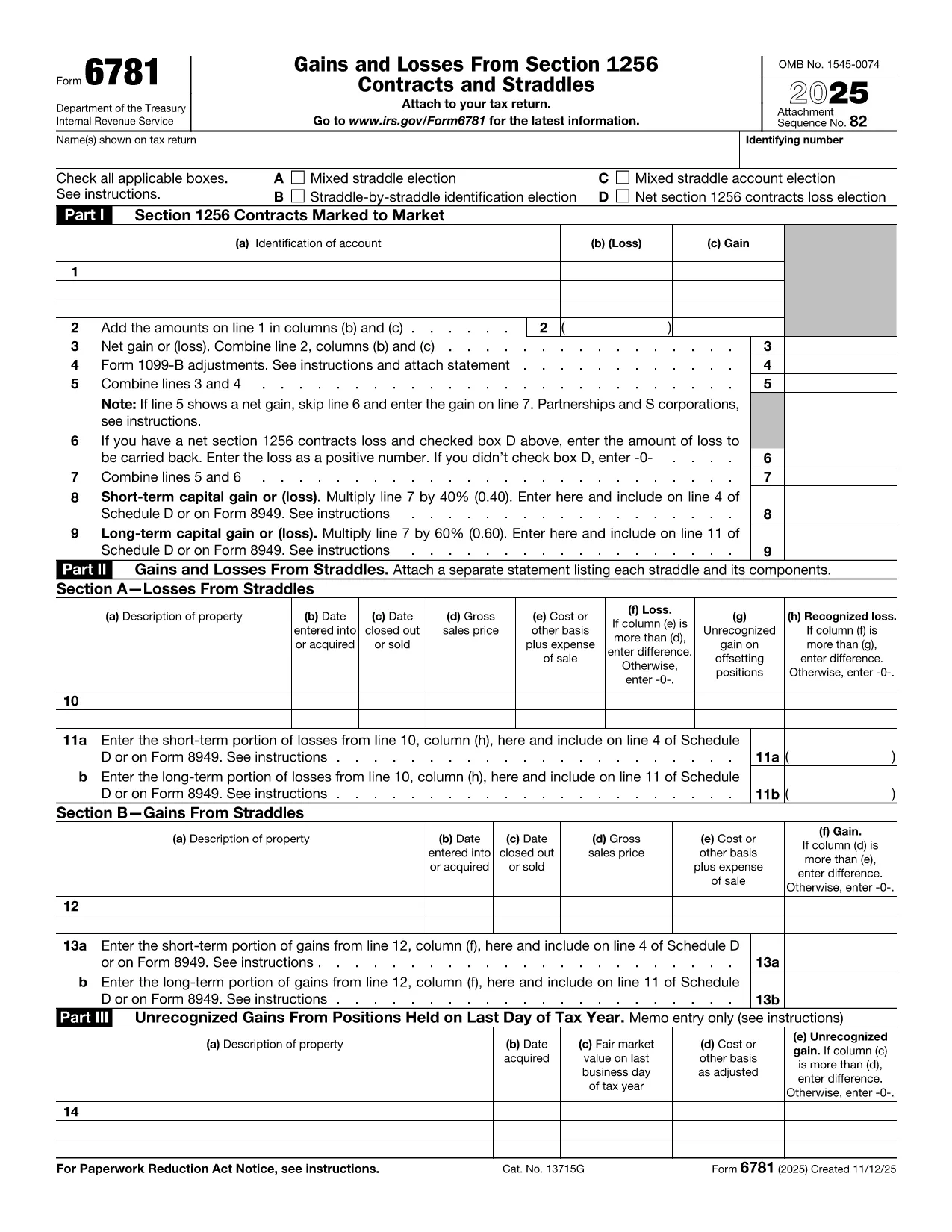
Form 6781, officially titled Gains and Losses From Section 1256 Contracts and Straddles, is required for traders, investors, and any taxpayer who holds regulated futures, options, foreign‑currency contracts, or other Section 1256 instruments. This one‑page form reports both short‑term and long‑term capital results, and it includes election boxes for mixed‑straddle and loss‑carryback options.

What Is IRS Form 6781?

The form captures three distinct sections:

  • Part I – Section 1256 Contracts Marked to Market
  • Part II – Gains and Losses from Straddles
  • Part III – Unrecognized Gains on Positions Held at Year‑End

Each part helps the IRS calculate the correct mix of short‑term (40%) and long‑term (60%) capital treatment, regardless of the actual holding period.

How to Fill Out the Form Using Formize

Instead of printing, scanning, or editing the PDF in a desktop editor, you can complete the form directly in your browser:

  1. Click "Fill out this form" on the page – the Formize PDF Filler loads instantly.
  2. Enter your name, Social Security or EIN, and the tax year.
  3. Select any applicable election boxes (Mixed Straddle, Straddle‑by‑Straddle, etc.).
  4. Enter contract identifiers, gains, and losses for each line item.
  5. Review the calculations, then click Save to download a completed PDF or Print to file with your return.

The online filler validates numeric fields and ensures required boxes are checked, reducing the chance of IRS rejections.

Common Mistakes to Avoid

  • Leaving election boxes unchecked when a mixed straddle exists.
  • Reporting the same contract in both Part I and Part II.
  • Mis‑calculating the 60/40 split of long‑term vs. short‑term gains.
  • Forgetting to attach a statement when you elect a net Section 1256 loss carryback.

When to File and Who Needs This Form

Form 6781 is attached to your individual, corporate, partnership, or trust tax return (Form 1040, 1120, 1065, or 1041). The filing deadline matches the underlying return – typically April 15 for individuals, with extensions available.

If you traded any Section 1256 contracts during the tax year, you must file Form 6781, even if the net result is a zero gain or loss.

Ready to get started? Click the button below to open the fillable version and complete it in seconds.

FAQ
  • What types of contracts are reported on Form 6781?

    Section 1256 contracts include regulated futures, foreign‑currency contracts, non‑equity options, dealer equity options, and dealer securities futures contracts.

  • Do I need to file Form 6781 if I had no gain or loss?

    Yes. If you held any Section 1256 contracts during the year, you must file Form 6781 even if the net result is zero.

  • Can I e‑file Form 6781 with my return?

    Form 6781 is attached to the main tax return (Form 1040, 1120, etc.). When you e‑file the return, the completed PDF is included automatically.

  • What is the deadline for filing Form 6781?

    The deadline matches the filing deadline of the associated tax return – typically April 15 for individuals, with extensions available.

  • How does the 60/40 long‑term/short‑term split work?

    Regardless of how long you held the contract, 60% of the gain or loss is treated as long‑term capital, and 40% as short‑term capital.

  • Can I carry back a net Section 1256 loss?

    Yes, individuals may carry back a net Section 1256 loss up to three prior years, but corporations, partnerships, estates, and trusts are not eligible.

  • What common errors should I watch for?

    Common mistakes include forgetting to check required election boxes, double‑reporting contracts in both Part I and Part II, and mis‑calculating the 60/40 split.

  • Is there a printable version if I prefer paper?

    The fillable PDF can be downloaded, printed, and mailed, but using the online filler reduces errors and speeds up the process.

COME

Come compilare Form 6781 gratuitamente, online in 5 semplici passaggi:

  1. 1
    Open the Fillable Form
    Click the "Fill out this form" button on the page. The Formize PDF Filler will load instantly in your browser.
  2. 2
    Enter Taxpayer Information
    Provide your name, Social Security Number (or EIN), and the tax year at the top of the form.
  3. 3
    Select Election Boxes
    Check any applicable boxes for mixed straddle elections, straddle‑by‑straddle identification, or net loss carryback.
  4. 4
    Report Gains and Losses
    Enter each contract’s identification, mark‑to‑market gain or loss, and let the filler calculate the 60% long‑term / 40% short‑term split.
  5. 5
    Save or Print
    When all fields are complete, click "Save" to download the finished PDF or "Print" to attach it to your tax return.
App Formize PDF Filler
DI

Moduli fiscali

Form 6781 è uno dei moduli fiscali che sono documenti utilizzati per segnalare redditi, detrazioni e passività fiscali all'autorità fiscale competente. Questi moduli costituiscono una parte essenziale del processo di dichiarazione dei redditi e vengono utilizzati per garantire che gli individui e le imprese rispettino le leggi fiscali e calcolino accuratamente i loro obblighi fiscali.

I moduli fiscali specifici richiesti possono variare a seconda di fattori quali lo stato di dichiarazione di un individuo, le fonti di reddito e le leggi fiscali del paese. Tuttavia, ecco alcuni tipi comuni di moduli fiscali:

Moduli per l'imposta sul reddito individuale: questi moduli, come la serie 1040 negli Stati Uniti, vengono utilizzati da parte degli individui per dichiarare il proprio reddito, richiedere detrazioni e crediti e calcolare la propria responsabilità fiscale.

Moduli fiscali aziendali: le aziende, comprese le imprese individuali, le società di persone, le società e i lavoratori autonomi, potrebbero dover compilare vari moduli per segnalare entrate, spese e imposte dovute. Gli esempi includono l'Allegato C (Profitti o perdite aziendali) e il Modulo 1120 (Dichiarazione dei redditi delle società statunitensi).

Moduli fiscali sul lavoro: i datori di lavoro sono tenuti a dichiarare le retribuzioni dei dipendenti e a trattenere e versare le imposte sui salari. A questo scopo vengono utilizzati moduli come W-2 (Dichiarazione salariale e fiscale) e 941 (Dichiarazione dei redditi federale trimestrale del datore di lavoro).

Moduli per conti pensionistici e di investimento: questi moduli vengono utilizzati per segnalare redditi da investimenti, plusvalenze e perdite, nonché contributi e distribuzioni dai conti pensionistici. Gli esempi includono il modulo 1099-DIV (Dividendi e distribuzioni) e Modulo 5498 (Informazioni sui contributi dell'IRA).

Moduli per imposte sulle successioni e sulle donazioni: quando una persona muore o fa donazioni significative, moduli specifici come il Modulo 706 (Dichiarazione dei redditi degli Stati Uniti sulle proprietà immobiliari (e trasferimento di generazione)) e Modulo 709 (Regali degli Stati Uniti (e generazione-trasferimento) Salto trasferimento) Dichiarazione dei redditi) vengono utilizzati per segnalare e calcolare eventuali imposte sulle successioni o sulle donazioni applicabili.

È importante notare che le leggi e i moduli fiscali possono cambiare nel tempo, pertanto i privati ​​e le imprese dovrebbero consultare l’autorità fiscale competente o richiedere una consulenza fiscale professionale per garantire la conformità ai requisiti attuali.

CARATTERISTICHE

Compilatore PDF

Il modo più semplice per compilare moduli PDF online

  • Compila rapidamente Form 6781
    Cerchi un modo per compilare rapidamente Form 6781 online? Con il nostro compilatore di moduli PDF gratuito online, saprai come modificare e compilare questo documento PDF in meno di un minuto.
  • Editor PDF online facile da usare
    Stufo di stampare file PDF in modo da poterli modificare, prima di riscansionarli e rispedirli? Modifica documenti PDF gratuitamente online. Utilizza il nostro editor PDF online per risparmiare tempo e carta.
  • Grandi strumenti, tutte le piattaforme
    Ti stai chiedendo come inserire Form 6781 su un Mac o forse come utilizzare un riempitivo PDF gratuito? I nostri strumenti PDF online funzionano su tutte le piattaforme.
  • Archiviazione sicura dei file
    I file "Form 6781" completati vengono archiviati in un database protetto gestito dall'hosting Amazon Cloud. Puoi eliminare i tuoi file dal nostro sistema in qualsiasi momento. In ogni caso, questi file vengono automaticamente cancellati dopo 24 ore.
  • Chatta con {parola chiave}
    Chatta con "Form 6781" su Chatize che è un assistente di lettura PDF gratuito. Fai domande e ottieni risposte da "Form 6781". Basta fare clic sul pulsante Chatta con il documento in alto.

Elimina sessione di riempimento

Eliminare la sessione di riempimento selezionata? In questo caso, i progressi nella compilazione del modulo andranno persi.

Elimina la sessione di modifica

Eliminare la sessione di editing selezionata? In questo caso, i tuoi progressi nella creazione e modifica del modulo andranno persi.